social media video editing: Top tips to boost engagement

Master social media video editing with practical tips, platform tricks, and the best tools to craft thumb-stopping content that drives engagement.
Ever found yourself with a folder full of raw video clips, not sure how to turn them into something people will actually want to watch? That’s where social media video editing comes in. Think of it as the magic that transforms a rough draft into a final, polished story, specifically built to shine on platforms like TikTok, Instagram, and YouTube.
It's the process of taking all your separate pieces—video clips, audio tracks, graphics, and text—and weaving them together into something cohesive and compelling.
Why Social Media Video Editing Is Your New Superpower
In today's crowded social feeds, just posting a raw video clip is like whispering in a packed stadium. It’s just not going to get noticed. Great editing isn’t a luxury anymore; it’s a core part of any smart digital strategy. It’s what turns a decent idea into a video that stops the scroll and gets people to pay attention.
Your unedited footage is just a pile of ingredients. A good edit is the recipe that turns those ingredients into a delicious meal—a story that connects with your audience and makes them feel something. This guide is here to walk you through that recipe, step by step.
Moving from Views to Value
Let’s be clear: the goal here isn’t just to make your videos look slick. It's about getting real results that help you grow. A well-edited video can do so much more than rack up a few views.
- Build Brand Trust: When your content looks professional, people see you as credible and authoritative. It builds instant trust.
- Capture and Hold Attention: The average attention span is short. Quick cuts, punchy captions, and smart effects are what you need to keep eyeballs on your content.
- Communicate Clearly: Editing lets you cut out all the fluff. You can get straight to the point and deliver your message powerfully before you lose your viewer.
- Drive Action: A great edit guides the viewer. It can subtly (or not-so-subtly) push them toward a comment, a share, or a click on your link.
The real gap between a video that flops and a video that goes viral isn't the idea—it's the execution. Editing is how you tell a bigger story in a shorter amount of time.
Your Roadmap to Success
We’ve designed this guide to be your go-to resource. We’re not just going to talk about what to do, but also dig into the why and the how. We’ll cover everything from the unspoken rules of each platform to creating an editing workflow you can use over and over again.
You’ll also see how smart tools like ShortGenius can help you work more efficiently, turning what used to be hours of tedious editing into just a few minutes of your time. By the time you’re done reading, you’ll have a practical plan to make videos that don't just get seen—they make an impact. Let's get started.
Decoding the New Rules of Short-Form Video

Let's be honest: platforms like TikTok, Instagram Reels, and YouTube Shorts haven't just introduced a new video format. They've completely bulldozed the old rulebook. The slow, cinematic intros and wide, sweeping shots that used to work on YouTube now feel ancient in a feed designed for instant gratification.
Today’s viewers are looking for something different. They want content that feels real, moves fast, and is made specifically for the phone in their hand. This isn't just a fleeting trend; it's a deep shift in how we watch things. Consider this: users spend over 75% of their video time on mobile, where the vertical 9:16 screen is king. On Instagram, for example, nearly 50% of all time on the app is spent just watching Reels. You can dig into more of these stats in recent social media video reports.
What does this mean for us? It means our entire approach to editing has to change. We need to stop building a slow burn and start creating an immediate explosion.
Mastering the First Three Seconds
Think of the first three seconds of your video as the most expensive piece of real estate on the internet. In the endless scroll, that tiny window is your one and only shot to stop someone's thumb. If you can’t hook them immediately, they’re gone. Vanished into the algorithm, never to be seen again.
This "psychology of the scroll" forces us to be aggressive with our editing right from frame one. Forget traditional story arcs. You need to lead with your strongest visual, a bold question, or an irresistible sound.
- Front-load the value: Don't save the best for last. Show the incredible "after" shot or the finished product right away.
- Create a visual hook: Use a whip pan, a jarring transition, or eye-catching text to make someone physically stop scrolling.
- Ask a question: Start with a problem you know your audience has. Frame it as a question they’ll stick around to see answered.
A great hook doesn't just ask for attention; it earns it. Your opening shot should be a promise of what's to come, making the viewer feel they'll miss out if they scroll away.
The Non-Negotiable Elements of Short-Form Editing
Once you've got their attention, you have to hold it. This isn't magic; it's a specific set of editing techniques built for the modern attention span. These are the things that separate a viral hit from a video that gets zero engagement.
1. Rhythmic and Snappy Cuts Long, drawn-out shots are the kiss of death on TikTok and Reels. Your editing needs to feel like a drumbeat—quick, snappy, and perfectly timed to the audio. Making frequent cuts, even just to slightly change the camera angle, injects a dose of energy that keeps the brain from getting bored. This is the absolute foundation of good social media video editing.
2. Dynamic On-Screen Captions A huge number of people watch videos with the sound off. That makes captions a must-have. But don't just slap on the default auto-generated text. Use dynamic captions that pop on screen word-by-word, use brand colors, and toss in relevant emojis. This turns your text from a simple reading aid into another layer of visual entertainment.
3. Strategic Use of Trending Audio Trending audio isn't just background music; it's a distribution pipeline. Using a popular sound or song can plug your video directly into a massive, ongoing conversation, showing it to people who have never heard of you. The trick is to find a trend that genuinely fits your message, not to awkwardly force your content into a meme where it doesn't belong. When you get the mix of visuals and audio just right, that's when people hit the share button.
Building Your Social Media Video Editing Workflow
A great video never just happens. It’s the result of a solid, repeatable process. The real secret to churning out consistently high-quality content without burning out is building a dependable workflow. Think of it like a chef’s mise en place—everything has its place, making the creative process smooth, efficient, and predictable.
This system takes the chaos out of creativity and breaks it down into simple, manageable stages. By following these steps, you’ll move from a pile of raw footage to a polished, share-worthy video faster and with far fewer headaches.
Let’s walk through the four essential stages.
Stage 1: The Pre-Production Setup
This is all about getting your house in order before the real work begins. Skipping this stage is like trying to build IKEA furniture without looking at the instructions—you might get there eventually, but it's going to be painful. A little organization upfront saves a mountain of frustration later.
Start by creating a main project folder. Inside that, create a few key subfolders:
- Footage: Every raw video clip you shot lives here.
- Audio: This is for your music, voiceovers, and sound effects.
- Graphics: Logos, lower thirds, and any other visual assets go here.
- Exports: This is where your finished videos will end up.
Once your files are sorted, pull up your script or outline. This is your roadmap. Having a clear idea of the story you want to tell helps you pinpoint the best takes and assets before you even touch your editing software.
Stage 2: The Assembly Cut
Okay, with everything organized, it’s time to start building. The assembly cut (or "rough cut") is where you lay down the basic skeleton of your video. The goal here isn't perfection; it's just about getting the story in the right order.
Start by dragging your main video clips onto the timeline according to your script. Don't waste time on perfect timing or fancy transitions yet. If your video has a voiceover or someone talking to the camera, put that audio track down first. Then, you can sync up your other visuals (B-roll) to match what’s being said.
The assembly cut is purely about structure and pacing. If the story feels clunky or confusing at this stage, no amount of special effects will save it. Get the bones right first.
Once the clips are in order, do a quick pass and trim the dead space from the beginning and end of each one. This simple step starts to build the rhythm of the video and makes sure you're only working with the good stuff.
Stage 3: The Polish Pass
Now that you have a solid foundation, it’s time to make it shine. The polish pass is where you add all the professional touches that turn a simple sequence of clips into a captivating piece of content. This is where the magic really happens, and it demands attention to detail.
Here’s a quick checklist for what to focus on during this phase:
- Text and Subtitles: Add your captions. With so many people watching videos on mute, clear, easy-to-read subtitles are absolutely essential for engagement.
- Color Correction and Grading: First, use color correction to make your footage look natural (think true whites and realistic skin tones). Then, apply color grading to give your video a specific mood or to match your brand’s signature look.
- Sound Design: This is so much more than just slapping a music track on top. Mix your audio levels so the dialogue is crisp and clear, the music sets the mood without being distracting, and subtle sound effects punch up key moments on screen.
- Graphics and B-Roll: Layer in your logos, lower thirds, and any other animations. This is also the perfect time to drop in extra B-roll clips to add context and keep the visuals interesting, especially during long talking segments.
Stage 4: The Final Export
You’ve made it! The video looks and sounds great. The last hurdle is exporting it correctly for each social media platform. A huge mistake people make is using a one-size-fits-all export setting. What works for YouTube won't necessarily look good on TikTok.
Each platform has its own preferred specs. For instance, Instagram Reels, TikTok, and YouTube Shorts are all built for a vertical 9:16 aspect ratio. You'll need to create a separate version for each platform to ensure it’s perfectly optimized. Pay close attention to things like resolution, frame rate, and bitrate to get the best balance between quality and file size.
And one final check: make sure your text and important visuals are inside the "safe zones." You don't want a platform's UI to cover up your brilliant call-to-action. Getting this last step right ensures your video looks just as amazing on someone's phone as it did on your editing timeline.
How AI Is Changing the Video Editing Game
Let's get one thing straight: artificial intelligence isn't here to replace your creativity. Think of it as the ultimate production assistant—one that handles all the tedious, repetitive jobs so you can spend your time on what really matters: strategy and storytelling.
It’s all about working smarter, not harder. Instead of losing hours manually transcribing audio or hunting for the perfect clip in a mountain of footage, AI tools can do it for you in the background. This frees you up to dramatically increase your creative output without burning out.
At its core, AI brings incredible efficiency. It automates the parts of video editing that feel like a chore, boiling down complex processes into simple, one-click actions. This means creators of all skill levels can produce polished, professional-looking content much, much faster.
Putting Tedious Work on Autopilot
One of the first things you'll notice is how AI tackles the mundane but necessary tasks. These aren't just futuristic ideas; they're real features you can find in many modern editing tools today.
- Automatic Subtitle Generation: Forget typing out every single word. AI can listen to your audio and generate accurate, perfectly timed captions in minutes. This is a game-changer for accessibility and for grabbing the attention of viewers scrolling with the sound off.
- Intelligent Scene Detection: Instead of manually scrubbing through an hour-long recording, AI can analyze the entire video and automatically flag distinct scenes, key moments, and even changes in speakers. Finding that one perfect soundbite for a highlight reel suddenly becomes effortless.
- Smart Reframing and Resizing: Anyone who has manually reframed a horizontal video for a vertical platform like TikTok knows how painful it can be. AI can automatically detect the main subject and keep them perfectly centered as it reformats the video for any aspect ratio.
This infographic breaks down a typical video editing workflow, pinpointing exactly where AI can lend a hand.
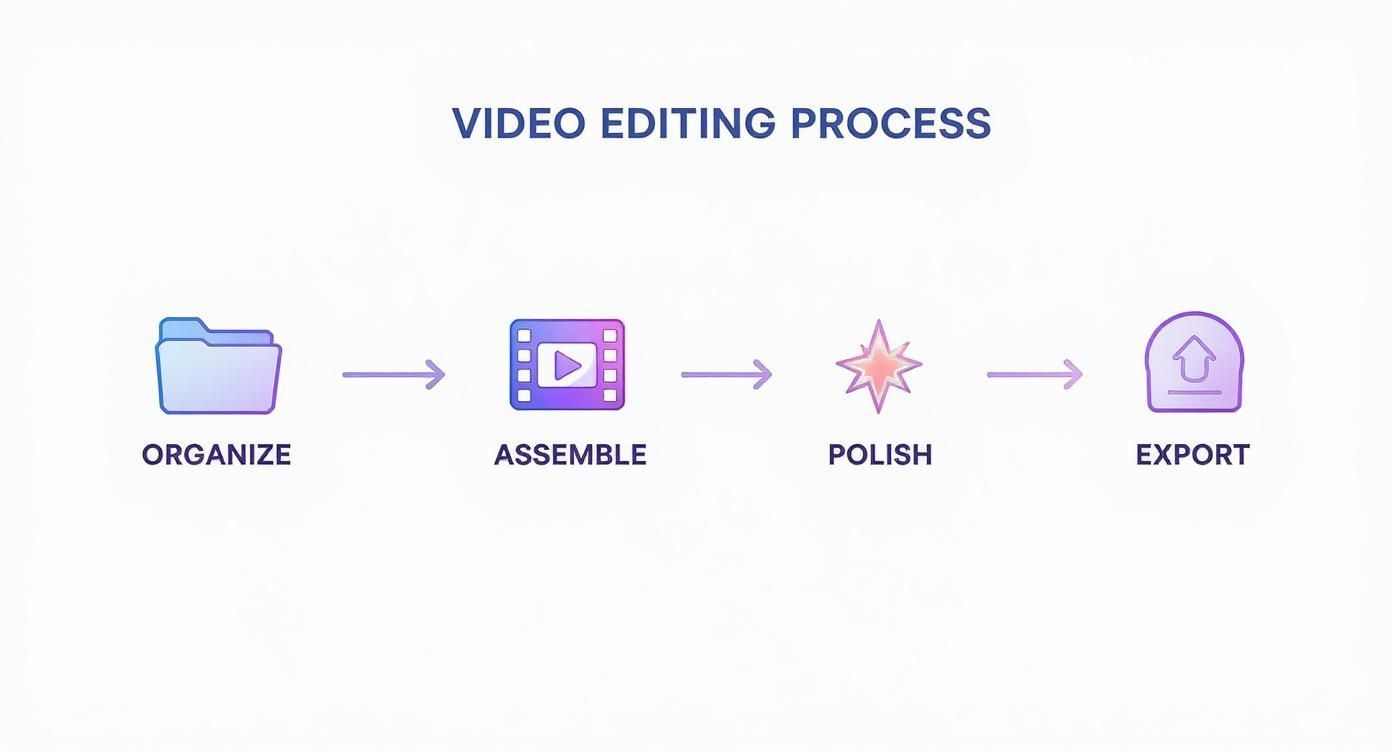
As you can see, from organizing your files to exporting the final cut, AI tools can seriously speed up the assembly and polishing stages.
Turn One Long Video Into Endless Clips
This is where AI truly shines for social media managers and creators: content repurposing. A single long-form video—whether it's a podcast, a webinar, or a customer interview—is a goldmine of potential short-form clips.
AI acts as a content multiplier. It can scan a one-hour video and instantly pull out dozens of the most engaging, shareable 30-second clips, complete with branded, dynamic captions.
This is exactly what platforms like ShortGenius are built for. You feed the tool one long video, and its AI gets to work finding viral-worthy moments, adding eye-catching captions, and spitting out a whole batch of clips ready to post. A task that once took a full day of editing can now be done in the time it takes to grab a coffee. This kind of system is crucial for staying consistent on platforms that demand a constant stream of new content.
The Growing Reliance on AI in Content Creation
This move toward AI-powered editing isn't just a hunch; the numbers tell the story. The integration of artificial intelligence into social media video editing has become a dominant force.
Around 67% of social media users now prefer using AI tools to create personalized videos, and about 52% of the content you see on TikTok and Instagram Reels is made with AI-generation tools. It’s happening on YouTube, too, where 72% of creators are using AI-edited thumbnails—a tactic that's been shown to boost click-through rates by 38%. You can learn more about these video editing statistics to see just how deeply AI is reshaping the creator economy.
By handling the heavy lifting, AI does more than just save time. It lowers the barrier to entry, making it possible for anyone to create high-quality video content and focus on what they do best: connecting with their audience.
Choosing the Right Video Editing Tools for Your Goals
Asking “what’s the best video editor?” is a bit of a trick question. The only right answer is: it’s the one that actually helps you hit your goals, matches your skill level, and works for the kind of videos you want to make. The powerhouse software used for a short film is total overkill for a 15-second TikTok, and a simple mobile app just won't cut it for a deep-dive documentary.
The world of video software can feel like a crowded, noisy room, but it’s much easier to navigate once you group the tools by what they’re built to do. Instead of getting bogged down in endless feature lists, let's focus on the why behind each category. This will help you find a tool that not only works, but also saves you a ton of time and creative energy.
Professional Desktop Suites for Maximum Control
This is the big leagues. We're talking about software for creators who need complete command over every single pixel and sound wave. Think of tools like Adobe Premiere Pro or Final Cut Pro as a professional chef's kitchen—fully stocked with every gadget imaginable for complex edits, advanced color grading, and intricate sound design.
These platforms are your go-to for:
- Long-form content like polished YouTube videos, documentaries, or cinematic brand stories.
- Projects that demand precise control over visual effects, custom motion graphics, and complex audio mixes.
- Creators who are already comfortable with a more traditional, timeline-based workflow and don't mind a steeper learning curve.
The trade-off for all that power is usually cost and complexity. You're looking at a subscription or a hefty one-time purchase, and you'll need a pretty powerful computer to run them without a hitch. But when quality and customization are everything, these are the top of the line.
Mobile and Web-Based Apps for Speed and Trends
Next up are the tools built for the fast-paced world of social media. Apps like CapCut and InShot are the food trucks of the video editing world—they’re fast, efficient, and they serve up exactly what’s popular right now. They let you edit right on your phone or in a browser, which is perfect for creating content on the fly.
These apps aren't just watered-down desktop software. They’re built from the ground up for the social media ecosystem, with deep integrations for trending sounds, viral filters, and ready-to-go templates you can apply in seconds.
This category is a perfect match for:
- Creating trend-focused content for platforms like TikTok, Instagram Reels, and YouTube Shorts.
- Quickly adding captions, music, and simple effects without firing up a beast of a computer.
- Beginners or social media managers who need to churn out a lot of content quickly.
They might not offer the deep-level customization of a professional suite, but their ease of use and direct access to viral elements make them absolutely essential for anyone serious about social media video.
AI-Powered Repurposing Platforms for Efficiency
This last category is all about working smarter, not harder. AI-powered platforms are designed to solve one of the biggest headaches for creators: turning a single long-form video into dozens of social-ready clips. Imagine having a skilled assistant who can watch your hour-long podcast, instantly find the best moments, and edit them for you.
This is exactly where a tool like ShortGenius shines. You can upload one long video, and its AI gets to work finding the most compelling highlights, automatically reframing them for vertical screens, and adding eye-catching, branded captions. A task that would take a human editor hours can now be done in minutes.
For anyone looking to scale their content output without burning out, this is a game-changer. You can see how this works by exploring the AI video generator on the ShortGenius website.
This approach is tailor-made for:
- Podcasters, coaches, and educators looking to get more mileage out of their long-form content on social media.
- Marketing teams needing to slice up webinars and interviews into a steady stream of promotional clips.
- Creators focused on volume and consistency who want to automate the most tedious parts of video editing.
Video Editing Tool Comparison
To help you visualize where each type of tool fits, here’s a quick breakdown. Think of this table as a cheat sheet for matching the right software to your specific needs, whether you're just starting out or you're a seasoned pro.
| Tool Category | Best For | Skill Level | Cost Model |
|---|---|---|---|
| Professional Desktop Suites | Long-form, cinematic content with full creative control. | Intermediate to Advanced | Subscription or One-Time Purchase |
| Mobile & Web-Based Apps | Quick, trend-focused social media videos (Reels, TikToks). | Beginner to Intermediate | Freemium or Low-Cost Subscription |
| AI Repurposing Platforms | Turning long videos into many short clips automatically. | Beginner to Advanced | Subscription (Tiered by Usage) |
Ultimately, the best tool is the one you’ll actually use. Don’t be afraid to try a few different options—many offer free trials. Your workflow will thank you for finding the perfect fit.
Advanced Techniques That Make Your Videos Stand Out
Alright, you've got the basics down—you can trim clips and add captions. Now, let’s get into the details that separate decent content from videos people can't stop watching. These advanced editing techniques are less about flashy effects and more about making your videos feel polished, professional, and genuinely compelling.
It's all about guiding your audience's experience without them even realizing it. These methods create a smoother flow and make your storytelling feel more natural and immersive.
Creating Seamless Audio and Visual Flow
One of the biggest tells of an amateur edit is a hard, jarring cut between clips. To really level up your work, you need to master audio transitions like J-cuts and L-cuts.
-
J-Cuts: Picture this: you hear the audio from the next scene a split-second before you actually see it. That's a J-cut. It’s a classic filmmaking trick that pulls the viewer into the next shot by leading with sound, building a little anticipation and making the transition feel buttery smooth.
-
L-Cuts: Now, flip that around. The video cuts to a new scene, but the audio from the previous clip lingers for a moment longer. This is an L-cut. It’s perfect for when you cut from someone talking to a shot of what they're talking about, letting their voice elegantly connect the two visuals.
Using these techniques makes your video feel deliberate and thoughtfully constructed, not just a bunch of clips strung together.
Think of J-cuts and L-cuts as the conversational equivalent of a smooth transition. Instead of abruptly changing the subject, they create a natural bridge from one idea to the next, making the entire video feel more connected.
Adding Visual Depth With B-Roll
Let’s be honest: a single, unbroken shot of someone talking for 60 seconds is a recipe for a quick scroll. This is exactly where B-roll comes in to save the day.
B-roll is simply any extra footage you cut in over your main shot (the A-roll). It’s there to add context, illustrate a point, or just break up the visual monotony and keep things interesting.
If you’re reviewing a product, your B-roll might be close-ups of its best features or shots of it in action. This extra layer is a powerful tool for holding attention, which is crucial when you consider that videos generate up to 12 times more shares than text and images combined.
Establishing a Mood With Color Grading
Color does so much of the heavy lifting when it comes to setting a mood. Color grading is the final touch where you adjust the hues and tones of your footage to create a specific vibe or feeling.
Want your video to feel warm and nostalgic? Push the golden and orange tones. Going for a clean, corporate look? Emphasize cool blues and crisp whites. If you really want to get serious, mastering cinematic color grading for stunning videos can completely change the game.
When you're consistent with your color palette, it becomes part of your brand. People will start to recognize your content in a crowded feed before they even see your name.
Got Questions About Social Media Video Editing? We've Got Answers.
Jumping into video editing for social media can feel a bit overwhelming, and it's natural to have a few questions. Let's clear up some of the most common ones so you can start creating with confidence.
How Long Should My Social Media Videos Be?
There's no single magic number, but here's a solid rule of thumb: make it as long as it needs to be to get your point across, but not a second longer. The perfect length really comes down to the platform you're on and what you're trying to achieve.
For platforms like TikTok and Instagram Reels, you're aiming for the 15-30 second sweet spot. It's just right for the quick-scroll, short-attention-span environment. YouTube Shorts gives you a bit more breathing room, letting you go up to 60 seconds.
If you're creating deeper, more educational content for places like Facebook or LinkedIn, you can definitely push it to 1-3 minutes. The catch? Your first 3-5 seconds have to be absolutely magnetic to convince someone to stick around.
Do I Really Need an Expensive Camera?
Not at all. Seriously. The camera you already have in your pocket is more than powerful enough to create amazing, professional-looking videos. The real secret isn't the camera—it's how you use it.
Instead of obsessing over gear, nail two things first: good lighting and clear audio. You'll get much better results filming next to a window with natural light and using a cheap microphone than you would with a fancy 4K camera and muffled, echoey sound. Focus on telling a great story and polishing your editing skills. You can always upgrade your equipment later.
The single biggest mistake is creating one video and posting it everywhere without any adjustments. Every social platform has its own unique culture, audience, and technical rules.
Think about it: a landscape video that looks perfect on YouTube is going to look terrible as a vertical Instagram Reel. It just wasn't built for that format or the audience expecting it. You have to tailor your edit for each platform, respecting things like aspect ratios, text-safe zones, and what’s currently trending.
How Important Are Subtitles, Really?
They're absolutely essential. This one is non-negotiable. A huge number of people watch social media videos with the sound off—they might be on a bus, at their desk, or just scrolling in a quiet room.
If you don't have subtitles or dynamic captions, your message is completely lost on a massive slice of your audience. Good, easy-to-read captions don't just make your content accessible; they've been proven to boost watch time and help people remember what you said. Always edit as if your viewer can't hear a thing. If you want to stay on top of trends and find more answers to common questions, resources like the PlayPause blog are a great place to look.
Ready to turn your long-form content into dozens of viral-ready clips in minutes? With ShortGenius, you can automate the tedious parts of editing and focus on what matters most—your message. Let our AI find your best moments, add stunning captions, and get your videos ready for every platform. Start creating smarter, not harder, by visiting https://shortgenius.com today.