Shopify AI Video Ad Generator from Product Images A Practical Guide

Discover how a Shopify AI video ad generator from product images can transform your marketing. Create high-converting video ads in minutes and scale your sales.
If you're looking for the most direct path from static product photos to high-converting video ads, a Shopify AI video ad generator from product images is your answer. These tools are built to take what you already have—your product catalog—and automatically spin it into compelling, scroll-stopping video content, all without needing a production team.
Why AI-Generated Video Ads Are a Game-Changer for Shopify Stores
Let's be honest: in a feed saturated with content, your beautiful product photos just don't have the stopping power they once did. Shoppers today expect dynamic, engaging experiences that show a product in a more lively way, and video is the undisputed king of grabbing and holding attention.
For years, this reality put smaller Shopify stores at a huge disadvantage. It was nearly impossible to compete with big-brand budgets for video shoots, professional actors, and post-production studios.
That era is officially over. The accessibility of AI video generation has completely leveled the playing field. You no longer need to wrestle with complex software or hire a pricey agency to create ads that truly perform. Instead, you can use the assets you’ve already invested in—your high-quality product images—as the foundation for countless video variations.
Moving from Static Images to Dynamic Ads
The data tells a clear story: video is where advertising is headed. Advertisers worldwide poured a staggering $176 billion into video ads in 2023. Even back in 2022, spending in the US alone hit $69 billion. Considering that 62% of all Shopify stores are based in the United States, this isn't just a trend; it's a fundamental market shift.
For the 39% of marketers who say time is their biggest hurdle in video production, AI generators are a lifesaver. This isn't just about making one video; it's about being able to move at the speed of social media, where new trends pop up overnight. Instead of spending weeks producing a single ad, you can now generate a batch of fresh creatives in just a few minutes.
Key Takeaway: An AI video ad generator isn't just a cool new tool—it's a strategic business advantage. It turns an expensive, time-sucking process into a scalable, affordable, and incredibly effective marketing engine.
With this approach, you can immediately start to:
- Boost Engagement: It's a simple fact. Motion and sound stop the scroll far more effectively than a still image ever could.
- Increase Conversions: Use video to quickly demonstrate product benefits, build trust, and create the urgency that pushes a viewer to click "buy."
- Scale A/B Testing: Why guess what works? Effortlessly create dozens of ad variations to test different hooks, visuals, and calls-to-action to find your winning formula.
- Maintain Brand Consistency: Easily apply your brand kit—logos, fonts, and colors—to every video, ensuring a polished and professional look across all your campaigns.
To put this shift into perspective, let's look at a quick comparison.
Traditional Video Production vs AI Generation
The table below breaks down the resource commitment between the old way and the new way of creating video ads.
| Factor | Traditional Video Production | AI Video Ad Generation |
|---|---|---|
| Time | Weeks to months. Involves scripting, shooting, and extensive editing. | Minutes. Generate videos on-demand from existing assets. |
| Cost | $1,000s to $100,000s. Includes equipment, crew, actors, and studio time. | Low monthly subscription. Predictable and affordable for any budget. |
| Skills Required | Highly specialized. Requires videographers, editors, and graphic designers. | Minimal. If you can upload an image, you can make a video. |
| Scalability | Extremely limited. Creating variations is a whole new project. | Virtually unlimited. Create hundreds of variations for testing with a few clicks. |
It's clear that AI generation removes nearly every barrier that once stood in the way of high-quality video advertising for e-commerce brands.
Understanding the transformative impact of AI-powered advertising helps place this in a broader context. The core principles of automation, personalization, and data-driven creativity are reshaping marketing far beyond e-commerce, and now, they are fully accessible to every single Shopify store owner.
Getting Your Product Images Ready for the AI Spotlight
That old saying, "garbage in, garbage out," couldn't be more accurate when it comes to AI. The quality of your final video ad hinges entirely on the quality of the product images you feed the system. Think of your photos as the core ingredients—the better they are, the more polished and professional your video will look.
You don't need a high-end photography studio to get this right. It’s about being deliberate with the assets you already have. A little prep work can be the difference between a video that looks cheap and one that actually drives sales.
Start with Sharp, Well-Lit Photos
First things first: image quality is non-negotiable. AI algorithms thrive on clear, detailed visuals. If you upload blurry, pixelated, or poorly lit photos, you’ll end up with a muddy, unprofessional video that can seriously damage your brand's credibility.
Always start with the highest resolution images you have. If your Shopify store already features crisp, clean photos, you've won half the battle. Make sure your products are well-lit, with soft, even lighting that avoids harsh shadows that might obscure important details. Natural light is usually your best friend here, but even a simple lightbox can work wonders.
My Two Cents: Don't just upload a single hero shot. A shopify ai video ad generator from product images works its magic by animating and transitioning between different shots. Giving it several high-quality photos is the secret to a compelling, dynamic result.
Show Off Your Product from Every Angle
To create a sense of depth and movement that feels like a real video, the AI needs visual variety. One of the easiest ways to provide this is by uploading images of your product from multiple perspectives.
- The Essentials: Start with the front, back, and side views. This gives a complete 360-degree understanding of the product.
- Zoom In on Details: Get close-ups of specific features, textures, or materials that make your product stand out. Think of the unique stitching on a leather bag or the intricate clasp on a piece of jewelry.
- Show It in Action: Lifestyle or in-context shots are gold. They help customers imagine the product in their own lives, which is an incredibly powerful storytelling tool.
Giving the AI this range of material to work with allows it to generate far more interesting camera pans, zooms, and cuts that mimic what a professional videographer would do.
Keep Your Brand's Vibe Consistent
While different angles are great, all your images should still feel like they belong together. A consistent style across your photos is crucial for a final video that looks cohesive and professional, not like a jumbled slideshow.
For example, if your brand's aesthetic is bright and minimalist, make sure every photo reflects that. If you're going for a more rustic, warm vibe, carry that mood through all your shots. This consistency reinforces your brand identity and builds trust with your audience. An AI video generator can then take this a step further by applying a single brand kit—your logo, fonts, and colors—to tie everything together perfectly.
To really get the most out of AI, it helps to understand what's going on under the hood. Digging into research into AI image generation can give you some fascinating insights into how these tools transform your static visuals.
A Few Simple Edits Go a Long Way
You don't have to be a Photoshop pro to prep your images. Basic touch-ups can make a huge difference, and there are plenty of simple online tools and Shopify apps that can help.
For example, tools that let you quickly remove or replace backgrounds are fantastic for creating clean, uniform product shots that are perfect for AI animation. You can see for yourself how a simple AI-powered image editor can get your assets ready for video creation.
Ultimately, these platforms are making video production more accessible than ever. Even Shopify's own AI tools, like Magic, can simplify product photography by editing backgrounds for you. This is a game-changer for the 36% of businesses producing videos monthly and the 29% doing it weekly. The cost savings are huge; while a quarter of marketers might spend $1,000-$5,000 on a single traditional video, AI brings that cost way down.
Alright, you've got your product images polished and ready to go. Now for the fun part: turning those static pictures into a video ad that actually converts. This is exactly where a Shopify AI video ad generator from product images, like ShortGenius, comes in. Forget weeks of back-and-forth with a video editor; we're talking about getting this done in minutes.
Let's walk through how it works, from start to finish.
Picking the Right Template and AI Model
The first move is choosing a template, but don't just grab the flashiest one. Think of templates as the strategic foundation for your ad. A video for a product launch needs a totally different vibe than a quick ad for a weekend flash sale.
Are you showing off a new arrival, pushing a discount, or maybe featuring some killer customer reviews? A good AI tool will have a library full of templates built for these specific goals. A "Product Feature" template, for instance, will likely use fast cuts and text pop-ups to hammer home the benefits. On the other hand, a "Brand Story" template might use slower pacing and more emotional music to forge a real connection.
Once you've locked in a template, you'll often get to pick an AI model or actor. This is a game-changer for adding that human touch, making your ad feel more authentic and trustworthy—especially if you're going for that popular user-generated content (UGC) style.
Crafting a Script and Voiceover That Sells
This is where the AI really flexes its muscles. Instead of wrestling with a blank page, you can just tell the AI what you need. A powerful generator lets you plug in the core details:
- Product Name: The hero of your ad.
- Key Benefits: What problem are you solving for the customer?
- Target Audience: Are you talking to "busy moms" or "tech-savvy college students"?
- Call to Action (CTA): What’s the next step? "Shop Now"? "Learn More"?
The AI takes this info and spins up a script with a hook that stops the scroll, a body that sells the value, and a CTA that drives action. From there, you can generate a surprisingly natural-sounding voiceover in seconds. You can even choose different accents and vocal styles to find the perfect voice for your brand.
Pro Tip: Don't settle for the first script the AI gives you. I always recommend regenerating it a few times. Tweak your prompts a little—you'll be surprised how a small change in input can lead to a script that just clicks.
Video marketing isn't just a trend; it's the standard. Today, a staggering 91% of businesses are using video, and AI is making it accessible to everyone. Tools can now auto-generate not just scripts but also captions (used by 59% of marketers), hooks, and even mind-bending surreal effects. With 31% of marketers now using AI for social engagement, getting comfortable with these tools is no longer optional.
Keeping It on Brand with Your Brand Kit
An ad that looks professional is an ad that looks branded. Before you hit publish, applying your brand kit is a non-negotiable step. It’s what makes your content instantly recognizable and builds that all-important brand consistency.
The best generators make this dead simple. You upload your assets once, and then you can apply them with a click.
- Logo: A simple watermark goes a long way in protecting your content and boosting brand recall.
- Colors: Use your brand’s color palette for text, backgrounds, and any on-screen elements.
- Fonts: Stick to your brand fonts. Consistency here makes you look polished and authoritative.
This single step transforms your video from a generic clip into a legitimate piece of marketing that builds trust in a noisy feed. Understanding how a solid AI-powered ad generator automates this is the key to creating high-quality ads at scale.
This entire workflow—from selecting your best shots to organizing them for the AI—is a deliberate process.
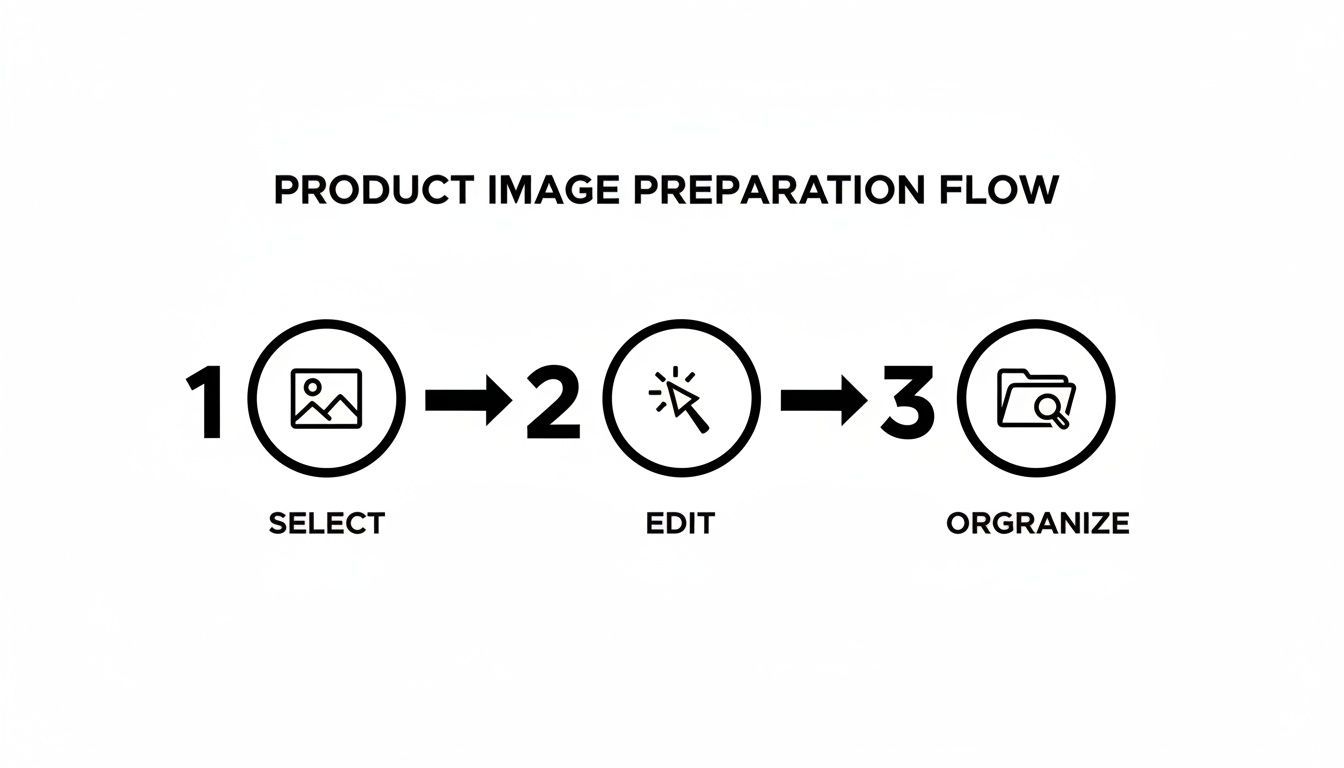
As the diagram shows, great results come from a sequence: careful selection, thoughtful refinement, and smart organization.
Making Your Ad Unskippable with Dynamic Effects
Let’s be honest, people scroll mindlessly. Your ad needs to jolt them out of it. This is where dynamic features and special effects become your secret weapon.
Look for a tool that offers Scroll Stoppers. These are quick, attention-grabbing animations or effects that fire in the first 1-3 seconds. Think of a sudden zoom, a glitch effect, or a bold text animation that appears out of nowhere—anything to break the visual pattern of their feed.
You can also get creative with Surreal Effects. Imagine your product floating through a dreamscape or animating in a way that defies physics. These unexpected visuals create a sense of wonder and make your ad far more memorable than another boring product slideshow. When used well, these effects can seriously boost your watch time and engagement, which is exactly what the algorithms love to see.
Optimizing and Scaling Your AI Video Ad Campaigns
Getting that first AI-generated video ad out the door feels like a huge win. But here’s the secret from someone who's been in the trenches: the real magic isn't in creating just one ad. It's what you do next that separates the top-performing stores from the rest. The goal is to move from making one-off creatives to building a full-blown growth engine.
Honestly, the days of "set it and forget it" ad campaigns are long gone. Platforms like TikTok and Instagram are hungry for fresh content, and your audience gets bored fast. So, stop searching for that one "perfect" ad. Instead, focus on building a system to quickly find out what your customers actually want to see.
This whole process boils down to one simple but crucial idea: never trust your gut instinct alone. I've seen it a hundred times—the ad you think is a masterpiece falls flat, while a quirky variation you almost deleted becomes a runaway bestseller. The only way to know for sure is to test everything.
Building a Framework for Rapid A/B Testing
This is where an AI generator completely changes the game. In the past, testing even two or three different ad concepts was a massive undertaking. Now, you can spin up multiple variations with just a few clicks, letting you test the core components of your ad that were once too expensive or time-consuming to touch.
The key is to be methodical. Don't throw everything at the wall to see what sticks. Start by isolating a single variable at a time so you know exactly what caused that jump in performance.
Here are the elements I always test first—they almost always have the biggest impact:
- The Hook (Your First 3 Seconds): Your ad lives or dies here. Try testing a question ("Tired of flimsy phone cases?") against a bold statement ("This is the last wallet you'll ever buy."). A surprising visual effect can also work wonders to stop the scroll.
- The Call-to-Action (CTA): Don't just stick with "Shop Now." Experiment with different offers and angles. See if a discount-focused CTA like "Get 50% Off" beats a more direct one. Adding a little urgency with "Limited Stock" can also make a huge difference.
- The Visual Style: Pit different aesthetics against each other. Does a clean, minimalist video get more clicks than one with wild, surreal effects? Test an AI model-led, UGC-style video against a slick, product-focused animation to see what your audience prefers.
- The Voiceover: The voice can dramatically change the feel of an ad. For a tech gadget, a calm, authoritative voice might build trust. For a fashion brand, an upbeat, energetic voice might create more excitement. Try a few different AI voices and see what sticks.
By systematically working through these elements, you're not just guessing anymore. You're collecting real data on what makes your audience tick.
Analyzing Key Metrics to Identify Winners
Once your test campaigns are running, you need to know what a "win" actually looks like. It's incredibly easy to get lost in a sea of data, so focus only on the metrics that tell you if your ad is actually making you money. Things like "impressions" are mostly vanity metrics; you need to dig deeper.
This means getting comfortable inside your ad managers on platforms like Meta (for Facebook and Instagram) and TikTok. Don't just glance at the overall campaign numbers. You need to get into the ad-level data to see how your variations are performing head-to-head.
Key Takeaway: The point of testing isn't just to find one winning ad. It's to understand the ingredients of a winning ad—the hook that grabs them, the benefit that connects, and the CTA that converts—so you can bake that success into every ad you make going forward.
To cut through the noise, here is a quick guide to the most important metrics for evaluating your A/B tests.
Key Metrics for A/B Testing Video Ad Variations
The table below breaks down what you should be looking at in your ad platforms to make smart, data-driven decisions about which ads to scale and which to kill.
| Metric | What It Tells You | Platform to Track |
|---|---|---|
| Hook Rate (3-Second Views / Impressions) | How effective your first three seconds are at stopping the scroll. A low hook rate means your opener isn't working. | Meta Ads Manager, TikTok Ads Manager |
| Click-Through Rate (CTR) | The percentage of people who saw your ad and clicked on it. This indicates how compelling your overall message is. | All ad platforms |
| Cost Per Click (CPC) | How much you're paying for each click. Lower is generally better, but it must be paired with conversion data. | All ad platforms |
| Return on Ad Spend (ROAS) | The most important metric. For every dollar you spend on ads, how much revenue are you generating? | Shopify Analytics, platform ad managers |
By keeping a close eye on these specific numbers, you can spot the underperformers early, kill them off, and push your budget toward the ads that are actually driving sales. It's a simple way to maximize every dollar you spend.
Combating Ad Fatigue with Creative Refreshing
Here’s a hard truth: even your best-performing ad will eventually die. This is called ad fatigue. Your audience sees it so many times they just start scrolling right past it. You'll see this happening in your metrics—your CPC starts creeping up while your CTR and ROAS take a nosedive.
This is another moment where having an AI video generator is a lifesaver. Instead of starting from scratch, you can simply "refresh" your winning creative.
- Swap out the background music for a new track.
- Change the first three seconds with a different hook you tested.
- Use a new AI voiceover with the exact same script.
- Apply a fresh set of visual effects to the same product shots.
This simple process breathes new life into a campaign that’s already proven to work, keeping it feeling fresh for both the algorithm and your audience. It helps you maintain strong performance for much longer without the headache of a full creative overhaul. If you want to take this a step further, learning how to generate AI UGC ads is a fantastic strategy for keeping your content endlessly fresh and authentic.
Pro Tips to Maximize Your Video Ad Performance
Alright, your video ads are generated and running. Fantastic. But the real work begins now. It's time to put on your strategist hat, because the best performance marketers don't just launch ads and hope for the best—they have a system for constant improvement.
This isn’t about finding one magical, "perfect" ad. It’s about building an engine that consistently produces results. Let's get into some proven strategies I've seen work time and again to squeeze every last drop of performance out of AI-generated videos.
Nail the First Three Seconds
Your ad lives or dies in the first three seconds. If you can't stop the scroll, the rest of your video might as well not exist. While a Shopify AI video ad generator from product images is brilliant at creating eye-catching hooks, the most powerful ones come from combining that AI magic with your own deep knowledge of what makes your customers tick.
Don't just rely on a cool visual. Your hook needs to immediately answer "What is this?" and "Is this for me?" It's the headline for your entire video.
A few approaches that work really well:
- Ask a pointed question: Start with something that gets an immediate "yes" from your target audience. Think, "Tired of skincare that just doesn't deliver?"
- Make a bold, surprising claim: Hit them with something unexpected, like, "This is the last water bottle you will ever buy."
- Show a quick "before and after": Nothing beats visually demonstrating the product's value right out of the gate. The transformation is instantly understandable.
When you pair an AI-generated scroll-stopper with a message that hits a real pain point, you create an opening that’s almost impossible to ignore.
Repurpose a Single Concept for Every Platform
Here's a huge time-saver: you don't need a totally new ad concept for every single social media platform. The smarter move is to take one core video idea and simply adapt it to the unique vibe and format of each channel.
For instance, that 30-second product demo you just created can be your new workhorse. Slice and dice it for different placements:
- Instagram Reels & TikTok: Chop it down to a punchy, 15-second clip. Add some trending audio and bold text overlays to make it feel native.
- YouTube Shorts: Use the same vertical cut, but layer on a clear, direct voiceover that quickly spells out the benefits.
- Instagram & Facebook Stories: Take that same video and add interactive elements like polls or question stickers to get people engaging directly.
This strategy saves an incredible amount of time and keeps your core message consistent everywhere. It's the definition of working smarter.
I've seen brands triple their creative output without any extra work, simply by adopting a "create once, publish everywhere" mindset. The trick is to tailor the format, not the core message, to each platform.
Integrate Videos Across the Entire Funnel
So many marketers fall into the trap of using video ads only for top-of-funnel brand awareness. While they’re great for grabbing attention from new audiences, your AI-generated videos are also powerhouse assets for guiding people all the way to the checkout.
Think about how you can use different video styles for each stage of the buyer's journey. A solid video strategy builds awareness, nurtures interest, and ultimately, drives the sale.
Mapping Video Content to Funnel Stages
| Funnel Stage | Video Ad Type | Goal of the Ad |
|---|---|---|
| Top of Funnel (Awareness) | High-energy product showcases with surreal effects. | Stop the scroll and introduce your brand to a cold audience. |
| Middle of Funnel (Consideration) | AI-generated UGC ads or "how-to" demos. | Build trust and show the product solving a real problem. |
| Bottom of Funnel (Conversion) | Simple ads featuring a strong discount or a limited-time offer. | Create urgency and drive immediate purchases from warm traffic. |
With this full-funnel approach, you're always delivering the right message to the right person at the right time. For example, a retargeting ad shown to someone who abandoned their cart should be direct and compelling—maybe it even features a unique discount code to nudge them over the finish line. That’s the kind of smart targeting that turns casual browsers into loyal customers.
Got Questions About AI Video Ad Generators? We’ve Got Answers.
Jumping into a new tool always comes with a few questions. When it comes to turning your Shopify product images into video ads with AI, I've noticed merchants tend to run into the same handful of concerns about quality, creativity, and performance. Let's clear those up so you can start creating with confidence.
One of the biggest hang-ups I hear is, "Will the videos look cheap or obviously AI-made?" It’s a fair question. Early AI video tools definitely had a clunky, robotic feel. But the technology has come a long way, fast. Today's platforms use surprisingly sophisticated animation, lifelike voiceovers, and smooth camera effects to produce ads that look and feel professional.
Pro Tip: The best way to avoid that "robotic" vibe is to feed the AI great inputs. Start with a variety of high-quality product photos, then dive into the customization settings. Applying your brand kit and picking the right voice tone makes a world of difference in giving the final video a human touch.
Can I Use My Own Music or Voiceover?
Yes, and you absolutely should if you can. While most generators come packed with royalty-free music and a selection of AI voices, the really good ones let you upload your own audio files. This is a game-changer for keeping your brand consistent, especially if you have a specific jingle or a voice artist you always use.
Think of it as a hybrid approach. Let the AI do the heavy lifting on the visual side, then layer in your custom audio track to tie it all together. You get the speed of AI generation without sacrificing your brand’s unique sound.
How Many Product Images Should I Use?
There isn't a single magic number here, but my rule of thumb is that more is always better. You can technically make a video from just one photo, but it’s going to feel more like a slideshow than a compelling ad.
For a really dynamic video, aim to provide at least 3-5 great images for each product. This gives the AI enough raw material to create different scenes, pans, and zooms, which is what makes a video feel engaging.
Try to include a mix of:
- The Basics: Clear shots of the front, back, and sides.
- The Details: Close-ups that show off texture, materials, or unique features.
- The Story: Lifestyle shots of the product in action. Help your customer see it in their world.
The goal is to give the AI enough visual variety to build a story, not just show off a product.
Ready to stop wrestling with video production and start creating high-performing ads in minutes? ShortGenius turns your Shopify product images into a scalable engine for growth. Generate unlimited ad variations, test what works, and watch your conversions climb. Get started with ShortGenius today!