Elevate Your Ads with shopify ai video ad generator from product images

Discover how shopify ai video ad generator from product images can boost your store's marketing with a practical workflow for high-converting video ads.
A Shopify AI video ad generator is a tool that takes your static product photos and, almost like magic, turns them into eye-catching video ads that actually convert. It's designed to solve one of the biggest headaches for online sellers: constantly needing fresh video content for social media without the huge costs and time sinks of traditional video shoots.
Why AI Video Ads Are a Shopify Game Changer
Let’s be real—trying to keep up with the demand for new video ads is a huge struggle for most Shopify store owners. Platforms like TikTok, Instagram, and YouTube are hungry for constant, fresh content. In the past, this meant coordinating expensive photoshoots, hiring videographers, and getting stuck in endless editing loops. That's just not a sustainable model for growing businesses.
This is where AI completely changes the game. It’s a major shift from sinking your budget into a few big-production videos to a more nimble, data-driven way of creating ads.
Moving Beyond Manual Production
The old way of making video ads just doesn't work for performance marketing anymore. You could spend thousands of dollars on one "perfect" hero video, only to watch it burn out from ad fatigue in less than a week. AI tools break this frustrating cycle by letting you create and test new ideas fast.
Instead of being stuck with one video, you can spin up dozens of variations to test different hooks, calls to action, or product angles. This ability to iterate quickly is the key to discovering what really works and keeping your campaigns profitable. Understanding this concept is a core part of learning how to use AI in marketing to its full potential.
The Power of Automated Creativity
A lot of people think AI-generated content will look bland or robotic, but that's a common misconception. Modern tools are built to transform your existing product photos into dynamic videos that feel genuinely engaging and on-brand. The process is surprisingly simple but incredibly effective.
- Asset Transformation: It breathes life into your static product images with motion, slick transitions, and text overlays.
- Script and Voiceover: The AI can write compelling ad copy and then produce a natural-sounding voiceover to match.
- Brand Alignment: You can easily apply your brand kit to make sure every video uses your specific logos, fonts, and colors.
The real win here isn't just about speed—it's about the power to test creative at a scale that was previously unimaginable. You can generate unique ads for different customer segments or highlight various product benefits without having to start from zero every single time. This directly improves your return on ad spend.
At the end of the day, this technology is more than just a neat tool. It’s a strategic asset that lets you combat ad fatigue, capture customer attention, and boost sales without needing a huge marketing team or a Hollywood-sized budget.
Alright, this is where the fun really starts. Let's get your Shopify store hooked up to the AI so it can start doing the heavy lifting for you.
Connecting Your Store to Automate Ad Creation
Think of this as creating a direct pipeline from your product catalog straight into the ad creation engine. Once you connect your Shopify store, you can say goodbye to the soul-crushing task of manually downloading images and copy-pasting product descriptions one by one.
This simple integration is the foundation for scaling your video ad production. When you grant access, you're letting the AI securely pull your product titles, descriptions, pricing, and—most importantly—all those beautiful, high-resolution photos you’ve already uploaded. It’s a one-time setup that saves you countless hours down the road.
Get Your Product Assets Ready for the AI Spotlight
There's a classic saying in tech: garbage in, garbage out. It’s especially true here. The final quality of your AI-generated videos depends entirely on the quality of the assets you feed the system.
Before you jump into generating videos, take a few minutes to review your product listings. A quick audit now will make a massive difference later.
The idea is to give the AI a diverse visual library to pull from for each product. Here’s what I recommend:
- Show Every Angle: Make sure you have shots from the front, back, and sides. Any unique perspectives are a huge plus.
- Give It Context: Lifestyle photos are gold. Show your product being used by a real person or sitting in a natural setting.
- Keep It Clean: Always include at least one crystal-clear shot of the product on a simple, uncluttered background—pure white or light grey works best.
- Zoom In: Don't forget the detail shots. Close-ups that highlight textures, unique features, or quality craftsmanship give the AI a lot to work with.
I always tell clients to think of their product images as ingredients for a gourmet meal. A chef with a pantry full of fresh, varied ingredients can create a masterpiece. An AI with a rich set of high-quality images can do the same for your video ads.
Why Your Product Descriptions Are a Secret Weapon
While images provide the visuals, your product descriptions are what fuel the AI's scriptwriting brain. A good AI video generator doesn't just see pixels; it reads your text to understand the product's benefits, features, and the unique voice of your brand.
Let’s imagine you're a boutique coffee roaster.
A lazy description like "12oz bag of coffee beans" is going to lead to a painfully generic and boring ad script. It gives the AI nothing to work with.
Now, look at what happens with a well-written description: "Artisan-roasted single-origin Ethiopian Yirgacheffe coffee. Experience bright, floral notes of jasmine and citrus with a clean, tea-like finish. Perfect for pour-over. Sourced from fair-trade certified farms."
See the difference? This version is packed with powerful keywords like "artisan-roasted," "floral notes," and "fair-trade." The AI can instantly grab these concepts and weave them into a compelling script that actually sells the experience, not just the product.
Spending an extra ten minutes beefing up your descriptions is one of the highest-leverage things you can do. It directly translates into better ads and is a core part of building a killer AI workflow for batch content creation that actually gets results.
Let's Build Your First AI-Powered Video Ad
Alright, your Shopify store is connected and your product assets are ready to go. Now for the fun part—actually creating your first ad. This is where we shift from setup to creation, telling the AI how to spin your static product images into a video that stops the scroll. Think of it as a partnership: you bring the strategy, and the AI does the heavy lifting on production in just a few seconds.
The first move is simple: pick the product you want to put in the spotlight. A solid Shopify AI video ad generator from product images will automatically pull in all the important details like photos, titles, and descriptions, giving you a clean slate to start from. From there, you'll start guiding the AI on the ad's vibe, style, and what you really want to say.
This diagram breaks down the workflow. Your store's data gets synced, the AI works its magic, and out comes your ad creative, ready for optimization.
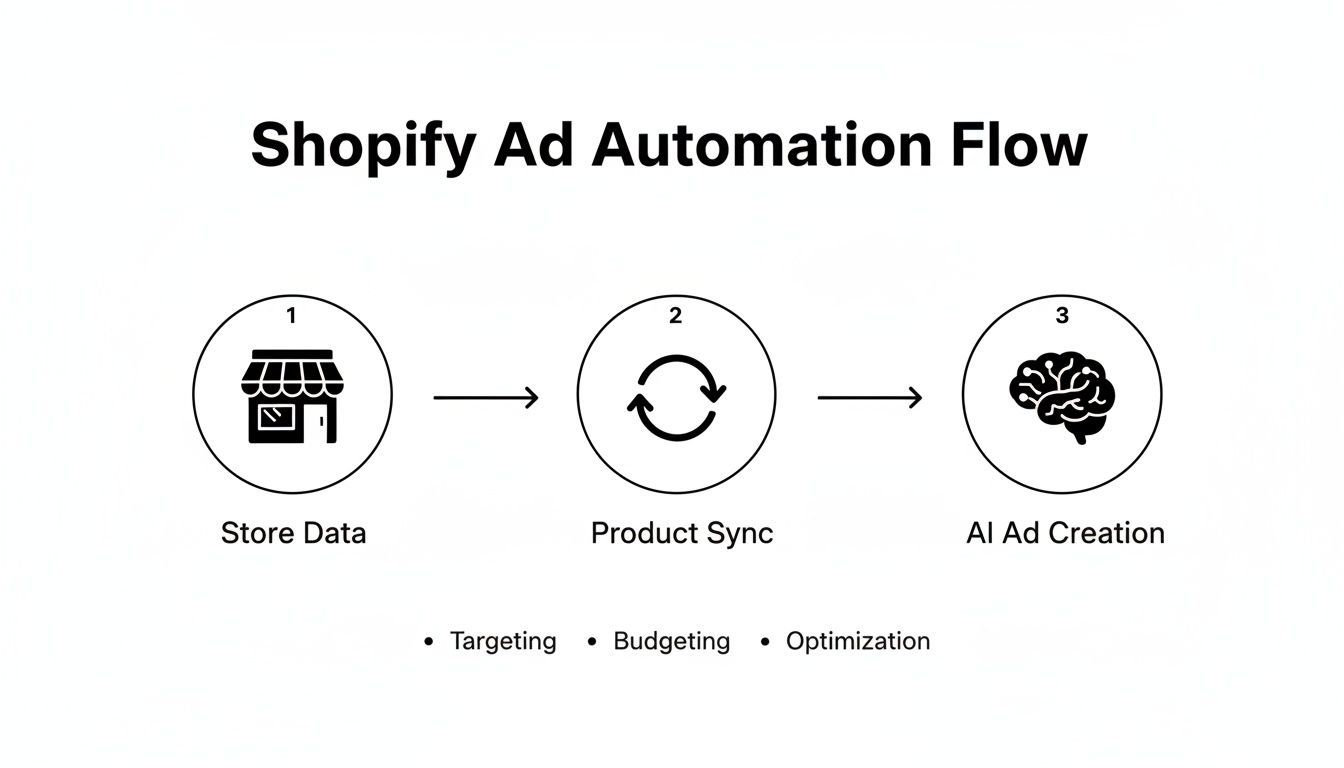
As you can see, the right tool acts as a bridge, turning the product info you already have into launch-ready video ads without all the manual grunt work.
Writing Prompts That Actually Persuade
Your prompt is hands-down the most critical instruction you’ll give the AI. A vague prompt gets you a generic, forgettable ad. But a specific, detailed prompt? That results in a script that speaks directly to your ideal customer. Don't think of it as a command; treat it like a creative brief for a junior editor.
Instead of just saying, "Make an ad for my coffee," you need to get much more specific. Let's stick with our boutique coffee brand example. With the same exact product images, we can generate three totally different ads just by changing the prompt.
- Angle 1 (The Ethical Choice): "Create an upbeat 15-second video for Instagram Reels. We need to highlight that our coffee is sourced from fair-trade certified farms in Ethiopia. Use words like 'ethically sourced,' 'empowering farmers,' and 'deliciously responsible.' The target audience is socially-conscious millennials."
- Angle 2 (The Sensory Journey): "Generate a cinematic 20-second video. Focus on the rich aroma and taste. I want to hear descriptive words like 'bold,' 'aromatic,' 'notes of jasmine and citrus,' and 'a perfect morning ritual.' The tone should feel luxurious and relaxing."
- Angle 3 (The FOMO Deal): "Produce a fast-paced 10-second video for TikTok. This one is all about promoting a limited-time bundle: buy two bags, get a free mug. Slap on text overlays like 'Limited Offer!' and a crystal-clear call to action: 'Tap to shop now!'"
See the difference? These specific prompts give the AI the context it needs to generate not just a script, but an entire ad concept built around a clear business goal. This is what makes tools like ShortGenius so effective for performance marketing—you're in the driver's seat.
Matching Visuals and Voice to Your Brand
Once the script is locked in, the AI will build out scenes using your product photos. Your job now is to put on your director’s hat. You can easily swap out images that don't quite land, reorder the scenes for better flow, and apply visual effects to make it pop.
A rookie mistake is to accept the AI's first draft as the final cut. The real magic happens in quick iteration. If a scene feels flat, swap in a lifestyle shot. If a transition feels clunky, pick a smoother one. These tiny tweaks can take an ad from "good enough" to "great" in less than a minute.
Choosing the right AI voiceover is just as important. An overly energetic voice can feel jarring for a relaxation product, while a flat, monotone voice will suck the life out of a flash sale announcement. Most platforms give you a whole library of voices to choose from.
Pro Tip: Always listen to a few different voices read your script before you commit. The right voice can boost viewer retention by up to 25% because it makes the ad feel more authentic and trustworthy. Make sure the voice you pick matches the brand persona you’ve worked so hard to build. That consistency is what builds recognition and trust with your audience over the long haul.
Refining and Optimizing Your AI-Generated Ads
Your first AI-generated video is a fantastic head start, but let's be real—it's rarely the final cut. The real magic happens when you put on your marketer hat and start refining the AI's output. This is where you transform a good ad into a high-converting workhorse.
Don't worry, this isn't about spending hours in a complex editor. We're talking about small, surgical tweaks that can seriously boost an ad's impact. The best platforms are designed for this kind of quick iteration, letting you fine-tune your videos in minutes.
Polishing Your Scenes and Pacing
The AI does a solid job of stitching scenes together from your product images, but you're the director. Watch the video through a few times. Does a particular scene drag on too long or feel out of place? Most tools let you easily drag and drop scenes to re-sequence them or trim a few milliseconds off the end to keep things snappy.
Swapping out visuals is another easy win. If the AI picked a generic product shot for a key moment, try replacing it with a more dynamic lifestyle image showing your product in action. That simple change can make the ad feel instantly more authentic and relatable.
Pro Tip: Never underestimate the power of sound. An upbeat, high-energy music track can make a flash sale ad feel urgent and exciting. A calmer, more atmospheric track can give a luxury product a premium, sophisticated vibe. I always test at least two different music options to see how dramatically they change the ad's entire mood.
Master Creative Resizing for Every Platform
Your audience is in a different mindset on every platform, and your ads need to match that. A single 16:9 video just won't cut it anymore. One of the biggest perks of using a dedicated AI video ad tool is the ability to instantly resize and reformat your creative for every channel.
This process, which we call creative versioning, is critical. It makes your ad look native to each platform, which can give your performance a serious lift. Here’s a quick rundown of the formats you absolutely need:
- 9:16 (Vertical): This is non-negotiable for TikTok, Instagram Reels, and YouTube Shorts. It fills the entire mobile screen and is the standard for short-form video.
- 1:1 (Square): Still a powerhouse for in-feed posts on Instagram and Facebook. It takes up way more screen real estate than a horizontal video, making it harder for users to scroll past.
- 16:9 (Horizontal): The classic format for YouTube ads and organic video. It’s also perfect for embedding on your Shopify product pages or in blog posts to add some dynamism.
Fight Ad Fatigue with Creative Refreshing
Even your best-performing ad will eventually run out of steam. It’s called ad fatigue. Your audience sees the same video one too many times, and they start to tune it out. Your costs creep up, and your return on ad spend (ROAS) takes a nosedive.
The solution isn't starting from scratch.
Instead, use a technique I rely on all the time: creative refreshing. Just duplicate your winning ad and change only the first three seconds. That’s your hook, and it’s the most important part of the video. Swap in a new visual, change the text overlay, or try a different opening line in the voiceover. That's often all it takes to make the ad feel brand new to someone scrolling their feed.
This simple trick extends the life of your best creative, helping you maintain strong performance without going back to the drawing board every few weeks. It’s a super-efficient way to keep your campaigns fresh and profitable.
Launching Your Ad and Measuring What Matters
Getting your video ad polished and ready is a great feeling, but that’s really just the starting line. The real test is what happens when you set it live. A killer video is one thing, but a video that actually drives sales for your Shopify store? That’s the whole point.
The good news is you don’t have to manually post every single video. Most modern tools, like the Shopify AI video ad generator from product images we've been using, come with built-in schedulers. This lets you map out your content calendar and have your ads go live automatically, so you can maintain a steady presence without being glued to your screen.
The Metrics That Actually Move the Needle
Once your ads are running, it’s time to put on your analyst hat. It's easy to get lost in a sea of data, but successful campaigns come from focusing on a handful of key performance indicators (KPIs). These are the numbers that tell you if you're making money or just noise.
Here’s what you absolutely need to be watching:
- Hook Rate: This is the percentage of people who stick around for the first three seconds. A solid hook rate, ideally over 30%, means your opening is doing its job and stopping the scroll.
- Click-Through Rate (CTR): What percentage of viewers actually clicked your ad? A high CTR is a clear sign that your message and offer are resonating.
- Cost Per Click (CPC): Simply put, how much are you paying for each click? The goal here is to drive this number down without sacrificing the quality of the people you're reaching.
- Return on Ad Spend (ROAS): This is the big one. For every dollar you put into ads, how many are you getting back in sales? A 3:1 ROAS is a common benchmark for a profitable campaign, but the higher, the better.
These metrics don't exist in a vacuum; they tell a story together. For instance, a high Hook Rate but a low CTR is a classic sign that your ad is grabbing attention, but the offer itself isn't compelling enough to earn the click. That's a specific problem you can fix by tweaking your call-to-action or sweetening the deal.
Build a Feedback Loop That Fuels Growth
Looking at your ad performance isn't something you do once and forget. It’s a constant cycle: launch, measure, learn, and repeat.
When you find an ad with a killer ROAS, you've struck gold. Your next move is to use those creative refreshing techniques we talked about earlier to keep it running strong for as long as possible.
And what about the duds? If an ad has a terrible Hook Rate and an sky-high CPC, it's telling you something. Listen to the data. Pull the plug on it and redirect that budget to your proven winners. It’s easy to get attached to a creative you worked hard on, but the numbers don’t have feelings.
This data-driven approach turns your ad creation into a smart, self-improving system. You stop guessing and start making decisions based on real-world feedback from your audience. This is how you consistently improve your results and truly scale your Shopify store.
Got Questions? Let's Clear Things Up
Jumping into any new tool, especially one driven by AI, naturally brings up a few questions. I hear the same ones from merchants all the time when they start using a Shopify AI video ad generator from product images, so let's tackle them right now.
The biggest worry? "Will my ads look fake or robotic?" It's a valid concern. But the latest generation of AI tools are built specifically to avoid that plastic, uncanny valley look. The secret is in the ingredients you provide. When you start with crisp, high-quality product photos, choose scene templates that feel genuine, and layer on your own branding, the final video feels like something your team created.
Think of the AI as a super-fast creative assistant, not a one-click magic button. You still guide the process and add that essential human polish at the end.
How Many Product Images Do I Actually Need?
This one comes up a lot. Technically, you could try to generate a video from a single photo, but the results will likely be underwhelming. For a really compelling ad, you want to give the AI more to work with.
From my experience, the sweet spot is 4-8 high-quality images per product.
This isn't just about quantity; it's about variety. Giving the AI a mix of shots is like handing a painter a full palette of colors. Try to include a mix of these:
- Studio Shots: Your classic, clean product photo on a simple background.
- Lifestyle Photos: Show your product in action, being used by real people in a relatable setting.
- Detail Close-ups: Zoom in on the texture, the stitching, a unique button, or any feature that makes your product special.
With this variety, the AI can build a much more dynamic and visually interesting story for your ad.
A common follow-up question is whether this replaces hiring a video agency. The answer is no, not really. It serves a completely different, but equally important, role. A video agency is your go-to for a high-concept, big-budget brand film. An AI generator, on the other hand, is your secret weapon for performance marketing. It lets you create and test dozens of ad variations quickly and affordably, so you can find out what actually converts. The smartest brands are using both.
Ready to see what your own product photos can become? ShortGenius lets you create high-performing video ads in minutes, not weeks. Start your free trial today