Learn how to turn product photos into video ads with ai and boost conversions

Discover how to turn product photos into video ads with ai and supercharge your campaigns with eye-catching visuals, faster production, and higher CTR.
So, you have a library of great product photos. What if you could turn them into engaging, high-converting video ads in minutes, without a film crew or a massive budget? That's exactly what AI-powered video generation makes possible. It's a process of taking your static images, feeding them to a smart platform, and using text prompts to direct the AI as it builds dynamic scenes, adds animations, and even generates a voiceover.
This isn't just a tech trick; it's a complete shift in how brands can create compelling short-form video ads.
Why AI Video Ads Are Changing The Game For Ecommerce
Let's be real. If your marketing still revolves entirely around static images, you're leaving money on the table. The biggest hurdle for most growing brands has always been the sheer cost and complexity of traditional video production.
Think about it: hiring a crew, renting equipment, and editing footage can easily run into the thousands for a single professional video. This makes it almost impossible to test new ad concepts quickly or create unique videos for every product in your catalog.
This is where AI video generation steps in, completely flipping the script. It moves you from slow, expensive production cycles to a nimble, affordable, and scalable workflow. Suddenly, any brand can dive into its existing photo library and churn out a steady stream of social-media-ready video ads.
The New Competitive Edge in Marketing
Turning product photos into video ads with AI is more than just a cool feature—it's fast becoming a go-to strategy for savvy performance marketers. Why? Because it solves the two biggest headaches in modern advertising: the relentless need for fresh content and the demand for constant, data-driven optimization.
The speed alone is a massive advantage. Instead of waiting weeks for an agency to deliver a final cut, you can generate a new ad in the time it takes to drink your coffee. You can test it, analyze the data, and iterate on the concept almost immediately. This opens the door to a much more agile and responsive ad strategy.
The core benefit here is agility. You can jump on market trends, test a dozen different value propositions, or whip up seasonal ads on the fly without being hamstrung by production delays or budget approvals.
We're seeing a huge wave of adoption for this tech. A recent 2025 market study revealed that a staggering 82% of marketers are excited about text-to-video AI tools. The reason is simple: it levels the playing field, giving smaller brands the firepower to compete with industry giants.
To get a sense of just how powerful this is, you can even explore how to create AI UGC ads and see another way this technology is being put to work. This isn't an experiment anymore; it's a fundamental part of the modern marketing toolkit.
AI Video Generation Vs Traditional Video Production
To really understand the shift, it helps to see a side-by-side comparison.
| Factor | Traditional Video Production | AI-Powered Video Generation |
|---|---|---|
| Cost | High (thousands per video) | Low (affordable subscription models) |
| Speed | Slow (weeks to months) | Fast (minutes to hours) |
| Scalability | Difficult to scale | Highly scalable |
| Skills Needed | Specialized (directors, editors) | Minimal (basic marketing knowledge) |
| Iteration | Costly and time-consuming | Quick and inexpensive |
The takeaway is clear. While traditional production still has its place for high-end brand films, AI offers an unbeatable solution for the fast-paced, high-volume needs of social media advertising.
Getting Your Product Photos Ready For AI
The final quality of your AI-generated video hinges entirely on the quality of your source images. It's a classic case of ‘garbage in, garbage out.’ A blurry, poorly lit photo will just give you a blurry, poorly lit video, regardless of how smart the AI is.
Think of your product photos as the foundation of a house. If the foundation is weak, the whole structure will be unstable. Giving the AI crisp, clean images is the single most important thing you can do to get a polished, professional video ad at the end of this process.
Spending a few extra minutes prepping your photos now will save you hours of headaches later. Trust me, it’s worth the effort to avoid pixelated visuals or products that look awkwardly pasted into a scene.
High Resolution Is Non-Negotiable
First things first: you absolutely must start with high-resolution images. Low-quality photos will look even worse once they’re animated, stretched, and resized for different social media feeds. You need sharp visuals that let the details of your product shine.
As a baseline, I always recommend using images that are at least 1000x1000 pixels. This gives the AI plenty of visual data to work with when it's generating new scenes or adding motion. When in doubt, go bigger.
Product Isolation and Clean Backgrounds
Most of the cool AI video tricks involve dropping your product into completely new, generated environments. For that to look believable, the AI has to know exactly what the product is and what the background is. This is where product isolation becomes crucial.
The gold standard here is a photo with the product already isolated on a transparent background, saved as a PNG file. This gives the AI total freedom to place your item anywhere—from a mountain top to a minimalist studio.
Pro Tip: Don't have transparent PNGs? The next best thing is a photo on a clean, simple background. A solid white or neutral color makes it much easier for the AI to digitally "cut out" the product.
Showcasing Multiple Angles
Don't settle for just one flat, front-facing shot. Feeding the AI images from different angles is the key to creating a video that feels dynamic and engaging, not like a glorified slideshow.
Try to gather a small collection of shots for each product:
- Front and back views: Give a complete picture of the item.
- Detail shots: Zoom in on unique features, textures, or logos.
- In-context shots: If you have them, include photos of the product being used.
This variety gives the AI more to work with, allowing it to build a real visual story. It can start wide, punch in on a key detail, and then cut to a lifestyle scene. That’s how you turn a simple product showcase into an ad that actually stops the scroll.
Writing Prompts That Actually Tell a Story
Alright, you’ve got your product shots ready to go. Now comes the fun part: playing director. This is where you tell the AI exactly what you want it to create. And let’s be clear, a lazy prompt gets you a boring, generic video. A great prompt, on the other hand, tells a story that actually sells your product.
The real trick to turning static photos into high-converting video ads is to lean on a classic marketing formula that just plain works: Hook, Problem, Solution, and Call to Action (CTA). Think of each part of that formula as a separate scene in your ad. Your job is to write a detailed prompt for each one, building a narrative that grabs a viewer's attention and guides them straight to your "buy now" button.
Thinking Like a Director, Not a Coder
You don't need to be a tech wizard for this. "Prompt engineering" is really just about being a good storyteller and painting a vivid picture with your words. Forget simple commands like "animate the product." You have to think like a filmmaker. What's the camera doing? What's the mood? How does the product itself move?
The more precise you are with your language, the more control you have over the final video. Here are a few things I always include in my prompts for each scene:
- Camera Movement: Get specific. Think "slow zoom in on our logo" or "pan smoothly from left to right, showing off the product's texture."
- Environment and Lighting: Set the stage. Is it "a clean, minimalist studio with soft morning light" or "sitting on a rustic wooden table next to a steaming cup of coffee"?
- Product Animation: Tell the AI how the product should act. Try something like, "the skincare bottle gently rotates to reveal the ingredients list" or "the sneakers levitate just off the ground as energy sparks fly around them."
Getting this granular is what makes the difference between an ad that feels polished and one that screams "I was made by a robot."
Just look at this example from OpenAI's Sora project. It shows just how photorealistic and nuanced these video models are becoming.
This image came from a detailed text prompt, which proves the AI can understand and execute on specific moods, lighting, and complex actions when given the right instructions.
Effective AI Prompts For Product Video Scenes
To really drive this home, I’ve put together a table showing the difference between lazy, vague prompts and the kind of specific, descriptive prompts that get real results. We'll use a new high-tech running shoe as our example.
| Desired Outcome | Vague Prompt (Avoid) | Specific Prompt (Use This) |
|---|---|---|
| Hook Scene | Show the running shoe. | "Extreme close-up on the running shoe's fabric, water beading off it in slow motion. Cinematic, dramatic lighting." |
| Problem Scene | A person running in the rain. | "Create a scene of a runner's feet splashing through a puddle on a dark, rainy city street. Moody and gritty feel." |
| Solution Scene | Shoe is waterproof. | "Animate the product photo of the shoe rotating against a clean, white background. Add a glowing blue shield effect to highlight its waterproof technology." |
| Action Scene | Show the shoe in sunshine. | "A runner's feet landing softly on a sun-drenched mountain trail. The shoe looks pristine and powerful. End with a slow zoom out." |
See the difference? It’s night and day. The vague prompts leave far too much up to chance and you end up with something that looks like a cheap slideshow. But the specific prompts build a compelling story. They introduce a problem (running in miserable weather), position the product as the hero (it’s waterproof!), and finish with an aspirational feeling (you can conquer any trail).
That's how you make a video that doesn't just show a product—it sells an experience.
Bringing Your AI Video Ad to Life
Alright, you've prepped your photos and crafted your prompts. Now for the fun part: actually making the video. This is where you hand everything over to the AI and watch the magic happen. Don't worry, it's a lot less technical than it sounds—most platforms have boiled this down to a few simple steps.
First, you'll upload those clean PNG product shots you prepared. Then, you'll copy and paste your detailed prompts into the text fields for each scene you planned. This is the moment your creative vision gets plugged directly into the AI's engine.
At the end of the day, turning a static image into a compelling ad clip is all about using sophisticated AI image to video tools. Once you click that "generate" button, the system gets to work, interpreting your text and animating your photos into short, engaging video scenes.
The Refinement Loop: Iteration is Key
Let’s be real: your first attempt probably won't be perfect. And that's completely okay. I've found that the real skill in using an AI ad generator like this one comes from refining and iterating. You have to think of the AI as a creative collaborator that needs a little guidance to nail your vision.
The workflow usually goes something like this:
- Generate the first clip: Feed it your prompt and let the AI take a first pass at the scene.
- Review it with a critical eye: Watch the clip back. Is the camera movement what you wanted? Does the animation look natural? Does it actually feel the way you imagined?
- Tweak your prompt: Based on what you saw, go back and adjust your prompt. If a "slow zoom" was too jarring, try "a very slow, subtle zoom in." If the background is distracting, add a phrase like "with a minimalist, out-of-focus background."
- Regenerate and repeat: Run the generation again with your new prompt. Keep doing this until the clip is exactly what you had in your head.
This back-and-forth process is how you get from a "good enough" video to a truly scroll-stopping ad. Don't hesitate to experiment here. I’ve been amazed at how a tiny change in wording can produce a massively better result.
Assembling the Final Ad
Once you’ve got a polished clip for your Hook, Problem, Solution, and Action, it's time to stitch them all together. Most AI video platforms have a built-in timeline editor that makes it easy to drag and drop your scenes into the right sequence.
This is also where you add all those final touches that make the video feel like a professional, cohesive ad. You can drop in text overlays to call out key benefits, pick some background music to set the mood, and even generate a high-quality AI voiceover to narrate the script.
To keep things on track, I always stick to a simple but incredibly effective 4-step formula. It’s the backbone of almost every successful video ad I’ve seen.
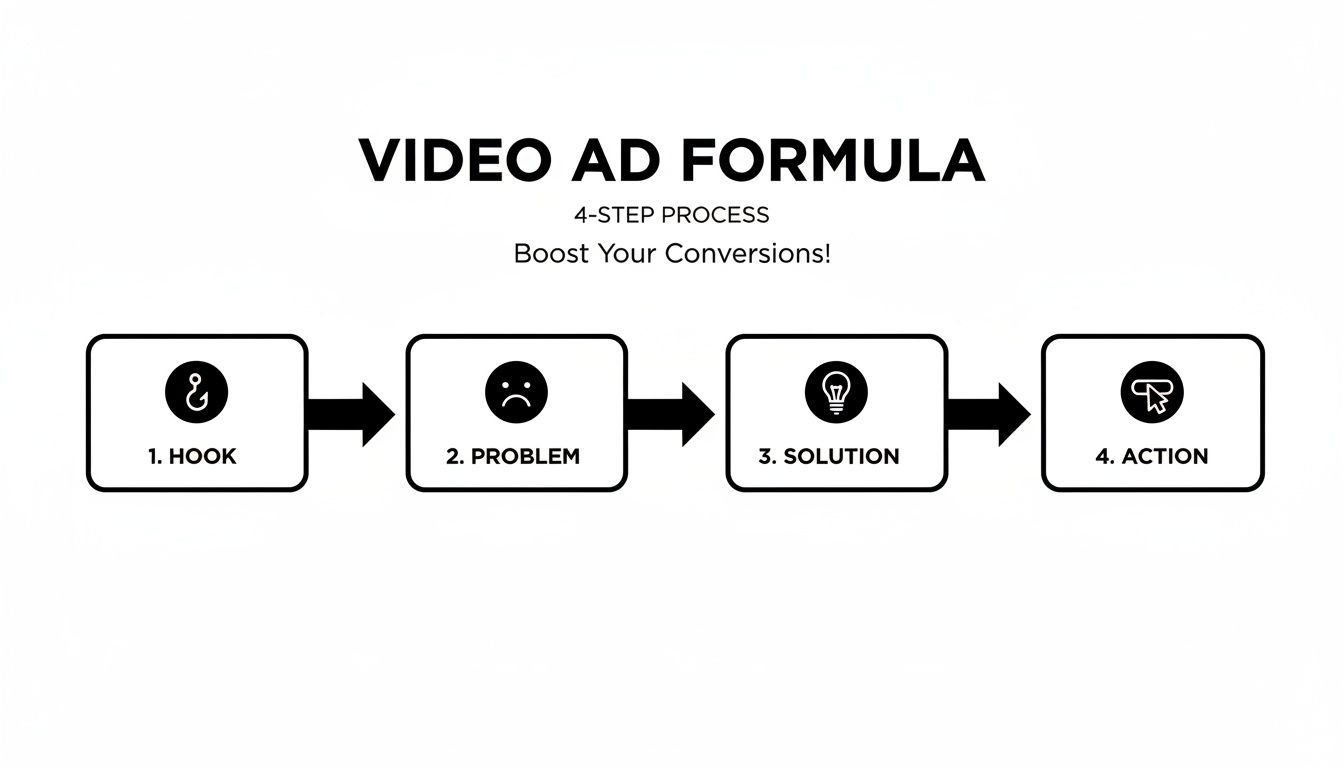
Following this structure makes sure your ad doesn't just look cool—it actually works. It pulls viewers in and gives them a clear path from curiosity to conversion. The time savings alone are a game-changer.
One 2025 study found that 76% of small businesses using AI photography tools saved over 80% in creative production costs. Some reports even show workflows that once took hours are now done in just five minutes. These numbers show just how powerful this approach is for creating high-quality ads at a scale that was impossible before.
Optimizing and Distributing Your Video for Sales
Alright, you've created your video ad. That's a huge milestone, but the work isn’t over until it’s actually bringing in sales. Now, we shift gears from creation to optimization and distribution—turning that polished video into an asset that genuinely moves the needle.
The first, most crucial task is making sure your video looks right wherever it shows up. A one-size-fits-all approach is a recipe for wasted ad spend.
You absolutely have to tailor the video for the platform. That means a 9:16 vertical format for TikTok and Instagram Reels is non-negotiable. For the main Instagram feed, a 1:1 square format usually gets the best results. Most modern video tools handle this resizing easily, but it's a fundamental step that I've seen even experienced marketers skip.
Fine-Tuning for Maximum Impact
With the sizing sorted, let's talk about the details that make a real difference. First up: captions. Think about how often you scroll through social media with the sound off. A huge chunk of your audience does the same, so clear, easy-to-read captions are essential for getting your message across in silence. Thankfully, many AI tools can auto-generate these, which saves a ton of manual effort.
This is also the perfect time to get into A/B testing, which is really the core of performance marketing. The great thing about using AI for video creation is how fast you can spin up different versions to test what resonates.
Here are a few variables I always recommend testing:
- The Hook: Swap out the first three seconds. Try a different opening scene, a punchier headline, or a question.
- The Call-to-Action (CTA): Pit "Shop Now" against "Learn More." Or try something more benefit-focused like "Get Your Glow."
- The Music: A simple change in the background track can completely alter the mood. See which vibe connects best with your audience.
You'd be surprised how a seemingly minor tweak can dramatically improve your ad's performance.
The numbers don't lie. Simply adding video to an e-commerce page can lift conversion rates by 34% to 39% over static images alone. And with 64% of consumers admitting they're more likely to buy after watching a product video, the payoff for turning those photos into ads is crystal clear.
Choosing the Right Channels
Finally, where you put your ad is just as important as what's in it. For the kind of short, dynamic videos we're making, a few platforms consistently deliver the best results for e-commerce brands.
- TikTok and Instagram Reels: This is your go-to for reaching younger demographics. The content needs to be fast, fun, and feel native to the platform. Understanding how much TikTok pays creators also highlights how valuable this ecosystem is.
- Facebook and Instagram Feeds: These are still powerhouses for running highly targeted, conversion-focused campaigns where you can zero in on specific customer profiles.
- YouTube Shorts: Don't sleep on Shorts. It's a rapidly growing channel that's perfect for quick product demos and snappy how-to content.
Creating a great ad is one thing, but the real goal is to drive sales. To take things a step further, look into other ways to improve ecommerce conversion rates across your entire funnel. By thoughtfully distributing and constantly optimizing your video ads, you'll successfully turn a simple product photo into a powerful, revenue-generating machine.
Got Questions? We’ve Got Answers on AI Video
Jumping into AI video can bring up a lot of questions. It's totally normal. Brands I talk to are always curious about the nuts and bolts of it all—from the legal stuff to whether the final video will even look good. Let's tackle some of the most common questions that pop up when you're learning how to turn product photos into video ads with AI.
One of the first things people ask is about copyright. Who actually owns the video when an AI makes it? The short answer is, you do. When you use a commercial AI platform like this, the video generated from your own product photos is yours to use for your ads. The only catch? You have to own the rights to the original photos you upload in the first place.
Another big one is authenticity. Is this thing going to look like a robot made it? A few years ago, maybe. But today's tools are a world away from the clunky, awkward AI video of the past. The secret to getting a natural, authentic-looking video is all in the prep work—your input photos and your prompts are everything. High-quality images and super-specific instructions will always give you a more realistic and compelling ad.
So, Can AI Videos Really Replace a Pro Shoot?
This is the million-dollar question, isn't it? The truth is, AI is a specialized tool for a specific job: churning out scalable, affordable social media ads. It's an absolute beast when you need to create a ton of different ad creatives for A/B testing or just to keep your feeds from getting stale.
But for that big, splashy brand film or a flagship product launch? A traditional photoshoot with a full crew is probably still your best bet for that level of fine-tuned creative control.
Here’s how I think about it:
- AI Video: Your go-to for rapid, high-volume ad creation. It's built for the relentless pace of platforms like TikTok, Instagram Reels, and YouTube Shorts.
- Traditional Shoots: Reserved for that "hero" content. Think brand storytelling and major campaigns where every single artistic detail has to be perfect.
The point isn’t for AI to replace your entire creative process. It’s a powerful new tool in your belt. It lets you produce more content, test more angles, and move faster than you ever could before, all without the crazy overhead of constant professional shoots.
Ultimately, you’re still the director. You bring the strategy, the product, and the story. The AI is just your incredibly fast, always-on production assistant, helping you bring that vision to life in minutes, not weeks.
Ready to see this in action and turn your product photos into ads that actually convert? ShortGenius gives you everything you need to generate slick video ads, write scripts that sell, and get campaigns live in seconds. Forget waiting around for a production team—it's time to start driving sales.