How to Post YouTube Shorts for Explosive Channel Growth

Discover how to post YouTube Shorts on mobile and desktop. Learn the optimization secrets that feed the algorithm and drive viral growth for your channel.
Posting your first YouTube Short is surprisingly simple. You can do it straight from your phone or even your desktop. The two golden rules are to keep your video in a vertical format (9:16 aspect ratio) and make sure it's 60 seconds or less. Tossing #Shorts into your title or description is also a good move to help YouTube's system categorize it correctly.
Why YouTube Shorts Are a Game-Changer for Channel Growth
Before we dive into the "how-to," let's talk about the "why." Why should you even bother with Shorts? In a creator world that feels more crowded by the day, Shorts aren't just another content format to check off your list. They're one of the most powerful discovery tools YouTube has ever built.
Think of it as a dedicated fast lane to a new audience.
The YouTube algorithm is hungry for good Shorts and actively pushes them to viewers on the Shorts shelf—prime real estate on the mobile app. This is a huge deal. Unlike your longer videos, which often rely on search terms and your existing subscribers, Shorts are designed for pure, rapid-fire discovery. This gives channels of any size a genuine shot at getting seen by people who have never heard of them before.
Tapping into a Massive, Engaged Audience
The scale of the Shorts audience is almost hard to believe. We're talking about over 70 billion daily views. That's not a typo. This isn't some passing fad; it's a fundamental shift in how people watch videos on the platform.
When you create a Short, you're not just making a quick video. You're dropping your content into an enormous pool of highly engaged viewers who are actively looking for new creators to follow. For a deeper dive into these numbers, you can check out the latest YouTube Shorts statistics.
The magic of Shorts lies in its ability to break through the noise. A single well-crafted Short can introduce your channel to thousands of potential subscribers overnight, a feat that could take months with long-form content alone.
The Strategic Edge of Short-Form Video
Beyond just raw view counts, Shorts give you a strategic advantage that works hand-in-hand with your traditional long-form content. They're not just throwaway clips; they serve real, practical purposes for a growing channel.
-
Test Ideas at Lightning Speed: Got a concept you're not sure about? Instead of sinking hours into a full-length video, make a Short. If it gets a great response, that’s your green light to produce a more in-depth video on the topic. It's like a free focus group.
-
Build Unstoppable Channel Momentum: The YouTube algorithm loves consistency. Pushing out Shorts daily or even a few times a week keeps your channel buzzing with activity. This signals to YouTube that you're a serious creator, which can give all your content—long and short—a nice little visibility boost.
-
Drive Traffic Where It Counts: Think of Shorts as movie trailers for your main content. A compelling 30-second clip can get viewers hooked and send them straight to your longer, monetized videos. This is a fantastic way to increase your channel's overall watch time and, ultimately, your revenue.
Getting Your First Short Live from Any Device
Alright, now that you see the potential Shorts have, let's get down to the fun part: actually making and posting them. The great thing is, YouTube has made this process incredibly simple, whether you're shooting something spontaneous on your phone or uploading a finely-tuned video from your computer. No matter which device you use, the basic rules of the game are the same.
Before we dive into the step-by-step, let's cover the three absolute must-haves for any video to even qualify as a Short. Think of these as the entry ticket.
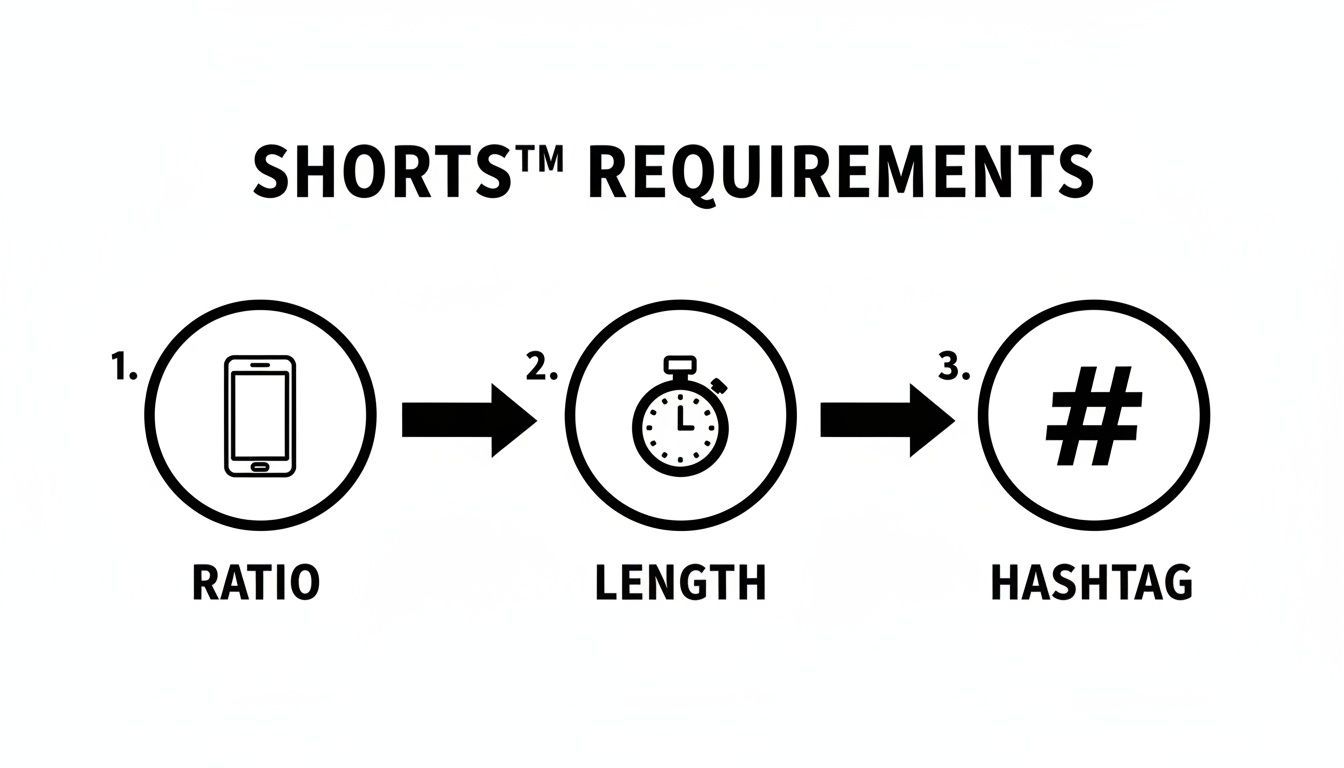
As you can see, getting the aspect ratio right, keeping it short and sweet, and using the right hashtag are the non-negotiables. Nail these, and you're in the game.
How to Post YouTube Shorts From Your Phone
The mobile app is the native habitat for Shorts. It’s packed with tools designed for fast, in-the-moment creation, and frankly, it's the quickest path from idea to live video for most creators.
Just pop open the YouTube app, hit that big plus icon (+) at the bottom, and choose "Create a Short." This launches the Shorts camera, which is basically your all-in-one studio. You can either record clips right then and there or pull in a video you've already shot and edited.
If you’re recording directly in the app, you’ve got some cool creative tools to play with:
- Speed Controls: Slow things down for dramatic effect or speed them up for a cool time-lapse.
- Timer: This is a lifesaver for solo creators. Set a countdown and record yourself hands-free.
- Green Screen: A surprisingly powerful feature that lets you place yourself in front of any image or video from your phone’s gallery.
- Add Sound: This is huge. You get instant access to YouTube's massive library of licensed music and trending audio clips.
You can also film in segments—just press and hold the record button for your first clip, let go, then press and hold again for the next. This lets you string together different shots seamlessly without ever leaving the app. Once your clips are ready, you can add text, slap on some filters, and make other tweaks before hitting publish.
Uploading Shorts From a Desktop
For those of us who live in editing software like Premiere Pro or DaVinci Resolve, uploading from a desktop is the way to go. This workflow gives you complete control over the final look, sound, and quality of your video.
The process is familiar if you've ever uploaded a long-form video. Head over to your YouTube Studio, click the "Create" button in the top-right corner, and select "Upload videos." Now, just drag and drop your vertical video file. The two critical specs are that it must be 60 seconds or less and have a 9:16 aspect ratio.
YouTube’s algorithm is pretty good at automatically detecting vertical videos under a minute as Shorts. But why leave it to chance?
Pro Tip: When uploading from a desktop, always include the hashtag #Shorts in your video’s title or description. This is a direct signal to YouTube that says, "Hey, this is a Short!" It eliminates any ambiguity and makes sure your content gets pushed to the Shorts shelf where viewers can discover it.
From there, you’ll go through the standard upload process: writing your title and description, adding tags, and selecting a thumbnail. While the Shorts feed will grab a random frame from your video, a custom thumbnail is still essential. It's what people will see when your Short appears on your channel page, in playlists, or in search results, so don't skip it.
Making Your Shorts Irresistible to the YouTube Algorithm

Getting your Short uploaded is just the starting line. The real race begins now, and to win, you need to think less like a creator and more like an algorithm whisperer. Your goal isn't just to publish a video; it's to create something YouTube's discovery engine feels compelled to show to millions.
The algorithm really only cares about one thing: keeping viewers happy and on the platform. When someone loves a Short, they watch it again, share it, or keep scrolling for more. Every one of those actions is a green light to YouTube, signaling that your content is a winner and needs a bigger audience.
The whole game boils down to a simple funnel. YouTube shows your Short to people (impressions), and your job is to get a high 'stayed to watch' rate—meaning, they didn't immediately swipe away. This metric is everything. To nail it, you absolutely have to hook viewers within the first 1-3 seconds.
Craft a Title That Stops the Scroll
Your title is your first, and often only, shot at grabbing someone's attention in a sea of content. It has to be short, punchy, and dripping with curiosity. Think of it as a tiny billboard for a very distracted audience.
Forget a bland title like "My Morning Routine." Instead, reframe it to create an information gap, like "The 5 AM Habit That Changed Everything." See the difference? One is a statement; the other is a hook that makes people need to know the secret.
Here are a few title frameworks I've seen work wonders for Shorts:
- The "How To" Promise: "How to Edit Photos Like a Pro in 15 Seconds"
- The "Mistake" You're Making: "You're Cleaning Your Keyboard All Wrong"
- The "Secret" Reveal: "The One Ingredient Pro Chefs Always Use"
Use Hashtags to Guide the Algorithm
Hashtags on your Shorts do two critical jobs: they tell YouTube what your video is about (categorization) and who should see it (discovery). Slapping #Shorts in your title or description is non-negotiable; it’s the most direct signal you can send. But you can't just stop there.
A smart hashtag strategy is all about mixing broad, popular tags with specific, niche ones. This helps the algorithm understand both the general topic and the exact audience you're aiming for.
Think of it this way: Hashtags are like road signs. A broad tag like
#fitnesstells YouTube the general neighborhood your video lives in. A niche tag like#kettlebellworkouttipspoints to the exact street address, connecting your content with the people most likely to love it.
For instance, if you post a Short about a quick vegan recipe, your tags could look like this:
#Shorts #veganrecipes #plantbased #15minutemeals #easycooking
Don't Underestimate a Great Thumbnail
I know, I know—the Shorts feed often just autoplays your video. So why bother with a thumbnail? Because your Short lives in other places, too. It shows up on your channel page, in search results, and in the "suggested videos" sidebar on desktop. A sharp thumbnail is a visual promise of the value inside.
Pick a frame from your video that is clear, high-contrast, and captures the peak moment of action or emotion. Sometimes, adding a little bit of text overlay can provide crucial context and seriously boost your click-through rates.
To really get an edge, you should also dig into comprehensive YouTube SEO tips, as many of the principles apply to Shorts and help your entire channel's authority.
By focusing on these key details, you turn a simple upload into a strategic play for growth. And if you want to make the creation process itself even easier, from script to final video, see what's possible with AI: https://shortgenius.com/shortgenius-models/text-to-video
Streamline Your Workflow with ShortGenius
Let's be real: consistency is key on YouTube, but the daily grind of creating Shorts can be a fast track to burnout. Knowing how to post a Short is one thing, but keeping that momentum day after day? That's the real challenge. This is where you have to start working smarter, not just harder.
What if you could take your content creation from a multi-hour headache down to just a few focused minutes? Tools built specifically for this can make that happen. They turn the huge task of daily uploads into a system that actually works, handling the tedious stuff so you can focus on the creative spark that makes your channel stand out.
From Idea to Published Short in Minutes
For most creators, the biggest bottleneck isn’t a shortage of ideas—it's the sheer amount of time it takes to bring them to life. An AI-powered workflow can slash that production time by pulling all the scattered steps into one place.
Think about the usual process and how it gets condensed:
- Scriptwriting: Instead of staring at a blank page, you can get dozens of solid video ideas and scripts in seconds.
- Visuals: Create unique scenes and find assets without having to master complex editing software.
- Voiceover: Need narration? Add a professional, human-sounding voiceover with a click.
- Branding: Instantly stamp your brand kit—logos, colors, fonts—on everything for a consistent look.
- Captions: Get automatically generated and styled captions to grab attention, even when viewers are watching on mute.
This all-in-one approach means you can assemble a polished, ready-to-post Short in a fraction of the time it would normally take juggling different apps. If you're serious about building a presence, checking out a platform like ShortGenius can be a huge move toward a more sustainable content strategy.
The goal isn't just to post more often. It's about keeping your quality high without draining your time and creative energy. The right tools make that balance possible.
Automate Your Posting Schedule
Once your Shorts are ready, the final piece of the puzzle is getting them live at the best possible time. A built-in scheduler is a non-negotiable feature for this. It eliminates the need to manually upload every single video.
Imagine batch-creating a week's worth of content in one afternoon, then setting it all to post automatically.
This kind of automation keeps your channel active and consistently feeding the algorithm new content, even when you're busy or taking a day off. It helps build the momentum YouTube loves and frees you from the pressure of the daily upload hamster wheel. Your content strategy shifts from a frantic, reactive scramble to a proactive, organized system.
Monetizing Your Shorts and Building a Business
Posting YouTube Shorts consistently is a fantastic way to grow your channel, but it’s also become a serious way to earn a living. Shorts aren't just for racking up subscribers anymore; they're a legitimate opportunity to build a real creator business, whether you're working from your phone or a full desktop setup.
Making money from Shorts has come a long way. It's a real business model now. With Shorts pulling in over 70 billion daily views, creators who qualify for the YouTube Partner Program can tap into a revenue-sharing system that pays them for making content people love to watch.
Qualifying for the YouTube Partner Program
Getting into the YouTube Partner Program (YPP) is your first step to earning directly from your Shorts. Thankfully, YouTube has set specific, achievable goals for short-form creators.
Here’s what you need to hit within a 90-day period:
- 1,000 subscribers
- 10 million valid public Shorts views
Once you cross both of those thresholds, you can apply. After you’re accepted, ads will start popping up in the Shorts feed between videos, and you'll get a cut of the money they generate. To get a clearer picture of what you could earn, it's worth digging into detailed guides on YouTube Shorts monetization.
The bottom line is simple: your income is tied directly to how much people watch your stuff. The more views you get, the bigger your slice of the ad revenue pie.
Beyond Direct Ad Revenue
Getting paid directly from ads is great, but that's really just the beginning. The most successful creators treat their Shorts as a gateway to much bigger, often more profitable, income sources. Think of every Short as a mini-commercial for your entire brand.
You can use your best-performing Shorts to:
- Drive Traffic to Long-Form Videos: Point viewers to your longer, more detailed videos. This is a classic move to boost watch time on your other monetized content.
- Promote Products and Services: Got merch? An online course? Affiliate links you want to share? A quick plug in a viral Short can send a flood of new customers your way.
- Land Brand Deals: When brands see your channel is pulling in millions of views on Shorts, they'll come knocking for sponsorship opportunities. A big, engaged audience is exactly what they're looking for.
Direct vs. Indirect Shorts Monetization Strategies
Understanding the different ways to earn from Shorts helps you build a more resilient creator business. You don't have to pick just one; the best approach often involves a mix of direct and indirect methods.
| Strategy | How It Works | Best For |
|---|---|---|
| YouTube Partner Program (YPP) | Earn a share of ad revenue from ads shown between Shorts in the feed. | Creators with high view counts and consistent engagement. |
| Affiliate Marketing | Promote products with unique links and earn a commission on sales. | Creators in niches like tech, beauty, or fashion with a trusted audience. |
| Selling Your Own Products | Drive traffic to your own merch, digital products, or online courses. | Creators with a strong personal brand and a loyal community. |
| Brand Sponsorships | Get paid by brands to feature their products or services in your Shorts. | Creators with a large, dedicated following in a specific niche. |
By combining direct earnings from the YPP with these other strategies, your Shorts stop being just videos and start becoming powerful assets for your business. For those focused on creating promotional content at scale, our guide on using an AI ad generator can be a huge help.
Got Questions About Posting Shorts? Let's Get Them Answered
Even after you get the hang of creating Shorts, a few nagging questions always seem to pop up. I get it. The platform has its quirks. Let's tackle some of the most common ones I hear from other creators so you can post with confidence and sidestep those little mistakes that can trip up your channel's growth.
Can You Post Horizontal Videos as Shorts?
Okay, let's clear this one up for good. Technically, yes, you can upload a 16:9 video that’s under 60 seconds and slap the #Shorts hashtag on it. But you really, really shouldn't.
Think about it—the Shorts player is designed for a vertical, phone-in-hand experience. When your horizontal video shows up, it's immediately boxed in by massive black bars. It looks awkward, out of place, and frankly, a bit lazy. Viewers know in a split second it wasn't made for them, and they'll swipe away without a second thought. That's a death sentence for your watch time. Stick to a vertical or at least a square aspect ratio; it's what the audience expects and what the algorithm rewards.
How Long Does It Take for a Short to Get Views?
This is the million-dollar question, and there's no single answer. The good news? It's usually much faster than with traditional long-form videos. I’ve had some Shorts catch a wave of views within a few hours of posting. Others? They might sit quietly for a day or two before the algorithm decides to see what happens.
I've personally watched a video collect dust for 48 hours, only to suddenly get a massive push into the Shorts feed and take off.
The big lesson here is to be patient. YouTube is always running little tests, showing your Short to small groups of people to see how they react. Don't get discouraged and delete a video if it's a slow starter—its big moment might be just around the corner.
What's the Best Posting Schedule for Shorts?
Consistency beats frequency, every single time. It's tempting to think that posting daily is the key to cracking the code, and while it can build momentum, it’s a recipe for burnout if you can't keep the quality up. Pushing out low-effort content just to hit a daily quota will do more harm than good.
Find a rhythm that works for you. For most creators just starting out, aiming for 3-5 high-quality Shorts per week is the sweet spot. It keeps your channel active and in the algorithm's mind without forcing you to compromise on making great content that actually stops people from scrolling.
Do Shorts Views Help with Monetization?
Absolutely, but the rules are a bit different. To join the YouTube Partner Program using Shorts, you're looking at two main goals: 1,000 subscribers and 10 million valid public Shorts views within the last 90 days.
Once you’re in the program, you get a slice of the ad revenue generated from the ads that play between Shorts in the feed. So yes, every single one of those views is a step toward building both your audience and your income.
Ready to stop the grind and start creating Shorts at scale? ShortGenius turns your ideas into publish-ready videos in minutes with AI-powered scripting, voiceovers, and scheduling. See how it works.