Learn how to manage multiple social media accounts: Simplify

Discover how to manage multiple social media accounts with practical tips and templates to stay organized, save time, and boost engagement.
Trying to manage multiple social media accounts without a system is like spinning plates. You're constantly running back and forth, trying to keep everything from crashing down. A killer X (formerly Twitter) presence, a polished LinkedIn profile, and a trending TikTok account all demand their own unique flavor. It's a recipe for chaos and brand inconsistency.
The solution isn't to work harder; it's to build a central command center. This starts with a unified brand voice and then finding the right tool to bring it all together.
Build Your Social Media Command Center
Think of this as your mission control for all things social. It's where you'll unify your strategy, streamline your workflow, and ensure every single post feels like it comes from the same brand, no matter which platform it’s on.
Establish a Cohesive Brand Identity
Before you even think about tools, you need a master brand kit. This isn't just a folder with a logo. It's your brand’s DNA, the single source of truth that guarantees consistency whether you're posting a witty meme or a serious business update.
Here’s what every solid brand kit needs:
- Logos and Variations: Primary logos, secondary marks, favicons—the works. Make sure to include clear rules on how and where to use them, like on light versus dark backgrounds.
- Color Palette: Define your primary, secondary, and accent colors with their exact hex codes. Get specific: which colors are for text, which are for backgrounds, and which are for that all-important call-to-action button?
- Typography: Lock in the fonts for your headings, body copy, and any special callouts. Provide guidance on sizing and spacing so everything stays clean and readable.
- Tone of Voice Guidelines: This is the big one. Is your brand witty and sarcastic? Professional and authoritative? Empathetic and nurturing? Give your team clear examples of what to say (and what not to say) to nail the voice every time.
When you get this right, people recognize your content instantly, even before they see your name on the post. That's the kind of brand recognition that builds real trust.
Choose the Right Management Tool
With your brand identity locked down, it's time to pick your platform. A social media management tool is the operational hub where your strategy comes to life. It saves you from the soul-crushing, time-wasting task of logging in and out of a dozen different apps all day.
Centralizing everything is so much easier with the best social media marketing tools that can pull scheduling, analytics, and engagement into one dashboard. Considering the average person uses 6.83 different social networks a month, trying to manage them all natively is a fast track to burnout.
To make the right choice, you need to know what to look for.
Choosing Your Social Media Management Tool
A great tool does more than just schedule posts. It gives you a bird's-eye view of your entire social media world, showing you what’s hitting the mark and what’s falling flat. Here's a breakdown of what to consider when comparing your options.
| Feature | What to Look For | Why It's Important |
|---|---|---|
| Platform Integrations | Does it support all the networks you actively use (and plan to use)? Look for native integration with platforms like Instagram, TikTok, LinkedIn, etc. | You don’t want to be managing “most” of your accounts from one place. Full integration prevents gaps in your workflow. |
| Unified Inbox | A single stream for all comments, DMs, and mentions from every platform. | This is a game-changer for community management. It stops messages from falling through the cracks and helps you respond faster. |
| Content Calendar & Scheduler | A visual drag-and-drop calendar, bulk scheduling options, and platform-specific post customization. | It allows you to plan your content weeks or months ahead, ensuring a consistent posting cadence without the daily scramble. |
| Team Collaboration | Features like user roles, approval workflows, and internal notes on posts. | If you're working with a team, this is non-negotiable. It prevents accidental posts and keeps everyone on the same page. |
| Analytics & Reporting | Customizable dashboards, automated reports, and the ability to track key metrics across all channels. | You can't improve what you don't measure. Strong analytics show you what's working and prove the ROI of your social efforts. |
Ultimately, a solo creator has very different needs than a large agency juggling dozens of client accounts. Find a tool that fits you today but has the features and flexibility to grow with you tomorrow. This isn't just another subscription; it's a strategic investment in bringing order to the chaos.
Build a Content Machine, Not a Content Treadmill
If you're trying to invent brand-new, unique content for every single social account, every single day, you're on the fastest path to burnout. I've seen it happen time and time again. The secret isn't about working harder; it's about being smarter with your effort by embracing a “Create Once, Distribute Everywhere” mindset.
This whole idea hinges on creating one big, valuable piece of pillar content and then slicing and dicing it for every channel. Think of it as your main event: a detailed blog post, a customer webinar, an in-depth case study, or a long-form YouTube video. This single, high-effort piece becomes the source material for dozens of smaller, platform-specific posts.
This system is about creating a true command center for your content, from brand identity all the way to a unified dashboard that shows you what's working.
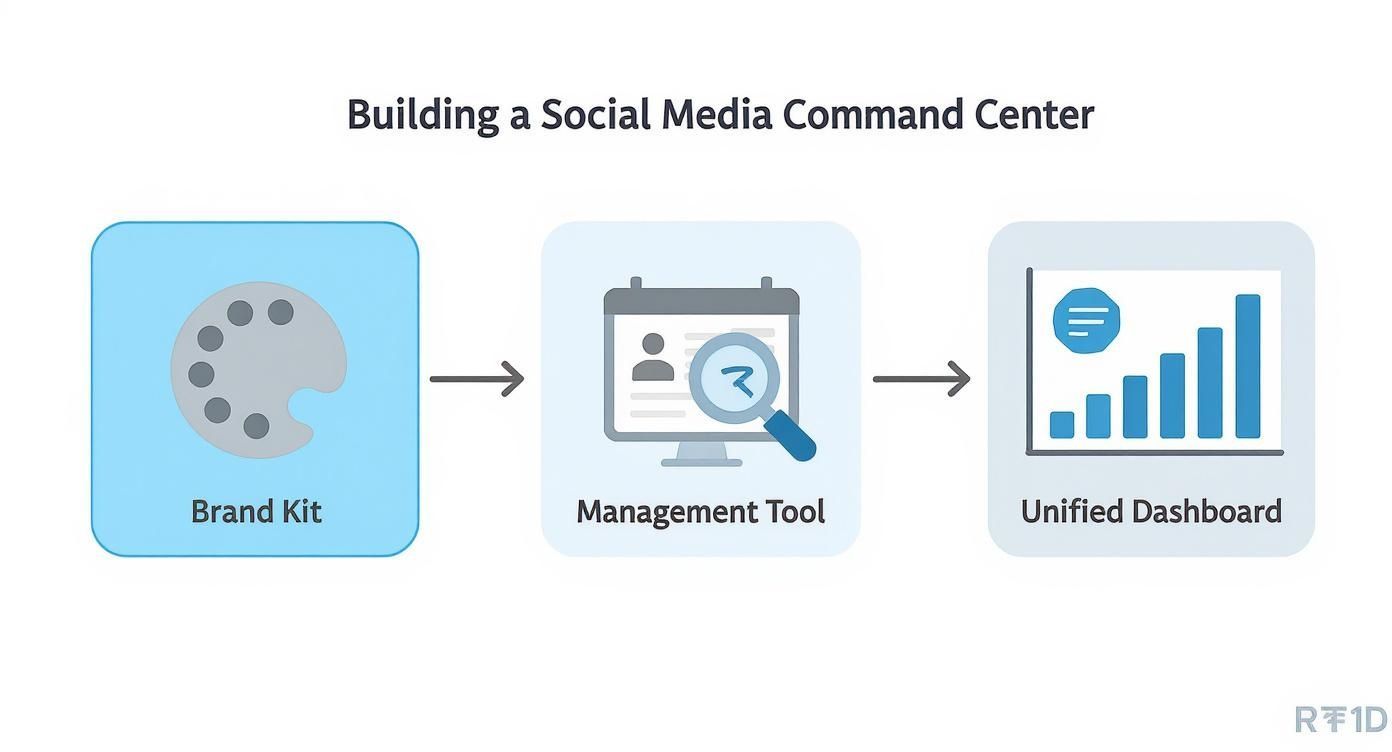
When you centralize your brand assets and use a solid management tool, you give yourself the foundation needed to make this distribution workflow actually happen without chaos.
Squeezing Every Drop of Value from Your Pillar Content
Let's make this real. Say your pillar content is a 45-minute webinar about a new product feature. The rookie move is to just post the recording link and call it a day. The pro move is to deconstruct that webinar into a month's worth of content. This isn't just about saving your sanity; it's about hammering your message home on every platform your audience uses.
Here’s how that one webinar can fuel your entire social calendar:
- Short-Form Video Clips: Your video editor can pull five to seven powerful, bite-sized moments. These 30-60 second clips are gold for Instagram Reels, TikTok, and YouTube Shorts. Each one can spotlight a killer tip, a surprising statistic, or a great customer quote from the session.
- Instagram Carousel Post: Have your designer create a sharp-looking carousel that walks through the three main takeaways. Each slide can break down a key point with a clean graphic, making it super easy for people to digest as they scroll.
- X (formerly Twitter) Thread: Break down the core concepts into a 10-part thread. You start with a strong hook, pack value into each tweet, and cap it off with a call-to-action to watch the full webinar.
- LinkedIn Article: Draft a summary article that goes deeper into the business implications discussed in the webinar. This is perfect for positioning your brand as a thought leader and reaching a professional audience.
- Pinterest Infographic: Condense the key stats and process flows into a clean, vertical infographic. This visual format is exactly what performs well on a discovery platform like Pinterest.
This repurposing model transforms one big project into a steady stream of targeted content. Your core message gets heard, and you look like you have a massive content team.
Making Repurposing a Repeatable System
Great ideas are useless without a process to execute them. To make this strategy stick, you absolutely need a repeatable workflow. Otherwise, your brilliant repurposing plan gets lost in the day-to-day scramble.
A structured content repurposing system is the cure for the daily "what on earth do I post?" headache. It shifts your focus from the grind of constant creation to the strategy of smart distribution.
Here’s a simple, repeatable workflow you can adapt for your own team:
- Pinpoint Your Pillars: At the beginning of the month (or quarter), decide which major pieces of content will be your pillars. A new blog post? A podcast episode? A customer success story? Get them on the calendar.
- Break It Down: For each pillar, hold a quick brainstorm to map out all the potential micro-content. What are the best quotes? The most shocking data points? What concepts would make a great visual?
- Assign the Work: Based on that brainstorm, create specific tasks. Your video editor gets a ticket to cut the clips. Your graphic designer gets a ticket to build the carousel and infographic. No ambiguity.
- Adapt for Each Platform: This is where the magic happens. Don't just copy and paste. Tweak each piece of micro-content for the platform it's destined for. That means adding trending audio to a Reel, using the right hashtags on X, and writing a polished, professional caption for LinkedIn. If you need some inspiration for creating platform-specific videos, the tools on ShortGenius can be a great starting point.
- Schedule Everything: Load all of these repurposed assets into your social media management tool and schedule them out. This creates that consistent, valuable stream of content that keeps pointing people back to your high-value pillar piece.
Once this becomes second nature, you'll have a content engine that runs smoothly, letting you maintain a powerful presence across all your channels without starting from zero every morning.
Master Your Content Batching and Scheduling

A clever repurposing workflow is a great start, but it's only half the battle. If you really want to get ahead of the chaos of managing multiple social media accounts, you have to ditch the daily scramble. The real secret pros use is content batching.
It sounds simple, but the results are huge. Instead of bouncing between writing, designing, and scheduling posts every single day, you carve out dedicated, uninterrupted blocks of time for one task at a time. This approach absolutely demolishes context-switching—that productivity black hole where your brain loses steam every time you jump between different kinds of work.
Think about it: what if your entire Monday morning was just for writing every social media caption for the week? Then, Monday afternoon, you switch gears to create all the visuals. By Tuesday morning, all that's left is to load everything into your scheduling tool. Suddenly, you've gone from being reactive to proactive.
Building Your Batching Schedule
The magic of batching is in grouping similar tasks together. It keeps you in the zone. Trying to write a serious caption for a professional LinkedIn account one minute, then immediately hunting for a trending TikTok audio the next? That's a surefire way to burn out.
Here’s a sample weekly rhythm you can steal and adapt. The idea is to knock out focused sprints of work, which makes the rest of your week feel surprisingly calm.
- Monday Morning (9 AM - 12 PM) — The Writing Sprint: This is pure copywriting time. Get all the captions written for every account for the entire week. No design, no distractions, just words on the page.
- Monday Afternoon (1 PM - 4 PM) — The Visual Factory: Now, put on your designer hat. Create all the graphics, pull the right video clips, and design any carousels needed to bring those captions to life.
- Tuesday Morning (9 AM - 11 AM) — The Scheduling Push: With all your content prepped and ready, this block is for plugging everything into your social media management tool. Load it, customize it for each platform, and schedule it out.
- Daily (30 Minutes) — The Engagement Block: Set aside a non-negotiable window each day just for engagement. This is when you reply to comments, answer DMs, and acknowledge mentions. It stops notifications from pulling you off track all day long.
A system like this gives your week a predictable flow, freeing up valuable mental energy for strategy, analyzing what's working, and jumping on those unexpected content opportunities.
Beyond Basic Scheduling
Once your content is batched, you can start layering in more advanced scheduling tactics. This is where you let data do the heavy lifting, helping you work smarter, not just faster. The aim is to build an automated engine that gets the right content in front of the right people at the right time.
Start by getting cozy with your analytics. Most good social media management tools, like Buffer or Sprout Social, have a "Best Time to Post" feature. This isn't based on generic advice; it analyzes when your specific audience is most active. Use your own data. Posting when your followers are actually online can give your content a massive initial boost in reach and engagement.
My rule of thumb? Aim to have 70-80% of your content scheduled in advance. This leaves a healthy 20-30% buffer in your calendar for real-time content—like jumping on a new trend, sharing user-generated content, or commenting on breaking news in your industry.
This hybrid model gives you the consistency of a planned calendar and the agility to stay relevant.
Creating an Evergreen Content Queue
Here’s another powerful tactic for managing multiple accounts: build an evergreen content queue. This is essentially a library of your best, non-time-sensitive posts that can be automatically recycled. Think of foundational tips, timeless advice, or links back to your cornerstone blog posts.
Most scheduling tools let you create separate queues. Set one up for your evergreen content and configure it to automatically publish a post whenever there's a gap in your main schedule. This is your safety net. It ensures your accounts never go dark, even during a crazy week, and it continuously drives traffic to your most valuable resources with almost zero ongoing effort.
Use AI and Automation the Smart Way
Let's be honest, trying to manage multiple social accounts without some help from AI and automation is like trying to row a boat with a single paddle. It's possible, but you'll get tired fast and probably just go in circles. The real trick isn't just using AI, but weaving it into your workflow so it feels like a natural extension of your team.
Think of AI as your super-powered intern. It’s fantastic for getting you off the starting blocks and handling the grunt work, but you're still the one calling the shots and adding the final, human polish.
For instance, when you're staring at a blank content calendar, AI can be a lifesaver. Give it your core messaging, tell it about your audience, and ask for ten different post ideas for LinkedIn, Instagram, and X. Just like that, you've got a whole menu of concepts to work with. The blank page is no longer a problem.
Where AI Really Shines for Social Media Managers
To get the most out of these tools, you have to be strategic. Point them at the tasks that drain your team's energy—the repetitive, data-driven, and ideation-heavy stuff. This clears the deck so your people can focus on what they do best: thinking strategically and actually talking to your community.
Here are a few ways I’ve seen this work brilliantly:
- Getting First Drafts on the Page: Feed an AI tool a link to your latest blog post and ask for five different caption options. You’ll get a solid starting point that you can then tweak for tone, punch up with a strong call-to-action, and make sure it sounds like you.
- Finding the Story in Your Data: Forget spending hours buried in spreadsheets. Ask a tool to chew on your analytics for you. A prompt like, "Look at the engagement on our last 30 Instagram posts and tell me which formats got the most saves," can uncover insights in moments.
- Multiplying Your Best Content: AI is an absolute beast when it comes to repurposing. Give it a single piece of pillar content, like a webinar recording, and ask it to spin it into a Twitter thread, a summary for a LinkedIn article, and a handful of key takeaways for an Instagram carousel.
Don't Forget the Human in the Loop
Here’s where things get real. While AI is a game-changer, going on full autopilot is a huge mistake. The data tells a fascinating story: 61% of social media managers say AI is their top tool for lightening the workload. But on the flip side, 62% of consumers admit they're less likely to trust or engage with content that feels like a robot wrote it. You can see more on this consumer sentiment over at ClearVoice.
That disconnect is where your strategy lives or dies. People follow brands for connection and authenticity—two things a machine just can't fake. Content that’s clearly been churned out by an algorithm feels empty and can undo years of trust-building overnight.
The most successful social media teams I've seen run a hybrid model. Let AI handle 80% of the behind-the-scenes work—drafting, scheduling, analyzing. But always keep that crucial 20% for your team: final content approvals, genuine community engagement, and big-picture strategy.
This is how you get efficiency without sacrificing the soul of your brand.
For example, you should never automate your DMs or replies to sensitive comments. Those moments are pure gold for building real relationships. A canned, AI-generated response can cause serious damage. The rule is simple: if it’s a personal interaction, a person should handle it.
Ultimately, smart automation is about creating space. It takes the tedious, time-sucking tasks off your plate so your team can pour their energy into what actually moves the needle: connecting with people and building a killer community.
Unify Your Performance Analytics
Running multiple social accounts without a single source of truth for your data is like flying blind. It's easy to feel busy, but you have no real idea if your hard work is actually paying off. It's time to stop jumping between a dozen different analytics tabs and start building a cohesive picture of your performance.
This is where a master dashboard comes in. Whether you build it inside your go-to social media tool or use a dedicated platform like Looker Studio, the goal is simple: get all your important numbers in one place. This unified view is what separates reactive tactics from smart, proactive strategy, turning your social media efforts from a guessing game into a predictable growth engine.
Moving Beyond Vanity Metrics
First things first, let's get honest about what actually matters. Follower counts are nice for the ego, but they don’t directly contribute to the bottom line. To truly understand your impact across multiple accounts, you need to zero in on key performance indicators (KPIs) tied directly to business goals.
Here are the core metrics you should be consolidating:
- Engagement Rate: This is the ultimate health check for your content. It shows the percentage of people who saw your post and were compelled to interact with it—through a like, comment, share, or save.
- Reach and Impressions: While not the end-all-be-all, these numbers tell you how many unique eyeballs are seeing your content and the total number of views it's getting. Think of it as your brand awareness pulse.
- Website Clicks: This one is non-negotiable. How many people are actually leaving the social platform to check out your website? This is a direct measure of how effectively your social presence drives traffic.
- Conversions: Now we're talking business. This tracks how many of those clicks result in a meaningful action, whether that's a sale, a newsletter sign-up, or a demo request.
Once you pull these figures into a single view, the insights become clear. You can immediately spot which platforms are driving real business results and which ones might need a strategy rethink.
The real power of a unified dashboard isn't just seeing all your numbers in one spot. It's about being able to compare performance apples-to-apples and identify the hidden patterns that tell you where to double down.
Setting Realistic Platform-Specific Goals
One of the biggest traps social media managers fall into is applying a one-size-fits-all definition of "good" performance. A 2% engagement rate might be fantastic on one network but a complete dud on another. Why? Because user behavior, audience expectations, and platform algorithms are worlds apart.
The performance landscape varies wildly from one platform to the next. For instance, recent data shows just how different engagement can be, with LinkedIn averaging around 6.50% in 2025, while Facebook sits at 5.07% and TikTok at 4.86%. These social media marketing statistics highlight that you can't compare channels directly without context.
This context is everything. You have to set specific, realistic benchmarks for each platform based on its unique ecosystem and how your audience uses it.
Platform-Specific KPI Benchmarks
Understanding what success actually looks like on each platform is crucial. You can't just aim for "high engagement" everywhere; you need to know the typical range to set achievable goals.
This table provides a solid starting point for benchmarking your performance. Think of it as a guide to help you set realistic targets and avoid the common mistake of comparing apples to oranges.
| Platform | Average Engagement Rate | Primary Goal |
|---|---|---|
| High (often 3-7%) | Professional networking, B2B lead generation, and thought leadership. | |
| Moderate (often 1-3%) | Visual brand building, community engagement, and e-commerce. | |
| Moderate (often 0.5-2%) | Community building, customer service, and driving website traffic. | |
| X (Twitter) | Low (often 0.05-0.5%) | Real-time conversation, news dissemination, and brand announcements. |
| TikTok | Very High (often 4-10%+) | Brand awareness, entertainment, and reaching younger demographics. |
As you build out your master report, make sure to segment your data by platform. This allows you to see the full story. For example, you might discover that while your TikTok videos get sky-high engagement, your LinkedIn articles are driving far more qualified website clicks. Both outcomes are valuable, but they serve different strategic purposes. This is the kind of data-driven insight that separates the pros from the amateurs in managing multiple social media accounts.
Answering Your Top Questions
Even with the best system in place, managing a bunch of social media accounts always throws a few curveballs. Let's tackle some of the most common questions that pop up in the day-to-day grind, with real-world answers to keep you on track.
How Many Social Media Platforms Is Too Many?
There's no magic number here. Honestly, the answer is simple: you're on too many platforms the moment you can no longer create high-quality, tailored content for each one. Spreading yourself too thin is a recipe for mediocrity.
It's far better to truly own your space on two or three key channels where your audience actually lives and breathes than to maintain a ghost town presence on five or six. If your team feels stretched and engagement is tanking, that’s your cue to do a platform audit. Look at your analytics and see which channels are dead weight. It’s perfectly fine—and smart—to put a platform on the back burner if it’s not giving you a return on your effort.
What Are the Best Free Tools for Beginners?
You don't need a massive budget to get started. Plenty of fantastic free and "freemium" tools can get you off the ground when you're just figuring out the ropes.
- For Scheduling: The free plan from Buffer is a great starting point. You can connect up to three social channels and line up 10 posts in advance for each one. It's a perfect way to dip your toes into content batching.
- For Design: Canva is the undisputed champ for anyone who isn't a graphic designer. The free version is incredibly powerful, giving you access to thousands of templates for posts, stories, and just about anything else you can think of.
- For Analytics: Don't overlook the native tools! Platforms like Meta Business Suite and X Analytics (formerly Twitter Analytics) offer surprisingly deep insights for free. Get comfortable with these first to really understand what's working before you even think about paying for a third-party tool.
These three cover your core needs—creation, scheduling, and analysis—giving you a solid foundation without spending a dime.
How Should I Handle Negative Comments Across Accounts?
Dealing with negative feedback quickly and professionally is non-negotiable for protecting your brand's reputation. This is where a unified inbox from a management tool becomes your absolute best friend, ensuring nothing slips through the cracks. The trick is to have a clear protocol before you need it.
The single worst thing you can do with a negative comment is ignore it. Responding thoughtfully shows the unhappy customer you're listening, but more importantly, it shows your entire audience that you take feedback seriously.
Your first step is to figure out if you're dealing with legitimate criticism or just a troll. Ignore the trolls; they feed on attention. For genuine complaints, follow a simple script:
- Acknowledge their frustration publicly. A simple, "I'm so sorry to hear you had this experience," goes a long way.
- Apologize.
- Take it private. Immediately offer to resolve their specific issue in DMs or over email.
This approach validates the customer's feelings in public while moving the messy details out of the main feed. For a deeper look at juggling these kinds of tasks, check out these strategies to Manage Multiple Social Media Accounts Without Burnout.
Ready to turn your ideas into a steady stream of high-quality videos for all your channels? ShortGenius unifies your entire content workflow, from AI scriptwriting and video creation to scheduling and multi-platform publishing. Start creating faster and more consistently today.