How to Make UGC That Converts in 2026

Learn how to make UGC that converts. This guide covers planning, scripting, shooting, & distributing high-performing videos for brands in 2026.
You’re probably in one of two spots right now.
Either you’re a creator trying to land UGC work and your videos still look like “content” instead of usable ad assets. Or you’re on the brand side, paying for videos that looked promising in the brief and weak in the final export.
Both problems usually come from the same gap. People learn how to shoot a trendy clip, but not how to build a repeatable UGC workflow. Good UGC is not random authenticity. It is structured, consent-safe, platform-aware content that still feels native when it reaches the feed.
The strongest teams treat UGC like a production system. They brief tightly, script multiple hooks, shoot simple, edit for response, secure rights, then review performance hard enough to improve the next round. AI tools can speed up almost every part of that process, but they only help when creative logic is sound first.
Why User-Generated Content Dominates Social Feeds
You open TikTok to check one thing and immediately scroll past a polished brand spot. Then you stop on a shaky clip of someone testing the product at their bathroom sink and explaining what happened on day three. That pattern is the reason so many brands shifted budget into UGC, and why so many creators started treating it like a service instead of casual content.
Analysts at Grand View Research project strong growth in the user-generated content platform category over the next several years, which tracks with what media buyers already see in-platform. Brands keep funding UGC because it gives them more testable creative angles, and viewers keep responding because the format feels closer to a recommendation than a campaign asset (Grand View Research on the user-generated content platform market).
Trust beats polish
High-performing UGC usually wins on credibility cues, not production value.
Viewers look for proof that the person on screen has handled the product, understands the use case, and is speaking in a way that matches the platform. Once those cues are missing, the content starts to read like an ad trying to impersonate a customer.
The cues are usually simple:
- Real environments: A desk, car console, kitchen counter, or bathroom shelf gives the product context fast.
- Natural language: Slightly uneven phrasing often feels more believable than heavily written copy.
- Demonstration over claim: Texture, setup, application, and before-and-after context do more work than generic praise.
- Personal framing: Specific use cases such as “I bought this for travel” or “I use this before workouts” create a believable reason to care.
A lot of strong UGC ads look ordinary on purpose. They feel usable, specific, and native to the feed.
Social platforms reward familiar formats
People do not evaluate every post from scratch. They make a snap judgment based on whether the clip feels like something that belongs in the feed. Native framing helps a video earn those first few seconds of attention.
A polished ad can still perform. For UGC, the job is usually to lower skepticism quickly and make the viewer feel like they are hearing from a person, not a campaign.
I see this mistake often on both sides. Brands over-direct the creator until the script loses any trace of natural speech. Creators over-style the video until it looks like portfolio content instead of conversion content. The result is clean, expensive, and weak.
The fastest way to make weak UGC is to copy ad aesthetics and label it authentic. Viewers catch the mismatch quickly.
Why brands and creators should care
For brands, UGC solves a practical problem. Paid social needs creative volume, fresh angles, and believable product proof. UGC can supply all three, especially when teams pair creator footage with faster scripting, variation testing, and edit iteration through tools such as ShortGenius.
For creators, learning how to make ugc means building a commercial workflow, not just filming well. Clients are buying hooks, message control, rights-ready assets, clean raw footage, and clips they can test across placements without legal or performance surprises.
The creators who get repeat work are rarely the most cinematic. They deliver usable footage, clear talking points, consent-safe assets, and enough variation for the brand to learn what converts.
The UGC Blueprint Planning and Briefing for Success
Most failed UGC does not fail on camera. It fails before the creator films a single clip.
A vague brief produces vague content. The creator fills in the gaps with guesses. The brand reviews the draft and says it “doesn’t feel right.” Then both sides waste time revising material that never had a clear target.
A better process exists. A structured 3-step creator onboarding methodology starts with a controlled test video, scales with proven concepts, and then expands into creative freedom. Brands using this approach report 50% higher creator retention, and it addresses the 70% of UGC that fails in pre-production due to vague briefs (Influencer Marketing Hub on UGC brief mistakes and creator onboarding).
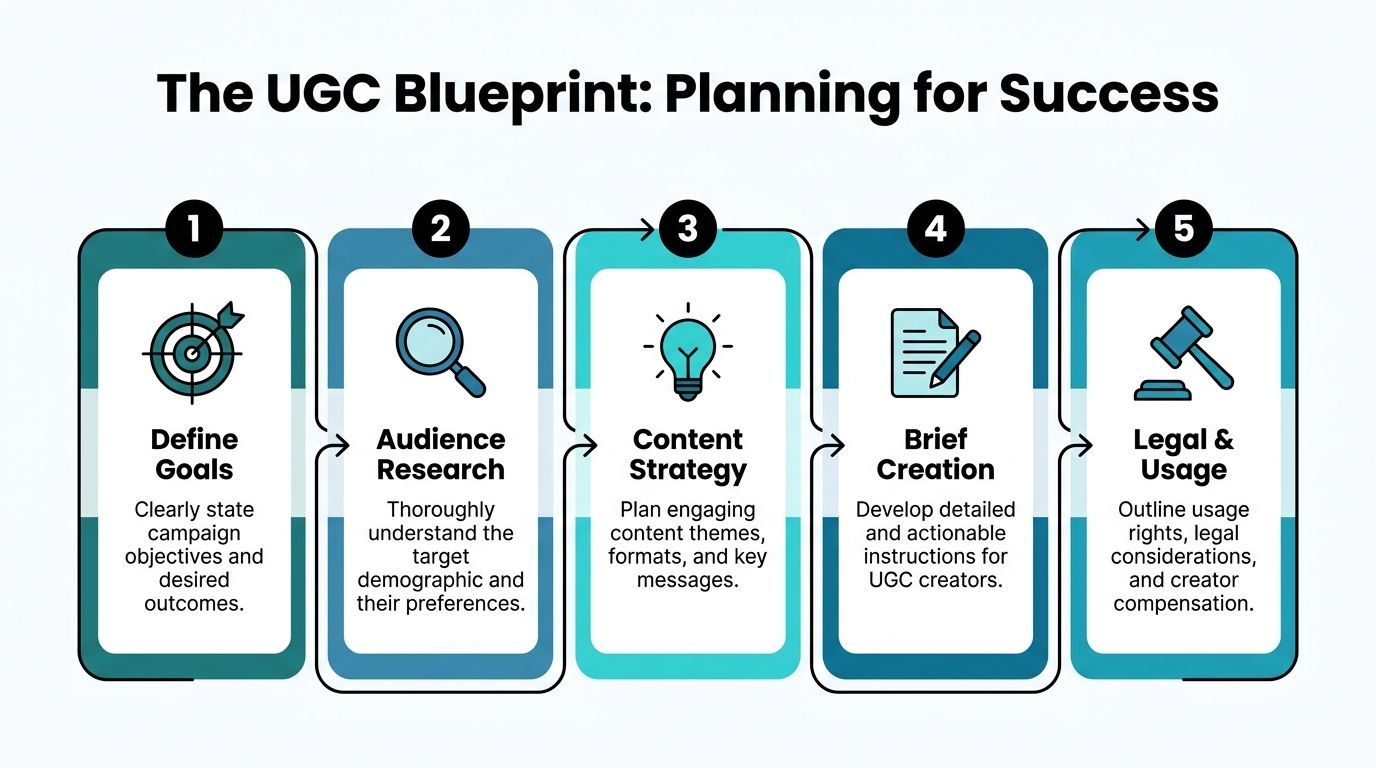
The three-stage briefing model
I use a progressive structure because it protects both sides.
Stage one uses control on purpose
Start with one concept. Not five.
Give the creator one brief and ask for three distinct hooks built around the same message. That tells you whether the creator can follow direction, understand product value, and deliver platform-native energy without drifting off message.
A good first-round brief should specify:
- Campaign objective: Awareness, product page clicks, signups, purchases, app installs, or creator whitelisting use
- Audience profile: Who the product is for, what problem they have, what language they use
- Offer context: Product, bundle, promo window, claim boundaries, proof points
- Deliverable format: Platform, aspect ratio, clip length, raw or edited, caption requirements
- Mandatory talking points: What must be included
- Hard no list: Claims, words, visuals, competitor mentions, compliance issues
If a creator pushes back and asks smart follow-up questions, that is a positive sign.
What a strong UGC brief includes
Here’s the version I want on every job, whether I’m hiring or creating:
| Brief item | What to include |
|---|---|
| Goal | The business action you want after the view |
| Audience | Age band, mindset, pain point, objections, preferred platform style |
| Product angle | One core promise, one proof point, one emotional angle |
| Hook directions | Three hook types to test |
| Scenes needed | Talking head, demo, unboxing, close-up, results, lifestyle cutaways |
| CTA | Exact next step, soft or direct |
| Usage rights | Organic only, paid usage, duration, editing permissions, platform scope |
| Consent notes | Any faces, locations, customer content, minors, employees, or testimonials requiring permission |
Stage two scales only what already works
Once a creator proves they can execute, give them brand-tested concepts. This is not the moment for total freedom.
Use scripts or message structures that already reflect what the brand wants. Let the creator make small phrasing changes so the content sounds human, but keep the strategic spine intact.
This is also where legal clarity matters. If the brand plans to run the video as an ad, edit it, add voiceover, or repurpose it across channels, that needs to be in writing before production starts.
If usage rights are fuzzy, the content is not finished. It is temporarily usable.
Stage three opens up creative range
Only after message fit is proven should the creator get wider latitude.
At that point, invite bigger swings:
- New hook angles
- Alternative visual openings
- Different settings
- More opinionated storytelling
- Unexpected objections or comparisons
- Faceless or voiceover-first executions
That order matters. Creative freedom works better after alignment, not before it.
The legal step most beginner guides skip
Basic tutorials often treat consent as a footnote. In practice, it belongs in the brief.
If a creator films with another person, uses a customer message, captures a workplace, shows identifiable bystanders, or records in a private location, get permission sorted early. A simple release should cover:
- who created the content
- who owns the final asset
- where it can be used
- whether paid ads are allowed
- whether edits, crops, subtitles, or voice swaps are allowed
- how credit will work, if relevant
- whether the creator can reuse it in a portfolio
That is how you avoid the most expensive kind of creative problem. A useful video you cannot legally use.
Scripting Hooks and Shots That Stop the Scroll
Strong UGC starts before filming. If the first line is weak, the footage rarely saves it.
Most creators make one script and hope the product or personality carries the rest. The better approach is to build multiple openings around the same core message, then choose based on platform fit and audience awareness.
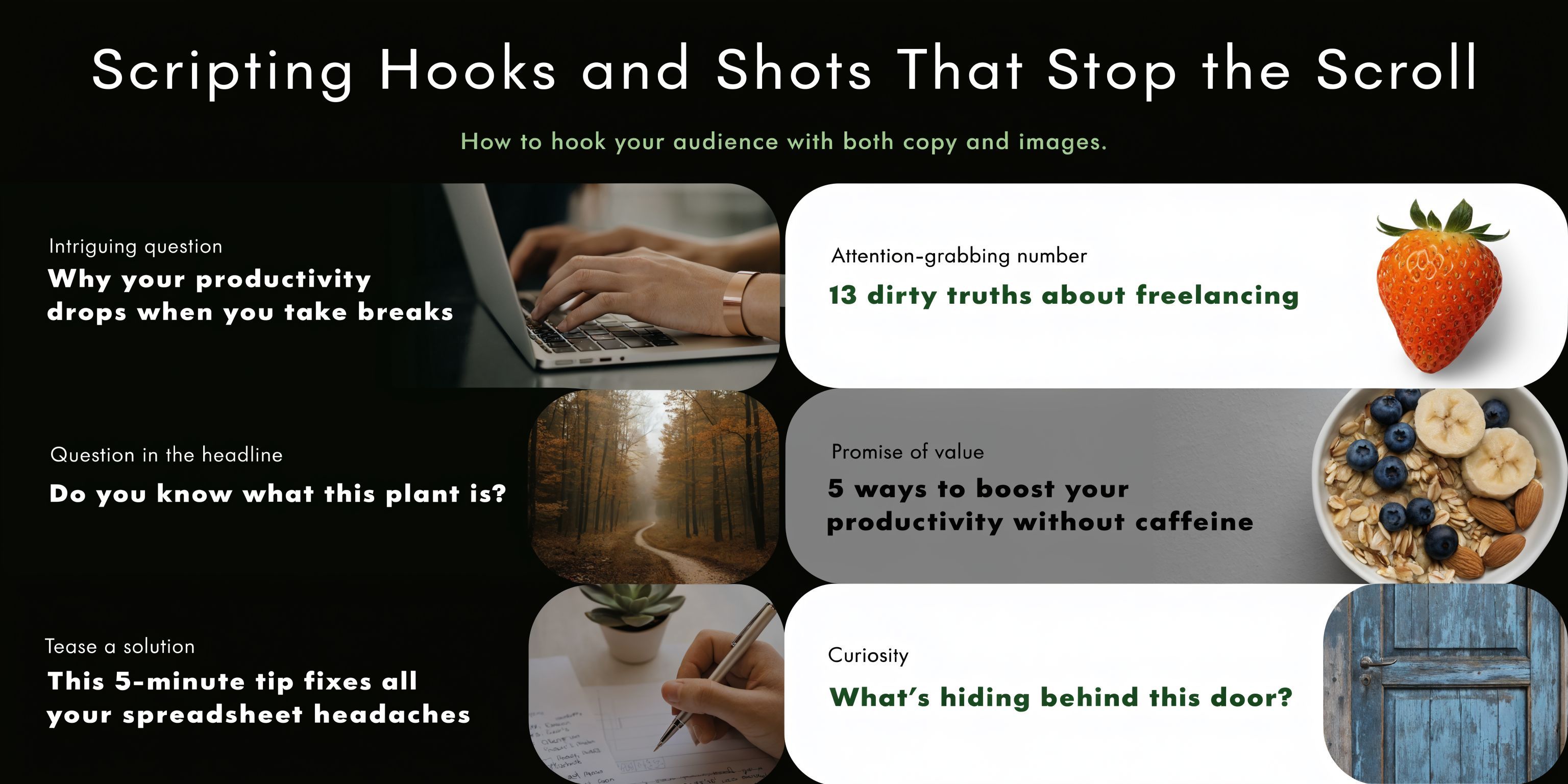
A data-driven hook testing framework is one of the clearest patterns in UGC performance. Top creators script three hook variations for each video, aim for over 70% retention at the 3-second mark, and videos with A/B tested hooks can see a 2-4x improvement in ROAS compared to unoptimized content (YouTube discussion of hook testing for UGC creators).
Write three hooks before one script
I usually start with the hook, not the body copy. The body is easier once the entry point is clear.
The simplest system is to write three hook families:
-
Problem hook Call out the frustration or failed attempt.
-
Curiosity hook Open a loop the viewer wants resolved.
-
Direct benefit hook Say what the product helps with, fast.
That gives you contrast. If all three openings sound similar, you are not really testing.
Here are practical examples.
Problem hook: “If your skin still feels dry after moisturizing, this is probably why.”
Curiosity hook: “I did not expect this tiny change to fix my morning routine.”
Direct benefit hook: “This made getting ready faster without making my routine feel rushed.”
Each one can lead into the same product. The emotional doorway changes.
Build scripts in beats, not paragraphs
UGC scripts should read like spoken thought. Long copy blocks create stiff delivery.
Use five beats:
- Hook
- Context
- Product introduction
- Proof or demo
- CTA
A simple template looks like this:
“I kept running into [problem]. I tried [common alternative], but it still felt off. Then I used [product] for [specific use case]. What I liked most was [clear benefit]. If you want [result], this is worth trying.”
That structure works because it sounds like a person explaining a decision, not reading a sales deck.
Match the shot list to the script
A lot of beginners either overshoot randomly or under-shoot and end up with one talking clip they cannot cut around.
Make a shot list that supports each script beat.
For a product-focused UGC video, I want some version of these:
| Script beat | Shot type |
|---|---|
| Hook | Face to camera, immediate motion, product already in hand |
| Problem | Demonstration of the issue, clutter, before state, failed routine |
| Product intro | Unboxing, pickup, packaging detail, app screen, product close-up |
| Proof | Use in action, texture, sound, setup, side-by-side, result |
| CTA | Hold product, point to text, screen recording, final outcome shot |
The biggest mistake here is decorative B-roll. If the shot does not support meaning, cut it.
Format should follow platform behavior
A Reel and a Story are not interchangeable because both are vertical. The pacing, expectation, and use case differ. If you need a quick primer on understanding the difference between Reels and Stories, that breakdown helps clarify why some scripts feel perfect in one format and awkward in the other.
For example:
- Reels usually need a stronger public-facing hook.
- Stories can be more conversational and sequential.
- Shorts often reward a tighter payoff and less setup.
The same product angle can survive across platforms, but the opening line and scene order often should not.
Use AI to widen options, not replace judgment
This is one area where AI helps if you use it like a sparring partner.
Prompting a tool for ten hook variants can save time. Generating alternate CTAs, objection responses, or voiceover drafts can also speed up pre-production. But the script still needs a human pass so it sounds native to the creator, the audience, and the product category.
Later in the workflow, video references can also sharpen your instincts. This breakdown is useful for seeing how fast hook pacing and visual reinforcement affect attention:
The script should leave room for delivery. If every line is over-written, the creator sounds trapped by the copy.
Effortless Production Shooting Authentic UGC
Most UGC shoots are small. That is part of the advantage.
A creator can film an effective asset in an apartment, office, parked car, kitchen, or bathroom with a phone, decent light, and a plan. What matters is not cinematic polish. It is believable delivery and usable coverage.
A typical shoot that works
A normal product UGC shoot often starts with the least glamorous step. Put every required shot in one place and film the boring coverage first.
That usually means:
- packaging close-ups
- product in hand
- application or use shots
- reaction takes
- CTA ending versions
After that, record the talking segments.
This order helps because the creator warms up on easier footage. By the time they film the main lines, they already know how the product sits in frame, what gestures look natural, and which side of the room looks best.
Light, sound, and framing matter more than gear
I would rather see a phone clip with clean window light than a camera clip with muddy shadows.
Use a simple setup:
- Lighting: Face a window. Turn off mixed overhead lights if they create color issues. If sunlight shifts too fast, move slightly back from the window instead of chasing the brightest spot.
- Audio: Record in the quietest soft-furnished room available. Curtains, rugs, bedding, and couches help more than people think.
- Framing: Keep the phone vertical for short-form use unless the client asked for multi-format crops. Leave a little headroom, but not so much that the subject feels distant.
You do not need to perform authenticity. You need to remove distractions.
Realism trade-offs
A lot of creators overcorrect. They hear “raw” and deliver footage that is messy, dim, or hard to hear.
That is not authentic. That is hard to use.
The sweet spot is clean but casual. Hair can be imperfect. A kitchen counter can look lived-in. The delivery can feel spontaneous. But the viewer still needs to understand the face, product, and key action immediately.
Keep alternate takes intentionally different
Do not film three takes that are the same.
Change one variable each time:
- pace
- facial intensity
- first sentence rhythm
- prop handling
- angle
- distance from camera
That gives the edit real options.
If you want to speed up concept-to-shoot work, especially when a client needs multiple ad directions, tools such as the ShortGenius AI ad generator can help draft concepts and visual directions before you film. That is useful when the bottleneck is not recording itself, but deciding what version to shoot first.
If a line feels unnatural on the third take, rewrite it. Better copy beats forced performance every time.
Editing That Converts From Raw Clips to Polished Story
The edit is where UGC stops being “someone talking” and starts becoming a conversion asset.
A mediocre recording can improve in the timeline. A weak edit usually kills even good footage. That is why experienced creators spend less time chasing perfect takes and more time shaping momentum after the shoot.
Strategically produced UGC can drive a 73% higher website conversion rate and lift conversions on product pages by up to 200%, with much of that improvement tied to editing choices like pacing, captions, and clearer calls to action (Podium on UGC stats and conversion impact).
Start by cutting for speed, not beauty
The first edit pass should remove drag.
I look for:
- slow starts
- throat-clearing phrases
- repeated points
- dead air between lines
- B-roll that says nothing new
A lot of first cuts improve by trimming the first half-second of every clip. Social viewers feel pace before they consciously register it.
Captions carry more weight than most creators think
Captions are not decoration. They are structural.
Use them to:
- reinforce the hook
- highlight the problem statement
- isolate the key benefit
- support the CTA
Short lines read better than sentence blocks. Keep text high enough to avoid interface overlap. If the brand has font and color rules, apply them lightly. Over-branding can make the video feel like an ad too early.
Sequence proof before polish
The strongest edit order is usually:
- Hook
- Immediate context
- Product in frame
- Demonstration
- One clear reason to believe
- CTA
That order beats a more cinematic reveal in most performance settings because it reduces uncertainty. The viewer knows what they are watching and why they should keep going.
What to add and what to leave out
Use effects sparingly.
Helpful additions:
- punch-in zooms on emphasis
- light sound effects on transitions
- text callouts for benefits
- quick inserts for proof shots
- subtle music under speech
Usually harmful:
- long intro titles
- trendy transitions with no function
- too many fonts
- heavy color grading
- stock footage that breaks realism
The best UGC edit often feels invisible. The viewer notices the message, not the timeline tricks.
AI is most useful in the tedious parts
Editing is where integrated tools save the most time because the repetitive tasks pile up fast.
Auto-captioning, resizing for multiple platforms, basic scene assembly, voiceover swaps, and thumbnail cleanup can compress a long post-production cycle. If you need to quickly clean or adapt supporting visuals, an image workflow like this editing model page is one example of how teams streamline asset prep without bouncing between multiple apps.
What matters is not whether AI touched the file. What matters is whether the final video still sounds like a person and moves like native social content.
Distribution Legal Rights and Performance Tracking
A UGC asset is not finished when the export lands in a folder. Its true test starts after delivery. Can the brand publish it across the right channels, use it without rights disputes, and learn enough from the results to brief the next round better?
That handoff breaks more campaigns than weak editing does.
I have seen solid creator content lose value because the team posted one cut everywhere, forgot to secure paid usage, or reviewed reach without checking whether viewers clicked, purchased, or submitted anything. Brands and creators both need the same operating system here. Clear publishing rules, clear permissions, and a review loop that turns results into better briefs.
Distribution needs platform-specific intent
Posting the same video file to TikTok, Reels, Shorts, and LinkedIn rarely holds up. Each platform rewards different behavior. TikTok can carry a rougher opening if the first line creates curiosity fast. Instagram usually needs cleaner on-screen text and a frame that reads well without sound. YouTube Shorts often gives slightly more room for payoff, but weak first seconds still get punished.
Distribution also changes once a video moves from organic creator content into paid media. A creator may post a native-feeling version on their own account, while the brand runs a tighter cut with a clearer claim, a different CTA, and alternate captions for ads. That only works if the files, rights, and versions are organized from the start.
Teams that produce at volume usually need a shared workflow, not a loose folder structure. AI UGC ad workflows in ShortGenius help with versioning, repurposing, and scheduling, which matters when one winning concept needs five hooks, three aspect ratios, and separate creator and brand-side deliverables.
If your distribution plan includes creator clips repurposed for company pages, hiring content, or founder-led posts, timing still affects outcomes. This guide on best times to post on LinkedIn is a useful reference for that channel.
Rights should be settled before launch
UGC gets expensive fast when the paperwork is vague.
A simple agreement is enough if it answers the questions that affect publishing and editing later:
| Rights question | Why it matters |
|---|---|
| Who owns the raw footage | Decides whether the brand can recut, localize, or reuse clips later |
| Where the video can appear | Organic social, website, email, paid ads, retail pages, marketplaces |
| How long rights last | Avoids expired assets sitting inside active campaigns |
| Whether paid usage is included | Organic reposting is different from ad usage |
| Whether the brand can modify the asset | Covers captions, crops, cutdowns, voiceovers, translations, and hook swaps |
| Whether the creator can reuse it | Portfolio use and competitor restrictions matter on both sides |
Consent goes beyond the creator agreement. If the video includes customer reviews, DMs, bystanders, private locations, employees, or minors, get permission that matches the actual use case. A tagged post is not a license. A customer testimonial sent by email is not blanket approval for paid social.
My default rule is simple. If legal use depends on assumptions, the asset is not ready to publish.
Track metrics that change decisions
Performance tracking should answer one question. Should this concept, creator, or edit style be repeated?
Vanity metrics can still be useful as directional signals, but they are not enough on their own. A video with high views and weak click-through may be a decent top-of-funnel asset. A lower-reach ad with strong conversion rate may deserve more budget. The job of the content decides the metric stack.
Use a scorecard tied to the asset purpose:
- Hook retention: Did viewers stay through the first seconds?
- Hold rate after product reveal: Did interest continue once the offer became clear?
- CTR: Did the video generate action?
- Landing page behavior: Did traffic bounce or keep reading?
- Conversion rate: Did viewers complete the intended action?
- Submission rate: Useful for UGC collection campaigns, lead gen, or creator applications
- Edit-level drop-offs: Where did attention fall apart?
That review needs to happen at the version level, not just the campaign level. If hook A beats hook B, keep the body and replace the opener. If one creator drives strong thumb-stop rates but weak conversions, the issue may be message clarity rather than delivery. If testimonials outperform aesthetic montage cuts, shift the next brief toward proof and specificity.
Use performance reviews to improve briefs
Good reporting changes production. Bad reporting fills slides.
The strongest teams close the loop quickly. They log what won, why it likely won, what needs a retest, and what should be removed from future briefs. Creators benefit from that clarity too. Specific feedback such as "your direct problem-solution opening held attention better than your lifestyle opener" is usable. "Make it more engaging" is not.
A simple post-campaign review can stay practical:
- Keep: elements that clearly improved retention, clicks, or conversions
- Cut: recurring choices that hurt performance
- Change: parts that underperformed but still look fixable
- Retest: variables that need another round before a decision
That process turns UGC from one-off content into a repeatable growth channel.
Final Takeaways and Common UGC Mistakes to Avoid
A brand gets three usable videos back from a ten-video UGC batch. One creator went off-brief. Two clips sound scripted. Four cannot be used in ads because usage rights were never spelled out. The edit team spends more time rescuing footage than launching tests.
That is the failure pattern behind a lot of weak UGC. The problem rarely starts in the timeline. It starts upstream, in briefing, scripting, approvals, and consent.
Trust is easy to lose here. If content feels staged, borrowed, or vague, viewers pull back fast. As noted earlier, authenticity shapes both performance and brand credibility, so the standard is simple. Make the content feel native to the platform, and make the production process tight enough that the asset can be used.
What to keep doing
- Build briefs that remove ambiguity: State the audience, problem, message, mandatory claims, prohibited claims, shot list, deliverable specs, and usage rights before filming starts.
- Script for spoken delivery: Read every line out loud. If it sounds like homepage copy, rewrite it.
- Ask for coverage, not just the hero take: Product-in-hand clips, setup footage, objection handling, before-and-after context, and clean b-roll give editors options.
- Cut to clarity fast: The viewer should understand the point early, not after a long lifestyle intro.
- Handle consent and rights at the start: This includes likeness consent, platform usage, paid usage, whitelisting terms if relevant, and asset storage rules.
- Review performance by asset: One strong creator can still produce a weak angle. One average creator can win with the right hook.
What usually hurts performance
The same mistakes keep showing up because they look harmless during production.
- Over-directing the creator: Tight control often strips out the natural phrasing that makes UGC believable.
- Writing claims without proof: A benefit lands harder when the viewer can see the use case, result, or comparison.
- Delaying the product reveal: Mystery rarely beats clarity in short-form social.
- Trying to say everything in one clip: One pain point, one promise, one action usually performs better.
- Ignoring legal review for UGC-style ads: A usable organic post and a paid ad do not always have the same risk profile.
- Treating raw files casually: If footage, approvals, and rights records are scattered across email and chat threads, reuse becomes slow and risky.
One practical fix is to run UGC like a shared workflow between brand and creator, not a handoff. The brand sets the brief, claims, approvals, and legal boundaries. The creator shapes delivery, phrasing, and realism. AI tools can shorten the slow parts. ShortGenius (AI Video / AI Ad Generator) can help teams move from script drafts to voiceovers, edits, and publishing in one system, which is useful when multiple versions need to be produced and tracked without losing the original brief.
The standard that holds up
The cleanest rule for how to make ugc is simple. Build for authenticity, but operate with production discipline.
That usually means:
- a clear brief
- two to five hooks per concept
- native-looking footage with proof
- edits built around one message
- written consent and usage terms
- version tracking tied to results
Creators who work this way are easier to book again because brands can trust the process, not just the final clip. Brands that work this way get more usable assets, faster iterations, and fewer legal surprises.
Strong UGC looks casual on screen. The workflow behind it should not.