How to Get More Views on YouTube Shorts A Practical Guide

Discover how to get more views on YouTube Shorts with proven strategies. This guide covers hooks, retention, optimization, and AI tools to grow your channel.
Getting more views on YouTube Shorts isn't about chasing viral luck—it's about building a repeatable strategy that works. The entire game is won or lost in the first couple of seconds. If you can grab someone's attention instantly and hold it, you send a powerful signal to the YouTube algorithm that your content is worth pushing to a bigger audience.
This playbook is designed to show you exactly how to do that, step by step.
Unlocking Growth on YouTube Shorts
The YouTube Shorts feed is an incredibly crowded and competitive space. With literally millions of other creators fighting for the same eyeballs, you have to be strategic. Success comes from really understanding what makes both the algorithm and the viewer tick.
Shorts are a different beast than traditional long-form videos. They live and die by their immediate impact. You have no time for a slow build-up or a meandering intro; every single second has to count. Your one and only job is to craft a tight, engaging story that makes people want to watch it again, share it, and hit that like button.
The algorithm is pretty smart, and it's looking for specific signals to decide which Shorts to promote:
- Viewer Retention: A huge one. What percentage of your video are people actually watching? If most people stick around until the end, that's a massive win.
- Engagement Rate: This is all about the likes, comments, and shares. These tell YouTube your content is connecting with real people.
- Loop Count: This might be the most powerful signal of all. When someone watches your Short over and over, it tells the algorithm this is a top-tier video.
The Opportunity Is Massive
The growth of YouTube Shorts has been absolutely staggering. Back in 2021, Shorts were getting around 30 billion daily views. Fast forward to 2026, and that number has exploded to over 200 billion views per day. With YouTube itself having 2.3 billion monthly active users, the potential audience you can reach is almost limitless.
The bottom line is this: if you can master the art of the hook and deliver on your promise quickly, the algorithm will do the heavy lifting for you. It becomes a positive feedback loop—your quality content gets shown to more people, which generates more positive signals, which gets you in front of even more people.
Your Quick Start Guide
Before we dive into the advanced stuff, let's get the fundamentals right. True, sustainable growth always starts with a solid foundation. The table below breaks down the essential pillars of a winning Shorts strategy. For an even deeper dive, this How to Get More Views on YouTube Shorts: A Practical Guide is an excellent resource.
Here’s a quick-glance guide to get you started on the right foot.
YouTube Shorts Growth Quick Start Guide
| Pillar | Actionable Tip | Why It Works |
|---|---|---|
| Hook & Retention | Hit them with a bold claim or a curiosity-sparking question in the first 2 seconds. | It immediately stops the scroll and gives the viewer a compelling reason to stick around. |
| Content Pacing | Use fast cuts, on-screen text, and different camera angles to keep the energy high. | This prevents boredom from setting in and makes the video feel dynamic and engaging. |
| Value Proposition | Make sure every Short delivers something clear—entertainment, a new skill, or a bit of inspiration. | It gives people a solid reason to follow you and actively look for your future content. |
Think of this as your starting point for building a system that produces consistent results. Once you nail these principles, you can stop hoping for a video to go viral and start engineering it. This is where tools like ShortGenius come in, helping you scale this entire process and turn your ideas into high-performing content much more efficiently.
Crafting Hooks That Stop the Scroll
In the never-ending stream of the YouTube Shorts feed, you don't have minutes to grab someone's attention—you have milliseconds. Seriously. The first two seconds of your video are everything. This tiny window is your one shot to either stop the scroll or get swiped into oblivion.
A killer hook is way more than just a catchy first line. It’s a psychological gut-punch that breaks someone's mindless scrolling pattern. It needs to make them pause, creating an instant question, promising a juicy payoff, or just showing them something they absolutely did not expect to see. If you want to know how to get more views on YouTube Shorts, mastering this one skill is non-negotiable.
The Psychology of a Great Hook
So what makes a hook work? The best ones tap into simple human psychology. They create a tiny bit of tension or curiosity that the viewer's brain feels an urgent need to resolve. It's like opening a story loop that they just have to see closed.
The top creators rarely stick to one method. They mix and match these techniques to keep things fresh.
- The Curiosity Gap: This is the classic "You won't believe what happened" trick. You set up a situation but deliberately hold back the outcome, making the viewer stick around for the big reveal. It’s all about promising a surprising piece of information.
- The Provocative Question: Asking a direct question is a shortcut to engaging someone's brain. Something like, "Are you still making this huge mistake?" or "What if everything you believe about X is wrong?" makes your content feel personal and immediately relevant.
- The Pattern Interrupt: Our brains are hardwired to notice anything that breaks a pattern. Kicking off your Short with a bizarre sound, a jarring visual edit, or a completely absurd statement is incredibly effective simply because it’s different.
A great hook makes a specific promise. It tells the viewer, "Give me 30 seconds, and I'll give you this exact piece of value in return." When you actually deliver on that promise, you earn their trust and, more importantly, their watch time.
Practical Hook Examples That Actually Work
Okay, let's get out of theory land. Generic hooks get you nowhere. You need to be specific, bold, and hyper-relevant to the person you're trying to reach. The goal is to make them think, "Whoa, this is for me."
Here are a few frameworks you can swipe and adapt:
- The "You're Doing It Wrong" Hook: This one instantly positions you as the expert with a better way. A fitness creator could say, "You're doing push-ups all wrong, and it's killing your gains." A cooking channel might use, "If you’re still boiling pasta this way, you need to stop."
- The "Secret" or "Hack" Hook: Everyone loves feeling like they're getting an insider tip. Kicking off with "Here's a productivity hack I wish I knew sooner" or "The one iPhone setting you have to change right now" promises exclusive, high-value info that feels like a cheat code.
- The "Story Time" Hook: We're all suckers for a good story. Starting with a relatable, personal conflict works wonders. Think, "The moment I realized my dream job was a total nightmare," or "How I accidentally made $10,000 from a tiny side project."
Maintaining Momentum Beyond the First Two Seconds
A brilliant hook gets them to stop, but keeping them watching is a whole different ball game. Once you've earned that initial pause, you have to keep the energy up to maximize retention and get people to re-watch—two of the most powerful signals you can send to the YouTube algorithm.
Here's how you hold their attention:
- Rapid-Fire Cuts: Keep your edits snappy. Don't let a single shot linger for more than a few seconds unless it’s for a very specific, dramatic purpose. This creates a feeling of momentum and stops the viewer's mind from wandering.
- Dynamic B-Roll: Constantly add relevant B-roll (supplemental clips) to show what you're talking about. If you're talking about a tool, show it in action. Telling a story? Show clips that bring it to life.
- Animated On-Screen Text: Use text to punch up key points, ask questions, or add another layer of commentary. Animated text that pops, slides, or flashes adds a ton of visual interest and helps land your message, especially for people watching with the sound off.
When it comes down to it, every single element of your Short should be engineered to hold attention. By combining a powerful psychological hook with fast-paced, dynamic editing, you create a viewing experience that feels satisfying and worth watching again. That’s how you turn a single view into a loop, a like, and eventually, a new subscriber.
Optimizing Your Shorts for Maximum Discovery
Making a killer Short is one thing, but getting it seen is a whole different ball game. If you don't optimize your video, it’s like hiding a masterpiece in a locked room. The YouTube algorithm needs a clear roadmap to find the right audience for your content, and it's your job to provide it.
Every little detail—your title, the description, even the sound you pick—is a signal to the algorithm. Nailing these elements is how you stop gambling on views and start engineering a system for consistent discovery.
Writing Titles That Grab Attention
Your title is prime real estate. It's one of the first things a viewer sees, and you've got to make every character count. YouTube gives you 100 characters, but on a phone screen, much less is actually visible at a glance. You have to be quick, compelling, and crystal clear.
The trick is to ignite curiosity while weaving in keywords that help YouTube figure out what your Short is about. Don't just state the facts; create an emotional reason to click.
-
Instead of: "My Morning Routine"
-
Try: "This 5 AM Routine Changed My Life"
-
Instead of: "Making a Smoothie"
-
Try: "The 1 Smoothie That Cures My Afternoon Slump"
See the difference? This simple tweak transforms your content from a basic activity into a compelling story or a valuable solution. It makes a promise to the viewer.
The Art of the Description and Hashtags
Let's be real: most viewers aren't going to read your full description. But the algorithm does, and it pays close attention. This is your spot to add more context and double down on your keywords. Make that first sentence count, as it's often the only part people see.
After a quick sentence that builds on your title, it's time for hashtags.
My best advice here is to avoid the temptation to just copy-paste every trending tag. That's a rookie mistake. Be surgical. Use a blend of broad and super-specific tags. This tells YouTube not just the general topic, but the exact niche your Short fits into.
For a quick pasta recipe video, a smart hashtag strategy would look like this:
- Broad: #shorts #cooking #food
- Specific: #pastarecipe #15minutemeals #easyrecipes
This mix helps you show up in massive, high-traffic searches and for people looking for exactly what you made.
Choosing a Frame That Sparks Curiosity
Unlike your regular videos, Shorts don't get custom thumbnails. Instead, you get to pick one frame from the video itself to act as the cover. Don't just scrub through and pick a random one—this choice is way more important than it seems.
When your Short pops up on your channel page or in search results, this single frame is your entire visual pitch. While you're filming and editing, keep an eye out for moments that are visually arresting or make someone stop and think, "Wait, what's going on here?"
Look for a frame that:
- Asks a silent question: A shot of a wild reaction or a bizarre-looking ingredient makes people need to know the context.
- Captures peak action: Grab a frame from the most dynamic, exciting part of the video.
- Is clean and crisp: Avoid anything blurry or dark. It needs to be instantly understandable, even when it's tiny.
Capitalizing on Trending Audio
Finally, let's talk about one of the most powerful discovery hacks on the platform: trending audio. Using a popular sound automatically puts your Short into a feed with every other video using that same audio. It’s like getting a VIP pass to an audience that's already hyped about that trend.
This doesn't mean you have to do a cheesy dance (unless you want to!). You can be clever and use trending songs as subtle background music or integrate a sound bite as a punchline. The key is to find audio that actually fits your vibe and jump on it while it's hot. Tapping into these trends gives your content an instant lift and a much better shot at getting discovered.
Nail Your Production Workflow
Getting more views on YouTube Shorts isn’t just about having great ideas; it’s about being able to execute them consistently. And consistency? That comes from having a smart, repeatable workflow. You don't need a Hollywood budget to look professional, but you absolutely need an efficient process to keep from burning out.
Honestly, a chaotic, disorganized approach is the fastest way to kill your momentum. When you build a system, you free up your creative energy to focus on what actually matters—making killer Shorts—instead of getting lost in the weeds of logistics.
Filming Basics for a Pro-Level Look
You don't need a fancy RED camera to make your Shorts look sharp. Your smartphone is a powerhouse, as long as you get a few fundamentals right. Making these small tweaks can seriously elevate how people perceive your content's quality.
First up, lighting is everything. I mean everything. You could have the best camera on the market, but a dark, grainy shot just screams amateur. The best and cheapest solution is to film near a window with natural light. If that's not an option, a simple ring light is a game-changer for creating that clean, bright look.
Next, get your camera work stable. Nothing makes me swipe away faster than shaky footage. It’s just distracting. A small, cheap tripod for your phone is one of the best investments you can possibly make. Seriously. Even propping your phone against a stack of books is a huge improvement over a jittery handheld shot.
Finally, let's talk audio. Muffled, hard-to-understand sound will get you skipped in a heartbeat. The easiest win is to film in a quiet space, but for less than the price of a pizza, you can get a small lavalier microphone that clips onto your shirt. This will capture crisp, clear audio that makes your content feel way more premium.
Remember, the goal here isn't cinematic perfection. It's clarity. A viewer who can clearly see and hear what you're saying is far more likely to stick around. Good light, stable shots, and clear audio are the holy trinity of a quality Short.
Editing for Pace and Energy
Once you've got your raw clips, the edit is where the magic happens. This is where you inject the energy and fast pace that great Shorts are known for. It’s not just about trimming the start and end; it’s about crafting a dynamic experience that holds attention from the first second to the last.
The name of the game is keeping things moving. A single, static shot for 30 seconds is a recipe for a quick swipe.
- Punch-ins: When you're talking to the camera, use quick "punch-ins" where you zoom in slightly to emphasize a point. It's a simple trick that breaks up the visual monotony and re-engages the viewer's brain.
- Camera Movements: Even if you filmed on a tripod, you can add motion after the fact. Tools like ShortGenius have built-in effects that can simulate pans and zooms, adding a dynamic layer to an otherwise static shot.
- Seamless Transitions: Get comfortable with a few simple transitions to move between clips. A quick slide, a subtle fade, or a clever match cut can keep the story flowing without being jarring.
Another powerful tool people often sleep on is color grading. You don't have to be a professional colorist. Simply applying a consistent filter or preset (a LUT, if you want to get technical) can give your Shorts a distinct, branded vibe. This small touch makes your content feel more cohesive and intentional.
How to Build a Production System That Scales
If you want to avoid creator burnout and stick to a real posting schedule, you need a workflow you can run on autopilot. The goal is to get from idea to published Short with as little friction as possible.
Here's a simple, four-part system you can adapt for yourself:
- Batch Your Ideas: Set aside a specific time each week just for brainstorming. Your only job is to come up with a list of 10-15 ideas at once. This way, you're never staring at your phone wondering what to film next.
- Film in Batches: Don't film one Short at a time. It’s a huge time-waster. Block out an afternoon to film multiple videos. Change your shirt or background between each one, and boom—you've got a week's worth of content from a single session.
- Use Templates and Presets: This is where you find massive efficiencies. Create editing templates with your go-to text styles, color grades, and sound effects already in place. Tools like ShortGenius can help here by letting you save brand kits, making sure every video has a consistent look with just a few clicks.
- Schedule Everything: Once your Shorts are ready, don't just dump them all at once. Use a scheduler to map out your content for the week. This keeps a steady stream of content flowing, which is a huge signal to the YouTube algorithm that you're an active, reliable creator.
By building and refining a system like this, you eliminate decision fatigue. You create a true content engine that lets you scale up your output without letting quality slide—and that’s the real secret to getting more views on your YouTube Shorts.
Scaling Content Creation with AI Tools
Consistency is king on YouTube. Everyone knows it. Showing up day after day with quality content is what separates the channels that take off from the ones that fizzle out. But let's be real—it's also a surefire recipe for burnout.
This is where building a smart workflow, powered by AI, becomes your secret weapon. By using the right tools, you can slash the time it takes to get from a rough idea to a published Short. This isn't about letting a robot take over your creativity; it's about eliminating the frustrating production bottlenecks that are holding you back.
From Idea to Published Short in Minutes
Think about this: what if you could turn a single content idea into a finished video in just a few minutes? It's not science fiction anymore. AI platforms like ShortGenius are designed to handle the most tedious parts of video creation. You can start with a simple text prompt, and the AI will generate a script that's already structured for short-form video—complete with a strong hook and a clear narrative.
From there, the platform can generate a natural-sounding voiceover, pull in relevant stock footage, and even apply your brand kit—your fonts, colors, and logo—so every video feels like yours. It’s all in one place, which means you spend less time fumbling with different apps and more time focusing on what you want to say.
This simple flow shows how an integrated tool collapses the whole process.
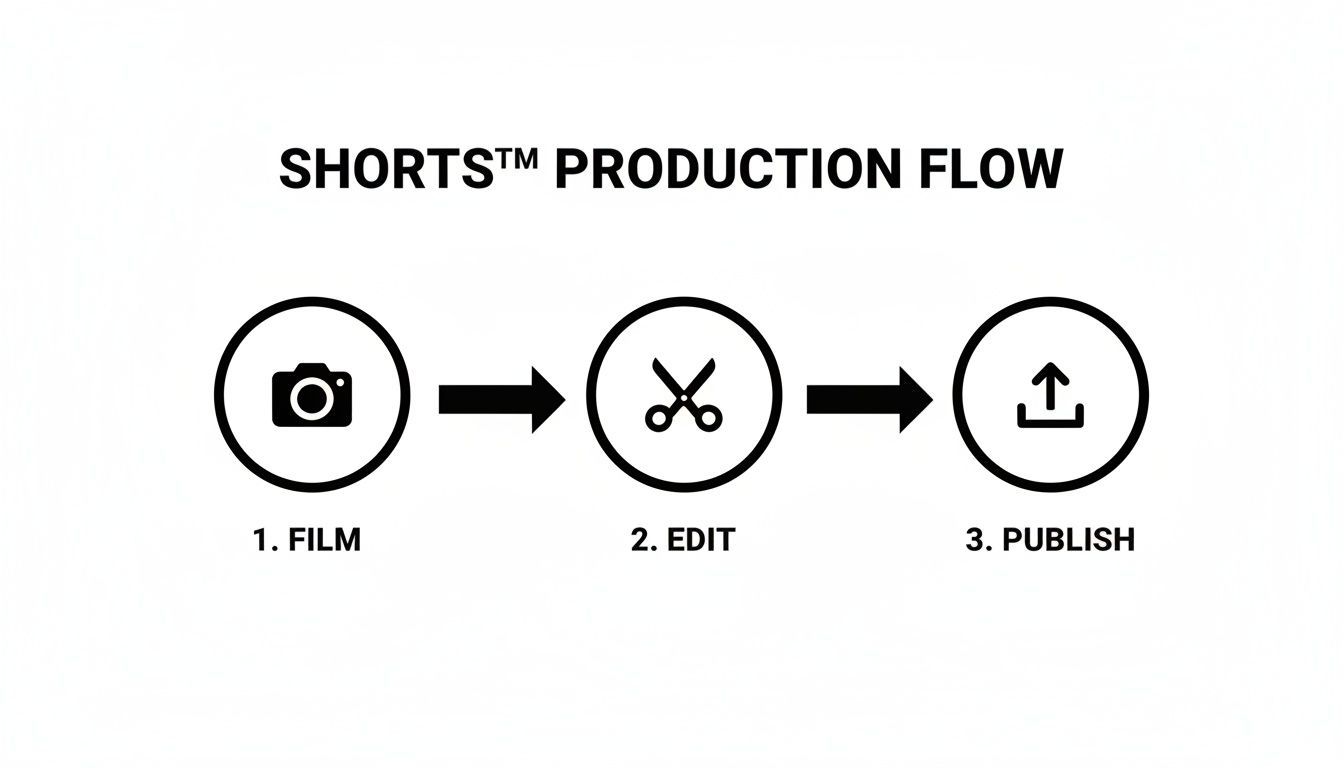
By bringing filming, editing, and publishing closer together, you get hours of your week back.
Building and Managing a Content Series
One of the best ways to get more views on your YouTube Shorts is to create a content series built around a single theme. A series gives people a reason to binge your content and, more importantly, a reason to subscribe. But trying to keep track of all the ideas, scripts, and assets for a series can turn into a disorganized mess fast.
This is another area where AI tools can help you get organized. You can set up dedicated projects for each series, keeping all your scripts, media files, and final videos in one neat dashboard.
When you're organized, it's so much easier to create spin-offs and follow-up Shorts that build on your momentum. If a viewer loves your "30-Day Fitness Challenge" series, they're much more likely to stick around for a "Healthy Eating Hacks" series if it feels connected and consistent.
This level of organization also makes it incredibly easy to A/B test your ideas. You can quickly generate five different versions of a Short, each with a slightly different hook or call to action, and see which one performs best—all without having to re-edit everything from scratch.
The Power of Automation and Scheduling
To stay relevant, you have to stay present. That’s where auto-scheduling becomes a lifesaver. Instead of having to manually upload every single video at the "perfect" time, you can map out your content calendar weeks in advance. A unified platform lets you schedule your finished Shorts to post directly to YouTube, TikTok, and Instagram, all at once.
For example, you could spend one afternoon batch-producing an entire week's worth of content. Schedule them to go live during peak viewing hours each day, and you're done. This frees you from the daily grind of publishing and lets you focus on bigger things, like engaging with your community and analyzing your metrics to see what's actually working. A steady stream of content is a huge signal to the algorithm that you're a creator worth paying attention to.
The efficiency you gain from using AI directly translates into more opportunities for growth. YouTube Shorts already have a seriously impressive average engagement rate of 5.91%, which is higher than other platforms. And while the revenue per impression is still growing, campaigns using Shorts are seeing 10-20% more conversions than their long-form counterparts. It’s a powerful format for building a real audience.
Ultimately, bringing AI tools into your workflow helps you build a scalable content engine. You can test more ideas, publish more often, and keep your quality high, giving you a serious edge in the crowded world of YouTube Shorts.
Common Questions About Growing on YouTube Shorts
Even the best-laid plans run into a few hurdles. As you dive into creating Shorts, you're bound to have questions pop up. "Am I doing this right?" "Is this really the best way?" It happens to everyone.
This section is all about tackling those common questions with straight, practical answers drawn from real-world experience. Let's clear up some of the most frequent uncertainties creators face.
How Long Should My YouTube Shorts Be?
Technically, you can go up to 60 seconds, but that doesn't mean you should. For most Shorts, the magic really happens between 15 and 30 seconds. Why? It's all about retention.
A shorter video makes it incredibly easy for someone to watch the entire thing—or even let it loop a few times. That’s a massive positive signal to the YouTube algorithm. So, my advice is to start short. Pack your value into a tight, punchy format and only go longer when the concept absolutely demands it.
How Often Should I Be Posting?
This one trips a lot of people up. It's not about volume; it's about consistency. Pushing out one great Short every day will always beat dumping five mediocre ones whenever you have time. The algorithm loves a reliable channel.
Find a rhythm that works for you and won't lead to burnout. A good way to start is:
- 3-5 Shorts a week to get the ball rolling and build momentum.
- 1 Short per day once you've ironed out your creation process.
The goal is to avoid big, dead-air gaps in your upload schedule. Staying active keeps you on the algorithm's radar and your content fresh for your audience.
The Bottom Line: Find a sustainable pace that prioritizes quality. The algorithm rewards consistency, not just quantity. It's better to be a reliable creator than a sporadic one.
Are Hashtags Still a Thing for Shorts?
Yes, they absolutely are, but you have to be strategic. Don't just spam your description with a wall of tags. Think of them as signposts that tell YouTube who is most likely to enjoy your video.
A good mix is key. Let’s say you made a quick pasta recipe Short. Your tags might look like this:
- Broad Tags: #shorts, #cooking, #youtubeshorts
- Niche Tags: #pastarecipe, #15minutemeals, #quickdinner
This blend helps YouTube properly categorize your video, boosting its odds of landing in front of the right viewers. While a Short can certainly go viral without any hashtags, using them correctly gives you a much better starting point for discovery.
Can I Just Repost My TikToks and Reels?
You can, and you should! Repurposing content is a massive time-saver. But there's a right way and a wrong way to do it.
First, always remove the watermark from other platforms like TikTok or Instagram. YouTube has been known to suppress the reach of videos that are clearly branded for a competitor.
More importantly, remember that every platform has its own vibe. A trend that kills it on TikTok might need a different sound, a faster pace, or a new caption to connect with the Shorts audience. It’s always a good idea to understand what exactly are YouTube Shorts to make sure your repurposed content feels native to the platform.
The potential here is staggering. @DanielLaBelle's top Short has an unbelievable 1.5 billion views. And a single Short from @MrBeast pulled in 49 million likes. The ceiling for engagement is incredibly high.
Ready to stop guessing and start growing? ShortGenius gives you an all-in-one AI platform to create high-quality, engaging Shorts in minutes. Streamline your entire workflow from script to schedule and build a content engine that gets results. Try it today at https://shortgenius.com.