How to Create Video Ads Without Filming Yourself

Learn how to create video ads without filming yourself using AI, stock footage, and smart scripting. A practical guide for creating high-converting ads.
Let’s be honest, the thought of getting in front of a camera to create a video ad can be daunting. The good news? You don't have to. You can now create incredibly effective, high-converting video ads without ever stepping into the frame yourself.
The magic combination is a trio of accessible tools: AI video generators, massive stock footage libraries, and surprisingly realistic AI voiceover software. This workflow lets just about anyone—from solo founders to lean marketing teams—pump out professional-looking ads without the traditional headaches and costs.
The Shift to Camera-Free Video Ads
We're in a new chapter of video advertising, one where a camera, a studio, and an on-screen presence are completely optional. This isn't just about being camera-shy; it's a strategic move that levels the playing field, allowing smaller businesses to compete with big brands on their own terms.
The advantages go way beyond simply avoiding the camera:
- Massive Cost Savings: Forget about renting equipment, scouting locations, or hiring actors. Your biggest expense is a software subscription.
- Insanely Fast Production: You can genuinely go from a rough idea to a campaign-ready ad in just a few hours. That's a world away from the weeks or months traditional production can take.
- Agile Creative Testing: This is the real game-changer. Instead of one perfect video, you can quickly create a dozen variations to A/B test, letting you discover what actually connects with your audience.
The entire strategy hinges on sourcing your visuals and audio from different places—stock libraries, AI tools, or a mix of both—and then stitching them together. It’s a surprisingly simple, modular approach.
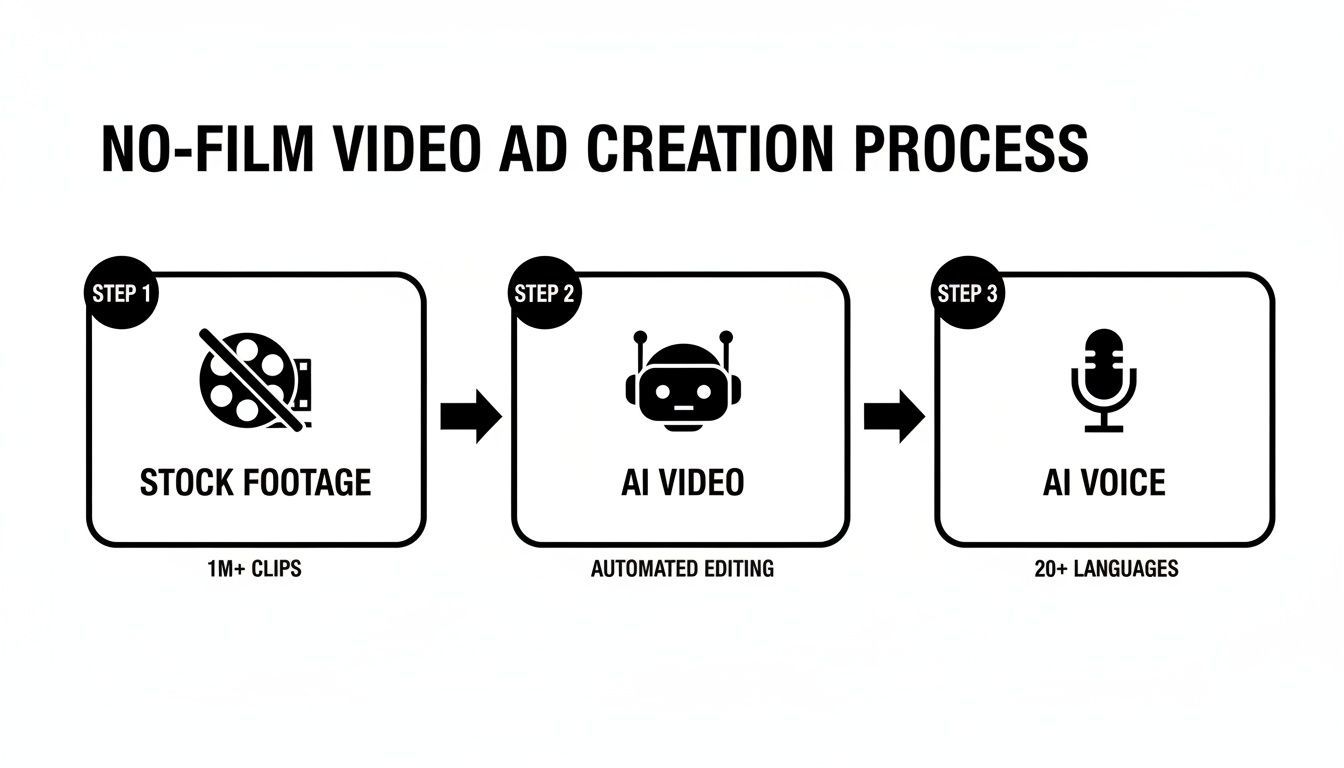
Each piece—visuals from stock footage or AI, paired with an AI-generated voiceover—comes together to create a complete, camera-free ad.
Why This is More Than Just a Trend
The market for AI-generated video is blowing up, growing at an annual rate of 35% and on track to hit $14.8 billion by 2030. This boom is what’s making it so easy for anyone to create great-looking ads using simple text-to-video platforms.
While a single traditionally produced video can run into the thousands, these new tools can slash that cost by up to 90%. You can dig deeper into these video marketing statistics to see just how much of an impact this can have.
This isn't just about saving money; it’s about gaining a competitive edge through speed and volume. The ability to test dozens of ad creatives in the time it takes to produce one traditional video is a massive advantage for performance marketing.
Three Core Methods for Creating No-Film Video Ads
To get started, it helps to understand the main paths you can take. Each one has its own strengths, depending on what you're trying to achieve, your budget, and your brand's style. Let's look at the three core methods for creating video ads without putting yourself on camera.
| Method | Best For | Key Benefit |
|---|---|---|
| Stock Footage | Creating realistic, cinematic, or lifestyle-focused ads quickly. | Access to millions of high-quality clips for a professional look. |
| AI Video Generation | Producing unique, imaginative, or abstract visuals from text prompts. | Limitless creative possibilities and completely original content. |
| Animated & Text-Based | Explainer videos, simple product showcases, or data-driven ads. | Clear, direct communication that's easy to produce and digest. |
Choosing the right approach from the start will make the whole process smoother and give you a better final product for your campaign.
Nailing Your Ad Concept and Script with AI
Before you even think about visuals, your ad needs a solid foundation: a killer concept and a script that actually gets people to take action. The good news? You don't have to be a seasoned copywriter to pull this off. AI can act as your creative co-pilot, spinning your raw product details into a narrative that connects.
This isn't just about telling an AI to "write an ad for me." That's a recipe for bland, generic content. Instead, we need to give it a proven structure to work with. One of the best for short-form ads is the classic AIDA model:
- Attention: A scroll-stopping hook. You have less than three seconds to grab them.
- Interest: A relatable problem or a surprising fact that makes them lean in.
- Desire: The pivot to your solution. Show them how your product makes their life better.
- Action: A crystal-clear Call-to-Action (CTA). Tell them exactly what to do next.
By framing your prompts around AIDA, you're essentially guiding the AI to build a script with a persuasive arc that feels natural—a crucial element when creating video ads without filming.
How to Craft an AI Prompt That Delivers
Garbage in, garbage out. A vague prompt will get you a script that sounds like it could be for any product on the internet. To get something that feels custom-made and actually converts, you have to feed the AI specific, high-quality details about your brand and what you're offering.
Think of it as handing over a complete creative brief. Here’s the essential information you should always include:
- Your Product: Be specific. Not just "coffee pods," but "eco-friendly, compostable coffee pods."
- Your Target Audience: Get into their heads. Who are they really? "Environmentally conscious millennials, aged 25-40, who own a Nespresso machine and feel a twinge of guilt every time they throw away a plastic pod."
- Unique Selling Proposition (USP): What makes you the only choice? "The only Nespresso-compatible pod that's 100% plant-based and can be composted at home, delivering amazing coffee without the waste."
- The Offer & CTA: What's the deal, and what's the next step? "Get 20% off your first subscription box. Click 'Shop Now' to find your blend."
Let's walk through what this looks like for a small e-commerce brand selling those eco-friendly coffee pods.
Pro Tip: Don't just state facts. Weave emotional language into your prompt to guide the AI's tone. Words like "frustrated," "guilty," "effortless," and "delicious" are signals that help the AI produce a far more persuasive and relatable message.
Real-World Example: Eco-Friendly Coffee Pods
Here’s an example of a detailed prompt I'd feed into a tool like ChatGPT or Jasper:
Prompt: `"Write a 30-second video ad script using the AIDA framework for a new brand of eco-friendly coffee pods.
- Product: 'EarthBrew' 100% plant-based, home-compostable coffee pods for Nespresso machines.
- Audience: Eco-conscious millennials (25-40) who love their daily coffee but hate the plastic waste. They feel a sense of 'eco-guilt.'
- USP: Enjoy barista-quality coffee with zero plastic waste. Our pods break down in your home compost, turning into nutrient-rich soil.
- Tone: Uplifting, inspiring, and a little urgent.
- CTA: Click 'Shop Now' to get 20% off your first subscription box."`
See the difference? This prompt gives the AI all the ingredients it needs to cook up something special. The result is a highly targeted script that speaks directly to the audience's pain points and positions the product as the obvious hero.
To make this even easier, you could use a dedicated AI ad generator that's built for this exact purpose. An all-in-one tool often speeds up the whole process, integrating the scriptwriting right into the video creation workflow and keeping everything consistent.
Getting this foundational script right is everything. With a strong, persuasive narrative locked in, you’re ready for the fun part: bringing it all to life with visuals and sound, no camera required.
Alright, you've got your script locked in. Now comes the fun part: creating the world of your ad and turning those words into something people can't look away from. The best news? You don't need a camera, a crew, or an expensive studio to make something that looks incredible.
We're going to dive into two fantastic methods for this: generating completely original scenes with AI and strategically pulling from high-end stock footage libraries. Which path you take really depends on your brand's vibe, your message, and your budget, but both give you a ton of creative firepower.
Creating Unique Visuals with AI
AI video generation is one of the most exciting things happening in this space. Tools like Sora, RunwayML, and Pika Labs can take a simple text prompt and spin it into a short, compelling video clip. This means you can get visuals that are 100% unique and perfectly matched to your script.
The real skill here is learning how to write a good prompt. Think of it like you're a director giving very specific instructions. You need to be clear about the subject, what it's doing, the environment, and the overall aesthetic you're going for.
If you want to go straight from an idea to a finished ad without ever touching a camera, digging into the best AI video generators is a great place to start. These platforms are getting more and more sophisticated, giving you finer control over the final video.
Let's break down how this works with a couple of different ad concepts.
Example 1: The Fast-Paced Product Montage Let's say you’re launching a new high-tech sneaker. You need a quick, energetic ad that’s all about the features.
- Prompt Example: "Dynamic close-up shot of a futuristic sneaker splashing through a neon-lit puddle in slow motion, city lights blurred in the background, cinematic, hyper-realistic."
Example 2: The Cinematic Brand Story Now, picture a brand that sells sustainable, handcrafted wooden watches. The vibe needs to be slower, more emotional.
- Prompt Example: "Warm morning sunlight filtering through a rustic workshop window, dust motes dancing in the air. A watchmaker's hands carefully assemble a wooden watch on a worn workbench, macro shot, soft focus, peaceful and timeless."
Key Takeaway: Your prompt is everything. The more descriptive and evocative you are, the closer the AI will get to what's in your head. Don’t just describe what’s happening; describe the feeling you want to create.
The Art of Curating Premium Stock Footage
Stock footage is a classic for a reason. Libraries like Envato Elements and Storyblocks are treasure troves of professionally shot clips. You can piece together a slick, high-quality ad in a fraction of the time and cost it would take to shoot it yourself.
The trick, though, is to avoid that generic "I've seen this clip in ten other ads" feeling. The secret isn't just finding clips; it's curating them with a designer's eye. Every shot needs to feel like it belongs in the same story.
This method works. I've seen it time and again. Social videos get 1200% more shares than posts with just images and text. And for e-commerce brands, using video can seriously cut down on product returns while boosting engagement.
Pro Tips for a Cohesive Stock Video Ad
To make your ad feel custom-made and high-end, visual consistency is your north star.
-
Define Your Color Palette: Before you even start searching, nail down your color scheme. Use search terms like "warm tones," "muted colors," or "vibrant and saturated" to pull clips that look like they were all shot by the same crew on the same day.
-
Match the Lighting Style: Lighting sets the mood. Are you going for bright, airy, and optimistic? Or moody and dramatic? Use keywords like "natural light," "golden hour," or "studio lighting" to find clips that all share the same lighting DNA.
-
Find a Consistent Mood: Your ad needs to deliver one clear emotion. Whether it’s excitement, peace, or urgency, every single clip has to contribute to that feeling. Look for clips that have a similar energy and subject matter.
By blending these visual strategies with the powerful script you've already written, you’ll be well on your way to creating video ads that genuinely connect with your audience. And if you're looking to put this on easy mode, you can even explore how to generate AI UGC ads at https://shortgenius.com/ai-ugc-ads, as some platforms can automate a lot of this creative work for you.
Ultimately, whether you lean into AI generation or become a master of stock curation, you have everything you need to bring your vision to life without ever stepping in front of a camera.
Getting Your Audio Right: AI Voiceovers and Captions
The visuals in your ad might be what stops the scroll, but it's the audio that truly sells the story. A great video ad needs to work just as well with the sound on as it does with it off, especially when you consider that up to 85% of social media videos are watched on mute. This means you need a solid plan for both your voiceover and your on-screen text.
The good news? You don't need a fancy recording booth or a professional voice actor anymore. Modern AI voiceover tools are so good they can deliver incredibly natural-sounding narration, saving you a ton of time and money.
How to Craft the Perfect AI Voiceover
Tools like Murf.ai and ElevenLabs can take your script and spin it into gold, creating audio that's often hard to tell apart from a real person. The real skill here isn't just hitting the "generate" button; it's about treating the AI like an actor you're directing.
You're the director, and your job is to guide the AI to a performance that feels right for your brand and connects with your audience. To get a better handle on creating compelling spoken audio without ever stepping in front of a mic, it's worth exploring how an AI voice generator for videos can completely change your workflow.
Here’s how I get the delivery just right:
- Choose the Right Voice: Don't just settle for the default. Think about who you're talking to. Would a warm, approachable female voice build more trust? Or does your product need a deep, authoritative male voice? Play around with different accents, tones, and ages until you find one that embodies your brand's personality.
- Control the Pacing: The speed of the voiceover sets the mood. If you're running a flash sale, a faster pace can create a sense of urgency. If you're explaining a complex feature, slowing things down can feel more thoughtful and build confidence. I always use strategic pauses to let a key message or a powerful image really land with the viewer.
- Add Emphasis and Inflection: This is where the magic happens. Most of the better AI tools let you tweak the inflection on individual words. Go through your script and pinpoint the words that matter most—like "free," "new," or "guaranteed"—and tell the AI to deliver them with a bit more punch.
The biggest mistake I see is settling for a flat, robotic tone. You have to experiment. Tweak the settings, try different voices, and listen back until it sounds like a real conversation. The goal is for the audio to be so natural that no one even suspects it's AI.
Why Captions Are a Must-Have
Think about where people watch videos: on the bus, in a quiet office, or late at night next to a sleeping partner. Captions aren't just a nice-to-have anymore; they're absolutely essential. They make sure your message gets across no matter the situation.
If you skip captions, you're basically telling a huge chunk of your potential audience that you don't care if they see your ad. Luckily, adding them is incredibly simple these days.
Tips for Styling Your Captions
Most modern video editors, like CapCut or Adobe Premiere Pro, come with auto-captioning features that do the heavy lifting for you. They’ll transcribe your audio with surprising accuracy. From there, it's all about styling them so they're easy to read and look great.
Here are a few quick rules I follow to make captions a seamless part of the ad:
- Pick a Readable Font: I always stick with clean, clear sans-serif fonts. Think Poppins, Montserrat, or Helvetica. Fancy script fonts might look cool, but they’re a nightmare to read on a small phone screen.
- Go for High Contrast: Your text has to pop, no matter what's happening in the video behind it. The most reliable combo is white text with a slight black outline or a semi-transparent background box. It’s readable against both light and dark scenes.
- Get the Size Right: Captions need to be big enough to read at a glance but not so big they cover up the important parts of your video. Test it on your own phone to find the sweet spot.
- Keep It On-Brand: Readability comes first, but you can still sprinkle in your brand's look and feel. Try using your brand's colors for highlighting key words, as long as it doesn't make the text harder to read.
By nailing both the AI voiceover and the captions, you’re creating an ad that can connect with your audience and deliver its message effectively, whether they're listening with headphones in or watching in total silence.
Alright, let's get all your assets—visuals, script, and voiceover—pulled together into a polished ad that actually gets results. This is the fun part, where all the pieces click into place and you see your idea come to life. And don't worry, you don't need a Hollywood editing suite. Tools like CapCut or the video editor built into Canva have more than enough power for what we're doing here.
First, you'll want to get everything into your editor. Pull in your AI-generated video clips, your voiceover audio file, and any background music you've picked out. Your first pass is just about laying everything out on the timeline. Line up the visuals with the right parts of the narration from your script. The goal here is simple: make sure the story flows and makes sense.
Getting the Pace and Flow Just Right
The rhythm of your ad is everything. If it drags, people will scroll right past it. If it's too chaotic, they won't understand the message. This is where you have to be a little ruthless with your editing. Every single second counts.
Go through your timeline, clip by clip, and trim the fat. Is there a half-second of dead air at the beginning of a shot? Cut it. Does a scene hang around a moment too long after the voiceover has already moved on? Chop it down. This tightening process is what separates an amateur video from one that feels professional and keeps viewers hooked.
While you're refining the timing, a few key elements will really make your ad pop:
- Seamless Transitions: Jarring cuts can feel cheap. Stick to simple, clean transitions like a quick fade or a smooth dissolve between scenes. Most editors have a library of these ready to go.
- Brand Overlays: This is how you make the ad yours. Add your logo in a corner (keep it subtle!) and use text overlays to punch up key messages from your script, like a discount code or a standout benefit.
- Background Music: Never underestimate the power of audio. The right track can completely shift the emotional tone of your ad. Find some royalty-free music that matches the vibe you're going for and slide it into the timeline. The most important tip here? Make sure you lower the music's volume so it sits comfortably under the voiceover, never competing with it.
One Ad, Many Platforms: The Art of Resizing
Here’s one of the biggest rookie mistakes I see: creating one video and just blasting it out everywhere. It doesn't work. Each social platform is its own world with its own audience and, crucially, its own preferred video shape. An ad built for YouTube will look awful and get ignored as an Instagram Reel.
Think of it this way: you wouldn't wear the same outfit to a board meeting and a beach party. Customizing your ad for each platform isn’t just a nice-to-have; it’s absolutely essential for getting a decent return on your ad spend.
This all comes down to understanding aspect ratios—a fancy term for the video's shape. Getting this right is a fundamental skill for creating ads without ever stepping in front of a camera.
Common Aspect Ratios You Need to Know:
| Aspect Ratio | Common Use Cases | Why It Matters |
|---|---|---|
| 9:16 (Vertical) | TikTok, Instagram Reels, YouTube Shorts | This is the king of mobile. It fills the entire screen for a completely immersive experience. It's non-negotiable for these platforms. |
| 1:1 (Square) | Instagram Feed, Facebook Feed | A square video takes up way more screen real estate in a feed than a horizontal one, making it harder for users to ignore as they scroll. |
| 4:5 (Vertical) | Instagram Feed, Facebook Feed | This is a slightly taller version of the square, grabbing even more vertical space in the feed for maximum attention. |
| 16:9 (Horizontal) | YouTube, X (formerly Twitter) Feed | The classic widescreen format we all know. It's perfect for traditional platforms like YouTube where a more cinematic feel works well. |
Luckily, you don't have to rebuild the ad from scratch for each format. Modern editors like CapCut and Canva make resizing a breeze. You can perfect your main ad (I'd recommend starting with 9:16), then simply duplicate the project and change the aspect ratio with a click. You'll just need to do a quick pass to adjust the position of your text and logo so they aren't cut off in the new frame. It's a small step that makes a huge difference in performance.
The Final Pre-Flight Check
Okay, you're almost there. Before you hit that export button, do a quick final review. Is your hook in the first three seconds genuinely attention-grabbing? Is your call-to-action (CTA) clear, both spoken in the voiceover and shown as text on screen? And finally, the most critical test: watch the ad on your phone with the sound turned off. If the story still makes sense and the captions are easy to read, you're good to go.
With these optimizations locked in, your camera-free video ad is officially ready to launch and start bringing in results.
Got Questions? We've Got Answers
Diving into creating video ads without a camera often brings up a few questions. That's totally normal. Here, I'll tackle the most common ones I hear, giving you straight, simple answers to help you clear any hurdles and get started with confidence.
What are the best tools if I'm on a tight budget?
You absolutely don't need to spend a fortune to create professional-looking ads. It’s all about being smart with the incredible free and freemium tools available.
For scripting, the free versions of AI assistants like ChatGPT or Claude are more than powerful enough. When it's time for visuals, sites like Pexels and Pixabay are goldmines, offering huge libraries of high-quality stock videos and photos that are completely free for commercial use.
Then, to pull it all together, CapCut (on desktop and mobile) and Canva's video editor are fantastic free options. They come packed with everything you need—auto-captioning, text overlays, and royalty-free music—to produce a polished ad.
How do I make my ad not look so... generic?
This is the big one. To avoid that stale, "stock footage" vibe, your entire focus should be on cohesion and curation. You want your collection of clips to feel like they were all shot intentionally for your brand's story.
First, lock in a consistent visual style. When you're searching on stock sites, use the filters. Look for clips with similar lighting (like 'natural light' or 'cinematic') and color grading ('warm tones' or 'muted colors'). This simple step creates a unified look and feel from the start.
Next, mix up your shots. Don't just use a string of wide shots. Combine those with intimate close-ups and dynamic clips with movement to build a compelling rhythm. Most importantly, customize everything heavily. Add your branded text, use color correction tools to match your brand palette, and layer it all with a great voiceover and unique sound design.
What about copyright issues with AI or stock footage?
This is a critical point, so pay close attention. With stock footage, always stick to reputable platforms. For paid options, sites like Envato Elements or Storyblocks have you covered with clear licenses. For free content from places like Pexels, always double-check the specific license for each clip before you use it in a commercial ad.
AI-generated content is a bit of a newer frontier legally. Most AI tools grant you commercial rights to what you create, but you absolutely must read their terms of service.
A simple rule to stay safe: avoid using AI to generate images of celebrities, famous characters, or trademarked logos. Doing so can get you into hot water over copyright or publicity rights. Stick to creating original scenes that match your script.
How do I even know if my ad is working?
Measuring success always comes back to one question: what was your goal? The metrics you obsess over should directly reflect what you wanted the ad to accomplish.
Here's a quick breakdown:
- For Brand Awareness: Keep an eye on impressions, reach, and especially the video view-through rate (VTR). A high VTR is a great sign that your creative is holding people's attention.
- For Driving Traffic: Your number one metric is the click-through rate (CTR). This tells you exactly how many people who saw the ad actually clicked the link.
- For Sales & Conversions: This is where the money is. You'll need tracking pixels from platforms like Meta or TikTok to monitor conversions, cost per acquisition (CPA), and return on ad spend (ROAS).
One of the best parts about this creation method is how easy it is to A/B test. You can quickly whip up different versions with new hooks, visuals, or calls-to-action to see what your audience responds to.
For those looking to make this entire process even faster, an all-in-one platform can be a game-changer. You can learn more about how ShortGenius simplifies creating and optimizing ads that actually perform.
Ready to create high-performing video ads in minutes, not weeks? With ShortGenius, you can generate ad concepts, scripts, visuals, and voiceovers with AI, then assemble and optimize everything in one seamless workflow. Start creating for free today at https://shortgenius.com.