How to Create a Content Calendar That Actually Works

Learn how to create a content calendar that streamlines your workflow and drives real results. Ditch the chaos and start publishing with purpose.
Creating a content calendar isn't just about plugging ideas into a spreadsheet. It’s a strategic process that involves setting clear goals, figuring out your core content pillars, picking the right tools, and committing to a schedule you can actually stick to. This turns random acts of content into a plan that drives real growth and, frankly, saves a ton of time.
Why a Content Calendar Is Your Unfair Advantage
Let's stop thinking about a content calendar as a glorified to-do list. For the most successful creators and marketing teams I've worked with, it's the secret weapon that transforms last-minute chaos into a predictable engine for audience growth and hitting business targets.

This single source of truth brings the clarity you need to scale your efforts, whether you're a one-person show or managing a growing agency. It’s what separates reactive, "what do I post today?" content from a proactive, strategic operation.
Ditch the Daily Scramble
Without a plan, every morning starts with that dreaded, creativity-killing question: "What should I post today?" This constant decision-making leads to burnout and, more often than not, inconsistent and low-impact content. A content calendar completely removes that pressure.
When you plan ahead, you give your best ideas the space they need to breathe and develop. You can start batch-creating content—like shooting a week's worth of TikToks in a single afternoon or outlining several blog posts at once—which is a massive efficiency win. This frees up your mental bandwidth to focus on what actually moves the needle: creating valuable, high-quality content that your audience genuinely cares about.
Achieve True Team Alignment
For any team, a content calendar is non-negotiable. It acts as the central command center where writers, designers, social media managers, and other stakeholders can see the entire content pipeline at a glance. Everyone knows what’s coming, when it's due, and how it fits into the bigger picture.
This shared visibility is a lifesaver, preventing common headaches like:
- Crossed Wires: No more accidentally posting the same message twice or sending out conflicting information on the same day.
- Workflow Bottlenecks: You can instantly see where a piece of content is stuck—whether it's in the draft stage, waiting for approval, or ready to be scheduled.
- Misaligned Efforts: The calendar ensures every single piece of content serves a purpose, whether that's supporting a product launch or driving a brand awareness campaign.
A well-built calendar doesn't just organize posts; it organizes your people. It transforms a collection of individual tasks into a cohesive and powerful marketing force.
The market statistics back this up. The global marketing calendar software market was valued at $12.5 billion in 2025 and is projected to skyrocket to $32.4 billion by 2035. With North America expected to hold a 41% market share, it’s clear that businesses recognize these tools as essential for managing today’s complex, multi-channel marketing efforts. You can learn more about the growth of marketing calendar software and why it's becoming such a critical investment.
Defining Your Goals Before You Plan
A great content calendar is built on strategy, not just a list of dates. I've seen it a hundred times: people jump straight into scheduling without a clear "why." It's like setting sail without a map—you'll be busy, but you won't get anywhere meaningful.
Before you ever open a spreadsheet or a fancy tool, you have to know what you're trying to achieve. Your content goals aren't just fluff; they should be a direct reflection of your bigger business objectives. What does success actually look like? Ditch vague ideas like "more engagement" and get specific. This is the compass that will guide every single piece of content you plan.
Pinpoint Your Primary Objective
Every post, every video, every article needs a job to do. Are you trying to get your name out there, pull in new leads, or just keep your current audience happy and engaged? Each of these requires a completely different playbook.
Let’s break it down:
- Driving Brand Awareness: If you just want people to know you exist, you need content that travels. Think highly shareable stuff like viral-style videos, eye-catching infographics, or relatable memes that get passed around. The name of the game is maximum reach.
- Generating Qualified Leads: This is about solving a specific problem for your ideal customer. You'll want to create in-depth guides, webinars, or free tools that are so valuable people will happily trade their email for them.
- Building an Engaged Community: To get people talking, you need to start the conversation. This means Q&A sessions, behind-the-scenes glimpses into your business, and celebrating your audience by featuring their content.
To really nail this down, it's crucial you start by understanding what is a sales funnel. This framework is your secret weapon for mapping the right content to the right person at the right time, guiding them from "who are you?" to "take my money!"
Audit Your Existing Content
Your past content is a goldmine of data just waiting to be dug up. Don't even think about brainstorming new topics until you’ve looked back at what has already worked—and what totally bombed. A quick content audit can tell you more than a crystal ball ever could.
Start by pulling up your analytics for the last six months. Look for the rockstars. What are the common threads in your top-performing pieces? Are your short-form videos on TikTok crushing your carefully crafted Instagram carousels? Do people love your "how-to" guides but snooze through trend-based posts?
Use these insights to double down on what’s working and spot the glaring holes in your strategy. For example, if you see that all your content is geared toward grabbing initial attention (top-of-funnel), you know your new calendar needs to focus on content that helps people make a buying decision.
This data-first approach takes the guesswork out of the equation. You're no longer just filling empty slots on a calendar. Instead, you're strategically creating content with a proven track record, making informed decisions that push you closer to your goals with every single post. This is how a simple schedule becomes a powerful tool for growth.
Alright, you've got your high-level goals sorted. Now for the fun part: figuring out what you’re actually going to talk about. This is where we define your content pillars.
Think of content pillars as the main, recurring themes you’ll build your entire content strategy around. They're the big-picture topics that anchor everything you create. A fitness coach, for example, isn’t just randomly posting workout videos. Their pillars might be something like ‘At-Home Fitness,’ ‘Debunking Nutrition Myths,’ and ‘Mindset & Motivation.’
Every single piece of content they produce—a blog post, an Instagram Reel, a YouTube short—will fall under one of those pillars. This simple framework stops you from chasing shiny objects and gets you out of the "what should I post today?" panic. Suddenly, you have a reliable system for generating fresh, relevant ideas.
Uncovering Your Core Themes
The sweet spot for a great content pillar is where your audience's problems meet your brand's expertise. You're looking for three to five broad themes that you can dive into from dozens of different angles.
So, where do you find these magical pillars? It’s easier than you think.
- Listen to your audience. Seriously. Your customers, followers, and clients are telling you exactly what they need every single day. Dig through your social media DMs, email replies, and support tickets. What questions keep coming up? Those are pure gold.
- Do some recon on your competitors. See what’s hitting the mark for others in your niche. A proper ultimate guide to competitor analysis will help you spot what they’re doing well and, more importantly, what gaps you can fill.
- Lean on keyword research. Tools like Ahrefs or Semrush are fantastic for this. They show you the exact phrases and questions people are typing into Google, revealing their biggest pain points.
This isn't a "set it and forget it" task. Your pillars should grow with your brand. I recommend revisiting them every quarter to make sure they still line up with what your audience cares about and where your business is headed.
Translating Pillars Into Actionable Ideas
Once you have your pillars nailed down, coming up with actual content ideas becomes a breeze. Let's say one of your pillars is "Sustainable Living for Beginners." Now you can spin that single theme into content for every platform imaginable.
- Blog Post: "10 Simple Swaps for a More Eco-Friendly Kitchen"
- TikTok Video: "3 household items you can compost (that will surprise you!)"
- Instagram Carousel: "Swipe through my zero-waste grocery shopping routine."
- YouTube Tutorial: "How to Make Your Own All-Purpose Cleaner (for under $2)"
Each of these ideas ladders back up to that core pillar. You're not just creating content; you're building a library of resources that consistently reinforces your expertise on that topic.
To give you a better sense of how this works across different fields, here are a few real-world examples.
Content Pillar Examples for Different Niches
| Niche / Audience | Content Pillar 1 | Content Pillar 2 | Content Pillar 3 |
|---|---|---|---|
| B2B SaaS for Sales Teams | "Sales Productivity Hacks" | "CRM Best Practices" | "Customer Success Stories" |
| Personal Finance Influencer | "Budgeting for Millennials" | "Intro to Investing" | "Side Hustle Ideas" |
| Local Coffee Shop | "Meet Our Baristas" | "Coffee Education" | "Community Events" |
| Freelance Graphic Designer | "Branding Tips" | "Portfolio Breakdowns" | "Client Management" |
See how each pillar can spawn hundreds of specific content ideas? This is how you build a powerful, consistent content engine.
This kind of strategic planning is why the content marketing industry is exploding. It ballooned from $36,786.6 million in 2018 and is projected to reach an incredible $107,540.6 million by 2026. If you want to understand the forces driving this growth, you can learn more about these content market findings. A solid content calendar built on strong pillars is your ticket to claiming a piece of that action.
Choosing the Right Tools to Build Your Calendar
Alright, you've got your goals locked in and your content pillars defined. Now comes the fun part: picking the tool that will actually house your content calendar. Think of this as building your mission control—the central hub where all the magic happens. Your choice here directly impacts your team's workflow, your efficiency, and your ability to scale.
Let's be clear: there's no single "best" tool. The perfect choice is simply the one that fits your team, your budget, and your strategy.
From Simple Spreadsheets to Robust Platforms
If you're flying solo or part of a small, nimble team, don't overcomplicate things. A simple Google Sheet or an Airtable base can be a powerhouse. They're free, ridiculously flexible, and a breeze to share. You can set up columns for all your key data points and get a bird's-eye view of your schedule without any fuss.
But what happens when your team expands or your content strategy gets more layered? You'll probably start to feel the limitations of a basic spreadsheet. That's when dedicated project management tools become your best friend.
- Trello or Asana: These tools are brilliant for visualizing your entire content pipeline. Using a Kanban-style board, you can literally drag and drop a piece of content from "Idea" to "Drafting" to "Review" and finally to "Published." It’s an incredibly intuitive way for teams to see the status of everything at a glance.
- Notion: For those who want ultimate control, Notion is a game-changer. It’s less of a tool and more of a blank canvas, letting you build a completely custom content ecosystem. You can blend calendars, databases, task lists, and creative briefs all into one unified space. It's the ideal "single source of truth" for teams that want everything in one place.
The goal is to find a system that reduces friction, not adds to it. If your team spends more time fighting with the tool than creating content, you've made the wrong choice. Start simple and upgrade only when you feel the limitations of your current setup.
Here's a quick rundown of some popular options to help you decide.
Comparison of Content Calendar Tools
| Tool Type | Best For | Pros | Cons |
|---|---|---|---|
| Spreadsheets (Google Sheets, Excel) | Solo creators, small teams, and those on a tight budget. | Free, highly customizable, and easy to share with anyone. | Lacks automation, can become cluttered, and offers no built-in workflow management. |
| Kanban Boards (Trello, Asana) | Visual thinkers and teams managing a multi-stage content pipeline. | Excellent for tracking progress, intuitive drag-and-drop interface, great collaboration features. | Can be too simplistic for complex campaigns or detailed asset management. |
| All-in-One Workspaces (Notion, ClickUp) | Teams wanting a single source of truth for all content operations. | Infinitely flexible, combines docs, tasks, and calendars, highly scalable. | Can have a steep learning curve and might be overkill for very simple needs. |
| Dedicated Content Platforms (ShortGenius, CoSchedule) | Marketing teams looking for an integrated solution. | Includes AI assistance, social scheduling, and analytics all in one place. | Often comes with a subscription fee and can be less flexible than custom setups. |
Ultimately, the right tool is the one your team will actually use consistently. Don't get caught up in finding the most feature-packed option if a simple spreadsheet does the job perfectly for now.
Essential Fields for Your Content Calendar
No matter which tool you pick, its power comes from how you structure it. A great content calendar tracks far more than just a publish date—it's the complete blueprint for every single asset you create.
To make sure nothing ever falls through the cracks, your calendar needs to be the go-to resource for your entire team.
This decision tree shows how to link your big-picture goals to the brainstorming process, whether you're digging into keyword research or just listening to what your audience is asking for.
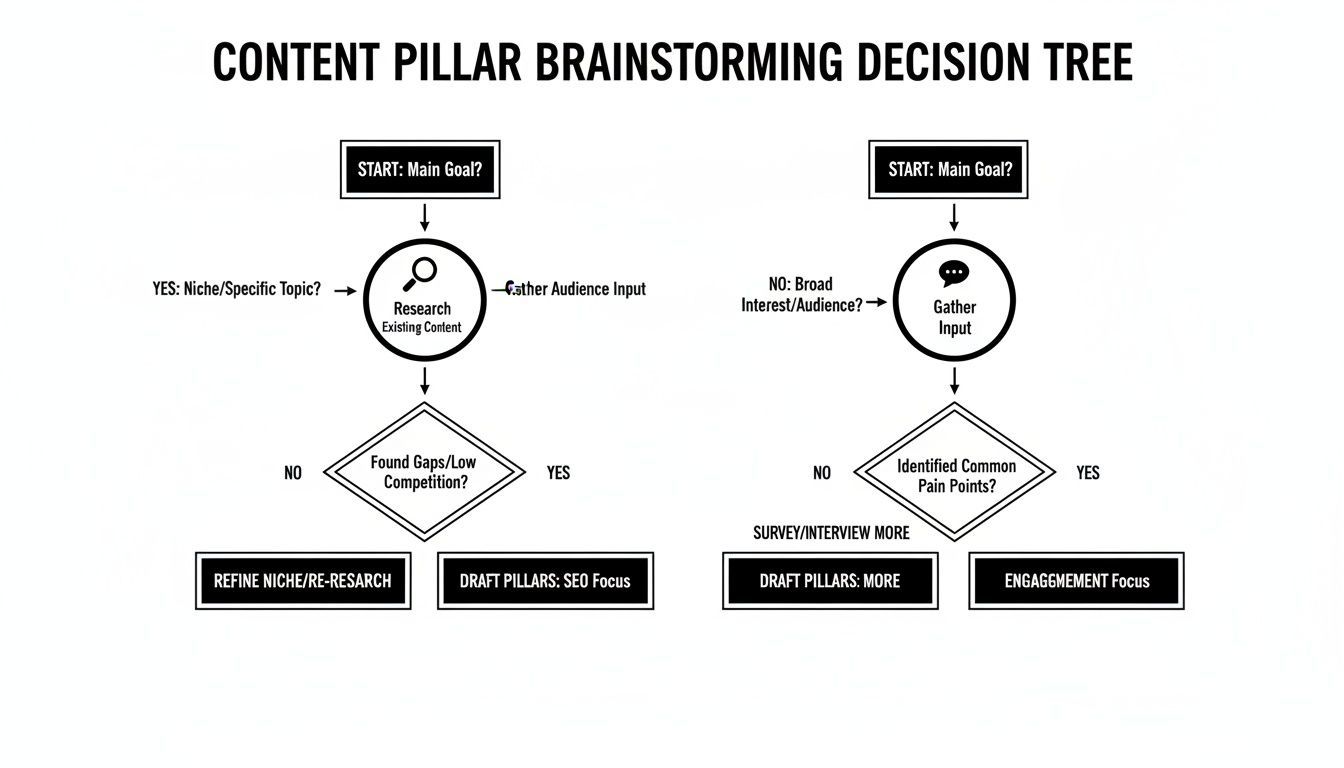
It’s a great reminder that your most powerful content ideas often come from that sweet spot where data-driven insights meet genuine community feedback.
Here are the non-negotiable fields I recommend including in your calendar:
- Publish Date & Time: The exact moment it’s set to go live.
- Topic/Headline: The working title for the content piece.
- Content Format: Is it a blog post, TikTok, Instagram story, or a webinar?
- Channel(s): Where will this be published and promoted? (e.g., Blog, LinkedIn, Twitter).
- Status: A dropdown menu is perfect here. Think
Idea,In Progress,Awaiting Review,Approved, andScheduled. - Primary CTA (Call-to-Action): What's the one thing you want the audience to do next?
- Link to Assets: A direct link to the Google Doc, Figma file, or video draft. No more hunting around for files.
When you centralize all this information, you're not just making a schedule. You're creating a command center that gives anyone on your team a complete, real-time snapshot of your entire content operation.
Time to Execute: Bringing Your Content Plan to Life
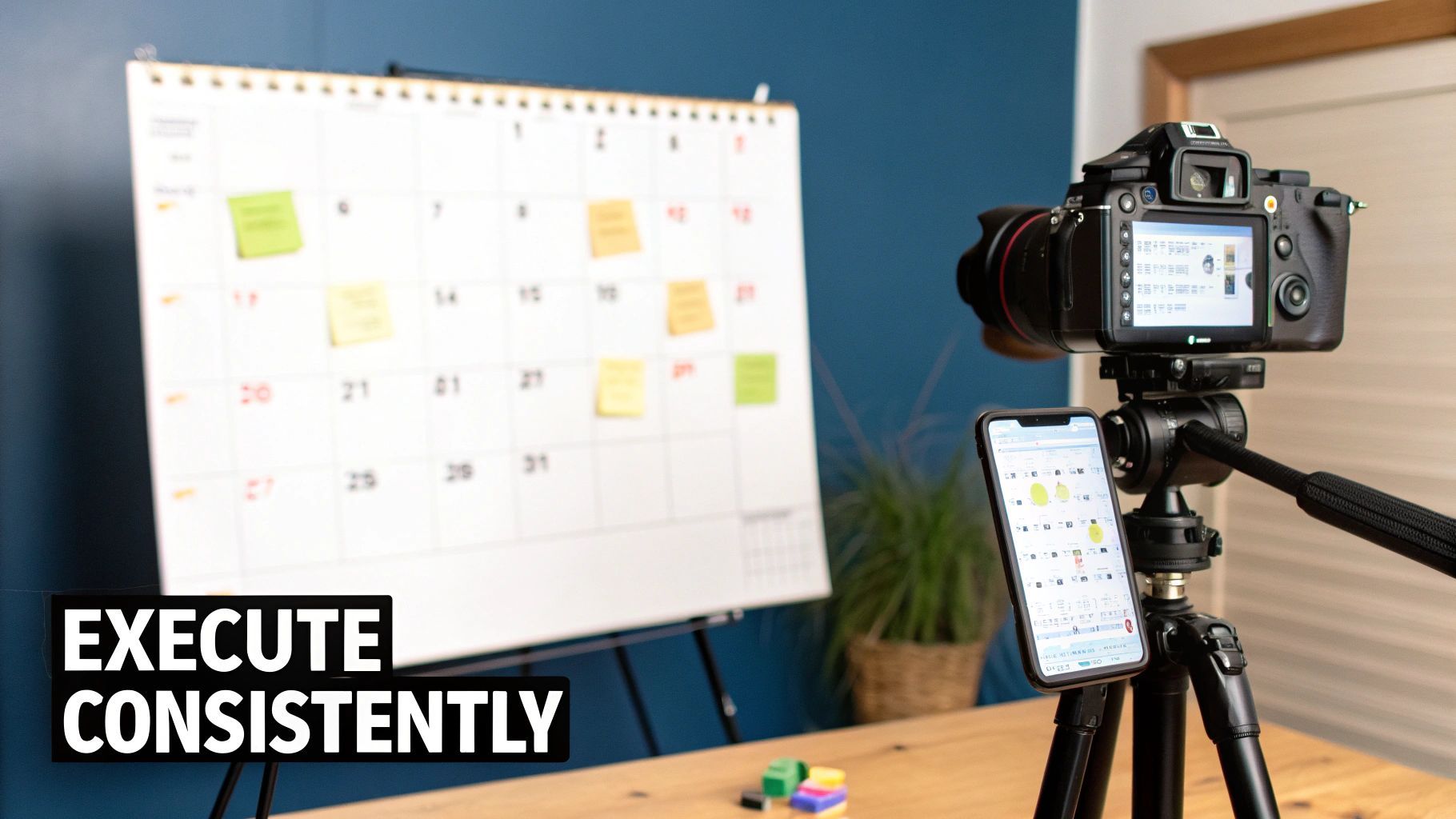
A well-designed content calendar is great, but it’s just a document. Execution is what actually drives results. This is where you move from planning to production, building a system that turns those great ideas into a steady stream of content your audience can count on.
First things first, you need a realistic publishing cadence. It's so tempting to aim for daily posts across every channel, but that's a surefire recipe for burnout. My advice? Start with a schedule you can comfortably manage, even on your busiest weeks. You can always ramp up later.
Trust me, consistency trumps frequency every time.
The Secret to Staying Consistent: Content Batching
One of the best ways I've found to stay on track is content batching. It’s a game-changer. The idea is simple: you block off a chunk of time to create multiple pieces of content at once. So instead of scrambling to film a video every single day, you shoot all of the week’s videos in one go.
Batching builds momentum like nothing else and saves a ton of mental energy. When you focus on a single task—whether it's writing scripts, designing graphics, or editing footage—you get into a state of flow and the work is not only faster, but better.
A simple batching workflow could look something like this:
- Week 1: Brainstorm ideas and create outlines for the entire month's content.
- Week 2: Write all the blog posts, video scripts, and social media captions.
- Week 3: Film all your videos and shoot any necessary photos or custom graphics.
- Week 4: Edit everything, finalize the details, and get it all scheduled.
This turns content creation from a chaotic daily scramble into a structured, predictable part of your work. It’s how the pros maintain a constant presence without losing their minds.
Build a Workflow That Keeps You on Track
Once you have your schedule and batching system down, the final piece of the puzzle is a clear workflow. Think of it as your content’s journey from a raw idea to a published post, all tracked right inside your calendar. Remember those status fields you set up—like Idea, Drafting, Review, and Published? Now's the time to use them.
This visibility is a lifesaver. You can spot bottlenecks long before they derail your schedule and keep everyone on the same page. It also makes your calendar a central hub for coordinating everything, which is especially handy when you need to react to a sudden trend.
A well-executed content calendar is your key to capitalizing on timely opportunities. It ensures you're ready to align your content with major events—whether it's a global moment like the FIFA World Cup or a seasonal buying trend—to maximize your impact and relevance.
This level of planning isn't just a nice-to-have anymore. With global ad spend projected to reach $1.04 trillion in 2026 and online video consumption jumping by 11.5%, a structured calendar is essential for keeping up. These 2026 marketing statistics really drive home why strategic planning is so critical.
By bringing your plan to life with solid systems, you’re not just making content—you’re building a foundation for sustainable growth.
Common Questions About Content Calendars (And Straightforward Answers)
Putting a content calendar into practice always brings up a few questions. Even the best-laid plans hit real-world snags. Let's walk through some of the most common hurdles I see people face and get you some clear, practical answers to keep things moving.
These aren't just hypotheticals; they're the little details that can trip up even the most organized teams. Nailing these things is what makes a content calendar a powerful tool instead of just another spreadsheet you forget to update.
How Far Out Should I Actually Plan My Content?
There’s no single right answer, but a fantastic rule of thumb is to plan one full month in advance. This gives your team enough breathing room to actually create thoughtful content and go through a round of feedback. It’s the sweet spot between planning ahead and being so rigid you can't react to anything new.
Now, for bigger campaigns or seasonal pushes—think Black Friday or a new product launch—you need a longer runway. Start mapping those out three to six months ahead. A layered approach works best here:
- Quarterly: Set your big-picture themes and major goals.
- Monthly: Nail down the specific topics, formats, and hard deadlines.
- Weekly: This is for the final details—finalizing assets, writing captions, and hitting "schedule."
Just remember, a content calendar is a living document. It's meant to be adjusted.
The best content calendars I've ever worked with are dynamic. They provide a solid foundation for your core content but leave space for those spontaneous, trend-driven posts that show you’re paying attention.
What Absolutely Needs to Be in My Calendar?
Okay, let’s talk basics. Every single piece of content on your calendar must have a Publish Date, a clear Topic/Headline, the Content Format (is it a video, a carousel, an article?), and its current Status (like Idea, In Progress, Scheduled). If you don't have these, you just have a wish list, not a plan.
But to really turn your calendar into a command center, you'll want to add a bit more detail. These are the fields that make a real difference in your workflow:
- Target Channel(s): Where is this actually going live?
- Associated Content Pillar: Which of your core themes does this support?
- Primary Call-to-Action (CTA): What’s the one thing you want someone to do after seeing this?
- Links to Assets: A direct link to the Google Doc, Figma file, or video draft. This one is a lifesaver—no more digging through folders.
The more you centralize this information, the less friction you'll have in your day-to-day process.
How Do I Leave Room for Trending Topics?
This is crucial. You can't just be a content robot. My favorite method is the 80/20 rule. Plan and schedule about 80% of your core, evergreen content ahead of time. That leaves 20% of your calendar open as "flex slots."
These empty spots are your secret weapon. They’re where you can jump on a viral trend, react to industry news, or share some great user-generated content without blowing up your entire schedule.
Another great trick is to keep an "idea backlog" or "parking lot" section right in your calendar tool. When a timely idea pops up, just drop it there. When an opportunity arises, you can pull a ready-made idea into one of your flex slots. It’s a way to be spontaneously strategic.
Ready to turn those calendar slots into a steady stream of video content? ShortGenius pulls AI scriptwriting, video generation, and scheduling for multiple channels into one place. It’s time to stop switching between a dozen tabs and just start creating. See how you can build and execute your video content calendar in minutes at https://shortgenius.com.