Mastering Ads: how to brief an ai ad generator for better results

Learn how to brief an ai ad generator for better results with practical prompts, defined goals, and measurable performance boosts.
If you want your AI ad generator to create ads that actually work, it all comes down to one thing: the quality of your brief. A great brief is the secret sauce. It needs to clearly spell out your campaign goals, paint a vivid picture of your target audience, lay down the creative ground rules, and give the AI concrete examples to learn from. This is what separates random, weird outputs from ads that genuinely convert.
Why a Great Brief Unlocks Your AI's Potential
You’ve probably heard the old saying, “garbage in, garbage out.” When you're working with AI ad generators, this isn't just a catchy phrase—it’s a hard truth that directly impacts your return on ad spend. A lazy or vague brief is the fastest way to get generic, low-engagement ads that burn through your budget without ever connecting with your audience.
Think of yourself as a film director. You wouldn't just hand over a camera and say, "make a movie," then cross your fingers for a blockbuster. You’d provide a detailed script, character notes, storyboards, and a clear vision. Your AI needs that exact same level of guidance to do its best work.
The Real Cost of a Poor Brief
Vague prompts don't just produce mediocre ads; they have a real, measurable cost. Every ad that misses the mark is wasted ad spend, a lost conversion opportunity, and a step backward for your brand's message.
The data backs this up, too. Marketers who take the time to write detailed prompts see a 37% boost in purchase intent on their TikTok ads. On the flip side, weak briefs can drag down performance by as much as 17.5%, leaving you with bland visuals that just don't perform.
A well-crafted brief is your most powerful tool for making sure the AI understands not just what to create, but why it's creating it. That strategic input is what turns a simple AI output into a high-performing marketing asset.
The Four Pillars of an Effective AI Ad Brief
So, what does it take to brief an AI ad generator effectively? It all starts with building your request on four foundational pillars. These components give the AI the context it needs, turning a simple command into a powerful, strategic directive.
This framework is your roadmap for guiding the AI toward ads that are not just creative, but also strategically sound and effective.
| Pillar | Why It Matters | Example Input |
|---|---|---|
| Objectives | Tells the AI the purpose of the ad. Is it for clicks, sign-ups, or sales? | "Generate an ad to drive sign-ups for our free webinar on sustainable gardening." |
| Audience | Defines who you're talking to, influencing tone, visuals, and messaging. | "Target urban millennials (25-35) who live in apartments and are interested in eco-friendly hobbies." |
| Constraints | Sets the brand's guardrails—colors, fonts, tone, and things to avoid. | "Use our brand colors (#34A853, #FFFFFF), Lato font, and maintain an upbeat, educational tone. Avoid jargon." |
| Examples | Provides a concrete model for the AI to emulate for style, structure, and messaging. | "Create a 15-second video ad in the style of [competitor ad link], focusing on a quick, satisfying visual of a plant growing." |
Mastering these four pillars is the first and most important step toward getting the most out of your AI ad generator.
To get a better sense of how these tools are changing the game, it's worth exploring the wider trends in AI applications in digital marketing. Understanding the bigger picture helps you see just how critical a solid briefing process is for staying ahead.
Defining Your Campaign Goals and Audience
Before you even think about writing a prompt, we need to lay down a solid strategic foundation. Just telling an AI ad generator to "make an ad for my product" is a recipe for disaster. It’s like setting sail without a map—you'll get something, but it probably won't be what you need. The real trick is learning to translate your marketing strategy into a language the AI can actually work with.
This all starts by getting specific. "Increase sales" isn't a campaign objective; it's a business goal. It’s far too vague for an AI to act on, lacking the detail needed to generate truly effective creative.
From Vague Goals to Specific Directives
A powerful brief hinges on crystal-clear, measurable targets. The AI has to know exactly what you want the viewer to do. We need to think in terms of concrete outcomes tied to a specific product, for a specific audience, on a specific platform.
So, instead of a broad goal like "get more website traffic," your objective should look more like this:
- "Drive qualified leads by hitting a 15% click-through rate to the landing page for our new productivity app."
- "Increase consideration by getting at least 5,000 saves on Instagram for our vegan cookbook promo."
- "Boost conversions by achieving a 20% lift in 'add-to-carts' for our summer skincare bundle."
See the difference? These directives give the AI a clear definition of success. It understands the goal isn't just a passive view but a valuable action. This clarity directly impacts the kind of hooks, visuals, and CTAs it will suggest.
Building an Audience Persona the AI Understands
You already know your audience is important, but a generic description just won't cut it here. You have to build a detailed persona that goes way beyond basic demographics. An AI can't do much with "women, 25-40." That's way too broad and gives it zero creative direction.
Your job is to paint a vivid picture of one ideal customer. Get into their head with psychographics—what do they value? What are their interests? What keeps them up at night? More importantly, what’s the big frustration your product can solve for them?
A great persona tells the AI not just who the customer is, but what motivates them. This psychological context is the key to generating ads that feel personal and resonant, rather than generic and intrusive.
To really nail this, you should be pulling insights from everywhere. Understanding what people are saying online is a goldmine, and using advanced AI social listening tools can help you tap into the exact language your audience uses, revealing their pain points and desires straight from the source.
A Practical Persona Checklist for Your Brief
When briefing your AI, don't just describe your audience—introduce them. I always use a checklist to make sure I’m giving the AI a complete profile that can inform every creative decision it makes.
Example Persona: "Sustainable Sarah"
- Demographics: Female, 28, living in an urban apartment in Austin, TX. She works in tech marketing.
- Psychographics: Deeply eco-conscious, values ethical sourcing, and leans toward minimalism. She follows zero-waste influencers and loves shopping at local farmers' markets.
- Pain Points: She feels a constant guilt about the plastic waste from everyday products. She also finds it incredibly time-consuming to research truly sustainable alternatives that actually work well.
- Online Behavior: Spends her downtime on Instagram and TikTok, saving content about sustainable living, DIYs, and plant-based recipes. She puts more trust in micro-influencers than big, faceless brands.
- Media Consumption: Listens to podcasts about climate change and entrepreneurship. She responds to authentic, user-generated content (UGC), not polished, corporate-style ads.
Framing your audience this way gives the AI a rich character to write for. It can immediately infer the right tone (educational, not preachy), the best visual style (authentic, not slick), and the most powerful message (convenience without compromise). This level of detail is absolutely non-negotiable if you want to get better results from your AI ad generator.
Crafting Prompts That Actually Work
Alright, you've done the strategic heavy lifting. Now for the fun part: telling the AI what you actually want it to create. This is where your strategy becomes a tangible set of instructions. A well-written prompt is the single most important lever you can pull to get high-quality, on-brand creative instead of something generic and unusable.
Think of it this way: your strategy is the "why" and "who," but the prompt is the "what" and "how."
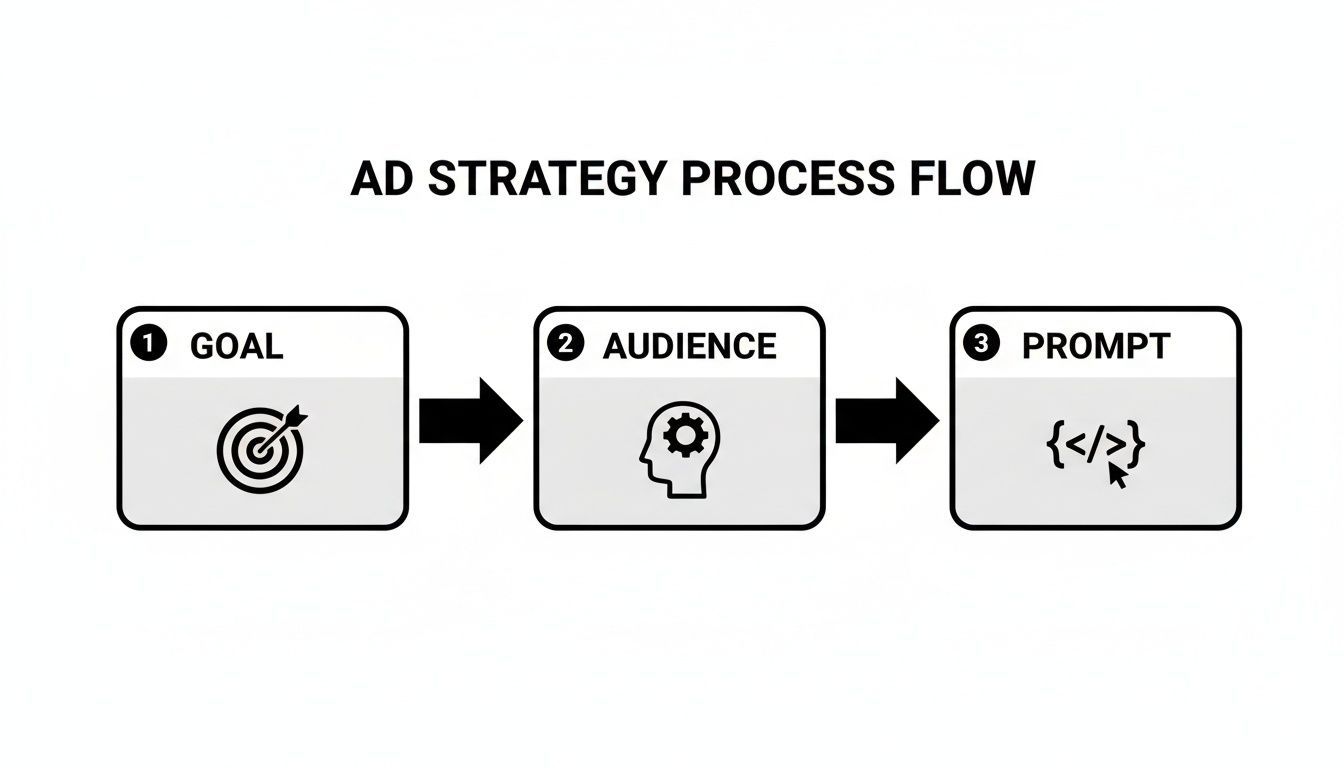
This simple flow chart really drives the point home. A great prompt isn't pulled out of thin air; it’s the direct result of having a clear goal and a deep understanding of your audience.
The Anatomy of a World-Class AI Ad Prompt
I like to think of a prompt as a recipe for a great ad. If you leave out a key ingredient, the whole thing falls flat. To get consistent results, you need to include a few non-negotiable components that give the AI a complete picture.
Here’s what every single one of my briefs contains:
- Objective: What's the one thing you want the viewer to do? Be specific.
- Audience: Who are you talking to? Pull directly from the persona you built.
- Core Message: In one sentence, what’s the key takeaway or benefit?
- Tone of Voice: How should the ad feel? What personality are you aiming for?
- Visual Style: What's the look and feel? Think colors, camera angles, and overall aesthetic.
- Call-to-Action (CTA): What are the exact words that will get them to click?
- Negative Constraints: What should the AI absolutely not do? This is just as important.
Covering these bases removes the guesswork. You're no longer hoping for a good result; you're engineering one by aligning the AI's creative engine with your business goals.
From Core Message to Visual Execution
Let’s get practical. The core message is your ad's North Star, but the tone and visual style are what make it connect with real people on a specific platform.
Imagine we're marketing a new project management tool. Our core message is simple: "Organize your team's chaos in minutes." How we bring that to life for LinkedIn versus TikTok is a night-and-day difference.
Scenario 1: The Polished Brand Ad for LinkedIn
For a sleek, professional video ad targeting seasoned project managers on LinkedIn, the prompt needs to scream competence and efficiency.
Power Prompt: Polished Brand Ad
Objective: Drive sign-ups for our 14-day free trial. Audience: Project managers (30-45) at mid-sized tech companies, drowning in Slack messages and email chains. Core Message: "Our tool is the single source of truth that ends project chaos." Tone of Voice: Confident, professional, and straight to the point. Visual Style: Clean, minimalist aesthetic. Feature on-screen graphics showing our clean UI. Use our brand palette (#1A2B4C, #FFFFFF, #4ECDC4). Show calm, focused professionals collaborating effectively. CTA: "Start Your Free Trial." Negative Constraints: Absolutely no stock photos of people in suits high-fiving. Avoid empty jargon like 'synergy' or 'paradigm shift'.
This prompt leaves nothing to chance. The AI knows the goal (trial sign-ups), understands the audience's pain point (chaos), and has precise instructions on the visual and tonal language needed to build trust.
Adapting Your Brief for Different Platforms
Now, let's take that same product and core message and flip it for an entirely different world: TikTok. The audience is younger, the vibe is faster, and authenticity is everything. Your LinkedIn brief would be a spectacular failure here.
We have to completely reimagine the execution while holding onto the core strategy. This means writing a prompt that speaks the language of user-generated content (UGC).
Scenario 2: The UGC-Style Ad for TikTok
Here, we want to create something that feels like a real user sharing a life-changing hack. The prompt has to shift from polished and professional to personal and raw.
Power Prompt: UGC-Style TikTok Ad
Objective: Generate awareness and drive app installs among younger teams. Audience: Startup founders and team leads (22-30) who are digital natives and allergic to corporate-speak. Core Message: "This is the app that finally got our team on the same page." Tone of Voice: Relatable, a little chaotic, but ultimately relieved. Use casual, conversational language—internet slang is okay. Visual Style: Shot vertically, smartphone-style. Show a realistic (aka slightly messy) desk setup. Use quick cuts, a trending audio track, and bold on-screen text captions highlighting the frustrations and then the solution. CTA: "Download now and thank me later." Negative Constraints: No polished graphics or professional voiceover. Do not show a pristine, fake office. Keep it real.
See the difference? This detailed brief stops the AI from defaulting to a generic corporate ad. By specifying things like "shot vertically on a smartphone" and a "relatable, slightly chaotic tone," you guide it to produce something that feels native to the TikTok feed. This level of detail is how you get consistently high-performing creative, every single time.
Using Advanced Briefing Techniques
Once you've nailed the fundamentals, it's time to graduate from single prompts and start thinking like a seasoned performance marketer. Advanced briefing isn't about chasing one perfect ad; it's about building a system for rapid, continuous improvement. This is where you really let the AI's speed work for you, allowing you to test, learn, and iterate faster than ever before.
The core idea is to shift your mindset. Your AI ad generator isn't just a content creator; it's a strategic partner. You can direct it to build entire testing frameworks, spin up cohesive multi-part campaigns, and even learn from your past performance data. This is how you turn a simple briefing process into a powerful growth engine.
Briefing for High-Velocity A/B Testing
We all know A/B testing is essential for optimization, but let's be honest—manually creating all those distinct variations is a massive time sink. This is a perfect job for AI. Instead of just asking for one ad, you can brief the AI to become your dedicated testing lab, churning out targeted variations at scale.
The trick is to be laser-focused on the variable you want to test. Isolate a single element—the hook, the call-to-action, the main value prop—and tell the AI to keep everything else the same. This scientific approach is what gives you clean, actionable results.
For instance, a prompt could look like this:
- "Generate five 15-second TikTok ad scripts for our meditation app. Keep the core message and visual style consistent, but write a completely different hook for each one. Base the hooks on these five angles: stress relief, improved focus, better sleep, scientific backing, and a limited-time offer."
With one prompt, you get a complete testing matrix. You’re not just getting random ideas; you're getting a structured set of creatives designed to tell you exactly which emotional trigger resonates most with your audience.
Using Performance Data to Inform New Briefs
Your most valuable asset for writing future briefs is your past performance data. Stop starting from a blank slate every time. Feed the AI context from your winning (and losing) campaigns to guide its creative direction. This creates a powerful feedback loop where every ad you generate is smarter than the last.
Start by digging into your ad metrics. Which hooks had the highest thumb-stop rate? What CTAs actually drove clicks? This data is the foundation of your next prompt.
By referencing concrete performance metrics in your brief, you anchor the AI's creativity in proven results. This moves you from guessing what might work to building upon what already does.
Here’s what that looks like in practice:
Before (Vague Prompt): "Create a new ad for our eco-friendly cleaning spray."
After (Data-Informed Prompt): "Our last campaign showed that UGC-style videos with a 'before and after' cleaning shot had a 30% higher click-through rate than our lifestyle ads. Generate three new ad concepts that lead with a quick, satisfying 'before and after' visual. Make sure to emphasize the product's non-toxic ingredients, as that was a key theme in our highest-engagement comments."
The second prompt gives the AI specific, data-backed guardrails, dramatically increasing the odds of producing another winner right out of the gate.
Crafting Cohesive Ad Series and Storytelling
Single ads are great for getting a quick response, but building real brand affinity often requires a narrative. You can brief your AI to think sequentially, creating a series of ads that tell a bigger story or build on each other over time.
This technique is perfect for things like remarketing campaigns or building buzz for a product launch. You map out the story arc first, then instruct the AI to generate the creative for each individual phase.
Example Ad Series Brief
- Ad 1 (Problem/Awareness): "Generate a 10-second ad highlighting the frustration of using slow, clunky project management software. End it on a cliffhanger that teases a better way."
- Ad 2 (Solution/Introduction): "Now, create a follow-up ad that introduces our tool as the solution to the problem in Ad 1. Focus on its speed and intuitive design."
- Ad 3 (Social Proof/CTA): "For the final ad in the series, generate a script for a montage of user testimonials and showcase a special offer for new sign-ups. Make sure it references the journey from frustration to relief."
This approach transforms your advertising from a string of one-off messages into a compelling story that actually guides your audience down the funnel. Mastering these advanced briefing techniques is how you truly unlock the strategic power of an AI ad generator and get far better, more consistent results.
Getting the Most Out of ShortGenius

General prompting advice is a great starting point, but to really make an AI ad generator sing, you have to learn its specific language. The ShortGenius platform isn't just a black box; it's packed with tools designed to turn your strategy into high-performing creative. Knowing how to use them is the secret to getting exceptional results.
This is where you move beyond just hoping for a good ad and start engineering one. It's about using the system's built-in advantages for maximum efficiency and impact.
Start with Your Brand Kit
Before you even think about writing a prompt, make the Brand Kit your first stop. Seriously. This feature is your first line of defense against off-brand creative. Take a few minutes to upload your logos, color palettes, and fonts.
Think of it as the foundational layer of every single brief you'll ever write. It tells the AI, "No matter what else I ask for, this is who we are." This one-time setup is a game-changer, saving you hours of manual tweaking and ensuring brand consistency is baked into every ad.
Choose the Right AI Model for Your Goal
Not all ads serve the same purpose, and ShortGenius gets that. The platform offers different AI models, each one fine-tuned for specific campaign objectives. This is one of the most critical decisions you'll make, as it directly shapes the style and structure of your ad.
For a direct-response campaign that’s all about clicks and conversions, the Performance Model is your best bet. It’s built to prioritize clear value props, strong hooks, and direct calls-to-action.
But what if you're trying to build awareness or tell a bigger story? Switch over to the Brand Model. This model is designed for more cinematic visuals and narrative-driven scripts, focusing on creating an emotional connection rather than driving an immediate click.
Choosing the right model is like picking the right tool for the job. You wouldn't use a hammer to turn a screw. Matching the AI model to your campaign goal from the start ensures the final creative is built for its intended purpose.
Weave Platform Features into Your Prompts
This is where you get to pull the specific levers that make ShortGenius so powerful. The platform has a library of proven visual effects and styles you can call out by name right in your prompts. Instead of a vague request like "make it eye-catching," you can give precise, actionable commands.
Here’s how you can incorporate these presets into your next brief:
- Scroll Stoppers: Instead of just asking for a strong hook, try this: "Kick off the ad with a Glitch Transition Scroll Stopper to grab attention instantly." The AI knows exactly what to do.
- Surreal Effects: For a more abstract or mind-bending ad, brief the AI to "Showcase the product in a dreamlike environment using the Floating Objects surreal effect."
- Voiceover Styles: Don't just ask for a "friendly voice." Be specific with the platform’s options. For example: "Write a script designed for a Calm & Meditative voiceover to create a relaxing atmosphere."
By referencing these built-in features, you're speaking the AI's native language. It removes the guesswork and is the key to getting predictable, high-quality creative every single time.
Got Questions About Briefing AI? We've Got Answers.
Even with a solid plan, you're going to have questions when you start working with an AI ad generator. That’s perfectly normal. Getting the hang of it takes a little experimentation, but knowing the answers to a few common sticking points will get you there much faster.
Let's walk through some of the questions that come up most often when people start folding AI into their creative process.
How Specific Should I Be? Am I Stifling the AI's Creativity?
This is the classic balancing act. You want to be prescriptive, not restrictive. The trick is to give the AI firm guardrails for the non-negotiables but leave it plenty of room to play and come up with something unexpected.
Think of it like commissioning an artist. You'd tell them the size of the canvas, the color palette, and the subject matter, but you wouldn't dictate every single brushstroke.
Instead of writing out an entire script, focus on the strategic goal. For instance: "Give me a witty, 15-second UGC-style ad script for busy professionals. The key is showing how our product saves them 30 minutes every day." This nails down the tone, audience, and benefit, but lets the AI figure out the best way to say it.
What if the First Ad Is Just… Wrong?
Don't hit the delete button just yet. Think of that first output as a rough draft. Your job is to figure out why it missed the mark. Was the tone off? Did it misunderstand the audience? Did the visual idea feel completely disconnected from your brand?
Use that insight to make your next prompt better. If the first ad was way too corporate and stuffy, your next brief should explicitly ask for a "humorous and informal tone." Most good tools, including ShortGenius, let you tweak individual parts of the ad—like swapping out a scene or regenerating a voiceover—so you don't have to start over from square one.
How Can I Use AI to A/B Test Ads?
This is where AI really shines. You can get test variations incredibly fast, but the secret is to be crystal clear in your prompt. You need to tell the AI to change only one specific element while keeping everything else exactly the same. That’s how you get clean, reliable test results.
Here’s what a good A/B testing prompt looks like:
- "Create three different 10-second video hooks for our new productivity app."
- "The core message, visuals, and call to action must be identical in all three versions."
- "I want to test different psychological triggers: one hook should use FOMO, another should use social proof, and the last one should hit on a specific pain point."
This gives you three distinct, highly testable options ready for your ad campaign.
Can I Tell the AI About My Past Campaigns?
Yes, you absolutely should! This is a more advanced move, but it's incredibly powerful. When you feed your past performance data into the brief, you're creating a feedback loop that trains the AI on what actually resonates with your audience.
For example, you could write a prompt like: "Our last campaign showed that ads with a product demo got a 25% higher CTR than ads with lifestyle shots. Generate three new ad concepts for millennial gamers that lead with a fast, engaging product demo." You're literally using your past wins to set up your future success.
Ready to put all this into practice? ShortGenius has everything you need to turn a sharp brief into ads that actually perform—from a brand kit that keeps you consistent to AI models built for specific goals. Stop guessing and start creating smarter. Head over to https://shortgenius.com and see what a difference a great brief can make.