Can You See Who Views Your TikToks?

Wondering can you see who views your TikToks? Discover real answers on view tracking, creator analytics, profile visits, and how to safeguard against scams.
If you’re curious about whether TikTok lets you peek at who’s viewing your posts, the short story is: you can’t. The platform only hands out aggregate data like total views and profile visits, not individual names. Read on to learn which numbers TikTok reveals and where to find them.
Explore TikTok View Metrics

- Video Views: Totals how many times a clip has been played.
- Profile Views: Shows unique visits to your profile over the past month.
- Interactions: Logs likes, comments, duets and stitches to measure engagement.
You’ll find all of these under Creator Tools → Analytics with just a couple of taps on your profile.
Key Takeaway: Viewer identities stay hidden to protect privacy.
For example, open the Analytics tab and tap “Content” to see day-by-day trends. This can highlight sudden spikes right after you post a new video.
- Trends quickly reveal which topics drive the most profile traffic.
TikTok’s anonymity encourages people to browse freely. Use these insights to sharpen your content strategy.
Quick View Summary
Before diving deeper, here’s a side-by-side of what you can see on TikTok versus what remains anonymous.
| Feature | Visibility | Details |
|---|---|---|
| Video Views | Public Count | Total plays per video |
| Profile Views | Creator-Only Count | Unique visits in the last 28 days |
| Viewer Identities | Not Shared | Specific names are kept anonymous |
Keep this table handy as a quick reference when you’re reviewing your TikTok stats.
Understanding How TikTok Tracks Views
TikTok’s view counter works like a traffic monitor on a busy highway. Each play longer than three seconds counts as a view, but the system doesn’t record who pressed play.
This three-second rule keeps view counts honest—anything shorter simply won’t register. When Creator Analytics arrived in early 2020, it brought these totals into focus, yet individual usernames remained off the dashboard.
"TikTok counts views like cars passing by, focusing on flow not faces."
How Creator Analytics Informs Strategy
Aggregate metrics give creators a birds-eye view without revealing personal data. You’ll find total plays, watch time, and profile visits laid out in one place.
Imagine a recipe channel spotting a sudden jump in dessert video watch time—naturally, they’ll lean into more sweet treats. These insights shape post timing and content themes while keeping viewer identities private.
- Video Views: plays over 3 seconds
- Analytics Data: watch time and engagement
- Profile Visits: unique daily explorers
Key View Count Benchmarks
Without names attached, creators rely on percentages to measure success:
- 10–20% view rate indicates healthy growth
- 4–10% overall engagement rate
- Like-to-view ratio: 5–10% (platform average 4%)
- Viral hits usually hit 5–7% like-to-view, even at billions of views
- Small accounts (<5K followers): 4%+ engagement
- Mid/Large accounts: 3.7–3.9% engagement
- Outstanding engagement: 8–10%
Reach tends to shrink as follower counts grow:
- Under 5K followers: 43% reach
- 200K–1M followers: 4% reach
Brands battling under 2% engagement account for 22% of struggles, despite heavy ad impressions.
Combine these benchmarks with your posting schedule and engagement trends to boost visibility. Read more about how views are counted at darvideo.tv.
Difference Between Video Views And Profile Views
TikTok separates two key signals: the moments someone presses play and when they decide to peek behind the curtain. Understanding both is essential to gauge real interest in your content.
- Video Views count every play that lasts at least three seconds.
- Profile Views track unique visits to your TikTok profile.
- Viewer names stay anonymous in both reports—you see only totals, not identities.
Think of video views as passersby peeking through your shop window. Profile views are the ones who actually step inside.
Key Insight: Video views are window gazers; profile views are potential shoppers.
Video Views Vs Profile Views Table
Below is a side-by-side look at what each metric tells you:
| Metric | What It Shows | Viewer Identity |
|---|---|---|
| Video Views | Total plays per clip | Anonymous totals |
| Profile Views | Unique visits to your profile page | Anonymous counts |
Understanding this table helps you see why both numbers matter when you’re building an engaged following.
Insights From The Numbers
Even though TikTok keeps individual viewers anonymous, aggregated data shines a light on audience behavior. Post-2021 updates made profile analytics more privacy-friendly, but still packed with value. Here’s what benchmarks from 2025 reveal:
- Small accounts (<5K followers) average 43 views per 100 followers each video.
- Mid-tier creators (5K–50K followers) hit 15–25% reach, with profile spikes at Sundays at 8 PM.
- Zach King’s “Magic Ride” video surpassed 2.3 billion views by January 2025, funneling millions to his profile.
Learn more about view rate benchmarks on Shortimize
Combine video and profile data to refine your posting schedule, content style, and promotional tactics.
You might also find our guide on creating AI UGC ads with ShortGenius handy for boosting engagement and driving more visits to your profile.
Tip: Watch your window shoppers and store entries together for the clearest picture.
- Compare window clicks to store foot traffic.
- Spot high-interest trends before they fizzle out.
How To View Profile View Analytics
Think of your profile view analytics as a heatmap showing where people linger on your content. It doesn’t call out names, but it gives you a sense of who’s curious enough to click through. Like watching foot traffic in a storefront, these stats set the stage for your next move.
First, fire up the TikTok app and tap the profile icon at bottom right. You’ll see a three-line menu—tap it, then select Creator Tools.
- Open Analytics: Within Creator Tools, choose Analytics.
- Select Profile Views: This reveals your visitor count.
- Toggle Timeframes: Switch between 7-day and 28-day views.
- Spot Daily Patterns: Check each day’s tally.
- Note Totals: Track your overall profile visitors.
Once you’re in, you can dive deeper by flipping through those time windows. You might discover your profile gets a midday bump or an evening surge. Those patterns help you decide when to drop new content.
For instance, you might see a 50% spike in profile views right after a viral post. That’s your cue to keep the momentum rolling.
The infographic below maps out how Video Views, Profile Views, and Insights interconnect.
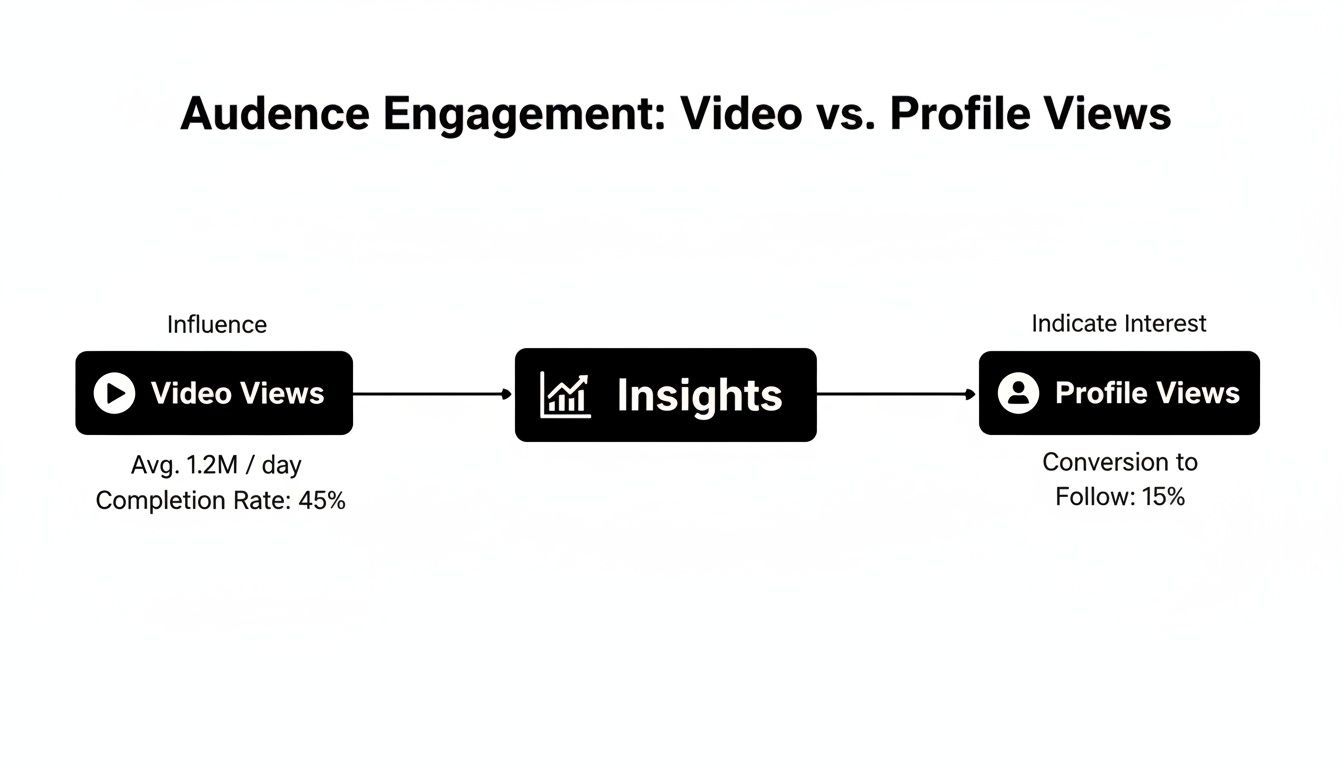
This concept map reveals how profile visits often trail view surges, highlighting the moments where deeper analysis pays off.
Tips For Interpreting Trends
Daily and weekend rhythms can look very different. A Monday jump often signals fresh interest after the weekend, while those weekend peaks tend to be casual users browsing around.
- Compare Posting Days: Match your posts to when followers are most active.
- Watch For Viral Echoes: A breakout video can send a 30–70% lift in profile views within 24 hours.
- Contextualize With Content: Pinpoint which themes or hashtags fuel each spike.
Don’t overlook the dips. A 20% dip before a planned series launch can be a red flag—time to tweak your strategy or shift your messaging.
Next Steps For Beginners
New to analytics? Start with a simple routine and let it grow into a habit. Over time, you’ll transform raw numbers into clear, actionable steps that boost engagement.
- Schedule A Weekly Review: Block time every Monday to export or screenshot your Profile Views stats.
- Experiment With Timing: Test different posting slots based on your audience’s peak hours.
- Track Your Progress: Jot down notes on what worked, then refine your approach.
By turning these insights into action, you’ll build a smarter posting strategy and keep your community coming back for more.
Using Creator Tools for Aggregate Metrics
When you dive into TikTok’s Creator Tools dashboard, it’s like opening a control room full of performance data.
Right now, TikTok only shares aggregate data—you won’t see individual usernames. Instead, you get insights in panels such as:
- Video Views: Counts plays over three seconds
- Watch Time: Totals all seconds watched
- Audience Demographics: Breaks down age and location
- Follower Growth: Shows new followers gained
- Engagement Rate: Tracks likes, comments, and shares
“Creators thrive when they combine view totals with audience patterns to guide content choices.”
Reading Audience Charts
Start by studying the Audience Demographics chart to identify your primary age brackets. For example, a travel blogger may find that 35–44 year olds dominate their views, while dance routines draw mainly 16–24 year olds.
Next, switch to the location map. Seeing which countries engage most can influence your hashtag strategy and posting schedule.
- Open Creator Tools and tap Analytics, then Followers
- Scroll to Audience Demographics for the age breakdown
- Tap the map icon to see your top countries
A lifestyle creator once used this exact method to adjust posting times—and saw a 20% lift in views overnight.
TikTok protects viewer privacy by never naming individuals; you only receive summed-up figures like total views and profile visits. For a deeper dive into these trends, check TikTok Statistics Research on Proxidize.
Applying Insights To Content Plan
Turn your data into an action plan by aligning posts with peak audience activity.
- Visit the Overview tab to spot your highest-engagement days and hours
- Schedule new videos during those windows
- Experiment with formats or topics that hit above a 6% engagement rate
Check out our guide on How Much Does TikTok Pay to factor monetization into your strategy.
| Metric | Action Suggestion |
|---|---|
| Video Views | Post during peak audience windows |
| Watch Time | Craft compelling first few seconds |
| Audience Demographics | Adjust content to top age groups |
| Engagement Rate | Add clear calls-to-action |
Regularly circling back to these panels keeps your content fresh and aligned with what your viewers love. Keep experimenting, and you’ll dial in a TikTok strategy that consistently hits the mark.
Risks Of Third-Party Apps And Scams

It’s tempting to install a nifty tool promising to reveal who peeked at your TikToks. But most of these “helpers” are traps in disguise. They lure you in with flashy previews and then ask for your login details.
• False “unlock” buttons that redirect you to phishing pages
• Prompts claiming to offer analytics but harvesting your data
• Suspicious URLs designed to look like TikTok’s official site
One bogus service might sport a polished layout yet live on a domain such as tiktok-viewers dot com, hoping you won’t spot the difference.
How To Spot Fake Tools
Keep an eye out for tiny typos in web addresses or unexpected requests for your two-factor codes. If a tool demands more than your username and password, treat it as a red flag.
“Never share your password or security code with unverified tools.”
• Verify official TikTok feature pages in your app’s settings
• Never hand over your login credentials or 2FA codes
• Stick to analytics inside Creator Tools on the TikTok app
You may also find our guide on AI ad generation with ShortGenius handy when planning your next campaign.
Security Best Practices
Protecting your TikTok starts with simple habits.
1. Regularly update the TikTok app to patch vulnerabilities.
2. Review active sessions under Settings & Privacy and end any unknown logins.
3. Use unique passwords and manage them with a reliable password manager.
Staying alert to phishing tactics will keep you from falling for promises of viewer lists that don’t exist.
Tip: Always look for HTTPS and the browser lock icon before entering credentials, and never trust unknown sites without confirming them in the official app.
Frequently Asked Questions
Many creators ask: Can I see who viewed my TikToks? And how long does TikTok keep view data? Below, we cut through the chatter and explain exactly what you can—and can’t—see in your analytics.
No Individual Names
TikTok keeps every viewer anonymous. You’ll only get aggregate video counts and profile visit numbers, never a list of usernames.
Storage Windows
In TikTok’s Creator Tools, view metrics span 7-day and 28-day windows. Profile view alerts stick around for 30 days. After that, the detailed breakdowns vanish and only lifetime totals remain.
Data Retention Periods
Engagement vs. Views
A video view registers any play over three seconds. Engagement tracks likes, comments, shares, duets, and stitches. Together, they reveal both reach and the depth of interaction.
- Video plays: logged after the three-second mark
- Profile visits: counted daily for 30 days
- Lifetime views: always visible on each post
Beware Third-Party Apps
External tools promising to show individual viewers often collect your login or send phishing links. Your safest bet is sticking with the official Creator Tools inside the TikTok app.
“Aggregate numbers protect privacy while still guiding content strategy.”
Tips For Secure Analytics
- Keep your analytics toggles within the app
- Always verify URLs before entering credentials
- Protect your account with two-factor authentication
Pro tip: Export your analytics snapshot weekly. That way, you capture trends that might disappear after TikTok’s built-in windows.
Get more video insights and streamline ad creation with ShortGenius