AI Video Generator for YouTube: A 2026 Workflow

Learn a hands-on workflow using an AI video generator for YouTube. This guide covers scripting, voiceover, visuals, editing, and publishing for 2026.
You're probably doing some version of this right now. One tab has a half-finished script. Another has stock footage that almost works. Your editor timeline is open, but the voiceover still isn't recorded, the captions aren't cleaned up, and you already know the thumbnail will become its own separate task.
That's the old YouTube bottleneck. Not creativity. Coordination.
The reason creators are searching for an ai video generator for youtube isn't that they want a magic button. It's that they want one workflow that turns an idea into a publishable video without bouncing across five disconnected tools and losing quality every time they switch context.
Beyond Burnout The New YouTube Creator Workflow
The part that drains most creators isn't filming. It's the constant handoff between planning, scripting, voice, visuals, editing, packaging, and repurposing. Every stage creates delay. Every delay kills consistency.
AI helps when you stop treating it like a novelty and start treating it like production infrastructure.
Why this changed recently
YouTube itself made the shift obvious. In 2024, YouTube integrated conversational AI for viewers and launched Dream Track for creators to generate AI soundtracks. In the same broader shift, a study of 274 how-to videos found that 17.9% used GenAI to animate static images and 6.9% used AI to select stock footage from scripts, showing that AI had already moved deep into real creator workflows, not just experiments, as described in YouTube's 2024 AI recap.
That matters because the platform is no longer treating AI as something external. It's part of the viewing layer, the creation layer, and the creator habit loop.
What actually works
The useful mental model is simple. Don't replace your channel with AI. Replace the repetitive parts of production with AI.
That means using AI to:
- Structure the first draft so you're not starting from a blank page
- Generate temporary or final narration so pacing gets tested early
- Create scene options fast before you commit to one visual direction
- Handle mechanical edits like captions, trims, resizing, and repackaging
What doesn't work is handing a vague topic to a tool and publishing whatever comes back.
Practical rule: AI is excellent at acceleration and weak at taste. You still need to decide what the video is trying to say, who it's for, and what should happen in the first 15 seconds.
The creators who benefit from this aren't necessarily using the fanciest models. They're using a tighter system. One script feeds the voice. The voice drives the scene list. The scene list informs the edit. The edit becomes the long-form upload and the Shorts cutdowns.
This is the upgrade. Less fragmentation. More output you can ship.
How to Build Your AI Production Studio
A lot of channels lose time before the edit even starts. The script lives in one app, the voiceover in another, the visuals in a third, and every handoff creates drift. Lines get rewritten after narration. Scene timing stops matching the audio. Someone exports the wrong aspect ratio and now the short-form cut needs to be rebuilt.
The fix is to choose your production system before you choose individual tools.
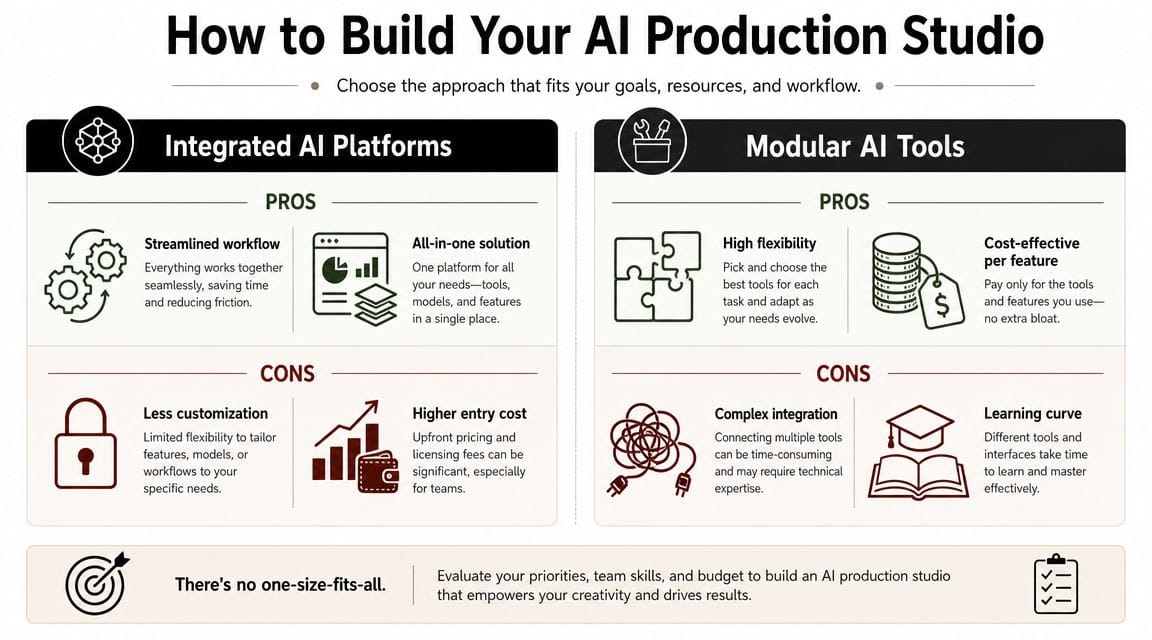
Integrated platform or modular stack
There are two setups that make sense.
An integrated platform fits creators who want one workflow for scripting, voice, scene generation, editing, captions, resizing, and publishing. The biggest advantage is continuity. One project file carries the intent from start to finish, which usually means fewer manual fixes and more consistent output across a series.
A modular stack fits creators who care more about control than speed. You can pair a strong writing model with a separate voice engine, a dedicated image or video model, and a timeline editor you already trust. That freedom is useful, but it comes with overhead. You spend more time on exports, file naming, prompt consistency, and keeping revisions synced across tools.
The actual choice is operational:
- Integrated platform is better for repeatable production, delegation, and keeping script, voice, and visuals in one chain.
- Modular stack is better for custom workflows, higher creative control, and creators who are willing to manage more moving parts.
What the market looks like now
You no longer need a large budget to test an AI video workflow. Zapier's review of AI video generator pricing and options shows a market with low-cost entry points, free tiers, and bundled access across several well-known tools.
That changes the buying decision. Price is often not the first problem. Workflow friction is.
I usually tell creators to find the stage where production keeps breaking. If scripts take too long, fix writing first. If narration sounds flat, fix voice first. If the edit gets messy because assets arrive from five places, fix the system instead of adding another tool.
A practical way to choose
Use four checks before you commit to any setup:
-
Does one input drive the rest of the pipeline?
The strongest workflows start with a script or outline that also informs the voiceover, shot list, and edit timing. -
Can you turn one project into multiple formats without rebuilding it?
Long-form, Shorts, and platform variants should come from the same source project whenever possible. -
Can you keep the channel recognizable across videos?
Voice style, captions, pacing, transitions, and visual framing should stay consistent without manual cleanup every time. -
Can someone else step into the workflow?
If a contractor or editor needs a two-hour explanation just to locate assets, the setup is too fragile.
For teams and solo creators who care about clipping and redistribution, this breakdown of AI for repurposing content is useful because it treats repurposing as part of the production system, not a separate marketing task.
That unified view matters. The best AI studio for YouTube is not the one with the most features. It is the one that keeps script, voice, visuals, edit, and repurposing connected so each step strengthens the next instead of resetting it.
Crafting Scripts That Sound Human with an LLM
A weak script creates expensive problems later. Bad pacing gives you bad voiceover. Bad voiceover gives you awkward scene timing. Awkward timing makes the edit feel fake, even if the visuals look good.
The fix isn't “use AI to write the whole thing.” The fix is direct the model like an editor.
Start with structure, not polish
Ask the model for a YouTube-ready structure first. Hook, promise, explanation beats, examples, payoff, and CTA. Don't ask for final wording on the first pass.
Then rewrite the brief before you rewrite the script.
A good brief usually includes:
- Audience such as beginner creators, B2B marketers, or faceless channel operators
- Outcome the viewer wants by the end
- Tone like sharp, calm, skeptical, fast-paced, or educational
- Length target expressed qualitatively, such as “tight 6 to 8 minute pacing” without forcing exact word counts
- Visual intent so the model naturally writes with scene changes in mind
The best prompt isn't the longest one. It's the one that gives the model a clear audience, a clear outcome, and a clear voice.
Use revision passes with one job each
Most robotic scripts happen because creators ask for too much at once. Don't request “make it engaging, short, smart, funny, SEO-friendly, and viral.” That creates mush.
Use separate passes:
- First pass for outline
- Second pass for opening hook options
- Third pass for natural spoken phrasing
- Fourth pass for trimming repetition
- Fifth pass for visual cues and scene prompts
If you're choosing a model for this work, it helps to compare LLM models for publishers based on writing style, instruction-following, and editing behavior rather than treating every model as interchangeable.
AI Script Prompt Templates for YouTube
| Video Type | Prompt Template |
|---|---|
| Tutorial | Write a YouTube tutorial script for [topic]. Target [audience]. Open with a problem the viewer is facing right now. Build a step-by-step explanation in a conversational tone. Include natural transitions, one caution about a common mistake, and a closing summary with a simple next action. Add inline visual notes in brackets. |
| Commentary | Write a YouTube commentary script about [topic]. Take a clear position, but sound measured rather than dramatic. Start with the most surprising angle. Use short spoken sentences, contrast common assumptions with what's actually happening, and add moments where b-roll or screenshots should appear. |
| Faceless explainer | Write a faceless YouTube explainer script for [topic]. Keep the language visual and easy to narrate. Each section should map to supporting footage, graphics, or text-on-screen. Avoid clichés and make every paragraph easy to read aloud. |
| Product review | Write a YouTube review script for [product or tool]. Cover who it's for, where it helps, where it frustrates, and when not to use it. Keep the tone practical. Add sections for intro, setup, experience, pros, limits, and verdict. |
| Shorts from long-form | Turn this transcript into a short YouTube script with one strong hook, one idea, and one payoff. Remove setup that only works in long-form. Keep every line punchy and spoken. Suggest three text overlays and one visual beat per line. |
The human pass still matters
Before you generate voice or scenes, read the script out loud once. If a sentence feels slightly stiff in your mouth, it will sound very stiff in an AI voice.
Cut transition phrases. Replace abstract wording with concrete language. Add one line that sounds like something you'd say on your channel.
That last pass is usually what separates usable AI writing from obvious AI writing.
Generating Your Voiceover and Video Scenes
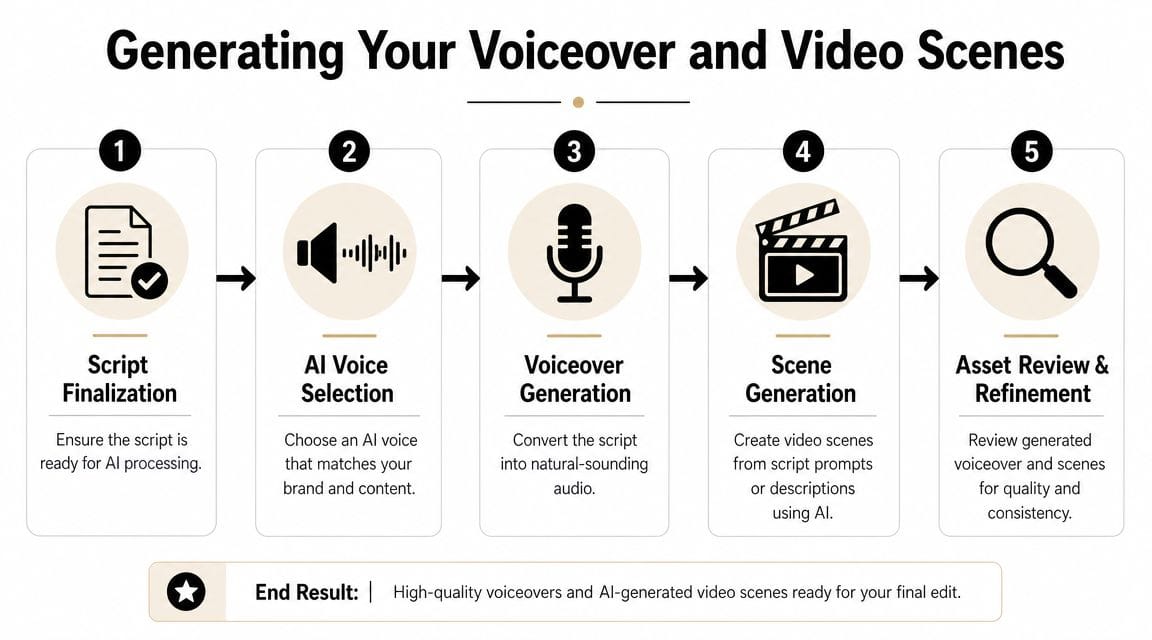
Once the script is stable, turn it into assets in one direction only. Script to voice, then voice to scenes. If you try generating visuals first, you'll keep rebuilding timing.
That order matters because pacing lives in the narration.
Pick a voice that can survive repetition
Most creators choose AI voices the wrong way. They pick the most realistic demo instead of the voice that holds up across multiple uploads.
A channel voice needs three things:
- Clarity under speed so faster sections don't slur
- A neutral baseline that still leaves room for emphasis
- Consistency across videos, especially if you're building a recognizable format
If the voice sounds impressive for one sentence but tiring after two minutes, it's the wrong pick.
Build scenes from narration, not keywords
The easiest way to get generic AI footage is to prompt scenes with topic words only. “Business growth chart,” “social media background,” “happy creator at desk.” That gives you filler, not storytelling.
Instead, extract visual intention from each spoken beat.
If the line says, “Most creators waste time switching between tools,” your prompt should reflect the situation and the action. Something like: creator working across multiple app windows, cluttered desktop, timeline edits, script document, visible friction, modern workspace, realistic lighting.
That gives the model context, movement, and purpose.
A reliable scene workflow
Use a scene sheet before you generate anything.
-
Break the script into beats
Usually one beat per idea, not one beat per sentence. -
Label the visual role
Demonstration, metaphor, UI-style explainer, talking-head substitute, motion graphic, or stock-style bridge. -
Write prompts with constraints
Include style, camera feel, subject, action, environment, and what to avoid. -
Generate alternatives
Don't settle on the first usable output. Generate options for the opening and any scene that carries your main promise. -
Lock a visual language
Keep color, framing, and motion direction coherent across the video.
Workflow note: The voiceover should decide where the cuts happen. The visuals should support the sentence, not compete with it.
For faceless videos, a strong mix usually includes AI-generated scenes, a few UI mockups, selective stock, text overlays, and occasional still images with motion. Pure AI footage for every second often feels synthetic. Mixed media usually feels more intentional.
When a scene doesn't look right, fix the prompt before you regenerate five more times. Most quality problems come from unclear direction, not from the model refusing to cooperate.
Assembling and Editing with AI-Powered Tools
Editing used to be where AI-generated workflows fell apart. You'd generate assets quickly, then lose the time savings inside a slow manual edit.
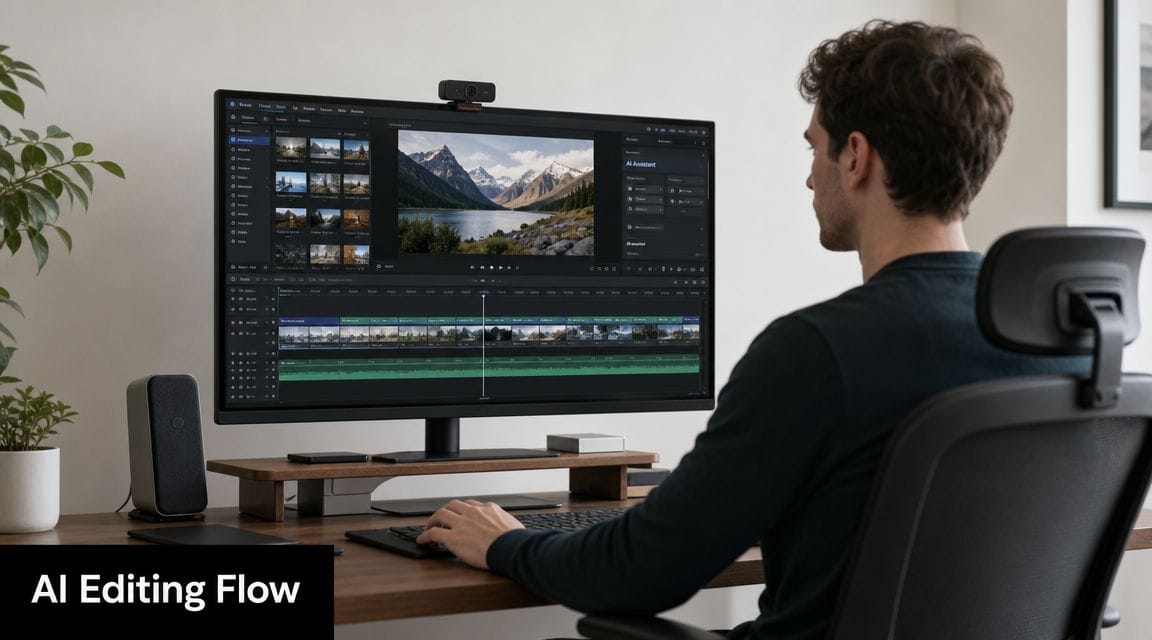
That's changed. The strongest AI editing flow now treats the timeline as a refinement layer, not the place where the whole video gets invented.
Assemble in passes
Don't try to finish everything on one timeline pass. That's how pacing problems survive until export.
A cleaner sequence looks like this:
- Pass one gets the narration onto the timeline and removes dead air
- Pass two maps scenes to the spoken beats
- Pass three adds text, captions, emphasis cuts, and brand elements
- Pass four fixes rhythm, where the video either drags or changes too fast
AI editors help most in the mechanical parts. Auto-syncing scenes to narration, suggesting cuts, generating captions, resizing for vertical, and carrying brand kits across multiple videos save more time than flashy effects.
What to keep manual
You still want human control over a few things:
- The opening 15 seconds because small timing mistakes kill retention
- Any claim-heavy segment where visuals must match the exact point
- Jokes, pauses, and emphasis because AI often trims too aggressively
- Music level decisions since auto-mixing can flatten energy
Don't judge the edit by how polished it looks muted. Judge it by whether the pacing feels inevitable once the narration starts.
A good editor preview makes this obvious:
The finishing moves that matter
Captions should support comprehension, not decorate the screen. Keep line breaks readable. Highlight selectively. If every word animates, nothing stands out.
Branding should also stay restrained. A logo bug, recurring font treatment, and consistent thumbnail language are enough. Most creators over-brand the video and under-brand the series.
Use AI to speed up these finishing moves:
- Caption cleanup for punctuation, line grouping, and keyword emphasis
- Silence detection to tighten long narration reads
- Scene swaps when one generated shot breaks visual consistency
- Format adaptation for Shorts, square, or alternate platform exports
The best result is a timeline that still feels edited by a person. AI should remove friction, not remove judgment.
Publishing Optimizing and Repurposing Content
You finish the edit, export the file, upload it, and the video still stalls. That usually is not an editing problem. It is a packaging problem.
A strong ai video generator for youtube workflow should carry through the publish step. The same system that helped shape the script, voice, and scenes should also help produce the title, description, chapters, Shorts angles, and alternate cuts. If those pieces are handled separately, the channel starts to feel inconsistent even when the videos look good.
Package the video like you are running tests
Treat the upload like a set of experiments. I do not ask AI for a single title. I ask for title sets built around different viewer motivations: curiosity, speed, credibility, mistake avoidance, and direct outcome. Those are different clicks from different people.
Then I cut hard. AI is good at volume. It is weak at knowing what your audience already ignores.
Use AI for first drafts of:
- Title options built from different angles, not minor rewrites
- Descriptions that explain the promise of the video in plain language
- Chapter markers when the format supports scanning
- Short-form hooks pulled from the strongest idea, not just the opening line
The useful habit here is consistency. If the title promises one outcome, the thumbnail, intro, description, and clipped Shorts should reinforce the same promise. That is the advantage of an end-to-end workflow. Packaging stops being a last-minute task and becomes part of the production system.
Turn one upload into a content set
Repurposing works best when you plan it before publish, not after the full video underperforms. Pull two or three clip candidates from the timeline while the script and voiceover are still fresh in memory. Mark one insight, one mistake, and one strong opinion. Those usually convert into separate Shorts better than three versions of the same takeaway.
Do not just crop the long-form video and call it done. Rewrite the first line for vertical viewing. Remove setup that only made sense in the full video. Add captions that can carry the point with sound off.
If you want a separate short-form production lane after the main upload, ShortGenius for AI video and Shorts creation can turn topics, scripts, or existing videos into vertical assets with captions and voiceover. That is useful when long-form and Shorts need different publishing cadence but still need to stay inside one content system.
Repurpose for speed, not just reach
Different platforms reward different openings, but the source material should stay coherent. A YouTube Short, an Instagram Reel, and a TikTok cut can come from the same master video if you change the hook, pacing, and caption treatment for each platform instead of exporting the same clip three times.
That saves time and protects quality. The visuals, voice, and script stay aligned because they came from one workflow. You are adapting the packaging, not rebuilding the content from scratch.
One caution. Artificial engagement can muddy your read on what is working. If you are evaluating growth tactics, understand the trade-offs and platform risks around services that buy youtube likes. Better titles, stronger hooks, and cleaner repurposing give you feedback you can trust.
Frequently Asked Questions About AI on YouTube
A lot of hesitation around AI on YouTube comes from practical uncertainty, not ideology. Most creators aren't asking whether AI exists. They're asking how to use it without making their channel look cheap, generic, or risky.
The questions that matter most
| Question | Answer |
|---|---|
| Does YouTube allow AI-generated videos? | Yes, but the useful standard is disclosure and responsibility. If AI materially changes how a person, event, or scene is represented, treat that seriously and follow YouTube's current platform guidance when publishing. Don't rely on AI as an excuse for unclear sourcing or misleading presentation. |
| How do I keep AI videos from all looking the same? | Lock a visual system before mass production. Use the same voice profile, pacing style, color treatment, text system, thumbnail logic, and prompt language. Build repeatable constraints. Random prompts create random channels. |
| Should I use a free tool or pay for a higher-tier plan? | Use the cheapest setup that reliably produces publishable output. Upgrade when you're blocked by quality limits, speed caps, watermark restrictions, export constraints, or team collaboration. Paying more only makes sense when it removes a real bottleneck. |
| Will AI replace my need to edit? | No. It reduces assembly time and first-draft labor. It doesn't replace judgment about story order, emphasis, humor, proof, or channel identity. The final cut still benefits from a creator who knows what the audience should feel moment by moment. |
| Is AI voiceover good enough for a serious channel? | It can be, if the script is written for speech and the voice is chosen for consistency instead of novelty. AI narration fails when the script is stiff, the pacing is off, or the tone doesn't match the subject. |
| What's the biggest mistake in an AI YouTube workflow? | Treating each stage as separate. When script, voice, visuals, and edit are disconnected, quality drops fast. The best workflows keep one source of truth and carry it all the way through to packaging and repurposing. |
A few hard rules
There are three habits that make the biggest difference.
- Keep one master script. Don't let the voice script, edit transcript, and caption text drift into different versions.
- Define your channel style in writing. Prompt templates, color preferences, preferred framing, voice notes, and banned phrases save time later.
- Review before you publish. AI mistakes are usually obvious if you watch the video once from the viewer's perspective instead of the creator's.
A channel doesn't become distinctive because it uses AI. It becomes distinctive because the creator applies the same taste repeatedly.
When a premium plan is worth it
A more expensive plan can make sense when you're publishing frequently, handing work to a team, or need cleaner outputs with fewer compromises. The upgrade is justified when it replaces manual cleanup you're doing every single upload.
It isn't justified if you're still unclear on your format.
Most creators should fix the workflow first. Then upgrade the tool that sits on the bottleneck.
The working standard
Use AI for speed. Keep humans in charge of judgment. Build the workflow once, then repeat it until your channel has a recognizable production language.
That's the practical path. Not more tools. Better continuity.
If you want one place to handle scriptwriting, voiceovers, scene generation, editing, resizing, and publishing, ShortGenius (AI Video / AI Ad Generator) is built for that end-to-end workflow. It's a practical fit for creators and teams who want to turn an idea into YouTube videos, Shorts, and ads without stitching the whole process together by hand.