A Practical Guide to High-Converting AI UGC Video Ads

Discover how to create high-converting AI UGC video ads that drive results. Our guide covers proven strategies for scripting, generation, and optimization.
AI UGC video ads are what you get when you combine the raw, authentic feel of user-generated content with the power of artificial intelligence. It's about using AI to create realistic avatars, voiceovers, and entire scenes that look and feel just like a real customer review or testimonial. This approach gives brands a way to produce relatable, high-converting video ads at a speed and scale that was once unthinkable, all without the high cost of traditional creator partnerships.
Why AI UGC Video Is Dominating Social Feeds
The explosion of AI UGC video ads isn't just another fleeting trend. It's a strategic answer to a major shift in how people view advertising. Today's audiences are sharp. They've learned to tune out overly polished, corporate-style ads, instead gravitating toward content that feels genuine, relatable, and human.
This is exactly why user-generated content (UGC) works so well. It taps into social proof and feels more like a recommendation from a friend than a sales pitch. The biggest hurdle for brands has always been getting enough of it. Finding creators, handling contracts, and organizing shoots is a slow, expensive, and logistical nightmare, especially when you need a high volume of ads for testing.
The AI-Powered Solution to Scalability
This is where AI completely changes the game. Tools like ShortGenius act as a massive force multiplier, allowing brands to crank out content that feels authentic at a previously unimaginable scale. It’s not about replacing human creativity; it’s about supercharging it.
You bring the strategy—the conversational script, the clear call-to-action—and the AI takes care of the heavy lifting, generating dozens of ad variations in minutes. As this type of content becomes more common, it’s worth understanding what synthetic media entails to fully appreciate its capabilities.
The market numbers back this up. The UGC platform market was valued at USD 7.8 billion and is expected to rocket to USD 109.19 billion by 2034. This growth, combined with the AI video market's own trajectory, shows a clear convergence toward a new advertising standard.
The real advantage is simple: AI UGC video ads give you the trust of a peer review combined with the scalability of programmatic advertising. You can test more creative, find winning ads faster, and talk to your audience in a way that feels like a conversation, not an interruption.
To give you a clearer picture, here's a quick comparison of how AI-powered UGC stacks up against the old way of doing things.
Key Advantages of AI UGC Video Ads
| Metric | Traditional Branded Ads | AI UGC Video Ads |
|---|---|---|
| Authenticity | Often feels polished and corporate | Mimics genuine, relatable peer reviews |
| Production Time | Weeks or months | Hours or even minutes |
| Cost | High (actors, locations, crew) | Low (subscription-based or per-video) |
| Scalability | Difficult to produce many variations | Easily generate hundreds of variations |
| Testing Ability | Limited due to cost and time | A/B test hooks, scripts, and avatars rapidly |
This table really highlights the efficiency gains. You're not just making ads cheaper; you're making your entire creative strategy more agile and data-driven.
Bridging the Authenticity Gap
By using AI, marketers can finally test everything. You can swap out different hooks, calls-to-action, or even the AI "creators" themselves (avatars) to pinpoint what truly connects with different audience segments. This data-first approach takes the guesswork out of creative development.
- Speed to Market: Move from a simple idea to a live ad campaign in a matter of hours, not weeks.
- Cost Efficiency: Slash production costs by eliminating the need for actors, location rentals, and lengthy post-production cycles.
- Creative Volume: Generate a massive library of ad variations to prevent ad fatigue and run highly targeted campaigns.
In the end, AI UGC video is taking over because it solves a core problem for modern marketers: how to create authentic, trusted content at the speed and scale that today's digital platforms demand.
Developing Your AI UGC Ad Creative Strategy
Here's a hard truth about making AI UGC video ads: the AI is only as smart as the instructions you give it. An incredible ad isn't born from a vague idea; it's built on a rock-solid creative plan. The "garbage in, garbage out" rule is brutally real here. A generic brief will get you a generic, forgettable ad every single time. Your job is to create a hyper-specific blueprint that guides the AI to produce content that genuinely connects with people.
This process kicks off long before you even think about writing a script. It all starts with getting an almost obsessive understanding of who you’re talking to and exactly what you want them to do.
Defining Your Target and Objective
Forget broad demographics. Vague targets like "millennials" are useless for an AI. You need to build a detailed persona that the AI can wrap a story around.
For instance, a weak target is "women aged 25-40." That tells the AI almost nothing. A strong target for an AI brief is a "sustainability-conscious millennial renter who needs non-toxic, pet-safe home cleaning products." That one sentence is packed with clues that will shape the language, tone, and even the visual setting the AI generates.
Your campaign goal needs that same level of crystal-clear focus. "Increase brand awareness" is just wishful thinking. On the other hand, "Increase first-time purchases by 20% in Q3" is a concrete objective that directly informs the script’s call-to-action (CTA) and sense of urgency.
- Weak Goal: Get more website clicks.
- Strong Goal: Drive a 15% lift in sign-ups for our free trial by targeting users who abandoned their cart.
- Weak Goal: Boost engagement.
- Strong Goal: Achieve a 5% hook rate (views of at least 3 seconds) on TikTok ads with our primary audience.
Once you’ve locked in a sharp audience persona and a clear objective, you're ready to tackle the most important piece of the puzzle: the script.
Crafting Compelling UGC-Style Scripts
When writing for AI UGC ads, you have to unlearn traditional ad copywriting. Your script needs to sound like a real person talking to a friend, not a polished message from a marketing department. It should be conversational, maybe even a little imperfect, and built around a simple problem-solution arc.
Every single successful UGC ad I've ever seen follows this simple but killer structure:
- The Hook: The first 1-3 seconds. This is everything. Grab their attention immediately with a surprising question, a bold claim, or a super relatable problem.
- The Problem: Hit on the specific pain point your audience persona feels every day. Make it real.
- The Solution: Seamlessly introduce your product as the obvious, easy fix to that problem.
- The Call-to-Action (CTA): Tell them precisely what to do next. No ambiguity.
The secret to a great AI UGC script is faking authenticity with a solid structure. When you feed the AI a conversational, problem-focused narrative, you’re giving it a human-centric framework to work with. That's how you get a final video that feels genuine, not robotic.
Let’s look at how this plays out in a couple of different scenarios.
Real-World Strategy Examples
Scenario 1: A SaaS Company Selling a Project Management Tool
- Audience: Freelance graphic designers drowning in client revisions and confusing feedback chains.
- Objective: Increase free trial sign-ups by 25%.
- The Hook: "I'm never using email for client feedback ever again."
- The Problem: "I was losing my mind trying to track which version was final. Clients were commenting on old files, and my inbox was a total nightmare."
- The Solution: "Then I found [Product Name]. It keeps all my files, versions, and client notes in one clean spot. My clients actually find it easier to use, too."
- The CTA: "Try it free and see for yourself. The link is right here."
See how direct that is? It speaks a freelancer's language and zeroes in on a very specific, very real pain point.
Scenario 2: A DTC Subscription Box for Artisan Coffee
- Audience: A self-proclaimed "coffee snob" who is bored with supermarket brands and wants to discover unique, single-origin beans.
- Objective: Drive 500 first-time purchases of their "Discovery Box."
- The Hook: "If you’re still buying your coffee from a grocery store, you need to see this."
- The Problem: "I seriously used to think all dark roast tasted the same—just bitter and burnt. I had no idea what I was missing out on."
- The Solution: "This subscription box from [Brand Name] sends me these incredible single-origin coffees from all over the world. This month’s is from Ethiopia and it has these wild blueberry notes."
- The CTA: "If you want to taste what coffee is supposed to taste like, you have to try this. Get 20% off your first box with the code below."
In both examples, the strategy is laid out with military precision. The specific audience, clear-cut goal, and conversational script give an AI tool like ShortGenius the perfect raw material to generate a UGC-style video ad that actually performs.
Putting It All Together: Your First AI UGC Video Ad Workflow
Okay, you've got a killer creative strategy. Now what? A great plan is only as good as its execution, and this is where we bridge the gap between your ideas and a finished, high-performing video ad.
This is where the right AI tools really shine. They're the engine that turns your carefully crafted script into a polished video that looks right at home in a social media feed.
Let's walk through a real-world workflow. While there are a bunch of tools out there, we'll use ShortGenius as our example because it neatly combines all the key steps—scripting, visuals, voiceovers, and editing—under one roof. My goal here is to show you just how straightforward it can be to get from a simple text prompt to an effective AI UGC video ad.
From Script to First Draft
Everything starts with your script. You’ll feed the text you wrote directly into the platform, which becomes the blueprint for the entire ad. But don't just hit "generate" yet. The next input is one that a lot of people skip, but it’s absolutely critical: defining the visual tone and pacing.
You’re not just making a video; you’re crafting a vibe. Is it a frantic, high-energy unboxing? Or a more relaxed, authentic testimonial? Nailing this down helps the AI pick the right kind of footage, cuts, and transitions to match the UGC style you're going for.
- Fast-Paced Unboxing: You'll want quick cuts, upbeat music, and dynamic shots that feel like someone excitedly tearing open a new purchase.
- Calm Testimonial: This calls for longer takes, a more stable "camera" feel, and a tight focus on the speaker to build that all-important trust.
- Problem-Solution Demo: Think split screens or sharp cuts that jump between a person showing their frustration and shots of your product actually solving the problem.
Here’s a glimpse of what that initial project setup looks like. This is where you translate your brief into direct commands for the AI, kicking off the whole creative process.
Choosing the Right Voice and Visuals
With your script and tone locked in, it's time to bring the ad to life. This is the make-or-break moment for creating that illusion of authenticity.
First up, the voiceover. Your number one priority is finding an AI voice that sounds genuinely human, not like a stiff, robotic announcer. Listen to a bunch of different options. A great AI voice has natural-sounding pauses, conversational rhythm, and realistic inflections. It should feel like someone chatting with a friend, not reading off a teleprompter. Sometimes, a voice that’s a little imperfect feels more real than one that’s technically flawless.
Next, you'll either generate or select your visuals. Most AI tools will suggest stock clips based on keywords from your script.
Your job is to be a ruthless curator. Ditch anything that looks too polished, staged, or like generic corporate stock footage. You're hunting for clips that feel like they were shot on a smartphone in a real-world setting—a messy desk, a normal kitchen, a backyard.
This is also where you can lean on built-in presets that scream "UGC." Look for effects that add a subtle camera shake, quick zoom-ins for emphasis, or swipe transitions that feel native to TikTok and Instagram Reels. These small touches do a ton of heavy lifting to make your AI-generated ad feel organic. For more tools to streamline your creative process, it's worth checking out guides on the best AI tools for freelancers to see what else can fit into your workflow.
Assembling and Reviewing the First Cut
After you've picked your voice and visuals, the AI gets to work and assembles the first draft. This version stitches together your script, voiceover, clips, and effects into a single, cohesive video. The whole thing, from pasting your script to watching a draft, often takes just a few minutes.
That speed is the real magic of using AI for UGC ads. You can go from a simple idea to a tangible asset almost instantly, which means you can test different angles without sinking a ton of time or money into production.
Remember, the first draft is a starting point, not the final product. Watch it with a critical eye.
- Does the pacing feel right for the vibe you wanted?
- Do the visuals actually match what's being said in the voiceover?
- Does the AI voice sound natural all the way through?
At this point, you have a complete video draft. It's a functional ad, ready for the next step: refinement. The beauty of this process is how easy it is to make changes. If a scene feels off, you can swap it out, regenerate a line of dialogue, or tweak the timing without having to start over from scratch.
Alright, you’ve got the first draft of your AI UGC video ad spit out by the machine. That’s a great first step, but let's be real—it's just the starting line. The real work, the part that separates a decent ad from one that actually drives sales, is all in the refinement. This is where your human expertise comes in to polish the AI's output until it’s ready to stop someone dead in their tracks while they're scrolling.
Think of that initial video as your raw clay. The script is there, the voiceover is probably okay, but it almost certainly lacks the snappy, almost-too-fast pacing that defines authentic social content. Your first job is to tighten everything up. Cut out any dead air, trim the first and last half-second of every clip, and make sure the rhythm feels energetic—like it was made for TikTok or Instagram, not a corporate presentation.
This simple workflow—script, generate, voiceover—is the foundation for the entire process.
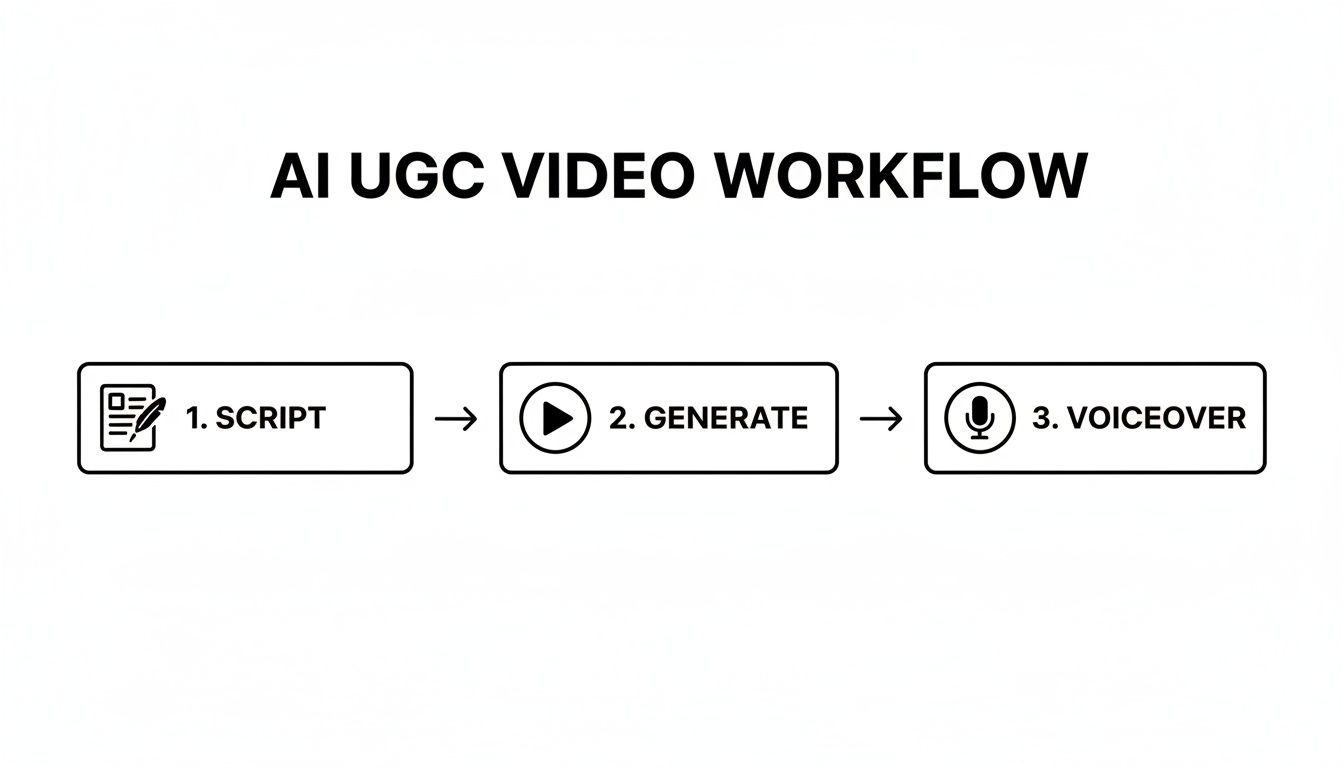
Each stage builds directly on the one before it, turning your strategy into a real creative asset that you can now start sharpening.
Assume Everyone’s Watching on Mute
You have to get this one thing right: most people will never hear your ad. With UGC-style video content expected to snag about 30% of the marketing pie, its dominance is fueled by mobile viewing. And on mobile, a staggering 85% of videos are watched with the sound off. Let that sink in. You can dig into more UGC marketing trends if you want, but that single stat should completely change your editing philosophy.
If your message doesn't land without a single sound, you've lost before you've even started. Your ad is basically invisible to most of your audience.
This makes bold, dynamic, and super-readable captions an absolute must. They aren’t just an accessory; they are the main event.
- Go for Bold Fonts: Stick with clean, sans-serif fonts that are easy to read on a tiny screen.
- Add a Text Background: A semi-transparent color block behind your captions makes the text pop, no matter how chaotic the background video is.
- Use Emojis & Highlights: Animate your captions. Make key words flash a different color or toss in a relevant emoji to keep their eyes moving and guide them through the message.
Tools like ShortGenius can auto-caption your videos, giving you a solid base to customize and brand.
Size It Right and Brand It Subtly
Don't be the person who posts a horizontal YouTube ad in an Instagram Story. It looks lazy and screams "I'm an ad!" Each platform has its own native dimensions, and if you want your ad to feel organic, you have to play by the rules.
The king of all formats right now is 9:16 (vertical). This is your go-to for:
- TikTok
- Instagram Reels
- YouTube Shorts
- Facebook Stories
Always, always create your master edit in 9:16. You can easily adapt it to other sizes, like 1:1 for feed posts, later on. Most modern AI video tools handle this resizing for you, intelligently reframing the shot so nothing important gets cut off.
Finally, bring in your brand kit—but do it with a light touch. Yes, UGC is supposed to feel authentic, but subtle branding builds recognition. I’m not talking about plastering your logo everywhere. Instead, use your brand's specific fonts and color palette for the captions, text overlays, or even a progress bar. This creates a professional, cohesive feel without killing the genuine UGC vibe.
Before you launch, do one last check. Does the hook work in the first three seconds? Are the captions easy to read and free of typos? Is the call-to-action painfully obvious? A quick final polish can make all the difference, ensuring your AI UGC video ad is ready to go out there and perform.
Testing and Scaling Your Ads for Peak Performance
Getting your first batch of AI UGC video ads live is a great first step, but the real work is just beginning. Think of it as the starting line, not the finish. Now, we enter the most important phase: a continuous cycle of testing, learning, and scaling what works.
This isn't about finding a single "perfect" ad. It's about building an engine for constant improvement. What you learn from the ads running today should directly fuel the creative brief for the AI-generated variations you’ll make tomorrow. This is how you turn a decent campaign into a seriously profitable one.
First 72 Hours: The Metrics That Actually Matter
Once your campaign is live, the first 72 hours are a firehose of valuable data. You have to be ruthless with your focus to avoid wasting time and money. Don't get lost in vanity metrics; concentrate on the early signals that predict long-term success.
These are the only three metrics I obsess over right at the start:
- Hook Rate (or 3-Second View Rate): This is your scroll-stopper metric. It tells you, point-blank, if the first few seconds of your ad are grabbing attention. If this number is low, your hook is broken, and nothing else in the ad matters.
- Click-Through Rate (CTR): Are people who watch the ad actually interested enough to click? A great hook rate but a terrible CTR is a classic sign of a disconnect between your opening and your actual offer.
- Cost Per Click (CPC): This is all about efficiency. A sky-high CPC from the get-go often means your creative isn't landing with the audience you're targeting, and the platform is charging you a premium to show it.
These early numbers are your road signs. A weak hook rate means it's time to generate new opening lines. A low CTR tells you the value proposition isn't clear or compelling. High CPCs are often a red flag to kill that creative and try a totally different angle.
High-Impact A/B Test Ideas
A/B testing used to be a slow, expensive headache. With an AI tool like ShortGenius, you can fire off dozens of variations to test specific elements and find winners fast. The key is to test just one thing at a time so you get clean, undeniable data.
The real magic of AI here is testing creative ideas at a scale that was never possible before. You're no longer guessing what might work—you're letting the data show you exactly which hook, call-to-action, or visual style your audience craves.
To get you started, here’s a breakdown of some high-impact A/B tests you can run with your AI UGC videos. By systematically working through these, you’ll quickly discover what actually moves the needle for your brand.
High-Impact A/B Test Ideas for AI UGC Ads
| Test Variable | Variation A Example | Variation B Example | Key Metric to Watch |
|---|---|---|---|
| Hook Type | "Here are 3 reasons why this will change your life." (Statement) | "Are you still struggling with [common problem]?" (Question) | Hook Rate |
| Call-to-Action | "Shop Now" (Direct, high-intent) | "Learn More" (Lower friction, informational) | CTR, Conversion Rate |
| AI Avatar | A young, energetic-looking avatar | A more mature, professional-looking avatar | CTR, CPC |
| Pacing | Fast cuts, high-energy music | Slower pace, calm and conversational tone | Hook Rate, View Duration |
Isolating variables like these lets you methodically build a "perfect" ad piece by piece. The data backs this up, too. Studies show that ads with a user-generated feel achieve four times higher click-through rates and a nearly 50% lower cost-per-click compared to slick, traditional creative. You can dig into more UGC performance statistics to see just how powerful this approach is when you nail the optimization.
Once you find a clear winner—say, a question-based hook that consistently crushes a statement-based one—it's time to double down. Use that insight as the foundation for your next round of AI UGC video ads, and then move on to testing the next variable on your list. This ongoing refinement is the secret sauce for scaling your campaigns profitably.
Got Questions About AI UGC Video Ads? We've Got Answers.
Jumping into AI-generated UGC is exciting, but it's totally normal to have a few questions. This stuff is moving fast, and getting a handle on the details can be the difference between a campaign that flops and one that flies.
Let's cut through the noise and tackle the questions I hear most often from marketers who are just starting out.
Can AI Really Fake Authenticity?
This is the big one, isn't it? The million-dollar question. An AI can't feel emotion or have a real experience with your product, but it has gotten shockingly good at mimicking the look and feel of authentic, human-made content.
Think of AI less as a genuine creator and more as an "authenticity simulator." It works its magic by combining conversational scripts (that you provide), selfie-style camera angles, and surprisingly human-sounding AI voices. The final product triggers the same sense of trust and relatability you get from a real person's video. Your job is to feed it a great, human-centric script; the AI's job is to produce it at scale, letting you test a dozen "authentic" concepts in the time it would take to film one.
What are the Biggest Mistakes People Make?
The number one mistake I see is writing a script that sounds like a corporate press release. Stiff, jargon-filled language is the quickest way to get scrolled past. You have to write like a real person talks.
A few other classic blunders will absolutely tank your ad's performance:
- Picking a "perfect" voice: When you choose that polished, super-professional announcer voice, you immediately break the illusion. Go for the AI voices that sound a little more conversational and natural, even if they aren't flawless.
- Forgetting captions: So many people watch videos on their phone with the sound off. If your ad doesn't have clear, bold captions, you might as well be invisible to a huge chunk of your audience.
- Using the wrong size: Sticking a landscape video in a 9:16 vertical feed on TikTok or Reels is a dead giveaway. It screams "I'm an ad!" and instantly looks out of place.
The secret to a winning AI UGC ad is making it blend in. You want it to feel like it belongs in the user's feed, not like an interruption. Avoiding these simple mistakes is how you do it.
How Should I Think About the ROI of My AI Ads?
When you measure the return on your AI ads, you'll start with the usual suspects: Cost Per Click (CPC), Click-Through Rate (CTR), and of course, Return on Ad Spend (ROAS). But stopping there misses the whole point.
The real game-changer with AI is the massive efficiency gain. To get your true ROI, you have to factor in all the time and money you're not spending on finding creators, negotiating contracts, shipping products, and going back and forth on edits.
If you can brainstorm, create, and launch ten different AI video concepts in the time it used to take to produce one traditional UGC video, you've just 10x'd your chances of finding a winner. That speed dramatically lowers your overall Cost Per Acquisition (CPA) and boosts your real ROI way beyond what a simple ROAS calculation can show.
What Kind of Visuals Work Best?
Simple is almost always better. The best visuals are the ones that feel completely native to the platform—like they were shot on a phone, not in a studio.
Stay away from anything that looks too cinematic, perfectly lit, or like it came from a stock video site. Instead, tell the AI to generate clips of your product in a real-world setting, like on a messy desk, in a normal-looking kitchen, or in someone's hand.
Quick unboxing shots and selfie-style clips of an AI avatar talking directly into the "camera" are gold. Many tools, like ShortGenius, even have built-in effects that add a little camera shake or quick cuts to make it feel even more real.
Ready to stop planning and start creating? With ShortGenius, you can turn a simple script into dozens of campaign-ready AI UGC video ads in minutes—complete with realistic voices, dynamic visuals, and automated captions. Ditch the creator outreach and start scaling your creative testing today. Explore ShortGenius now and see how easy it is to get started.