Your Guide to Using an AI TikTok Shorts Generator

Discover how an AI TikTok Shorts generator can streamline your content creation. Learn to write scripts, create visuals, and schedule posts for viral growth.
An AI TikTok Shorts generator is a tool that basically does the heavy lifting for you. It automates the whole video creation process—from writing the script to finding visuals and even adding a voiceover. This lets you pump out high-quality content in just a few minutes.
Think of it as your production assistant, handling the most tedious parts of making a video so you can focus on the bigger picture: your strategy and creative direction. If you've ever felt the pressure of TikTok's never-ending demand for new content, these tools are a complete game-changer.
Why an AI Generator Is Your New Secret Weapon
Let's be real: keeping up with TikTok is a grind. The algorithm loves consistency, but trying to come up with ideas, write scripts, film, and edit videos every single day is a surefire recipe for burnout. This is exactly where an AI generator completely flips the script, turning that manual slog into a smart, efficient workflow.
Instead of staring at a blank screen, you have an AI brainstorming partner ready to go. Rather than spending hours hunting for the perfect stock clip, the generator pulls together relevant, eye-catching scenes for you. It brings the entire production process—scripting, finding assets, voiceovers, and editing—under one roof.
This means solo creators and small teams can finally produce a steady stream of top-notch content and actually compete with the big brands.
Overcoming Production Bottlenecks
The real magic here is how these tools smash through common production roadblocks.
Writer's block? Gone. You can generate dozens of script ideas from a single prompt. On a tight budget? That's less of an issue when you don't need fancy cameras or a film crew. These generators are designed to eliminate friction at every stage of the creative process. They are a specialized subset of the broader world of AI automation services, which are all about making complex tasks simpler and faster.
To really see the difference, it helps to compare the old way of doing things with the new AI-powered approach.
Traditional vs AI-Powered TikTok Workflow
| Production Stage | Traditional Method (Manual) | AI-Powered Method (AI Generator) |
|---|---|---|
| Ideation & Scripting | Hours of brainstorming, writing, and rewriting. Prone to creative blocks. | Minutes. Generate dozens of script ideas from a simple text prompt. |
| Asset Sourcing | Hours searching stock libraries for videos and images. | Seconds. AI automatically finds and selects relevant, high-quality assets. |
| Video Editing | Hours in complex software, cutting clips, syncing audio, and timing scenes. | Automated. AI assembles scenes, adds transitions, and syncs everything. |
| Voiceover | Hire a voice actor or spend time recording and editing your own audio. | Instant. Generate a natural-sounding AI voiceover in multiple languages. |
| Captions & Text | Manually transcribe audio and add text overlays, ensuring proper timing. | Automated. AI generates and perfectly syncs captions to the video. |
| Total Time | 4-8 hours per video | 5-15 minutes per video |
The contrast is pretty stark. You’re not just saving a little time here and there; you're fundamentally changing how much content you can realistically produce.
This flowchart gives you a great visual breakdown of just how much simpler the workflow becomes.
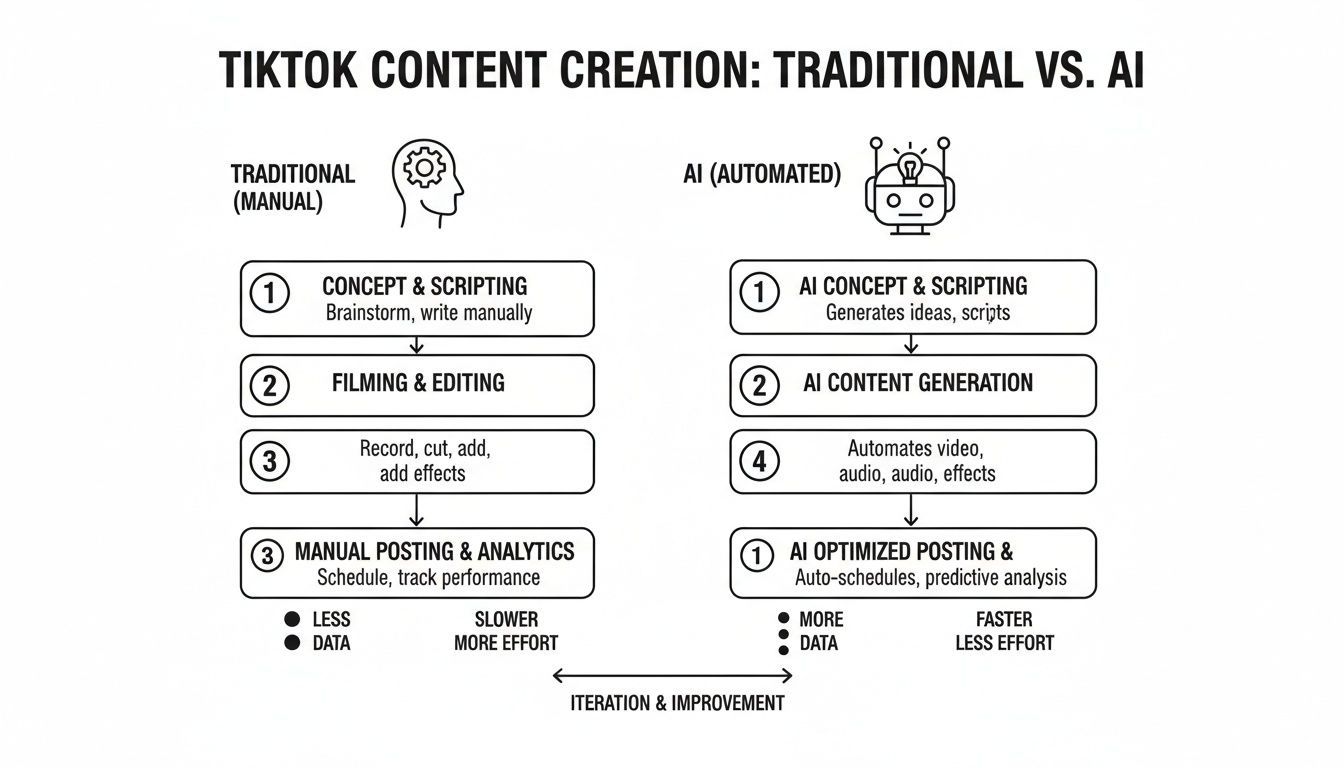
As the graphic shows, AI takes a bunch of slow, separate steps and condenses them into a few quick actions. That speed is absolutely critical on a platform like TikTok, which has already captured a massive 40% share of the short-form video market and shows no signs of slowing down.
Turning a Simple Idea into a Viral Script
Let's be honest, the hardest part of making content is often just getting started. That blank page, the blinking cursor… it’s a total momentum killer. This is where an ai tiktok shorts generator completely changes the game. Instead of losing hours to brainstorming, you can go from a fuzzy idea to a full-blown script in just a few minutes.
Think about a real-world example. Say you're a fitness coach, and your content idea is "healthy breakfast ideas." That’s a good start, but it’s broad. Instead of wrestling with how to structure it for a short-form video, you just feed that concept to the AI. It doesn't just spit back a list of foods; it builds a story—a hook, a middle, and an end—all formatted for the rapid-fire nature of TikTok.
Crafting a Winning Prompt
The secret to getting a great script from AI is all in the prompt. If you give it vague instructions, you'll get a generic, forgettable script back. You need to give the AI some guardrails and context to work with.
For instance, instead of just "healthy breakfast," push it further. Try something like this:
"Create a 30-second TikTok script about a high-protein breakfast that takes less than 5 minutes to make. The tone should be energetic and motivational, targeting busy professionals. Include a strong hook, three quick steps, and a call-to-action to follow for more healthy hacks."
See the difference? This prompt gives the AI everything it needs: the target audience, the video length, the core topic, the desired tone, and even the exact structure. The more specific you are, the better and more tailored your final script will be.
From Prompt to Polished Script
After you nail the prompt, the AI does the heavy lifting. In moments, you’ll have a structured script ready to go, often broken down scene-by-scene. For our fitness coach's breakfast idea, the output might look something like this:
- Hook: "Stop skipping breakfast! Here’s a high-protein meal you can make in 3 minutes."
- Scene 1: Quick shot of the ingredients laid out: Greek yogurt, berries, and granola.
- Scene 2: Fast, punchy cuts showing the parfait being assembled.
- Scene 3: A final, satisfying shot of the delicious finished breakfast.
- CTA: "Follow me for more recipes that fit your busy life!"
This is so much more than just a list of ideas; it’s a production blueprint. The AI is smart enough to know that TikTok favors quick cuts, visual storytelling, and clear, simple steps. It builds the script in a way that’s designed to keep people watching, which is exactly what the algorithm wants to see.
Pro Tip: Don't just accept the first script the AI gives you. If it doesn't feel right, just tweak your prompt and hit "generate" again. You could ask for a "no-cook recipe" or add "include a surprising ingredient" to get a totally fresh angle. Treat the AI like a creative partner that never gets tired of brainstorming new ideas with you.
Bringing Your Script to Life with AI Visuals & Voice
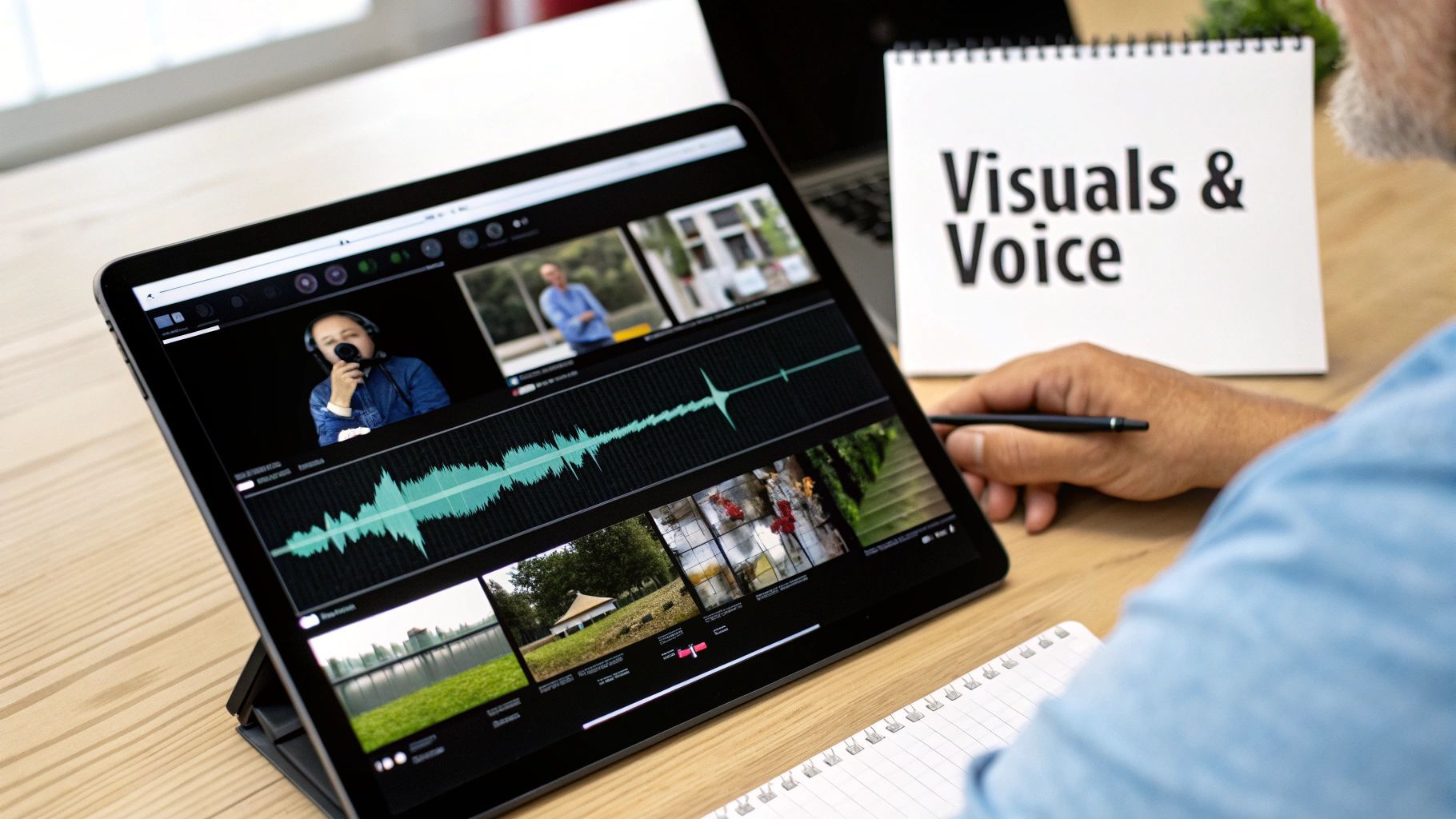
With a solid script ready to go, it's time for the fun part: turning those words into a video that grabs attention. This is where an AI TikTok Shorts generator becomes your best friend. Forget about the soul-crushing hours spent digging through stock footage sites. The AI does the heavy lifting, instantly reading your script and pulling together a series of relevant, high-quality video clips to tell your story.
The speed is almost hard to believe. The AI isn't just matching keywords; it understands the context and feeling behind your words. If your script mentions a "relaxing beach," it finds serene ocean views. If it talks about a "busy city," it pulls clips of energetic street scenes. It seamlessly mixes licensed stock footage with its own AI-generated imagery, creating a visual flow that feels completely custom.
Imagine a travel blogger wants to create a Short about "hidden gems in Tokyo." The AI can instantly assemble clips of bustling crosswalks, quiet temples, and colorful food stalls. The blogger never has to leave their desk, letting them focus on crafting the perfect narrative instead of planning an international film shoot.
Finding the Perfect AI Voice for Your Brand
Great visuals get people to stop scrolling, but the audio is what truly gives your video personality. The right voiceover is make-or-break for connecting with your audience, and modern AI tools offer an incredible library of voices to get it just right.
You’re not limited to a couple of generic, robotic-sounding options anymore. You can audition dozens of voices to find one that perfectly captures your brand’s vibe.
- Energetic and Persuasive: A fantastic choice for a tech company announcing a new feature or an e-commerce brand promoting a limited-time sale. It builds excitement and a sense of urgency.
- Calm and Authoritative: Perfect for a financial advisor explaining a complex investment strategy or a coach offering motivational wisdom. This tone conveys trust and expertise.
- Friendly and Conversational: This is my go-to for lifestyle content or community-focused brands. It feels like you're talking with your audience, not at them.
Being able to generate a professional-sounding voiceover in a click is a game-changer. It removes one of the biggest roadblocks for creators: the time, expense, and technical headache of recording and editing audio. You can test out different voices in seconds until you find the perfect fit.
From Hours of Work to a Ready-to-Post Video
The real magic is how quickly everything comes together. The efficiency boost here is enormous. On average, using an AI TikTok video generator can cut your total production time by up to 60%.
Some tools, like ShortGenius, take this even further, letting you go from a script to a fully produced video in less than two minutes. This makes batch-producing content for a daily posting schedule not just possible, but easy. With built-in templates and presets, you can create cinematic-looking TikToks without ever touching complex editing software. It’s a whole new way to think about video creation, and you can learn more about how AI is reshaping content workflows.
How to Polish Your Video for Maximum Impact
Getting a video draft from an AI generator is a massive head start, but that final polish is what separates a decent video from one that absolutely blows up on the For You Page. This is where you bring your brand's unique personality to the forefront and tighten up the pacing to keep viewers hooked until the very last second.
Think of the AI's first draft as perfectly prepped raw ingredients. Now, it's your turn to be the chef.
The first 3 seconds are everything on TikTok. Even small tweaks can make a huge difference in your watch time, and a professional-looking video instantly builds trust. The good news is that a quality AI TikTok Shorts generator won't just dump a file on you; it’ll have these crucial finishing tools built right into the platform, so you don't have to fuss with separate, clunky editing software.
Add Dynamic, Engaging Captions
A surprising number of people watch TikToks with the sound off. If your video relies only on the voiceover to tell the story, you're alienating a huge part of your audience right from the start. That’s why auto-captions aren’t just a nice-to-have; they’re a necessity.
Any decent AI tool will auto-transcribe your voiceover and sync the text for you. But don't stop there. Go beyond the boring, static text and opt for animated captions that highlight words as they’re spoken. This little bit of visual flair keeps people’s eyes locked on the screen, boosting engagement and making your content more accessible.
Don't just settle for the default caption style. Take a moment to customize the font and colors to match your brand. A lively, easy-to-read caption can be the single biggest factor in how long someone sticks around.
Apply Your Brand Kit in One Click
Building a recognizable brand on TikTok is all about consistency. The best AI generators make this ridiculously easy with a brand kit feature. You just set it up one time—upload your logo, plug in your brand colors, and choose your go-to fonts. From then on, you can apply your entire brand identity to any video with a single click.
It’s a simple move, but it adds a layer of professionalism that makes you look legit and helps you stand out in a sea of look-alike content.
Fine-Tune the Pacing and Visuals
The AI does a great job of picking out relevant visuals, but you always have the final creative control. If a clip doesn't quite match the vibe you're going for, or if a scene drags on for a fraction of a second too long, the built-in editor lets you fix it instantly.
Here are a few common tweaks I make all the time:
- Trim the fat: Shave a second or two off a clip to keep the energy high and the pacing snappy.
- Swap visuals: Don’t like an AI-selected clip? Replace it with one of your own or search the stock library for a better fit.
- Fix the voiceover: If a single line from the AI voiceover sounds a bit off, you can regenerate just that part without having to redo the whole thing.
Having this level of granular control lets you perfect the video's rhythm, which is absolutely critical for holding attention.
Before we move on, let's break down the essential elements every high-performing video needs and see how an AI tool helps you nail them every time.
Essential Features for a High-Performing TikTok Short
| Feature | Why It Matters on TikTok | How AI Accelerates It |
|---|---|---|
| Strong Visual Hook | Grabs attention in the first 1-2 seconds to stop the scroll. | Suggests visually striking clips and opening scenes based on your script. |
| Dynamic Captions | Engages viewers watching with no sound and improves accessibility. | Automatically generates and animates word-by-word captions. |
| Consistent Branding | Builds brand recognition and a professional look. | Applies your pre-set logo, fonts, and colors instantly with a brand kit. |
| Fast-Paced Editing | Keeps viewer attention by preventing visual boredom. | Generates a sequence of short clips (2-4 seconds each) for a dynamic feel. |
| Clear Audio | Ensures your message is heard and understood. | Provides a library of clear, high-quality AI voices for narration. |
Putting these elements together is what gets you higher completion rates—a key signal to the TikTok algorithm that your content is worth pushing.
The short-form video explosion, driven by TikTok's 1.04 billion monthly users, has completely changed the content creation game. It’s why platforms designed for this new reality are empowering over 100,000 creators to streamline these advanced editing workflows. The core principles of engaging short-form video are universal, so it’s also helpful to see how top creators create Instagram Reels that actually get views, as many of the same strategies apply.
Scheduling and Optimizing Your Content for Growth
Alright, you've created a killer video. That's a huge win, but it's only half the game. How and when you push that video live is just as critical as the content itself. A smart launch strategy is what separates videos that pop off from those that fall flat.
Thankfully, many AI TikTok Shorts generators aren't just for creation; they build these final, crucial steps right into the workflow. We're not just talking about hitting "publish." This is about posting with a purpose.
The whole idea is to get out of that chaotic, last-minute posting scramble and into a smooth, sustainable routine. This is where built-in schedulers become your best friend. Instead of hopping between platforms to manually upload, you can plan and push your content to TikTok, Instagram Reels, and YouTube Shorts all from one place. This is how you maximize your reach and show up everywhere your audience is hanging out.
Finding Your Audience's Peak Activity
Posting at the right time gives your video a massive head start. Don't just guess or follow some generic "best time to post" article you found online. Dive into your own analytics on each platform—they will literally tell you when your followers are most active.
Maybe you discover your audience is glued to their phones during their 1 PM lunch break on weekdays but are more active on Saturday evenings. Great. Now you can use the scheduler to hit those exact windows. Dropping your content when the most people are already scrolling gives it the best shot at gaining that all-important early momentum.
I see so many creators make the mistake of posting a video the second it’s finished. A much better approach is to build up a small buffer of 2-3 completed videos. This lets you schedule content consistently during your peak times, keeping the algorithm happy and your audience fed, even on days you aren't actively creating.
Crafting Compelling Captions and Hashtags
Never, ever treat your caption and hashtags as an afterthought. They're your primary tools for discoverability. A good AI tool can even give you a hand here, suggesting trending and relevant hashtags based on what your video is about. It takes a lot of the manual research and guesswork out of the equation.
As you write your caption, keep a few things in mind:
- Start with a Hook: Lead with a question or a bold statement. Anything to spark curiosity and get people to stop their scroll and comment.
- Be Brief: This isn't a blog post. Get to the point fast and use emojis to inject some personality and break up the text.
- Add a Call-to-Action (CTA): Be direct. Tell people what to do next. "Follow for Part 2," "Comment your favorite tip," or "Share this with a friend."
Your hashtag strategy needs a bit of a mix. For a video on "keto breakfast ideas," for instance, you'd want a blend like #keto (super broad), #ketobreakfastideas (very niche), and maybe a tag related to a trending sound or meme. This balanced approach helps you tap into a massive audience while also reaching the people who are specifically looking for your content.
When you nail both the AI-powered creation and a smart, data-informed publishing strategy, you've built a powerful engine for real, consistent channel growth.
Got Questions About AI Video Generators? Let's Clear Things Up.
Jumping into AI video creation for the first time can feel a little intimidating, and it's totally normal to have some questions. A lot of creators I talk to worry about losing their creative touch or getting bogged down in complicated tech. Let's tackle some of those common concerns head-on.
Probably the biggest question I hear is about creativity. Does using an AI TikTok Shorts generator mean your videos will come out looking like a cookie-cutter copy of everyone else's? The short answer is no. A better way to think about AI is as a super-efficient creative partner, not as a replacement for your own vision. Its real strength is in handling the grunt work—the stuff that eats up all your time—so you can pour your energy into the story, the strategy, and the unique spark that makes your content yours.
Can I Actually Be Creative with an AI Generator?
Absolutely. In fact, the most compelling videos I've seen come from a smart blend of AI's speed and a human's creative direction. You're always in the driver's seat.
For instance, you can:
- Riff on scripts. Don't like the first one? Regenerate it with a different tone or a fresh angle until it hits the mark.
- Swap out visuals. If an AI-suggested clip doesn't feel right, you can instantly replace it with your own footage or another stock option.
- Find the right voice. Sift through hundreds of voice styles to find the one that perfectly captures your brand's vibe.
- Add your personal flair. Apply your specific branding, text styles, and effects to make the final video unmistakably yours.
It's not about handing over control. It's about using a smarter tool to bring your ideas to life faster and more effectively than you could on your own.
How Does an AI Tool Keep My Branding Consistent?
This is a great question, and modern AI generators have a slick solution for it: the "Brand Kit." It's one of those simple features that makes a huge difference. You just set it up once by uploading your logo, plugging in your brand's hex codes, and selecting your fonts.
Once that's done, you can stamp your branding onto any video with a single click. Every TikTok, Reel, or Short you produce will have that polished, consistent look that builds brand recognition. It's a massive timesaver, completely getting rid of the tedious task of manually adding logos and tweaking colors for every single post.
The thing to remember is this: platforms like TikTok don't care how a video was made. The algorithm is obsessed with one thing: viewer engagement. If your AI-assisted video is genuinely good, provides value, and keeps people watching, it will perform well.
Are These AI Video Tools Difficult to Learn?
Not at all. These tools are built for creators and marketers, not for people with film degrees. The whole experience is designed to be intuitive from the get-go.
The process is usually incredibly straightforward:
- You start with a simple text prompt or an idea.
- The AI whips up a script and a storyboarded video draft.
- You make any final adjustments in a simple, drag-and-drop style editor.
Honestly, most people can go from signing up to having their first pro-looking short ready to post in just a few minutes. No technical background is needed. The entire point of these platforms is to tear down the technical walls so that anyone with a good idea can create great video content.
Ready to stop wrestling with video editing software and start creating content that actually moves the needle? With ShortGenius, you can take a simple idea and transform it into a polished TikTok Short in minutes. You’ll be in good company—over 100,000 creators and teams are already using it to grow their audiences faster.