Your AI Instagram Reels Video Ads Tutorial for Driving Conversions

A complete AI Instagram Reels video ads tutorial. Learn to script, generate, and optimize high-performing campaigns that deliver real results.
So, you're looking to create an Instagram Reels video ad using AI. What does that actually mean? It’s a completely modern way of making ads where AI handles the heavy lifting—writing scripts, creating visuals, generating voiceovers, and even adding captions. This process completely sidesteps the old-school, slow production methods, letting you pump out and test different ad versions quickly without breaking the bank.
Why AI Is Your Secret Weapon for Reels Ads
Before we jump into the how-to, let's talk about why AI is pretty much essential for Reels advertising now. The Instagram algorithm is hungry for a constant stream of fresh, engaging, and native-style content. For advertisers, that means you're under constant pressure to churn out new creative to avoid ad fatigue and keep your campaigns performing. This is exactly where AI bridges the gap.
AI platforms are no longer just a neat trick; they’re a real strategic advantage. They give you the power to produce authentic, high-performing ads at a scale that used to require a massive team and an even bigger budget. Forget spending weeks on a single video—you can now generate dozens of variations in an afternoon.
The Unstoppable Rise of Reels Ads
Let's be clear: Instagram Reels are the dominant force on the platform. They grab user attention and, as a result, a huge slice of ad budgets. This is where your audience lives, making it a non-negotiable spot for your ads.
The numbers don't lie. By 2025, the ad audience for Reels is projected to hit a staggering 726.8 million people, which is about 55.1% of Instagram’s entire advertising reach. On top of that, Meta reports that Reels are played over 140 billion times a day. The reach is simply immense.
This explosive growth is a wake-up call for advertisers. A static image ad just doesn't cut it anymore. Tutorial-style video ads, especially, are crushing it on Reels because they provide instant value and hook viewers by promising to teach them something new.
To put the power of Reels into perspective, just look at how they stack up against other ad formats.
Reels Ad Performance vs Traditional Instagram Placements
| Ad Format | Average Engagement Rate | Relative Cost Per Acquisition (CPA) |
|---|---|---|
| Instagram Reels Ads | 3.5% - 5.5% | Lower |
| Static Image Ads | 1.0% - 2.0% | Higher |
| Carousel Ads | 1.5% - 2.5% | Moderate |
As the data shows, Reels not only capture more engagement but often do so more efficiently, leading to a better return on your ad spend.
Closing the Production Gap With AI
The traditional way of making a video—scripting, shooting, editing—is painfully slow, expensive, and inflexible. It just can't keep up with a modern Reels strategy that demands constant testing and tweaking. This is where AI completely flips the script.
By automating the most tedious parts of creating a video, AI tools like ShortGenius free you up to focus on what really matters: strategy and performance.
You can spin up concepts in seconds, produce visuals that have that authentic user-generated content (UGC) feel, and add a compelling voiceover without booking a studio. Understanding the broader applications of AI in marketing helps put this into context—it’s not just a video tool, but a smarter way to advertise overall. The ability to create AI-generated UGC, for instance, lets you tap into the raw authenticity that drives sales. We've actually got a whole guide on that: https://shortgenius.com/ai-ugc-ads.
Ultimately, bringing AI into your workflow is about gaining speed, agility, and a creative advantage. You can test more ideas, find what works faster, and scale your campaigns without your costs spiraling out of control.
Building Your Ad Concept With AI
A killer ad doesn't just happen by magic. It’s built on a rock-solid plan and a creative angle that actually connects with people. This is exactly where AI stops being a novelty and becomes your strategic co-pilot, helping you blast past that intimidating blank page and jump straight into developing concepts that work. Forget trying to pull a scroll-stopping idea out of thin air; you can have AI spitball dozens of them in minutes.
The whole process kicks off with giving the AI the right fuel. You need to feed it the details: what your product is, who you're trying to reach, and what you want this ad to achieve. This isn't just about dumping in a few keywords; it's about painting a full picture. The more context you provide, the better the ideas you'll get back.
For instance, a lazy prompt like "make a video ad for my skincare cream" is going to get you a bland, generic ad. But watch what happens when you get specific: "Generate three 30-second Instagram Reels ad scripts for 'GlowUp,' a new vitamin C serum. The target audience is women aged 25-35 who are into clean beauty and follow skincare influencers. The goal is to drive sales. I want a UGC-style, problem-solution format." See the difference? That level of detail gives the AI the guardrails it needs to create something genuinely useful.
Generating Hooks That Stop the Scroll
Those first three seconds of your Reel are everything. They're the make-or-break moment that decides if someone flicks past or sticks around to hear what you have to say. With attention spans what they are, your hook is the most valuable piece of real estate in your entire ad. The good news is that AI is an absolute machine at cranking out hooks based on direct-response formulas that are proven to work.
You can tell an AI tool like ShortGenius to brainstorm hooks that tap into different psychological triggers.
- Problem-Agitation Hooks: Call out a pain point everyone in your audience has felt. (e.g., "Tired of skincare that promises the world but delivers nothing?")
- Curiosity-Driven Hooks: Ask a question or drop a bold claim that makes them need to know more. (e.g., "This is the one ingredient your morning routine is missing.")
- Benefit-Oriented Hooks: Lead with the gold—the result they're dreaming of. (e.g., "Get visibly brighter skin in just seven days.")
The real game-changer here isn't just the quality, but the sheer volume and variety. Instead of you agonizing over two or three hooks, an AI can generate twenty in the time it takes to make coffee. This gives you an incredible pool of options to A/B test, so you can let real data—not just a gut feeling—tell you which hook is the winner.
This approach is a cornerstone of any modern ai instagram reels video ads tutorial. You're moving away from manual, often biased brainstorming and into a more scientific process of testing and optimizing for what actually performs.
Crafting a Complete AI-Powered Script
Once you've nailed down a hook that grabs attention, it's time to build out the rest of the script. Today's AI ad generators don't just hand you a block of text; they deliver a complete production blueprint. We're talking scene-by-scene descriptions, voiceover lines, text overlays for the screen, and a crystal-clear call-to-action (CTA).
Let's imagine we're creating an ad for a fictional productivity app called "TaskFlow."
My Input Prompt: "Create a 30-second UGC-style script for TaskFlow, an app that organizes daily tasks using AI. The ad needs to show how it helps busy professionals finally beat procrastination."
The AI Script Output: The AI will likely structure it in three clear parts.
- Scene 1 (The Hook): We see a quick shot of someone looking completely overwhelmed at a messy desk. The voiceover kicks in: "Feeling like your to-do list is winning?" while the text "This is your sign to stop procrastinating" flashes on screen.
- Scene 2 (The Solution): The view switches to a satisfying screen recording of the TaskFlow app effortlessly organizing a chaotic list. The voiceover explains, "TaskFlow uses AI to prioritize your day, so you know exactly what to focus on next." On-screen text highlights: "AI-Powered Prioritization."
- Scene 3 (The CTA): We cut back to the person from the first scene, who now looks relaxed and is sipping a coffee. The final voiceover prompts, "Stop drowning in tasks. Download TaskFlow and reclaim your day," as the text "Link in Bio to Download!" appears.
This structured output is your roadmap. It tells you not just what to say, but how to show it, making the next step—generating the actual visuals—infinitely easier. In fact, many AI platforms can take this script and generate the corresponding images or video clips. If you want to see how this magic happens, you can explore the power of modern text-to-image AI models, which are the engine behind this entire creative process.
Alright, you’ve got a killer script. Now it’s time for the fun part: bringing it to life. This is where you'll see just how powerful AI video generation can be, letting you build an entire, high-quality ad from the ground up without ever touching a camera. We're going to turn your text-based plan into a scroll-stopping Reel in a matter of minutes.
The whole process hinges on feeding your script, scene by scene, into a tool like ShortGenius. The platform takes your descriptions—things like "UGC-style shot of a woman happily unboxing a package" or "Sleek animated graphic showing our app's interface"—and actually generates video clips to match. This isn't just about pulling from a stock library; these AI models create brand-new, unique visuals that align perfectly with your vision.
What I love about this method is the sheer flexibility. You can experiment with different visual styles to figure out what really clicks with your audience.
- Authentic UGC-Style Clips: These are gold. AI can generate realistic, creator-style videos that look and feel completely native to the Reels feed, which is huge for building trust.
- Polished Product Demos: Need a clean, professional shot of your product in action? You can generate it instantly to spotlight all the best features.
- Engaging Motion Graphics: Sometimes you need a little extra pop. AI can create eye-catching animations and text overlays to explain a concept or just make your ad more visually interesting.
This text-to-video workflow is the engine behind any modern ai instagram reels video ads tutorial.
Transforming Scripts into Visual Scenes
The execution is surprisingly simple. You take the first line from your script, say, "Scene 1: A person looking frustrated while working on a laptop at a cluttered desk," and paste that directly into the video generator as a prompt. The AI will then spit out several different visual takes on that idea for you to pick from.
But here’s a pro-tip: you're not limited to purely AI-generated content. One of the most useful features is the ability to upload your own assets. If you already have product photos, logos, or even a screen recording, you can bring them into your project. The AI can then work its magic, adding camera movements like a slow zoom or a pan to a static image, or overlaying dynamic text to make your existing assets feel much more engaging. This blend of AI creation and your own assets is where you get real creative control.
This flowchart breaks down how a simple idea gets turned into a full-blown ad script, which is exactly what we’re using as the input for this video generation stage.
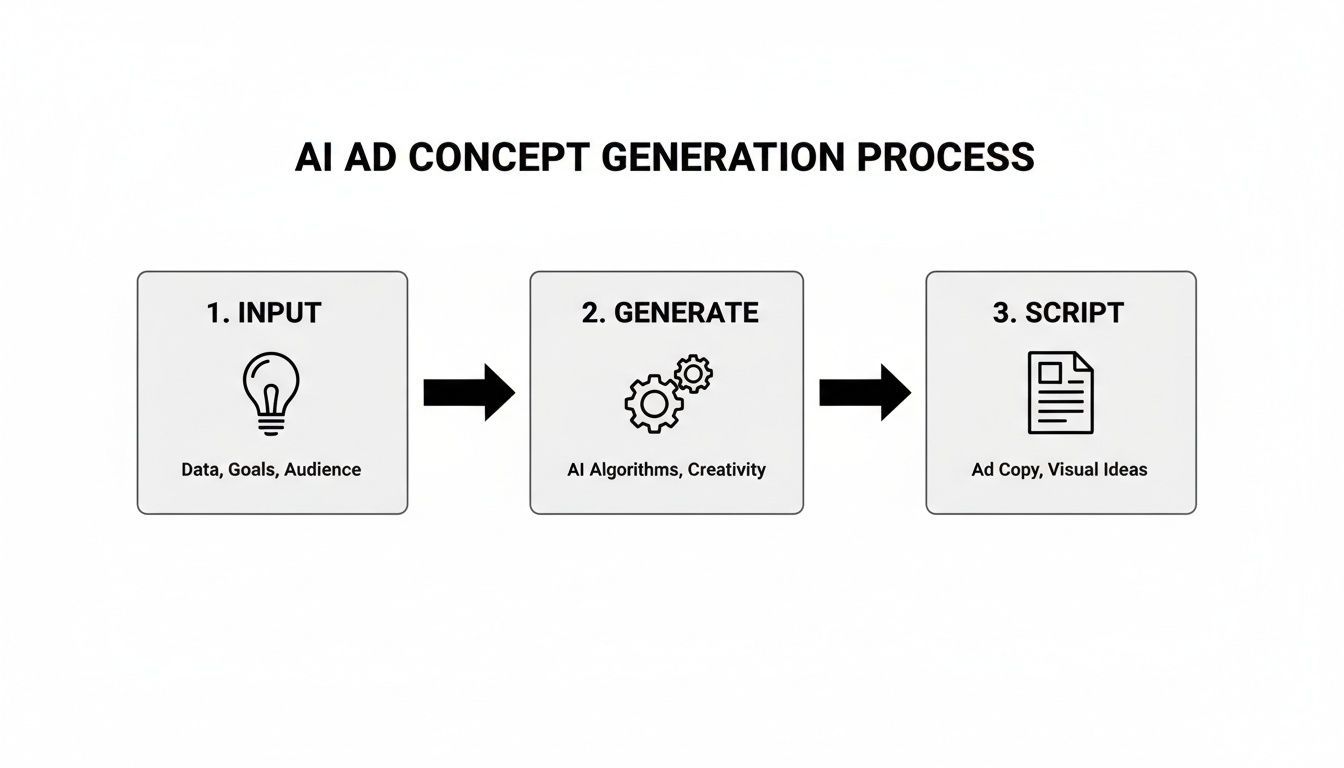
As you can see, it's a structured process. Good inputs lead to tailored, creative outputs that become the blueprint for the video you’re about to build.
Adding a Natural and Persuasive Voiceover
Don't even think about running a silent ad on Instagram. It's a massive missed opportunity. While captions are non-negotiable, a great voiceover is what truly drives the message home and keeps people watching. Recording audio yourself can be a pain, but AI voice generation handles this in seconds.
The goal is to choose a voice that not only matches your brand's personality—be it energetic, trustworthy, or sophisticated—but also resonates with your target demographic.
Modern AI voice libraries are incredible. You have a huge selection of voices, accents, and languages at your fingertips. You can even dial in the performance by tweaking the pace, pitch, and emotional tone. Need an upbeat, excited delivery for your hook? Just adjust the settings. Want a calmer, more reassuring tone for the problem-solution part? You can do that, too, without a single re-record.
Pasting your script's voiceover text into the tool, picking a voice, and hitting "generate" is all it takes. The platform syncs the audio to your video scenes automatically, creating a perfectly cohesive ad. If you want to go deeper, you can learn more about the technology behind this by exploring the latest in text-to-video AI technology.
By pulling together AI-generated scenes, your own brand assets, and a natural-sounding voiceover, you've just built a complete, high-quality video ad. You've done it in a fraction of the time it would normally take, and now you have a powerful creative asset ready for some final branding touches and, crucially, for A/B testing.
Getting Your AI-Generated Video Ad-Ready
So, the AI has worked its magic and handed you a video draft. That’s a massive head start, but let's be real—the raw output is rarely ready for prime time. The final polish is what separates a generic AI clip from a high-converting Instagram Reels ad that actually looks and feels like it belongs in someone’s feed. This is where you inject your brand's personality and tweak every second for maximum impact.
Think of the AI's video as your raw footage. Your job now is to be the editor. The great thing about tools like ShortGenius is that they have built-in editing suites, so you don't have to get bogged down exporting and importing into separate, complicated software. Everything you need to get this done is right there.
This refinement process is a non-negotiable step in any legitimate ai instagram reels video ads tutorial. It’s how you make sure your ad isn’t just eye-catching but also strategically sound, perfectly on-brand, and formatted to win on Reels.
Fine-Tuning the Pace and Flow
First thing's first: let's tighten up the pacing. Instagram Reels are all about quick, snappy cuts that keep people watching. Sometimes the AI will generate scenes that are a second or two longer than they need to be, and that's often enough to kill your ad's momentum.
Scrub through your video's timeline and be ruthless about trimming the fat. Does a scene hang around a little too long after the voiceover moves on? Cut it. Is there a weird, clunky pause between two clips? Get rid of it. The whole point is to create a seamless, high-energy flow that carries your viewer from start to finish without giving them a chance to even think about scrolling away.
- A Quick Trimming Tip: Keep an eye out for moments of dead air or visuals that don't add anything new. I usually aim for a new visual or piece of information to hit the screen every 1.5 to 2 seconds. It’s a simple rule of thumb that keeps things feeling fresh.
Making Your Captions and Text Work Harder
A huge chunk of your audience will be watching with the sound off. That means on-screen text isn't just a nice-to-have; it's absolutely critical. AI tools are great at auto-generating captions from your voiceover, which is a massive time-saver. But you can't just set it and forget it. You need to review them for accuracy and, more importantly, style them to make a real impact.
Your captions should be more than just words on a screen—they’re a branding tool and a way to direct attention.
- Go with Dynamic Captions: Instead of static blocks of text, animate your captions so words appear as they're spoken. You've probably seen this "karaoke captions" style before, and for good reason—it’s incredibly effective at keeping viewers hooked.
- Highlight the Important Stuff: Make key words and phrases pop by changing their color or adding an effect. For instance, if your voiceover says "50% off today only," you’d better believe that phrase should be a different color.
- Prioritize Readability: Always choose a bold, clear font. Just as crucial, make sure it has plenty of contrast against the video background so it's easy to read on a small phone screen, even in bright sunlight.
A well-captioned video does so much more than just cater to silent viewers. It actually boosts comprehension and increases how long people watch. When the text reinforces what's being said, your ad's core message becomes much more memorable.
Applying Your Brand Kit for Instant Recognition
Alright, it’s time to make this ad undeniably yours. A consistent look and feel across your ads builds brand recognition and trust over time. Most modern AI ad creators, ShortGenius included, let you upload a brand kit with all your specific assets to make this a breeze.
Here’s what you’ll lock in:
- Your Logo: Pop your logo on as a subtle watermark, usually tucked into a corner. It reinforces who you are without being obnoxious.
- Your Brand Colors: Use your brand’s color palette for any text overlays, highlighted captions, or other graphic elements.
- Your Brand Fonts: Swap out the default fonts for the ones you use everywhere else. This ensures every piece of text aligns with your established visual identity.
With a proper brand kit, this whole process can be a one-click affair that instantly turns a generic-looking video into something that feels like it came straight from your own design team. It’s a simple step, but it’s vital for telling your audience, "Yep, this is us," and building that crucial familiarity with every single view.
Launching and Scaling Your Reels Ad Campaign
Making a killer, AI-generated ad is a huge win, but that's really just the starting line. Now comes the fun part: launching it into the wild and actually managing it for a real return. How you set up, test, and scale your campaign inside Meta Ads Manager is every bit as important as the creative itself.
Your first decision is setting up a new campaign with the right objective. For most of us trying to drive sales or sign-ups, that means choosing the Sales or Leads objective. This immediately tells Meta’s algorithm what you want, so it can start hunting for people who are most likely to take that exact action.
From there, you’ll dive into the ad set level. This is where the magic happens—where you decide who sees your ad, where they see it, and how much you're willing to spend.
Nailing the Ad Set for Reels Dominance
When you reach the placements section, resist the temptation to just leave it on the default "Advantage+ placements." While that setting has its place, we're being surgical here.
Instead, select "Manual Placements" and then check only one box: Instagram Reels. This forces every penny of your budget to go exactly where you planned, on the specific format your new video was built for. No wasted impressions on other placements.
As for your budget, I almost always recommend a daily budget over a lifetime one, especially during the testing phase. It just gives you more flexibility. Pick a number you’re comfortable with, but try to give it enough fuel to get at least 50 conversion events per week. That’s the magic number where the algorithm really starts learning and optimizing effectively.
For your bidding strategy, "Highest volume" is usually the best place to start. It lets Meta do the heavy lifting to find the most conversions at the best price. Once you have some solid data, you can start playing with cost-per-result goals if you need tighter control over your customer acquisition cost.
The Art of Systematic A/B Testing
You didn't use an AI tool like ShortGenius to spit out multiple ad variations just to admire them. It’s time to put them to the test like a scientist. The golden rule here is to isolate one variable at a time, and the very first thing you should always test is the hook. Those first three seconds are everything.
Here’s a simple, effective way to set this up:
- Create one campaign.
- Inside it, create multiple ad sets.
- Keep the audience and budget identical for every ad set.
- Assign one unique video variation to each ad set.
For example, your setup might look like this:
- Ad Set 1: Video with the question-based hook.
- Ad Set 2: Video with the bold statement hook.
- Ad Set 3: Video with that visually jarring hook.
Let them run for a few days until each has a decent number of impressions. The data will quickly show you which hook truly stopped the scroll. Once you've crowned a winner, you can pause the losers and start a new test on another element, like the call-to-action (CTA) or the core visuals.
A/B testing isn't a one-and-done search for the "perfect" ad. It's about building a system of continuous improvement. You're always learning, always iterating, and always beating your last winner.
This methodical process takes the guesswork out of creative strategy and lets your audience's behavior tell you what actually works.
Focusing on the Metrics That Actually Matter
To figure out if your ads are actually making you money, you have to ignore the vanity metrics. Likes and comments are nice, but they don't pay the bills.
You need to laser-focus on the data points tied directly to your business goals.
Here are the big ones I live by in my own ad accounts:
- Cost Per Acquisition (CPA): This is your north star metric. Period. It tells you exactly what you’re paying for a new customer or lead. If this number is profitable for your business, your campaign is a success.
- Click-Through Rate (CTR): This shows how many people who saw your ad actually clicked. A healthy CTR is a great sign that your creative is hitting the mark with your target audience.
- Hook Rate (3-Second Video Views ÷ Impressions): This is the ultimate report card for your hook. What percentage of people even bothered to watch the first three seconds? A low number here tells you the opening of your ad is broken.
- Cost Per Mille (CPM): This is your cost per 1,000 impressions. If you see your CPM starting to creep up over time, it can be an early warning sign of ad fatigue.
The raw efficiency of this format speaks for itself. Benchmarks consistently show that Instagram Reels pull in an average engagement rate of around 1.23%, which blows most other formats out of the water. Even better for your wallet, vertical 9:16 video ads running on Reels have a 34.5% lower cost per acquisition (CPA) on average compared to static image ads. You can dig deeper into these powerful performance metrics to see just how much of an advantage Reels provides.
By keeping a close eye on these numbers, you can move from guessing to knowing. Once you find that winning ad that’s delivering a profitable CPA, it's time to pour some gas on the fire. You can start by slowly increasing the daily budget on that winning ad set or by duplicating it to test new, lookalike audiences.
Have Questions About AI Reels Ads? We Have Answers.
Diving into AI for ad creation is exciting, but it's natural to have a few questions before you jump in. As you start thinking about your own workflow for making AI Instagram Reels video ads, let's clear up some of the most common things marketers and creators ask.
Can AI-Generated Video Ads Actually Compete with Human-Shot Content?
You bet they can. In fact, they often outperform traditional ads. Today's best AI ad creation tools are designed to crank out videos that feel right at home on Instagram—think authentic user-generated content (UGC) vibes and clean, simple product demos.
These AI models have been trained on mountains of data from successful ads, so they've already learned what works, from attention-grabbing hooks to the right kind of pacing. When you pair AI-generated scenes with a natural-sounding AI voiceover and punchy captions, the final video just blends right into a user’s feed. That "native" feel often works way better than a slick, overproduced ad that feels completely out of place and screams "I'm trying to sell you something!"
How Long Should My AI-Generated Instagram Reels Ad Be?
For Instagram Reels ads, the magic number is usually somewhere between 15 and 45 seconds. The absolute most important thing is to land your main point and hook your viewer in the first three to five seconds. After that, you've earned a little more of their time.
If you’re making a tutorial-style ad, for example, you need enough time to actually show something useful. But you have to keep it tight to keep people watching. A solid approach is to aim for a 30-second ad as your starting point. Then, use your AI tool to easily whip up a shorter 15-second version and maybe a more in-depth 45-second cut to A/B test.
What’s the Single Most Important Thing to A/B Test in My Reels Ads?
If you only test one thing, make it the hook. The first 3 seconds of your video will make or break your entire ad. It's the moment a user decides to either stop scrolling or just keep on swiping.
Your hook is the front door to your ad. If it doesn’t work, it doesn't matter how great your offer, visuals, or call-to-action are—no one will ever see them.
This is where AI really shines. You can ask your platform to generate three to five completely different hooks for the exact same ad concept. For instance, you could try testing:
- A question that pokes at a common frustration.
- A surprising or controversial statement.
- A visually weird or captivating opening shot.
Once the data shows you which hook is the clear winner, you can then start testing other parts of the ad, like the call-to-action or the visuals in the middle.
What’s the Real Cost of Making Instagram Reels Ads with AI?
Using an AI ad generator is a whole different ballgame compared to traditional video production. Forget about shelling out for camera operators, editors, actors, and studio rentals—costs that can easily balloon into thousands of dollars for just one ad. Instead, you're usually looking at a simple, predictable monthly subscription for the software.
This completely changes the financial side of advertising. For one flat fee, you can create dozens, or even hundreds, of different ad variations. This drastically lowers what you spend per creative and lets you run a constant, data-backed testing strategy without draining your budget.
Ready to stop guessing and start generating ads that actually convert? With a tool like ShortGenius, you can create a whole batch of high-performing, on-brand Reels ads in just a few minutes. See how easy it is to build your next winning campaign.