Amplify Your Facebook Ads with ai facebook ad generator: A Quick Guide

Discover how ai facebook ad generator can help plan, create, and optimize Facebook ads with practical tips and real-world examples.
How AI Facebook Ads Transform Campaigns
Imagine cutting hours of manual work down to minutes. With an AI Facebook ad generator, headlines, visuals, and audience targeting come together almost instantly. Marketers reclaim precious time and keep every message on-brand, even while juggling dozens of variations.
Key Advantages Of Automated Ad Creation
- Reduced CPC and higher CTR thanks to adaptive audience targeting
- Overnight production of multiple ad variants for rapid A/B testing
- Consistent brand tone across every headline, image, and caption
“Using AI for Facebook ads cut our setup time in half and doubled click-through rates.”
– Marketing Lead at a SaaS startup
ROI Improvements Across Industries
From boutique e-commerce shops to enterprise SaaS firms, teams report dramatic performance lifts within weeks of switching on AI.
- 80% average boost in click-through rate within the first month
- 25% more cost-effective budgets through smarter bid adjustments
Deeper audience insights mean more personalized creative. Faster A/B cycles deliver clear direction in hours, not weeks.
Impact Of AI On Facebook Ad Performance
Below is a side-by-side snapshot of key metrics before and after integrating an AI Facebook ad generator.
Comparison of key metrics before and after using AI Facebook ad generator across industries
| Metric | Before AI | After AI |
|---|---|---|
| CTR | 0.9% | 2% |
| CPC | $1.72 | $1.38 |
| Conversions | Baseline | +35% |
Even a 122% jump in CTR and a 19.8% drop in cost per click show why teams are adopting AI-driven ads at scale.
Optimized Ad Generation Workflow
The process starts by feeding in a brief—your product details and target market. Within seconds, AI suggests:
- Headlines tailored to different buyer personas
- Image layouts that highlight key features
- Audience presets ready for testing
All of this happens in a single interface, so you can tweak copy, change visuals, or refine targeting on the fly.
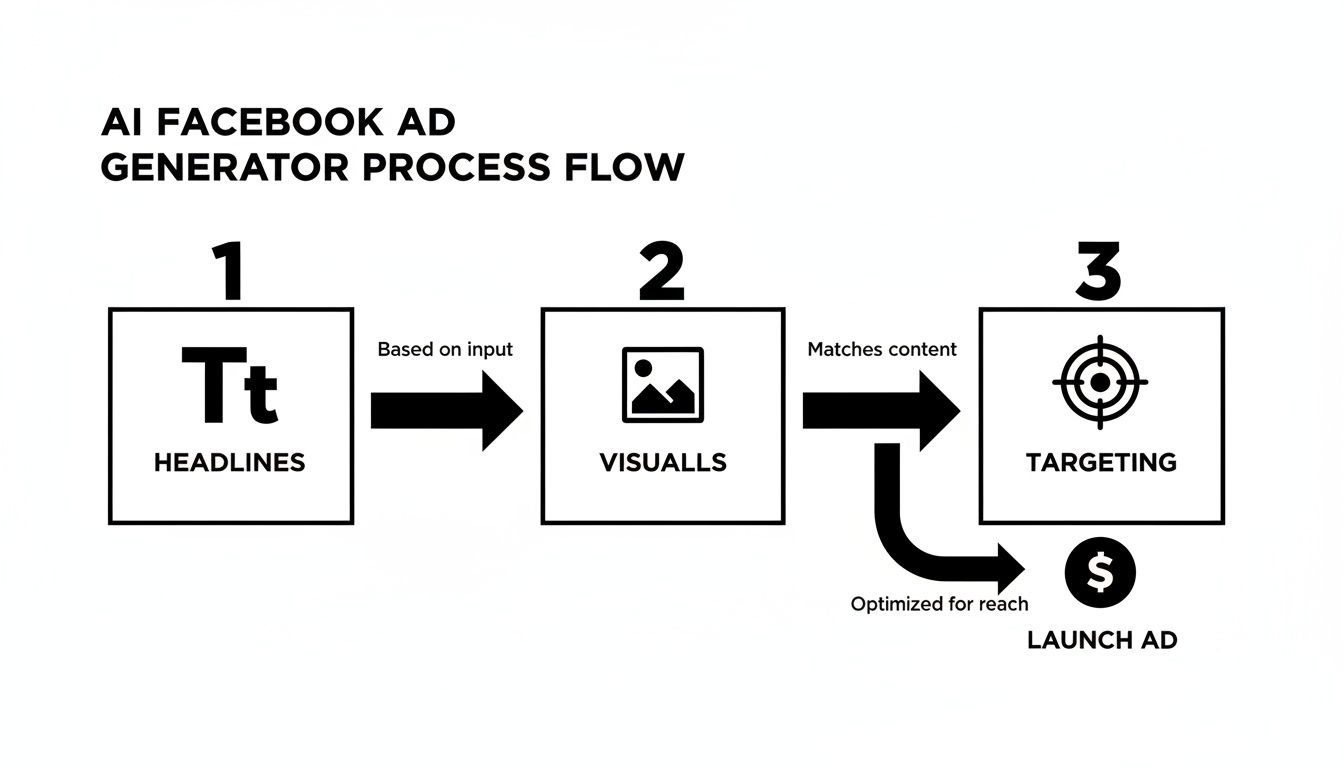
This flowchart shows how each element—headlines, images, audiences—feeds directly into your campaign build.
Explore ShortGenius AI Ad Generator Workflows
For a step-by-step walkthrough filled with concrete prompts, creative presets, resizing tips, and A/B test ideas, check out our practical guide: ShortGenius AI ad generator workflows
Planning Facebook Ads With AI Assistance
Starting any Facebook campaign means getting crystal-clear on what you want to achieve. Do you need broad awareness and tons of impressions, or are you zeroing in on sign-ups and purchases? This first decision steers your bidding type—CPC or CPM—and defines how your budget gets sliced.
Be realistic about spend. Match your daily or lifetime budget to audience size and ROI goals. When your AI tool sees clear numeric limits, it can suggest ad volumes that won’t bust the bank.
- Budget Brackets With Example Spend And Expected Reach Levels
- Bidding Strategies Matched To Awareness Or Conversion Objectives
- Time-Frame Settings For Daily Versus Lifetime Budgets
Mapping Goals And Budgets
Tying specific goals to budget tiers sharpens every AI suggestion. A $500 daily budget aimed at conversions, for example, will automatically lean into CPA optimization. Conversely, a larger lifetime budget for awareness typically nudges toward CPM to flood feeds with impressions. Plug those figures into your AI dashboard and watch ad recommendations get more precise.
Meta’s push into AI for Facebook ad generation has driven ad revenue over $160 billion in 2024 and Q1 2025 revenue to $42.31 billion, with 82% of top advertisers already relying on AI automation. Learn more about these findings on InBeat Agency.
Defining Audience Segments
Breaking down your market into tight segments makes messages hit home. Feed your AI:
- Core demographics like age, gender, and location
- Interests and behaviors from CRM records or Facebook Pixel
- High-value customers and lookalike profiles based on purchase history
These layered signals let the AI craft ad variations that resonate—cutting wasted impressions and boosting relevance.
Crafting AI Prompts
A well-structured prompt keeps AI output on point. Cover three key areas:
- Tone: friendly and energetic for consumer brands
- Messaging Hooks: scarcity alerts or social proof cues
- Visual Style: minimal text overlays or bright, eye-catching shots
Try a template like “Write a high-energy headline for summer hiking boots with a 20% off hook” to crank out multiple versions quickly. In one case, an outdoor gear brand combined seasonal trend data and competitor ad analysis into a 50-word prompt. The result? Eight unique ad variants and a 30% jump in engagement.
Finally, layer in real-time pixel events so the AI can swap images or headlines for audiences on the brink of converting. That wraps up the planning phase—now you’re ready to move from strategy to launch.
Generating Facebook Ad Creatives With AI Presets
When you jump into the creative phase, picking the right preset can make all the difference. These templates handle everything from static images to short video clips and ad copy styles. In just a few clicks, you could be showcasing your product in a clean, minimalistic layout or adding motion to grab attention.
Here are some presets worth exploring:
- Product Highlight Template: Puts key features front and center with concise text overlays.
- Motion Clip Preset: Brings still shots to life with animated text and transitions.
- Testimonial Style: Combines customer quotes with branded frames for authenticity.
- Dynamic Carousel: Cycles through multiple product images with custom captions.
Selecting And Customizing Templates
Say you start with the Motion Clip Preset. A couple of slider tweaks adjust contrast, saturation or tint. Suddenly, you’ve matched your brand’s vibe without opening a separate design tool.
When you move on to copy, batch prompts are a real time-saver. Drop in something like this:
Generate 5 headlines for a minimalist lamp brand Use urgency cues and brand voice Produce 3 CTAs and 2 short descriptions
That single run spits out five headline options, three CTAs, and two description variants. No more jumping between tabs—just pick the best angles and move on.
Layering Brand Styles
Next, inject your brand’s color palette and fonts. Most preset libraries let you paste hex codes and upload font files in moments.
Try these tips:
- Apply your primary and accent colors to headers or borders.
- Upload your official font or pick a close match.
- Save everything as a custom theme for future campaigns.
“We created five distinct ad concepts in under two minutes using ShortGenius presets,” recalls a home decor marketer. “Refining them for brand consistency was seamless.”
Below is a quick side-by-side of two variants we tested:
| Variant | Style | Key Metric |
|---|---|---|
| Version A | Bright Accent Bars | 0.45% CTR |
| Version B | Soft Pastel Filter | 0.38% CTR |
Experimentation like this helps you discover what resonates with your audience. Then you can launch A/B tests in Facebook Ads Manager and scale the winners.
Before long, you’ll be churning out seasonal or sale-focused creative bursts in just a few clicks.
For deeper UGC strategies, check out our guide on AI-driven user-generated ads for Facebook. Learn more about AI UGC ad creation in our article: Crafting User Focused Ads with AI Presets. Include these tactics in every campaign today.
Editing And Refining AI Facebook Ads

You’ve fed your prompts into an AI Facebook ad generator and pulled out a set of rough drafts. Now comes the fun part—fine-tuning those visuals and copy snippets so each placement truly pops.
Small adjustments to layout and wording can make a world of difference, especially when you’re juggling multiple ad spots.
Adapt Visuals For Each Placement
- Feeds Adjustment Swap in simplified layouts with bold overlays that stand out during a fast mobile scroll.
- Stories Optimization Go full-screen vertical and trim copy to one punchy line.
- In-Stream Refinement Add captions and loop shorter clips to keep autoplay viewers hooked.
Platform presets handle aspect ratios and file sizes in seconds. For instance, converting a 16:9 image into a 9:16 story frame takes just a click instead of manual resizing.
“Applying story templates cut our setup time by 40%,” says a paid media manager.
Ensure Compliance And Avoid Rejections
- Review Facebook policy for prohibited claims.
- Confirm text overlay stays within image-text limits.
- Strip out any copyrighted assets flagged by your ad tool.
A quick compliance run-through saves you from last-minute rejections and wasted spend.
Quick Copy Hacks And A/B Ideas
- Keep headlines under 25 characters to boost readability.
- Replace bland verbs with action words like “Grab,” “Explore,” or “Join.”
- Experiment with contrasting CTA colors against your brand palette.
Here’s a sample A/B matrix for inspiration:
| Test Element | Variant A | Variant B |
|---|---|---|
| Headline Length | 20 characters | 35 characters |
| CTA Color | #FF5722 | #009688 |
| Image Filter | High Contrast | Soft Fade |
Avoid overwhelming tests—stick to three variables or fewer per experiment.
Real-World Case Study
A fitness app campaign went from flat to flourishing after targeted tweaks. Swapping out muted tones for brighter hues and tightening up the hook resulted in a 20% jump in conversions.
“Small edits with AI drafts turned underperformers into our top sellers,” notes an agency lead.
Troubleshooting Hallucinations
Every so often, the AI will spit out an off-brand line or a weird visual. Scan for odd phrasing or irrelevant imagery, then swap in human-approved content before you hit publish.
Final Review Checklist
- Confirm a consistent tone across headlines and captions.
- Preview every placement in your ad platform.
- Double-check UTM tags and tracking parameters.
- Archive superseded drafts to avoid asset confusion.
These final checks ensure your AI-generated ads launch clean and error-free.
Optimize CTA Placement
- Slot CTAs into the first three seconds of Stories for maximum impact.
- Use bold button styles in feed ads to catch the eye.
- Mirror CTA wording exactly on your landing page for a seamless experience.
Monitoring early metrics in Ads Manager lets you spot CTR dips immediately. Then feed those insights back into your prompts so each new batch starts off stronger.
Publishing And Optimizing AI Facebook Campaigns
You’ve fine-tuned your AI creative prompts and you’re ready to hit publish. Facebook’s Ads Manager takes care of bid strategies, budget splits, and grouping objectives—so you can focus on results.
Before anything else, make sure your Facebook Pixel is firing correctly. That pixel data not only tracks conversions but also feeds your AI insights for sharper targeting.
Verifying Your Facebook Pixel
- Double-check installation in Events Manager to capture every action.
- Run through the Test Events tab—simulating clicks, sign-ups, and purchases—to confirm the pixel fires.
- Build audience segments around those events (e.g., add-to-cart, view content) for laser-focused retargeting.
Configuring Budgets And Schedules
Picking the right budget structure sets the pace for your ad spend.
- Daily budgets let you pivot fast, adjusting spend after early performance signals.
- Lifetime budgets smooth out delivery over the campaign’s full run, avoiding front-loading.
- Layer in an ad schedule by hour or day so you’re not burning cash when your audience is off-line.
Grouping Ads By Objective
Sorting campaigns by goal makes reporting crystal clear.
- Awareness: Drive reach and impressions to light up the top of your funnel.
- Consideration: Aim for clicks, video views, or leads—your mid-funnel growth drivers.
- Conversion: Zero in on purchases or sign-ups, optimizing for CPA and ROAS.
Setting Automated Rules
Let the system do the heavy lifting while you sleep.
- Pause any ad with a CPA above your threshold to stop wasted spend.
- Boost budgets on ads that exceed your ROAS target, accelerating winners.
- Trigger alerts when daily spend nears its limit so you never go over budget.
Interpreting Performance Metrics
Regularly scan your dashboard to spot trends and opportunities. These key figures steer your next moves:
| Metric | Definition | Action |
|---|---|---|
| CPA | Cost per Acquisition—spend required per conversion | Pause or refine ads above your target CPA |
| CTR | Click-Through Rate—percentage of users who click | Test fresh headlines or CTAs |
| ROAS | Return on Ad Spend—revenue earned per dollar spent | Scale up ads meeting or beating goals |
Continuous Improvement
Every campaign feeds your AI prompts with new data. By iterating weekly, a subscription box brand slashed CPA by 30% and lifted overall ROI.
“Week-over-week tweaks cut CPA and lifted returns.”
Stay nimble. Tweak, test, and repeat. For deeper insights, check out our ShortGenius guide.
Final Launch Checklist
- Preview creatives across all placements to catch formatting hiccups.
- Confirm UTM parameters in tracking URLs for granular reporting.
- Run live tests on mobile and desktop under varied network speeds.
- Schedule a monthly creative audit to retire underperformers and refresh messaging.
Best Practices And Insider Tips For AI Facebook Ads
Even small edits in your prompt can move the needle when using an AI Facebook Ad Generator. Swap vague language like “exciting sale” for “48-hour flash sale at 30% off” and watch your headlines drive more clicks.
Pacing matters too. Rather than asking for ten ads at once, request just three. Refine the next batch based on your favorites and you could trim review time by 40%.
One retailer ran an A/B test on five different headlines. By choosing a playful spin instead of a generic discount call, they lifted their CTR by 25%.
Prompt Crafting Tactics
A few targeted tweaks will keep your AI output on track:
- Include product specifics (material, use case) to boost relevance
- Add tone tags like “urgent” or “expert” to shape the emotion
- Keep prompts under 30 words so the model stays focused
“Breaking goals into smaller prompt batches helped us launch ads faster while keeping quality high.”
– Social Media Manager
Next, let’s sharpen your targeting.
Audience Targeting Strategies
Combining Facebook’s suggested audiences with your own customer lists narrows in on real buyers. Start with a 1% lookalike, then layer interests tied to previous purchases. The dual approach helps the AI Facebook Ad Generator craft messages that truly resonate.
Key criteria to feed:
- Core demographics (age, location, gender)
- Interests (page likes, behaviors)
- CRM-based lists for retargeting
Sometimes, a quick manual image swap can outperform automation. In one test, a lifestyle photo drove a 15% bump in engagement over the AI default.
Timing And Seasonal Planning
Launching AI-driven campaigns around shopping peaks makes a big difference. Roll out a holiday-themed batch one week before the rush to capture early attention.
To get started, map out your key dates and generate season-specific creatives about two weeks ahead. Then keep an eye on daily metrics so you can pivot quickly.
“A holiday-themed prompt tweak lifted sales by 30% in three days.”
Always scan for odd visuals or off-brand phrasing before you go live. Balancing AI speed with a human edit ensures your messages feel genuine.
When images, copy, and targeting all line up, you’ll see campaigns perform at their best. Try these insider tips today and watch your next batch of Facebook ads land more clicks.
Frequently Asked Questions
When you’re juggling several campaigns, it’s natural to wonder how an AI-powered Facebook ad creator fits into your process. Below are the most common questions—along with practical answers—to help you launch ads confidently.
Q: What Is an AI Facebook Ad Generator? How Does It Differ from Creating Ads Manually?
An AI Facebook ad generator analyzes your past performance to craft headlines, visuals, and audience suggestions in a flash. Instead of drafting each asset one by one, you get a batch of optimized variations ready to go.
Q: Can I Enforce My Brand Guidelines in AI-Generated Ads?
Absolutely. Simply upload your logo, share color hex codes and tone-of-voice notes, and the AI will mirror your brand’s look and feel across every headline, image, and caption.
“We saw every AI ad match our brand look—just as soon as we handed over our style kit,” recalls one marketing manager.
Q: What’s the Best Way to Compare AI-Generated Ads with My Own Creatives?
Head to Facebook Ads Manager and focus on CTR, CPA, and ROAS. Run A/B tests where AI variants go head-to-head with your manual ads. Then feed the top performers back into your main campaigns.
Q: How Much Should I Invest When Testing AI-Generated Ads?
Start with $100–$200 per ad set. Let each version run for at least three days to collect meaningful data. Only boost budgets on the ads that meet your CPA or conversion goals.
Troubleshooting Common Issues
- Odd Copy or Imagery: Swap out any strange AI-generated text or visuals with human-reviewed assets.
- Misplaced Ads: Use platform presets for feeds, Stories, and in-stream videos.
- Unexpected Rejections: Double-check Facebook’s ad policies before you publish.
- Reporting Glitches: Make sure UTM tags match ad set names exactly for clean analytics.
Key Takeaways
Consistent A/B testing and clear performance targets turn AI suggestions into high-converting ads.
Get more high-performing ads today.
Try ShortGenius at ShortGenius for a free trial today.