AI Ad Generator for Online Course Creators The Definitive Guide

Discover how an AI ad generator for online course creators can transform your marketing. Learn a proven workflow to create high-converting video ads in minutes.
Creating great video ads can feel like a full-time job. It’s a huge drain on your time and money, which is precisely why an AI ad generator for online course creators can completely change how you approach marketing. These tools give solo creators and small teams the power to produce professional, high-converting ads in minutes, not weeks, without a big budget or professional editing skills.
Why AI Ad Generators Are a Game Changer for Course Creators
If you've ever lost a week trying to script, shoot, and edit a single 30-second ad, you know the struggle. The old way is slow, expensive, and often feels like a shot in the dark. You pour all your energy into creating one "perfect" video, only for it to fall flat on social media, leaving you wondering what went wrong.
This is exactly where AI ad generators step in. They don't just speed things up; they overhaul the entire strategy for advertising your online course. Instead of putting all your eggs in one basket, you can now generate a dozen different ad variations in the time it used to take to make one. This opens the door to testing multiple hooks, visuals, and calls to action at the same time, letting actual data drive your marketing choices.
From Manual Labor to Strategic Partnership
Think of an AI ad generator as a creative partner that does the heavy lifting for you. You bring the core message and understanding of your audience, and the AI takes care of the rest—writing persuasive scripts, finding the right visuals, and even adding a professional voiceover. This frees you up to focus on what you do best: improving your course and engaging with your students.
To see just how different the process is, take a look at this comparison:
Before and After Ad Creation with AI
This table really puts the shift into perspective, showing how AI replaces tedious manual tasks with automated efficiency.
| Process Step | Traditional Method (Time & Cost) | AI Ad Generator Method (Time & Cost) |
|---|---|---|
| Scriptwriting | 1-2 days of brainstorming & writing; high cost for a copywriter. | 5-10 minutes with AI prompts; minimal to no cost. |
| Visuals/Filming | 1-3 days for shooting/sourcing; high cost for gear & stock footage. | 15-30 minutes for AI generation; included in software cost. |
| Editing & Voiceover | 2-4 days of editing; high cost for an editor & voice artist. | 10-20 minutes for auto-editing & AI voice; included in software cost. |
| Total Turnaround | 1-2 weeks | Under 1 hour |
The bottom line is clear: what once took weeks of coordinated effort and significant financial investment can now be done in less time than it takes to watch a movie. The benefits are massive:
- Time Savings: A task that once filled your entire week can now be done during a lunch break.
- Cost Reduction: You can skip the high costs of freelance editors, videographers, and expensive software licenses.
- Creative Scaling: Instead of being stuck with one or two concepts, you can easily test ten different ads to find what truly resonates.
AI ad generators are a powerful tool in the world of digital marketing for lead generation, giving course creators a direct and effective way to connect with their ideal students.
The Growing AI Ecosystem
This isn't just a niche trend; it's part of a massive technological shift. The generative AI market is on track to hit $356.10 billion by 2030, and an incredible 92% of Fortune 500 companies are already using this technology. For course creators, this rapid growth is fantastic news. It means more powerful, user-friendly, and affordable tools are hitting the market all the time as companies compete to offer the best solutions.
The biggest advantage isn't just speed; it's the ability to adopt a performance marketer's mindset. You can move from "I hope this ad works" to "I know which of these ten ads works best because the data tells me so."
Defining Your Ideal Student and Core Message
The secret to a killer ad isn't some fancy software trick—it’s a deep, almost personal understanding of your audience. Before you even touch an ai ad generator for online course creators, you have to get crystal clear on who you're talking to and exactly what you want to say.
Think of it this way: garbage in, garbage out. If you feed the AI generic prompts, you'll get back generic, forgettable ads that blend into the noise. We need to go beyond a vague "student avatar" and tap into the real-world frustrations and dreams that make someone search for a course like yours in the first place.
Moving Beyond the Surface-Level Avatar
Most course creators start with a basic avatar. "My ideal student is a 30-year-old marketer who wants to learn SEO." It’s not wrong, but it’s flimsy. It lacks the emotional punch needed to stop someone mid-scroll.
Let's dig deeper. Forget demographics for a minute and focus on their "jobs to be done"—what problem are they really trying to solve by taking your course?
To get to the good stuff, ask yourself these kinds of questions:
- What's their biggest professional headache right now? (Maybe their boss keeps shooting down their marketing ideas.)
- What's the secret goal they're daydreaming about? (They're quietly plotting to build a side hustle and finally quit their 9-to-5.)
- What have they already tried that failed? (They've binged dozens of free YouTube tutorials but still feel completely lost and overwhelmed.)
- How do they describe their problem in their own words? (Listen for phrases like, "I feel like I'm just guessing with our content strategy.")
The answers to these questions are pure gold. This is the emotional fuel you’ll feed the AI, turning a generic announcement into a direct, personal conversation with someone who feels like you're reading their mind.
Crafting a Core Message That Resonates
Once you have a sharp picture of your ideal student, you can build a core message that speaks directly to them. This isn't your ad script just yet. It's the central idea, the north star that all your ads will orbit around. It should be a simple, powerful statement connecting their pain to your solution.
A truly effective core message nails three things:
- The Audience: Who is this for, specifically?
- The Problem: What is the precise pain they feel?
- The Transformation: What amazing outcome does your course deliver?
Let's say you teach a public speaking course for introverts in the tech world.
Bad Example: "My course helps people become better speakers." (Yawn. Too generic.)
Good Example: "My course helps introverted software developers crush their fear of presenting so they can finally lead team meetings with confidence and get their best ideas heard." (Now we're talking. It’s specific, emotional, and focused on the outcome.)
This detailed message becomes the rock-solid foundation for your AI prompts. It’s packed with the keywords, emotional triggers, and specific goals that will guide the AI to generate ad copy that actually works.
Translating Insights into Powerful AI Prompts
With this prep work done, you can now give the AI a high-quality instruction—a prompt. The difference between a lazy prompt and a thoughtful one is night and day.
Let’s compare two approaches for a course on Notion.
| Prompt Type | Example Prompt | Expected AI Output |
|---|---|---|
| Weak Prompt | "Ad for a Notion course." | A bland, generic script about "getting organized." |
| Strong Prompt | "Generate a 30-second video ad script for a busy project manager who is drowning in emails and wants to learn Notion to streamline team communication and finally achieve 'inbox zero'." | A highly targeted script with hooks about email overload, the chaos of managing a team, and the sweet relief of a clean inbox. |
See the difference? The strong prompt gives the AI context. It names the audience (project manager), specifies the pain point (drowning in emails), and defines a clear transformation (inbox zero). This is how you empower the AI to create something that feels personal and urgent. Taking this time upfront is the single most important thing you can do to get incredible results from your AI-generated ads.
Crafting Ad Scripts and Hooks That Actually Convert
Alright, you’ve done the hard work of figuring out exactly who your ideal student is. Now for the fun part: creating the words that will actually stop them from scrolling.
This is where your AI tool transitions from a research assistant into a full-blown creative partner. The real goal here isn’t just to spit out one script. It’s to build a whole arsenal of hooks, angles, and full-blown scripts that you can test against each other to see what really resonates.
Forget the dreaded blank page. With the right prompts, you can turn all those audience insights into compelling, persuasive copy that feels like it was written just for them.
Lean on Proven Ad Frameworks
Why reinvent the wheel? The best ads almost always follow a proven formula for persuasion—a blueprint that guides your prospect through a logical and emotional journey. Instead of guessing at a structure, you can simply tell your AI to use one of these battle-tested frameworks.
For course creators, the Problem-Agitate-Solution (PAS) framework is gold. It's so effective because it starts by meeting your audience right where they are, deep in their frustration. You’re not just selling a course; you’re offering an escape route from a problem they’re desperate to solve.
Let’s say you have a course on email marketing. Here’s how you could prompt an AI to use the PAS framework:
Prompt Example: "Generate three 30-second video ad scripts for my 'Email Marketing Mastery' course using the PAS framework. My target audience is a small business owner who feels invisible on social media and wants a more direct way to get customers. Hit on the pain of low engagement and the dream of having sales on autopilot."
An AI will instantly understand how to structure the script:
- Problem: "Tired of posting on social media and hearing nothing but crickets?"
- Agitate: "You pour hours into creating content, but the algorithm just buries it. That means zero leads and a lot of wasted time."
- Solution: "My course teaches you to build an email list that you control. You’ll learn how to reach your customers directly and make sales every single time you hit 'send'."
See how much more powerful that is than a generic "learn email marketing" pitch? It taps directly into their struggle before you ever mention the solution.
Engineering Scroll-Stopping Hooks
On social media, you’ve got maybe three seconds to earn someone’s attention. That’s it. Your hook—the very first line of your ad—is everything. If it’s weak, the rest of your brilliant script doesn’t matter because no one will ever see it.
An AI ad generator is a hook-writing machine. You can brainstorm 50 different opening lines in the time it would take a human to write two. The trick is to ask for specific types of hooks that trigger curiosity, challenge a common belief, or drop a surprising fact.
Try asking your AI for these types of hooks:
- Controversial Questions: "Is your '9-to-5' actually a 9-to-9?"
- Surprising Statistics: "Did you know that 80% of online courses are never finished? Here’s how to make sure yours isn't one of them."
- "You" Statements: "You're probably making this one mistake with your YouTube channel."
- Benefit-Driven Hooks: "Steal my exact system for launching a profitable online course in just 30 days."
These targeted hooks are designed to grab your specific audience by the collar and make them pay attention.
Making It Sound Like a Human, Not a Robot
Let's be real: the first draft an AI gives you will probably sound a little... robotic. That's perfectly fine. Think of the AI output as high-quality raw material, not the finished product.
Your job is to be the editor. Take that script and inject your personality, your voice, and your unique way of speaking into it.
Read it out loud. Does it sound like you? If it feels clunky or too formal, tweak it. Swap out a stuffy word for a more casual one. Break up a long sentence into two short, punchy ones. Add a quick personal story or a phrase you use all the time with your community.
My Two Cents: The best AI-generated ads are a team effort. The AI gives you speed and structure, but you provide the soul. That final layer of authenticity is what makes people connect with you and, ultimately, buy from you.
This human touch is non-negotiable for user-generated content (UGC) style ads, where a genuine, off-the-cuff tone is essential for building trust. If you're leaning into that style, check out our guide on creating AI UGC ads for a deeper dive on scripting for authenticity. Your goal is to polish the AI's script until it sounds exactly like something you'd say to a friend over coffee.
Bringing Your Ad to Life with AI Visuals and Voiceovers
With a solid script in hand, it's time for the fun part: turning those words into a video ad that actually grabs people's attention. This is where a good AI ad generator for online course creators really proves its worth. We're moving beyond simple text and into building the sights and sounds that will make someone stop scrolling.
Forget the old days of painstakingly syncing audio tracks or spending hours digging through stock footage libraries. Now, your job is to guide the AI. You tell it what you need, and it assembles scenes, finds the right voice, and adds effects that match the unique vibe of your course. The best tools can do it all, from creating that popular user-generated content (UGC) feel to generating slick animations of your course platform in action.
Crafting Your Visual Identity
Let's talk about brand consistency. It's not just a buzzword; it's how people come to recognize you instantly. Your ads shouldn't look like a random jumble of clips. They need to scream you. This is exactly why features like a built-in brand kit are a game-changer.
Before you even think about generating a video, take five minutes to set this up. It's a one-and-done task that pays off big time.
- Your Logo: Upload a high-resolution version. Make sure you have a few variations if possible (like one for light backgrounds and one for dark).
- Brand Colors: Don't just eyeball it. Plug in the exact hex codes for your primary and secondary colors.
- Brand Fonts: If you use specific fonts on your website or in your course, upload those files here.
Once that's locked in, the AI automatically applies these elements to things like captions, title cards, and end screens. It’s a simple step, but it’s what makes every single ad look polished and professional, reinforcing who you are with every view.
Selecting the Perfect AI Voiceover
The voice of your ad is just as crucial as the visuals. Get it right, and you build trust and excitement. Get it wrong, and your message completely falls flat. Luckily, today's AI voices are startlingly realistic and give you a ton of options to find the perfect match for your brand's personality.
Think about the feeling you want your course to give off. Is it high-energy and motivating? Or is it more calm and thoughtful?
- For a high-energy fitness course: You'll probably want a confident, upbeat voice that speaks at a slightly faster pace.
- For a detailed coding tutorial: A clear, steady, and articulate voice is going to build more confidence with your audience.
- For a course on mindfulness: A soft, calming, and warm tone is obviously the way to go.
My advice? Don't just pick the first voice that sounds okay. Spend a few minutes auditioning them. Close your eyes and just listen. Does this sound like a person your ideal student would trust? Does it sound like a guide they'd want to learn from? That's the voice you're looking for.
Key Takeaway: The goal here isn't to find a narrator. It's to find an AI voice that becomes an authentic extension of your brand, speaking directly to your viewer's problems and aspirations.
Adding Professional Polish with Captions and Effects
So many people watch videos on their phone with the sound off. This makes dynamic auto-captions a non-negotiable part of your ad. A good AI tool can transcribe your voiceover and create animated, easy-to-read captions in just a few seconds. This isn't just an accessibility feature—it's a critical tool for engagement. Videos with captions almost always have higher watch times.
Beyond the captions, a few subtle effects can really elevate your ad. The best part is that you don't need any editing skills to use them.
- Subtle Camera Movements: Even a slow zoom or pan on a static image can create a feeling of motion and make it more dynamic.
- Smooth Transitions: Stick to simple fades or dissolves between your scenes. It keeps the ad flowing smoothly without being distracting.
- Highlight Effects: A quick color flash or a slick text animation can draw the viewer's eye to a key phrase or, most importantly, your call to action.
The world of AI advertising is moving incredibly fast, and as course creators, we're in a great position to benefit. The latest research from IAB shows that 85% of advertisers are already using AI for their social media ads, with 64% saying the biggest benefit is how cost-effective it is. By using these simple, built-in visual and audio tools, you’re tapping into the same strategies that much bigger brands use to create ads that work. You can read the full IAB report to see just how much AI is changing the ad industry.
This whole process, from a simple text prompt to a finished video, really highlights how powerful these creative tools have become. If you're interested in what's going on under the hood, our guide on AI text-to-video models breaks down how this technology actually works.
Testing and Optimizing Your AI Ads for Maximum ROI
Alright, you’ve launched your AI-generated ad. Now the real work begins. This is where we shift from a creative mindset to a performance marketer’s mindset. Your job isn't just about making ads anymore; it's about systematically figuring out what actually works through fast, data-driven testing.
This is where using an AI ad generator for online course creators really gives you an edge. Since you can churn out ad variations in a fraction of the time it used to take, you can run multiple tests at once without getting bogged down by filming and editing. This is your fast track to finding a winning formula.
Focusing on Metrics That Matter
It’s incredibly easy to get distracted by "vanity metrics" like likes, shares, or even total video views. They might feel good, but they don't pay the bills. For course creators, only two numbers truly define the success of an ad campaign.
Your entire optimization strategy should boil down to improving these two key performance indicators (KPIs):
- Cost Per Lead (CPL): This tells you how much you're spending to get one person to take the next step—signing up for your webinar, downloading a free guide, or joining your email list.
- Cost Per Enrollment (CPE): This is the ultimate bottom line. It's the exact amount of ad spend it takes to get one new student into your course.
Everything else, from Click-Through Rate (CTR) to watch time, is just a clue. These secondary metrics help you diagnose why your CPL and CPE are what they are.
A Framework for Reading the Data
Staring at your ad manager dashboard on Facebook or TikTok can feel overwhelming. The trick is to learn how to spot patterns and let them guide your next move.
Let's walk through a classic scenario. Say you have a super high CTR—tons of people are clicking—but your CPL is through the roof. This signals a major disconnect. It means your ad's hook and visuals are doing a great job of stopping the scroll, but something is falling apart after the click.
While AI is fantastic for creating ads, campaign success also depends heavily on where you send that traffic. To really boost your conversion rates, you need to understand effective landing page design. The problem might not be the ad at all; it could be a landing page that doesn't align with the ad's promise.
This is the beauty of the streamlined AI process—you can pivot quickly.
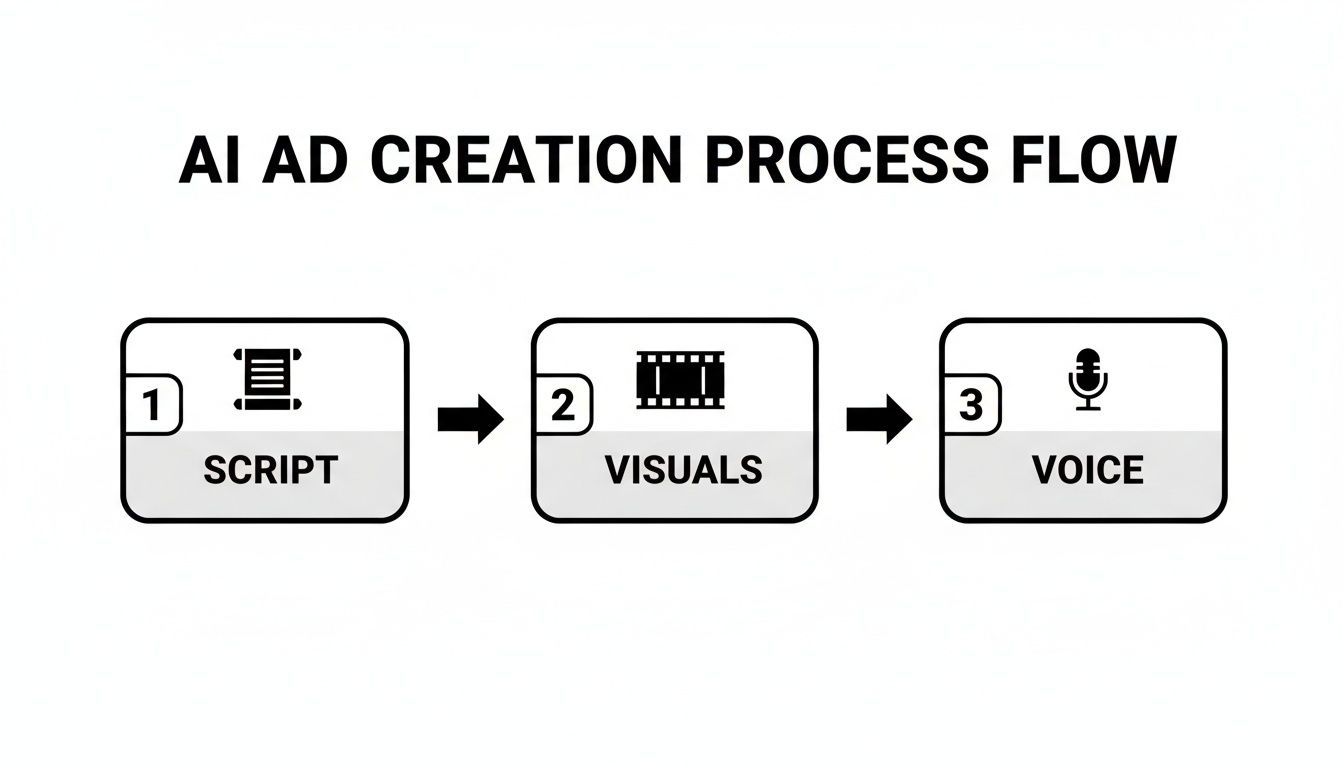
The speed advantage you see here means you can identify what’s not working, swap out the weak elements, and get a new test live in no time.
Smart A/B Testing with AI
A/B testing, or split testing, is all about running different versions of an ad to see which one performs best. With AI, you can test individual ad components at a scale that was just not practical before.
Instead of testing one completely different ad against another, a much smarter approach is to test one element at a time. This gives you much clearer insights.
Pro Tip: If you're just starting, always test the hook first. The first three seconds of your ad are everything. A small change to the hook can make a massive difference in performance.
With AI tools, running these tests is a breeze. Below is a quick table with some high-impact ideas you can start with.
A/B Testing Ideas for Your Course Ads
| Ad Element | Variable A | Variable B | Metric to Watch |
|---|---|---|---|
| The Hook | A question-based hook ("Struggling with...?") | A benefit-driven hook ("Get my exact system for...") | Click-Through Rate (CTR) |
| Visual Style | AI-generated UGC-style clips | Animated course demo visuals | 3-Second Watch Rate |
| Call to Action | "Sign Up Now" | "Watch the Free Training" | Cost Per Lead (CPL) |
| AI Voiceover | Energetic, upbeat male voice | Calm, reassuring female voice | Conversion Rate |
This methodical approach helps you pinpoint exactly what resonates with your audience.
The agility of AI tools is a game-changer here. If a particular product shot or interface mock-up in your ad isn't hitting the mark, you don't need a reshoot. You can use AI-powered image editing tools like this one: https://shortgenius.com/models/image-edit to generate a polished, professional alternative in seconds and get it into your next ad test.
My advice? Start by testing your hooks. Once you find a winner, lock it in as your "control" and begin testing different visual concepts against it. After you have a winning hook-and-visual combo, you can move on to testing calls to action or voiceovers.
By isolating one variable at a time, you get clean, reliable data. This iterative cycle of testing, learning, and optimizing is how you turn your ad spend into predictable course sales.
Common Questions About AI Ad Generators
Jumping into AI for ad creation can feel like a big step, especially when you’ve poured so much of yourself into building a unique brand. It’s completely normal to have questions and maybe even a bit of skepticism. Let's break down some of the most common worries I hear from fellow course creators and separate the hype from what really happens when you use these tools.
My goal isn't to sell you on AI as some kind of magic wand. Instead, I want to show you how to treat it like a powerful, controllable tool that actually serves your brand and helps you hit your goals.
Can AI Ads Truly Capture My Unique Brand Voice?
This is usually the first question people ask, and for good reason. The short answer is yes, but it won't happen on its own—it needs your guidance.
Think of an AI ad generator for online course creators as a really talented creative assistant, not an independent artist. It only knows what you tell it. The key to getting your brand's unique voice to shine through is the quality of the information you feed it.
For instance, if you give the AI prompts that define your brand's personality—like "witty and irreverent" or "calm and reassuring"—you're essentially setting up the creative guardrails. The best tools, like ShortGenius, take this a step further by letting you upload a brand kit. This means your specific logos, fonts, and color palettes are locked in, keeping everything visually consistent.
The AI provides the structure and speed; you provide the soul. Your voice comes from the initial creative direction, the specific pain points you highlight, and the final human polish you give the script.
The AI gives you a fantastic first draft, but that final ad is always a team effort. Your edits are what make it sound genuinely like you.
How Much Technical Skill Do I Really Need?
Honestly, not much at all. These platforms are built for people like us—marketers, entrepreneurs, and course creators—not professional video editors. If you can write a social media post or put together a simple slide deck, you're more than ready to get started.
The whole point of these tools is to tear down the technical walls that make video production so expensive and slow. The workflow is incredibly straightforward:
- You describe the ad you want in plain English using text prompts.
- The interfaces are clean and guide you through the process with clear menus.
- You might do some simple drag-and-drop or select from a library of pre-made templates.
These tools exist to make creating high-quality video ads something anyone can do, no matter their tech background.
Should I Use My Own Footage or AI-Generated Visuals?
From what I’ve seen, the most powerful ads often come from a hybrid approach. Blending your own authentic footage with slick AI-generated elements can be a winning combination.
For example, you could record a quick clip of yourself talking directly to your audience. Then, let the AI work its magic around that core piece of content. It can build a punchy intro, add eye-catching animated captions, and weave in relevant B-roll footage that visually reinforces your message.
What if you have no footage at all? No problem. You can still create a professional, effective ad from scratch using purely AI-generated scenes or high-quality stock video.
My best advice? Test both. Run one campaign with a personal, face-to-camera ad and another with polished AI visuals. Your audience’s response will tell you everything you need to know. The data doesn't lie.
Ready to stop spending weeks on a single video ad and start launching high-converting campaigns in minutes? ShortGenius lets you generate entire ads—scripts, visuals, and voiceovers—with AI, so you can test more ideas and find what works, faster. Start creating your first ad for free on ShortGenius.