یوٹیوب ویڈیوز سے کلپس کیسے حاصل کریں: حتمی رہنما

چار ثابت شدہ طریقوں سے یوٹیوب ویڈیوز سے کلپس حاصل کرنے کا طریقہ سیکھیں۔ یہ رہنما بہترین ٹولز، قانونی بہترین طریقے، اور تخلیق کاروں کے لیے AI ورک فلو کو احاطہ کرتا ہے۔
تو، آپ YouTube ویڈیوز سے کلپس حاصل کرنا چاہتے ہیں۔ یہ دراصل مختلف دستیاب ٹولز کو سمجھنے کے بعد بہت سیدھا ہے۔ آپ کے پاس آپشنز ہیں جو YouTube کے اپنے 'Clip' فیچر سے فاسٹ شیئرنگ کے لیے، YouTube Studio editor سے اپنی ویڈیوز کو ٹرم کرنے کے لیے، اور third-party downloaders اور screen recorders کی پوری دنیا جب آپ کو مزید flexibility چاہیے۔
ہر طریقہ مختلف کام کے لیے بنایا گیا ہے، چاہے آپ صرف ایک دوست کے لیے quick reaction GIF بنانے کی کوشش کر رہے ہوں یا آپ ایک creator ہیں جو اپنے long-form content کو social media gold کی لائبریری میں تبدیل کرنا چاہتے ہوں۔
YouTube ویڈیوز کو کلپ کرنے کیوں ایک جدید Content Goldmine ہے
"کیسے کریں" میں جانے سے پہلے، آئیے کیوں کے بارے میں بات کریں۔ اسے سمجھنا کلیدی ہے کیونکہ کلپنگ صرف ایک اچھا trick نہیں ہے؛ یہ ایک core strategy ہے۔ ویڈیو کی کھپت کا طریقہ مکمل طور پر تبدیل ہو گیا ہے۔ Attention spans مختصر ہو گئی ہیں، اور TikTok، Instagram Reels، اور YouTube Shorts جیسے platforms پر quick، punchy content کی بھوک پھٹ پڑی ہے۔
یہ کوئی گزرنے والی فیشن نہیں ہے۔ یہ ایک بہت بڑا opportunity ہے۔ آپ کی long-form ویڈیوز—چاہے وہ podcasts، webinars، tutorials، یا vlogs ہوں—brilliant little moments سے بھری پڑی ہیں۔ انہیں ایک لمبی ویڈیو میں قید رکھنا سونا نکالنے جیسا ہے اور صرف ایک nugget رکھنا۔
اپنے Creative Investment کو Maximize کریں
ایک 20-minute YouTube ویڈیو میں آپ نے جو کام کیا اس کے بارے میں سوچیں۔ Planning، scripting، filming، اور editing میں دن لگ سکتے ہیں۔ اس ویڈیو کو کلپ کرنے سے آپ اس کا impact بہت کم extra effort سے multiply کر سکتے ہیں۔
اچانک، ایک لمبی ویڈیو بن جاتی ہے:
- ڈوزن YouTube Shorts: Key takeaways، funny outtakes، یا powerful quotes نکالیں تاکہ نئی audience کو hook کریں۔
- Engaging Instagram Reels یا TikToks: Behind-the-scenes bits یا quick tips شیئر کریں جو vertical screens کے لیے perfectly formatted ہوں۔
- دوسرے social platforms کے لیے Teasers: X یا Facebook پر compelling snippets پوسٹ کریں تاکہ traffic کو اپنے main YouTube channel پر funnel کریں۔
- آپ کی website کے لیے Dynamic content: Landing pages یا email newsletters میں short، relevant clips embed کریں تاکہ engagement skyrocket ہو جائے۔
اس approach سے، ایک content piece پوری campaign کو fuel کرتا ہے۔ آپ incredible amount of time اور creative energy بچاتے ہیں۔ نئی ideas کے پیچھے بھاگنے کی بجائے، آپ اپنے already perfected content سے best moments mine کرنے پر focus کر سکتے ہیں۔
Untouched Audiences تک پہنچیں
سچ بتائیں: 60-second Short دیکھنے والا شخص ہمیشہ 30-minute deep dive کے لیے بیٹھنے والا نہیں ہوتا۔ Clips بنا کر، آپ اپنا content ان لوگوں کے لیے accessible بنا رہے ہیں جو otherwise کبھی آپ کا channel نہ ڈھونڈتے۔
Short-form video platforms discovery algorithms پر چلتے ہیں جو ایک clip کو overnight لاکھوں لوگوں تک پہنچا سکتے ہیں۔ یہ آپ کا ticket ہے اپنے brand اور expertise کو totally new demographic تک متعارف کرانے کا جو fast، digestible content پر جیتا ہے۔
یہاں ایک real-world example ہے۔ ایک financial advisor کی "Retirement Planning Strategies" پر detailed ویڈیو YouTube پر specific niche سے connect ہو سکتی ہے۔ لیکن اسی ویڈیو سے 30-second clip "The #1 Mistake People Make in Their 30s" TikTok پر easily viral ہو سکتی ہے۔ یہ ان کا brand بہت young audience تک پہنچاتا ہے اور genuinely curious viewers کو full story کے لیے channel پر واپس لاتا ہے۔
Efficiency اور Relevance کی Power
آخر میں، کلپنگ working smarter، not harder کے بارے میں ہے۔ یہ multiple platforms پر active رہنے کا single most efficient way ہے بغیر completely burnout کے۔ آپ relevant رہتے ہیں social media algorithms کو exactly جو چاہیے وہ دے کر: steady stream of bite-sized content۔
کوئی بھی creator یا marketer جو growth کے بارے میں serious ہے، YouTube ویڈیوز کو clip کرنا جاننا صرف technical skill نہیں—یہ modern content strategy کا fundamental part ہے۔ یہ آپ کے hard work کو tangible results سے جوڑتا ہے جیسے engagement boost کرنا، loyal community بنانا، اور digital footprint کو seriously expand کرنا۔
YouTube ویڈیوز کو Clipping کے لیے Four Essential Methods
YouTube ویڈیوز سے clips حاصل کرنا جاننے سے content possibilities کی massive world کھل جاتی ہے۔ لیکن ہر tool ہر job کے لیے right نہیں ہے۔ آپ کا goal—چاہے funny moment friends کے ساتھ share کرنا ہو یا multi-channel content strategy بنانا—best path determine کرے گا۔
آئیے four essential methods کو break down کریں، simplest built-in features سے لے کر powerful، flexible options تک۔ ہر approach کا distinct purpose ہے، اور pros اور cons سمجھنے سے آپ efficient اور effective workflow بنا سکتے ہیں۔
YouTube کے Native Clip Feature کا استعمال
شروع کرنے کا simplest way YouTube کا اپنا "Clip" button ہے، جو video player کے نیچے "Share" اور "Download" options کے ساتھ ہے۔ یہ feature ایک چیز کے لیے designed ہے: short segment کی quick، easy sharing، typically 5 اور 60 seconds کے درمیان۔
"Clip" پر کلک کرنے سے small editor pop up ہوتا ہے۔ آپ بس handles drag کر کے moment select کریں، title دیں، اور "Share clip" hit کریں۔ YouTube پھر unique URL generate کرتا ہے جو directly اس specific segment سے link کرتا ہے، viewer کے لیے loop کرتا ہوا۔
یہ method ideal ہے:
- Community Engagement: Comment section یا social media پر key highlight quickly share کریں discussion spark کرنے کے لیے۔
- Referencing a Point: ایک colleague کو long webinar کا exact moment بھیجیں جو انہیں دیکھنا چاہیے۔
- Simple Sharing: Funny یا memorable moment grab کریں X پر یا private chat میں post کرنے کے لیے۔
یہاں main limitation یہ ہے کہ آپ actual video file download نہیں کرتے۔ آپ YouTube within کا shareable link بنا رہے ہیں، جو viewers کو platform پر رکھنے کے لیے great ہے لیکن clip کو elsewhere repurpose کرنے کے لیے نہیں۔
YouTube Studio میں اپنے Content کو Trimming کریں
اگر آپ ویڈیو کے creator ہیں، تو YouTube Studio بہت powerful، built-in solution دیتا ہے۔ آپ کے channel dashboard میں "Editor" tool surprisingly capable video trimmer ہے جو آپ کو اپنی uploaded ویڈیوز کو permanently alter کرنے یا ان سے new clips save کرنے دیتا ہے۔
یہ tool آپ کا best friend ہے جب corrections بنانے یا اپنے content سے highlights extract کرنے ہوں۔ مثال کے طور پر، اگر آپ نے two-hour livestream host کیا، تو editor سے pre-show chatter trim out کر سکتے ہیں یا shorter، "best of" version بنا سکتے ہیں بغیر re-uploading کے۔
Process straightforward ہے: YouTube Studio میں ویڈیو پر جائیں، "Editor" select کریں، اور "Trim & Cut" function استعمال کریں۔ پھر changes existing ویڈیو پر save کریں یا "Save as new" option سے selected clip سے entirely separate ویڈیو بنائیں۔ یہ webinar highlight کو standalone tutorial میں تبدیل کرنے کے لیے perfect ہے۔
Reputable Third-Party Downloaders کا Leverage
جب آپ کو ویڈیو جو آپ کا own نہ ہو (اور permission ہو) سے actual MP4 file چاہیے، تو third-party tools جواب ہیں۔ یہ typically websites یا software ہیں جہاں آپ YouTube video URL paste کرتے ہیں، اور یہ specific portion کو video file کے طور پر download کرنے کے options دیتا ہے۔
یہاں caution ضروری ہے۔ Internet sketchy YouTube downloader sites سے بھری ہے جو pop-up ads اور potential malware سے riddled ہیں۔ Well-known، reputable services stick کریں جو clear privacy policies اور positive reviews رکھتے ہوں۔
یہ tools incredibly useful ہیں tasks جیسے:
- Reaction videos بنانے کے لیے جہاں another source سے clips splice کرنے ہوں۔
- Review video سے customer testimonial grab کریں website پر feature کرنے کے لیے۔
- Competitor's ad analyze کرنے کے لیے team breakdown کے لیے download کریں۔
Key benefit control ہے۔ آپ downloadable file format اور resolution میں choose کرتے ہیں، ready for any video editing software۔ Specific segments extract کرنے کے various manual اور automated options explore کرنے کے لیے، اس complete guide on how to get clips from YouTube videos میں delve کریں۔
Screen Recording کی Flexibility
آخر میں، most versatile method screen recording ہے۔ یہ catch-all solution ہے جب other methods fail ہوں یا practical نہ ہوں۔ OBS Studio، QuickTime (Mac پر)، یا Xbox Game Bar (Windows پر) جیسے software استعمال کر کے، آپ screen کا any portion record کر سکتے ہیں جب ویڈیو play ہو رہی ہو۔
یہ approach maximum flexibility دیتی ہے۔ آپ anything capture کر سکتے ہیں—including live streams جو download نہ ہوں—اور recording area پر full control رکھتے ہیں۔
Downside یہ ہے کہ quality آپ کی screen resolution اور computer performance پر dependent ہے۔ آپ "clean" file نہیں ملیں گے؛ آپ window میں visible everything record کریں گے۔ Still، many use cases کے لیے، جیسے quick GIF یا presentation کے لیے short clip بنانا، یہ fast اور effective solution ہے۔
Effort well worth ہے۔ YouTube Shorts 70 billion daily views pull کر رہے ہیں، clipping آپ کے long-form content کو massive، engaged audience تک direct path ہے۔
YouTube Clipping Methods کا Comparison
Right tool choose کرنا project needs پر depend کرتا ہے۔ کیا آپ کو quick shareable link چاہیے، یا editing کے لیے high-quality video file؟ یہ table ہر method کے pros اور cons کو glance میں break down کرتا ہے۔
| Method | Best For | Pros | Cons |
|---|---|---|---|
| YouTube Clip Feature | Social media یا chats پر quick، casual sharing۔ | Extremely fast اور easy؛ no software needed۔ | Link بناتا ہے، downloadable file نہیں؛ 60 seconds تک limited۔ |
| YouTube Studio Editor | Creators اپنے own long-form content edit کرنے کے لیے۔ | High-quality output؛ channel پر new video کے طور پر save کر سکتے ہیں۔ | صرف آپ کی videos پر کام کرتا ہے؛ editor slow ہو سکتا ہے۔ |
| Third-Party Downloaders | Editing یا offline use کے لیے MP4 file حاصل کرنے کے لیے۔ | Physical file (MP4، MOV، etc.) دیتا ہے؛ quality پر high control۔ | Sketchy sites سے malware کا risk؛ potential copyright issues۔ |
| Screen Recording | Live streams capture کرنے یا other methods fail ہونے پر۔ | Universal—any video پر کام کرتا ہے؛ exactly جو دیکھتے ہیں capture کرتا ہے۔ | Quality screen/PC پر depend؛ "clean" source file نہیں۔ |
Ultimately، ان چار techniques کو اپنے toolkit میں رکھنا ensure کرتا ہے کہ آپ any scenario کے لیے ready ہوں، quick social media post سے لے کر complex video project تک۔
Copyright اور Fair Use کو Navigate کریں بغیر Headaches کے
YouTube ویڈیو clip کرنا کیسے جاننا ایک چیز ہے۔ کیا کرنا چاہیے جاننا بالکل different ball game ہے۔
جو content آپ کا نہ ہو اسے استعمال کرنا eggshells پر چلنے جیسا لگتا ہے۔ لیکن copyright اور Fair Use doctrine کو real handle ملنے پر، آپ confidence سے create کر سکتے ہیں fear کی بجائے۔
Core میں، copyright law simple ہے: یہ creator کے original work کو protect کرتا ہے۔ کسی کی ویڈیو grab کر کے اپنی بنا کر re-upload کرنا textbook violation ہے۔ Period۔
However، law میں built-in exception ہے Fair Use۔ یہ copyrighted material کا limited use allow کرتا ہے permission لیے بغیر، لیکن specific purposes جیسے commentary، criticism، news reporting، اور education کے لیے۔ Any Fair Use argument کا linchpin یہ ہے کہ آپ کی new creation transformative ہو۔
"Transformative" کا مطلب کیا ہے؟
یہ Fair Use conversation کا million-dollar word ہے۔ Transformative ہونے کا مطلب ہے کہ آپ نے صرف copy-paste نہیں کیا—آپ نے original clip میں new layer of meaning، fresh perspective، یا different purpose add کیا ہے۔
آپ صرف clip show نہیں کر رہے؛ آپ اسے اپنے unique message کے building block کے طور پر استعمال کر رہے ہیں۔
اس طرح سوچیں: ایک movie reviewer جو 10-second scene show کر کے acting break down کرتا ہے transformative ہے۔ ان کا analysis اور perspective something new create کرتا ہے۔ Flip side پر، channel جو "Funniest Movie Scenes" string together کرتا ہے بغیر original commentary کے، صرف content redistribute کر رہا ہے۔ Fair Use کے لیے یہ much harder sell ہے۔
کچھ real-world examples crystal clear کر دیتے ہیں:
- Likely Fair Use: ایک video essayist popular animated series میں character development analyze کرتا ہے، short clips استعمال کر کے points illustrate کرنے کے لیے۔
- Not Fair Use: ایک channel اسی series کے full episodes upload کرتا ہے اپنا logo corner میں slap کر کے۔
- Likely Fair Use: ایک comedian parody بناتا ہے، political speech پر goofy dialogue dub کر کے satirical point بنانے کے لیے۔
- Not Fair Use: کوئی original political speech کو entirety میں upload کرتا ہے views chase کرنے کے لیے اپنے channel پر۔
سوال جو آپ خود سے پوچھیں: "کیا میں real value اور new context add کر رہا ہوں، یا صرف someone else's work re-share کر رہا ہوں؟" آپ کا honest answer تقریباً everything بتا دے گا۔
Wrong کرنے کے Real-World Consequences
Copyright rules ignore کرنے سے serious headaches ہو سکتے ہیں۔ YouTube کا automated Content ID system constantly new uploads scan کرتا ہے copyrighted material کے لیے، اور یہ surprisingly good ہے۔ اگر flag ہو جائے، تو کچھ things ہو سکتی ہیں۔
Most common Content ID claim ہے۔ یہ channel کے خلاف strike نہیں، بلکہ heads-up ہے۔ Copyright owner پھر ads run کر کے revenue collect کر سکتا ہے، analytics track کر سکتا ہے، یا certain countries میں block کر سکتا ہے۔ Annoying ہے، لیکن channel shut down نہیں کرے گا۔
Copyright strike، on the other hand، big deal ہے۔ یہ rights holder سے formal، legal takedown request ہے۔ Just one strike features جیسے livestreaming temporarily lock کر سکتا ہے۔ Three strikes rack up کرنے پر، YouTube آپ کا entire channel terminate کر سکتا ہے—videos، subscribers، everything۔ Gone۔ یہ real danger ہے جو avoid کرنا چاہیے۔
Risk Minimize کرنے کے Few Practical Tips
Fair Use legal defense ہے نہ کہ ironclad guarantee، لیکن few common-sense rules follow کر کے آپ dramatically risk lower کر سکتے ہیں۔
- ہمیشہ Commentary Add کریں۔ Clip کو silently نہ چلنے دیں۔ آپ کی voice، analysis، یا on-screen text experience کا prominent part ہونا چاہیے۔ آپ active participant ہوں، passive broadcaster نہیں۔
- صرف Necessary استعمال کریں۔ Editing میں ruthless ہوں۔ اگر 10-second clip point بنا دے، تو 30-second نہ استعمال کریں۔ جتنا کم استعمال، اتنا strong Fair Use argument۔
- Meaningful Credit دیں۔ Legally save نہیں کرے گا، لیکن right thing ہے۔ ہمیشہ original video link کریں اور description میں creator credit دیں۔ Respect دکھاتا ہے اور community میں goodwill بناتا ہے۔
- اپنا Purpose Consider کریں۔ Non-monetized educational video میں clip استعمال کرنا paid brand sponsorship میں استعمال سے far less risky ہے۔ Commercial use ہمیشہ higher scrutiny لاتا ہے۔
ان guidelines کو mind میں رکھ کر، آپ clips استعمال کر کے content کو far more dynamic اور engaging بنا سکتے ہیں، other creators کا respect کرتے ہوئے اور channel safe رکھتے ہوئے۔
اپنے Clips کو Maximum Impact کے لیے Optimize کریں
لمبی YouTube ویڈیو سے great clip pull کرنا solid start ہے، لیکن یہ بس beginning ہے۔ Raw، unedited clip unpolished gem جیسا ہے—potential ہے، لیکن properly cut اور set نہ ہونے تک shine نہیں کرے گا۔ TikTok، Reels، یا Shorts پر endless scroll روکنے کے لیے، آپ کو raw footage کو attention demand کرنے والے content میں transform کرنا ہوگا۔
یہاں real work شروع ہوتا ہے۔ Fat trim کرنے کا بس نہیں؛ strategically packaging کرنا ہے جیسے لوگ actually ویڈیوز دیکھتے ہیں آج کل۔ Video کی shape سے لے کر پہلے words تک، crowded social feed میں every detail counts۔
Start سے Format اور Quality Nail کریں
Witty captions یا viral audio سوچنے سے پہلے، clip phone پر right look اور feel کرے۔ Technical foundation straight کرنا non-negotiable ہے professional impression بنانے کے لیے۔
پہلے aspect ratio۔ Short-form platforms vertical world کے لیے بنے ہیں۔ آپ کو clip کو 9:16 میں format کرنا ہی ہوگا smartphone screen fill کرنے کے لیے۔ Horizontal video big black bars کے ساتھ "low effort" scream کرتی ہے اور instantly swipe away ہونے کا surefire way ہے۔
Next، resolution highest possible کریں۔ Minimum 1080p (1920x1080 pixels) aim کریں۔ Less ہونے سے video grainy یا pixelated لگ سکتی ہے، جو content کو cheap اور untrustworthy feel کراتی ہے۔ Poor quality message undermine نہ کرے کسی نے hear بھی نہ کیا ہو۔
Unskippable First Three Seconds Craft کریں
آپ کے پاس literally few moments ہیں viewer کو convince کرنے کے کہ clip worth their time ہے۔ First three seconds everything ہیں۔ Compelling hook نہ بنایا تو viewer gone، hard work drain۔
Strong hook کئی چیز ہو سکتی ہے:
- Provocative Question: Question سے kick off کریں جس کا audience desperate answer چاہتا ہے۔ جیسے، "کیا آپ اپنے finances میں یہ one critical mistake کر رہے ہیں؟"
- Bold Statement: Surprising یا against the grain claim کریں curiosity spark کرنے کے لیے۔ Instance، "Productivity کے بارے میں everything جو آپ جانتے ہیں wrong ہے۔"
- Visual Shock: Clip کا most visually interesting part سے open کریں۔ Explosion، dramatic facial expression، یا stunning visual جو eye grab کرے۔
Hook کو video کا headline سمجھیں۔ اس کا only job ہے viewer کی next five seconds attention earn کرنا۔ Master کرنے پر watch time اور retention metrics climb دیکھیں گے۔
Captions کو Top Priority بنائیں
آپ نے crystal-clear audio record کیا ہوگا، لیکن huge chunk audience اسے actually نہ سنے۔ لوگ everywhere ویڈیوز دیکھتے ہیں—public میں، work پر، late night—اور surprisingly many sound off کر کے۔ Captions کے بغیر message completely lost۔
Dynamic، easy-to-read captions accessibility feature نہیں رہے؛ modern video کا fundamental part ہیں۔ Silent viewers کو locked رکھتے ہیں اور everyone else کو information retain کرنے میں help کرتے ہیں۔ Large، bold fonts recommend کرتا ہوں جو spoken words highlight کریں visually engaging experience بنانے کے لیے۔
Data back کرتا ہے۔ 93% of marketers video سے strong ROI دیکھ رہے ہیں، optimization everything ہے۔ Best short-form content 50-70% average view duration aim کرتا ہے۔ 50% of viewers silently دیکھتے ہیں consider کرنے پر، captions add کرنا goal hit کرنے کا essential step ہے۔ جو creators right کرتے ہیں—high-retention moments pinpoint کر کے professional captions add—ان کا click-through rate up to 38% jump کر سکتا ہے، average 0.65% سے over 0.90%۔ More data-driven strategies اور scrape YouTube trends on eunit.me سیکھنے کے لیے dig کریں۔
Branding اور Clear Call to Action Add کریں
آخر میں، ہر clip کا purpose ہونا چاہیے۔ Traffic drive کرنا ہے، followers gain، یا leads generate؟ Goal جو بھی، explicitly بتائیں viewers کو next کیا کرنا ہے۔
یہ آپ کا call-to-action (CTA) ہے۔ Simple text overlay، quick verbal cue، یا end screen ہو سکتا ہے۔
- Verbal CTA: "مزید daily tips کے لیے مجھے follow کریں!"
- Text Overlay CTA: Simple graphic "Link in Bio" یا "Download Now" کہتا ہوا۔
- End Screen CTA: Final card جو website یا another video کی طرف point کرے۔
Subtle branding weave نہ بھولیں۔ Corner میں small logo یا brand colors text overlays میں recognition build کرتے ہیں time کے ساتھ۔ Ensure کرتا ہے کہ follow نہ کریں تو بھی content یاد رہے۔ Consistent visual identity one-off views کو loyal community میں بدلتی ہے۔
AI کے ساتھ High-Efficiency Clipping Workflow بنائیں
سچ بتائیں: hours of footage manually scrub کر کے few golden nuggets تلاش کرنا content repurposing کا single biggest bottleneck ہے۔ Tedious ہے، creative energy drain کرتا ہے، اور output crawl کر دیتا ہے۔ لیکن modern، AI-powered workflow اس model کو flip کر دیتا ہے، chore کو scalable content engine میں بدل دیتا ہے۔
Moments hunt کرنے کی بجائے، AI کو teach کر سکتے ہیں انہیں find کرنے کے لیے۔ Best-performing long-form content identify کرنے سے start ہوتا ہے۔ High audience retention spikes، lots of engagement، اور positive comments والی videos تلاش کریں۔ یہ goldmines ہیں۔
Source video pick کرنے کے بعد، AI tools transcript اور visual cues analyze کر کے most compelling moments auto-detect کر سکتے ہیں۔ Powerful quote، key takeaway، یا energy pop کرنے والا segment۔ جو manual review میں hour لیتا تھا اب minutes میں۔
Heavy Lifting Automate کریں
Key moments identify ہونے کے بعد real magic kick in ہوتی ہے۔ AI-driven system instantly dozens of short-form clips generate کر سکتا ہے، ہر ایک specific point کے around۔ یہ clipping کو one-off task سمجھنا چھوڑنے اور true production system بنانے کا way ہے۔
Imagine one-hour podcast episode tool میں feed کریں اور 20-30 ready-to-post clips ایک گھنٹے بعد مل جائیں۔ ہر ایک automatically vertical 9:16 aspect ratio میں reframe، logo stamp، اور dynamic، animated captions سے style۔
ایسی automation creative strategies unlock کرتی ہے جو manually impossible ہوں:
- Themed Clip Series بنائیں: Q&A session سے every question pull کریں اور Instagram Reels کے لیے week-long "Ask Me Anything" series بنائیں۔
- Weeks کے لیے Batch Content: Entire webinar کو month's worth of valuable، bite-sized tips میں repurpose کریں TikTok اور YouTube Shorts کے لیے۔
- A/B Test Hooks: Same clip کے different opening hooks والی few versions generate کریں see کرنے کے لیے کون audience grab کرتا ہے۔
یہ workflow shift آپ کو video editor سے content strategist میں بدل دیتا ہے۔ Focus tedious mechanics سے ہٹ کر high-level decisions پر جو actually growth drive کرتے ہیں۔
Practical AI Clipping Blueprint
تو، یہ new process actually کیسا لگتا ہے؟ Messy، multi-tool headache کی بجائے، single، unified workflow ملتا ہے۔
نیچے flowchart clip optimization process دکھاتا ہے simple، AI-powered، three-step flow سے—format سے hook تک captions تک۔
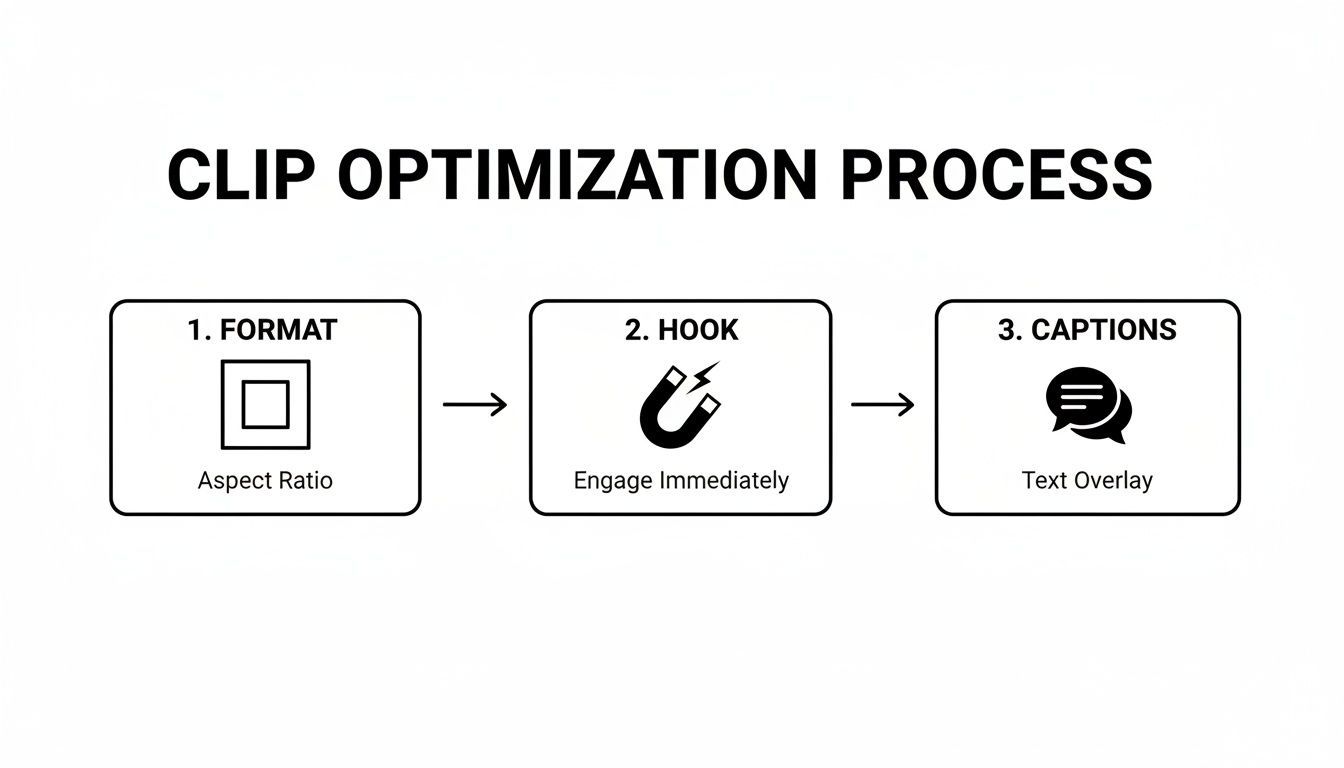
جیسا دیکھ سکتے ہیں، AI foundational edits handle کرتا ہے، آپ کو creative refinement اور strategy پر free کر دیتا ہے۔ Content dial in کرنے کے لیے، analyze YouTube video comments with AI کر سکتے ہیں actionable insights gain کرنے کے لیے جو workflow میں back feed ہوں۔
Brand Seamlessly Integrate کریں
AI workflow کا best part brand consistency ہے۔ Smart tools pre-set brand kit استعمال کر کے automatically colors، fonts، اور logo ہر clip پر apply کر سکتے ہیں۔ Ensure کرتا ہے کہ content cohesive اور professional feel کرے، wherever post کریں۔
Different content types کے templates set up کریں—motivational quotes کے لیے ایک، quick tips کے لیے دوسرا، testimonials کے لیے تیسرا۔ Organization اور speed کا یہ level top creators constant presence maintain کرتے ہیں multiple channels پر بغیر burnout کے۔ Platforms جیسے https://shortgenius.com اس entire operation کے لیے central hub serve کرنے کے لیے designed ہیں۔
Ultimately، AI-assisted workflow بنانا creativity replace کرنے کا نہیں۔ Friction remove کرنے کا ہے جو stifle کرتی ہے، repetitive editing پر less time spend کر کے more time audience connect اور brand grow کرنے پر۔
YouTube ویڈیوز Clipping کے بارے میں Questions؟ جوابات ہیں۔
YouTube ویڈیوز سے clips create کرنے میں پہلے dive کرنے پر questions آنا natural ہے۔ Rules اور best practices سے tightrope چلنے جیسا لگتا ہے۔ ہم there رہے۔ تو، most often سنی جانے والی questions کے straight-up answers یہاں ہیں۔
کیا Someone Else کی YouTube ویڈیو Clip کرنا Actually Legal ہے؟
یہ big one ہے، اور honest answer ہے… complicated۔ Someone کی ویڈیو grab کر کے اپنی بنا کر re-upload کرنا hard no ہے—straight-up copyright violation۔ Grey area، however، Fair Use ہے۔
Fair Use legal concept ہے جو clip protect کر سکتا ہے اگر transformative purposes کے لیے استعمال کر رہے ہوں۔ مطلب reposting نہیں؛ something new add کر رہے ہوں۔ جیسے:
- Clip پر own commentary اور critique کے ساتھ react کرنا۔
- News report میں short segment include کرنا۔
- Educational video میں teaching tool کے طور پر استعمال کرنا۔
- Parody یا satire بنانا۔
Point یہ ہے کہ own creative spin، analysis، یا context add کرنا ہوگا۔ Remember، Fair Use court میں defense ہے، free pass نہیں۔ Original creator credit دینا good idea ہے، اور unsure ہوں تو safest permission ask کریں۔
کیا Other Channels سے Clips استعمال کرنے والی Videos سے پیسے کما سکتا ہوں؟
Risky game ہے۔ YouTube کا Content ID system sophisticated ہے اور copyrighted material almost certainly find کر لے گا۔ اگر کر لیا تو: video demonetized ہو سکتی ہے، ad revenue original owner کو جا سکتا ہے، یا video blocked یا taken down۔
YouTube Partner Program qualify کرنے اور money earn کرنے کے لیے، channel significant original value offer کرنا ہوگا۔ اگر videos صرف other people's content mashup ہوں بغیر substantial commentary، creative editing، یا analysis کے، rejected ہوں گے۔
YouTube Short یا Clip کے لیے Best Length کیا ہے؟
YouTube Shorts 60 seconds تک allow کرتا ہے، لیکن مطلب یہ نہیں کہ کرنا چاہیے۔ Experience میں، magic 15 to 30-second range میں ہے۔ Instantly hook کرنا ہوگا۔
Starting point ہمیشہ "shorter is better" ہو۔ Punchy، 15-second clip جو key insight یا great laugh deliver کرے almost always 60-second clip سے better perform کرے گا جو point تک long لے جائے۔ Different lengths play کریں اور دیکھیں کیا audience resonate کرتا ہے۔
Clip استعمال کرتے وقت Original Creator کو Credit دینا ضروری ہے؟
ہاں۔ 100% ہاں۔ Confident ہوں Fair Use cover کرتا ہے تب بھی، credit دینا good practice اور right thing ہے۔ Work کرنے والے شخص کے لیے respect کا sign ہے، اور collaborative positive community بناتا ہے۔
Complicated نہیں۔ Video description میں simple line drop کریں، جیسے "Clip from [Channel Name]: [Link to Original Video]"。 Copyright claim سے save نہ کرے، لیکن responsible creator ہونے کا fundamental part ہے۔
ویڈیوز manually scrub کرنا چھوڑنے اور minutes میں high-quality clips generate کرنے کے لیے ready؟ ShortGenius کے ساتھ، AI استعمال کر کے best moments automatically find کریں، branding add کریں، اور dozens of shorts کو تمام social channels پر schedule کریں۔ آج اپنا content workflow transform کریں۔