PDF سے ویڈیو: AI سے پرکشش مواد تخلیق کریں

PDF سے ویڈیو - PDFs کو سوشل میڈیا کے لیے متحرک ویڈیوز میں تبدیل کریں۔ ہمارا رہنما AI اسکرپٹنگ، وائس اوورز اور آپٹیمائزیشن کو کور کرتا ہے تاکہ engagement بڑھے۔ PDF سے ویڈیو میں ماہر بن جائیں
آپ نے دن بھر ایک تیز whitepaper، کلائنٹ کے لیے تیار رپورٹ، یا مفید اندرونی گائیڈ لکھنے میں صرف کیا۔ آپ نے اسے PDF کے طور پر ایکسپورٹ کیا، لنک شیئر کیا، شاید ایک بار پوسٹ کیا، اور پھر دیکھا کہ یہ ہر دوسرے “قابلِ قدر وسائل” کی طرح جسے لوگ بعد میں پڑھنے کا ارادہ رکھتے ہیں، ڈیجیٹل قبرستان میں غائب ہو گیا۔
یہی زیادہ تر PDFs کا بنیادی مسئلہ ہے۔ مواد اکثر اچھا ہوتا ہے۔ فارمیٹ سامعین سے بہت کچھ مانگتا ہے۔
جب کوئی فون پر PDF کھولتا ہے، گھنے صفحات دیکھتا ہے، اور جانتا ہے کہ اسے سکрол کرنا، زوم کرنا، اور توجہ مرکوز کرنی پڑے گی، تو زیادہ تر لوگ چھوڑ دیتے ہیں۔ وہی خیالات ایک مختصر، اچھی طرح paced ویڈیو کی شکل میں feeds پر سفر کر سکتے ہیں، mute پر دیکھے جا سکتے ہیں، اور ان لوگوں تک مؤثر طریقے سے پہنچ سکتے ہیں جو کبھی دستاویز پر کلک نہ کریں۔
Why Your Best Content Is Trapped in a PDF
آپ ایک تیز رپورٹ، buyer guide، یا webinar recap کو PDF کی صورت میں پوسٹ کرتے ہیں۔ یہ کچھ saves اور چند شائستہ کلکس حاصل کرتی ہے، پھر رک جاتی ہے۔ مسئلہ عام طور پر خیال میں نہیں ہوتا۔ مسئلہ یہ ہے کہ feed-driven سامعین شاذ و نادر ہی اس طرح معلومات حاصل کرتے ہیں جیسا PDF مانگتا ہے۔
بہت سی product guides، research summaries، اور lead magnets میں شاندار خام مواد ہوتا ہے۔ ان میں پہلے سے ہی proof points، frameworks، quotes، اور examples ہوتے ہیں جو short-form video میں اچھا perform کرتے ہیں۔ لیکن PDF ایک focused session میں پڑھنے کے لیے بنایا جاتا ہے۔ TikTok، Reels، YouTube Shorts، اور LinkedIn feeds تیز فہم، visual motion، اور واضح pacing کو انعام دیتے ہیں۔
یہ behavior gap اچھی طرح documented ہے۔ HubSpot رپورٹ کرتا ہے کہ short-form video کسی بھی social media content format کا سب سے زیادہ ROI دیتا ہے اور یہ وہ format ہے جس میں marketers سب سے زیادہ aggressively invest کرنے کا منصوبہ بنا رہے ہیں، اس کی State of Marketing report کے مطابق۔ اگر وہی insight PDF اور ایک strong short video دونوں میں موجود ہے، تو video عام طور پر پہلے توجہ حاصل کرتی ہے۔
What this looks like in practice
ایک B2B marketer ایک اچھی طرح designed industry report شائع کرتا ہے۔ PDF bottom-funnel asset کے طور پر کام کر سکتی ہے ان لوگوں کے لیے جو پہلے سے دلچسپی رکھتے ہیں۔ یہ top-of-funnel distribution کے طور پر خود بخود کام نہیں کرتی۔ تین strong findings نکالیں، ہر ایک کو 20 سے 40 سیکنڈ کی ویڈیو میں تبدیل کریں، ایک hard opening line، captions، اور ایک chart motion کے ساتھ شامل کریں، اور وہی research download link کے پیچھے بیٹھنے کی بجائے reach کماتی ہے۔
مجھے educational content میں بھی وہی pattern نظر آتا ہے۔ PDF form میں study guide وقت، focus، اور intent مانگتی ہے۔ short video version ایک ایک concept deliver کر سکتی ہے، pacing tight رکھ سکتی ہے، اور viewer کو آسان next step دے سکتی ہے۔
کلیدی trade-off سادہ ہے۔ PDFs depth میں اچھی ہیں۔ Social video discovery میں اچھی ہے۔
یہی وجہ ہے کہ pdf to video کو repackaging workflow کے طور پر treat کیا جائے، file conversion task کی بجائے۔ اگر آپ ایک dense document کو AI tool میں ڈمپ کر دیں اور جو کچھ نکلے اسے publish کر دیں، تو نتیجہ عام طور پر flat محسوس ہوتا ہے۔ professional approach یہ ہے کہ strong ideas نکالیں، انہیں feed behavior کے لیے rebuild کریں، اور AI کو repetitive parts کو تیز کرنے کے لیے استعمال کریں۔
ShortGenius یہاں مفید ہے کیونکہ یہ صرف pages کو clips میں تبدیل نہیں کرتا۔ یہ best hooks identify کرنے، scene structure generate کرنے، voiceover drafts بنانے، captions شامل کرنے، اور short-form platforms کے لیے native version shape کرنے میں مدد کرتا ہے۔ یہ فرق matter کرتا ہے۔ Raw conversion motion دیتی ہے۔ Proper workflow ایسی ویڈیو دیتی ہے جسے لوگ finish کریں۔
Prepare Your PDF for a Flawless Video Conversion
ایک polished PDF اب بھی weak video draft produce کر سکتی ہے۔ مجھے یہ reports کے ساتھ ہمیشہ نظر آتا ہے جو print میں great لگتی ہیں اور AI کے scenes میں تبدیل کرنے کی کوشش کرتے ہی fall apart ہو جاتی ہیں۔ مسئلہ عام طور پر tool میں نہیں ہوتا۔ مسئلہ یہ ہے کہ print formatting اور short-form video structure مختلف چیزوں کو reward کرتے ہیں۔
اس مرحلے کا مقصد سادہ ہے۔ Upload کرنے سے پہلے ambiguity کم کریں۔ Clean PDF AI کو clear inputs دیتی ہے، جس کا مطلب بہتر hooks، tighter scene cuts، اور بعد میں ShortGenius's AI video workflow کے اندر کم cleanup passes۔
Clean structure beats clever design
Download کے لیے بنائے گئے documents اکثر design tricks پر rely کرتے ہیں جو conversion survive نہیں کرتیں۔ Multi-column layouts، dense sidebars، tiny footnotes، layered charts، اور floating callouts desktop پر reader کو impress کر سکتے ہیں، لیکن scene generation confuse کرتے ہیں اور cluttered visuals produce کرتے ہیں۔
ہر page ایک clear idea carry کرے۔ اگر ایک page تین jobs ایک ساتھ کرنے کی کوشش کرے، تو video ان میں سے کوئی اچھی طرح نہیں کرتی۔
میں PDFs blunt standard سے prepare کرتا ہوں۔ اگر page phone screen پر cramped لگے، تو یہ video کے لیے ready نہیں ہے۔
Upload سے پہلے یہ checklist استعمال کریں:
- Split long documents into clear sections: File کو topic change کی جگہ break کریں، random page counts پر نہیں۔ ایک report problem، finding، proof، اور recommendation کے لیے الگ videos بن سکتی ہے۔
- Rewrite heavy paragraphs: Long text blocks کو short statements، bullets، یا pull quotes میں تبدیل کریں جو spoken lines اور caption beats بن سکیں۔
- Remove repeated clutter: Headers، footers، page numbers، disclaimers، اور decorative elements screen time waste کرتے ہیں اور parser distract کرتے ہیں۔
- Check every visual at mobile size: PDF میں acceptable charts اور screenshots vertical video میں unreadable ہو جاتے ہیں۔
- Give each page one job: Page ایک scene، ایک argument، یا ایک visual proof point کے ساتھ naturally map ہو۔
Segment for meaning, not file size
بہت سے creators PDFs صرف file smaller بنانے کے لیے split کرتے ہیں۔ یہ performance help کرتا ہے، لیکن segmentation کا main reason یہ نہیں ہے۔ Main reason narrative control ہے۔
Short-form video کو clean topic boundaries چاہیے۔ ایک section ایک question answer کرے، ایک claim prove کرے، یا ایک step سکھائے۔ اگر chunk بہت زیادہ ground cover کرے، تو AI summary vague ہو جاتی ہے اور final edit generic explainer content جیسا sound کرتی ہے۔
ایک useful test یہ ہے۔ کیا یہ section strong opening line کے ساتھ 30-second standalone post کے طور پر کام کر سکتی ہے؟ اگر جواب نفی میں ہے، تو upload سے پہلے ایک اور pass کی ضرورت ہے۔
یہ principle strong AI for social media marketing کے ساتھ align ہوتا ہے۔ Distribution بہتر ہوتی ہے جب ہر asset ایک clear takeaway کے گرد بنایا جائے نہ کہ half-related points کے bundle کے۔
Prep for spoken delivery before you touch voiceover
Bad voiceover عام طور پر PDF میں start ہوتا ہے، audio settings میں نہیں۔ Page کے لیے لکھے sentences long run ہوتے ہیں، point bury کرتے ہیں، اور aloud پڑھنے پر stiff sound کرتے ہیں۔
Ear کے لیے edit کریں۔ Short sentences استعمال کریں۔ Nested clauses کاٹ دیں۔ Main claim کو front میں move کریں۔ اگر line presenter کو breath لینے پر مجبور کرے، تو rewrite کریں۔
میں citations، source notes، اور legal language بھی narration کے لیے intended pages سے ہٹا دیتا ہوں۔ اگر ضرورت ہو تو original document میں رکھیں، لیکن script generator کو ایسا material sort نہ کرنے دیں جو کبھی spoken نہ ہونا چاہے۔
Model کو clean chapters، plain language، اور per page ایک clear point دیں۔ یہی طریقہ ہے جس سے edit start ہونے سے پہلے edited draft ملتا ہے۔
Prepared PDF errors prevent کرنے سے زیادہ کرتی ہے۔ یہ AI کو structure دیتی ہے تاکہ useful creative choices کر سکے guesswork کی بجائے۔
Generate Your Video Script and Scenes with AI
Clean PDF AI کو کام دینے کے قابل بناتی ہے۔ Messy ایک guesswork force کرتی ہے۔ Document prepare ہونے کے بعد main task start ہوتا ہے۔ Static information کو ایسا script بنائیں جو لوگ genuinely watch کریں، اور scenes جو retention earn کریں narrated slide deck کی بجائے۔
Good tools تین jobs sequence میں handle کرتے ہیں۔ PDF سے text extract کرتے ہیں، structure جیسے headings اور image blocks interpret کرتے ہیں، اور اس material کو timing، narration، اور visual suggestions کے ساتھ scene plan میں convert کرتے ہیں۔ آخری step سب سے زیادہ matter کرتا ہے۔ بہت سے converters pages کو video میں turn کر سکتے ہیں۔ Far fewer dense document کو TikTok، Reels، یا Shorts کے لیے native short-form content میں۔
What the AI should produce
پہلا output clear editorial choices والا draft ہونا چاہیے۔
یعنی:
- Payoff سے lead کرنے والا hook
- Spoken delivery کے لیے rewritten script
- Ideas پر مبنی scene breaks، page count پر نہیں
- ہر line کے point سے match کرنے والی visual directions
اگر page three میں strongest insight ہے، تو اسے early استعمال کریں۔ اگر دو pages same claim repeat کریں، تو merge کریں۔ اگر chart phone پر پڑھنے کو dense ہے، تو ایک number نکالیں اور scene اس کے گرد بنائیں۔ AI speed help کرتی ہے، لیکن scene selection final video کو sharp یا lazy بناتی ہے۔
What the AI is actually translating
PDF-to-video generation عام طور پر تین practical layers میں break down ہوتی ہے۔
پہلے، OCR اور layout parsing file کو usable content میں turn کرتے ہیں۔ اگر PDF scanned ہے، تو tool کو text recognize کرنا پڑتا ہے۔ اگر layout crowded ہے، تو heading، caption، body copy، یا visual asset کیا ہے decide کرنا پڑتا ہے۔ اس pass کی quality downstream سب کچھ affect کرتی ہے، یہی وجہ ہے کہ OCR accuracy matter کرتی ہے۔ Google Cloud Document AI OCR کے overview میں document OCR اور layout extraction کیسے کام کرتے ہیں اس کی وضاحت کرتا ہے۔
دوسرے، system document language کو spoken language میں rewrite کرتا ہے۔ اس step میں good generator اپنا keep earn کرتا ہے۔ Whitepaper prose، report summaries، اور slide copy page پر fine پڑھتی ہے لیکن aloud stiff sound کرتی ہے۔ Model filler کاٹے، clauses shorten کرے، اور main point sentence کے front میں move کرے۔
تیسرے، ہر line کو visual treatment map کرتا ہے۔ کبھی kinetic text۔ کبھی screenshots، UI zooms، B-roll، یا static graphic پر light animation۔ Right choice source material اور platform پر depend کرتی ہے۔
How to get a stronger first draft in ShortGenius
ShortGenius's AI video workspace میں، generation کو editor brief کرنے جیسا treat کرنے سے بہتر results ملتے ہیں، conversion button دبانے جیسا نہیں۔
پہلے format set کریں۔ Vertical 9:16 scene composition، caption density، اور pacing کو start سے change کر دیتا ہے۔ پھر video کا job ایک sentence میں define کریں۔ "اس PDF کو LinkedIn اور Reels کے لیے 45-second founder-led explainer میں turn کریں" useful ہے۔ "اس document سے video بنائیں" نہیں ہے۔
یہ settings consistently first pass improve کرتی ہیں:
- Lead with the outcome: پہلی line میں most surprising claim یا result state کرنے والا opening مانگیں۔
- Set scene length on purpose: Short-form explainers page-by-page pacing کی بجائے tighter 3 to 7 second beats کے ساتھ بہتر کام کرتے ہیں۔
- Strip weak material: Scene generation سے پہلے disclaimers، references، appendix pages، اور duplicated charts exclude کریں۔
- Request visual variety: Text-led scenes، document zooms، stat callouts، اور product یا webpage inserts کا mix مانگیں۔
- Choose a voice for the script itself: "Direct, specific, creator-style" "professional" یا "informative" سے بہتر perform کرتا ہے، جو bland copy produce کرتے ہیں۔
Repeatable content بنانے والی teams کو سمجھنا چاہیے کہ یہ larger publishing system میں کیسے fit ہوتا ہے۔ AI for social media marketing گائیڈ scripting، distribution، اور iteration کو ایک workflow کے طور پر treat کرنے کی وجہ سے useful ہے۔
Why AI drafts go wrong
Weak outputs عام طور پر چار میں سے ایک وجہ سے fail ہوتی ہیں۔
| Problem | What it looks like | Better move |
|---|---|---|
| The script stays too close to the PDF | یہ document پر narration جیسا sound کرتی ہے video script کی بجائے | Summary-first rewriting اور spoken phrasing مانگیں |
| Scene timing follows page count | Low-value pages strong ones جتنا attention پاتی ہیں | Scenes importance کے گرد rebuild کریں، document order کی بجائے |
| Visual choices are generic | Random stock clips message dilute کرتے ہیں | Screenshots، charts، UI، یا bold text layouts swap کریں |
| The hook arrives late | Viewer payoff سے پہلے setup پاتا ہے | Strongest claim یا question کے گرد opening rewrite کریں |
مجھے lead magnets، ebooks، pitch decks، اور internal reports میں یہ constantly نظر آتا ہے۔ Source material fine ہے۔ Framing wrong ہے۔
Treat the output like a creative brief
Draft edit کا start ہے، end نہیں۔
Visual پہلے ہی دکھا چکا ہو اسے repeat کرنے والی line کاٹ دیں۔ Strongest moment early land کرنے کے لیے scenes rearrange کریں۔ Vague phrases specific سے replace کریں۔ اگر AI "businesses can improve efficiency" دے، تو rewrite کریں کہ کیا changed، کس نے changed، اور کیوں care کرنا چاہے۔
یہی simple conversion اور professional workflow کا فرق ہے۔ Converter PDF preserve کرتا ہے۔ Editor اسے attention، retention، اور reuse کے لیے short-form asset میں turn کرتا ہے۔
Add Polish with AI Voiceovers and Dynamic Motion
Raw conversion publish کرنے کے قابل rarely good enough ہوتی ہے۔ یہ accurate ہو سکتی ہے۔ Coherent بھی۔ اس کا مطلب یہ نہیں کہ کوئی finish تک watch کرے۔
Upgrade polish layer میں ہوتا ہے۔ Voice، motion، pacing، branding، اور emphasis converted PDF کو memorable video میں turn کرتے ہیں۔
Voiceover is carrying more than the script
بہت سے creators visuals پر obsess کرتے ہیں اور narration کو afterthought treat کرتے ہیں۔ Short-form explainers کے لیے یہ backwards ہے۔ Voice authority، energy، اور momentum determine کرتی ہے۔
Material سے fit voice choose کریں۔ Trend recap lighter tone handle کر سکتا ہے۔ Financial explainer یا B2B summary calmer، sharper delivery سے benefit کرتی ہے۔ اگر tool individual lines regenerate کرنے دے، تو aggressively استعمال کریں۔ ایک awkward sentence entire video کو synthetic feel کرا سکتی ہے۔
تین چیزوں پر listen کریں:
- Pacing: Attention رکھنے کو fast enough، rewind without سمجھنے کو slow enough۔
- Emphasis: Key phrases naturally land ہوں، uniformly flat نہ sound ہوں۔
- Pronunciation: Product names، acronyms، اور industry terms کو manual fixes چاہیے۔
“اگر line ایسا sound کرے جیسا کوئی aloud نہ کہے، تو regenerate سے پہلے rewrite کریں۔”
Motion creates the illusion of fresh content
Static PDFs dead feel کرتی ہیں کیونکہ reading کے لیے بنائی گئیں، watching کے لیے نہیں۔ Motion fix کرتی ہے، لیکن صرف اگر message support کرے۔
Good motion subtle ہے۔ Chart پر pan کریں۔ Headline میں zoom کریں۔ ایک key phrase animate کریں transition presets screen پر نہ پھینکیں۔ اگر ہر element move کرے، تو کوئی intentional نہ لگے۔
Attention direct کرنے کے لیے movement استعمال کریں:
- Hook big اور clean appear ہو۔
- Voiceover کہتے ہوئے ایک phrase highlight کریں۔
- Supporting points sequence میں reveal کریں screen پر dump نہ کریں۔
- Still images کو mild camera movement دیں تاکہ frame frozen نہ لگے۔
Branding should be visible, not loud
ہر corner میں logo یا ہر scene پر full brand palette کی ضرورت نہیں۔ PDF to video میں strong branding consistency سے آتی ہے، volume سے نہیں۔
کچھ repeatable elements رکھیں: font treatment، text box style، subtitle look، intro behavior، اور closing frame۔ یہ series کو platforms across unified feel کراتا ہے۔
Practical finishing pass ایسا لگتا ہے:
- Long pauses اور scenes کے درمیان dead air trim کریں۔
- Robotic lines rewrite کریں۔
- Highest-value scenes پر weak visuals replace کریں۔
- Mobile viewing کے لیے captions add کریں۔
- Core pacing right feel کرنے کے بعد brand kit apply کریں۔
یہ order matter کرتا ہے۔ Individuals styling too early کرتے ہیں اور polish کرتے ہیں scenes جو cut ہونے چاہیے تھے۔
Optimize and Schedule Your Video for Social Media
Video کو as-is publish کرنا wasted opportunity ہے۔ Converted PDF ایک asset بن سکتی ہے، لیکن smarter move اسے ہر platform کے لیے optimized small content set میں turn کرنا ہے۔
Production speed اب available ہے۔ 10-page PDF transitions اور shareable links کے ساتھ fully rendered video میں less than 5 minutes میں بن سکتی ہے، اور کچھ free plans up to 10 minutes of video output per month offer کرتے ہیں، اس video breakdown of AI PDF to video tools کے مطابق۔ Bottleneck creation نہیں رہا۔ Adaptation ہے۔
Format for the feed you’re entering
Strong LinkedIn explainer اور strong TikTok clip same source document سے ہوں تو بھی same behave نہیں کرتے۔
Different contexts کے لیے different cuts استعمال کریں:
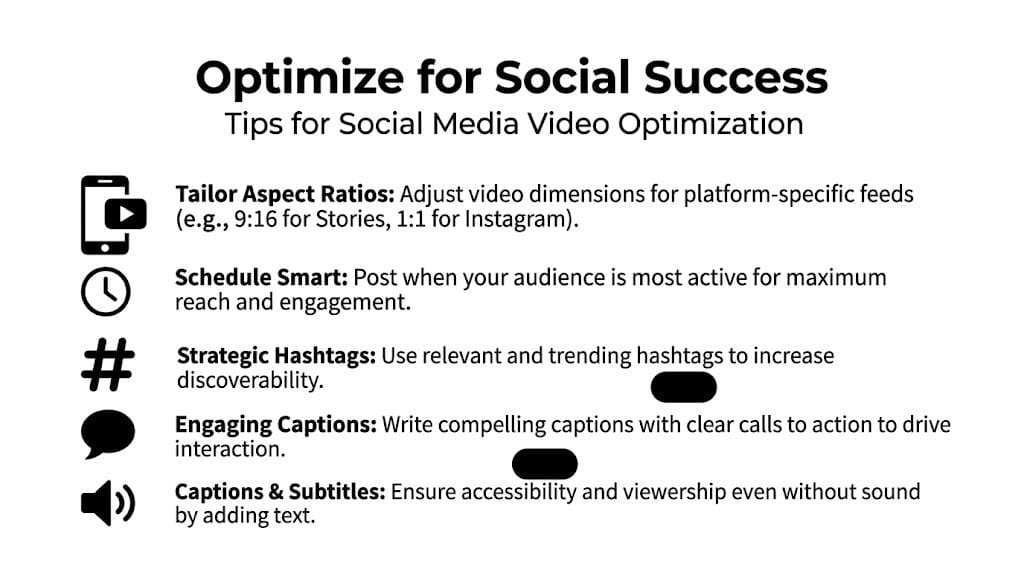
- Vertical video: TikTok، Reels، Shorts، اور Stories کے لیے best۔ Large text اور tighter framing prioritize کریں۔
- Square video: Feed placements میں on-screen text کے لیے more real estate چاہیں تو useful۔
- Widescreen video: YouTube explainers، embedded pages، اور internal presentations کے لیے better۔
Hard-coded captions matter کیونکہ بہت سے viewers sound on نہیں کریں گے۔ Captions technical terms، names، اور fast transitions clarify بھی help کرتی ہیں۔ Readable رکھیں۔ Lower third کو too much text اور graphic elements سے crowd نہ کریں۔
Edit for momentum, not completeness
Document culture سے آئے creators stumble کرتے ہیں۔ PDF کے ہر point preserve کرنے کی کوشش کرتے ہیں۔
Social video completeness reward نہیں کرتی۔ Clarity اور tension کو کرتی ہے۔
Better approach ہر version کو ایک question answer یا ایک payoff deliver کرنے والا بنانا ہے۔ ایک clip big insight handle کر سکتا ہے۔ دوسرا most surprising chart isolate کر سکتا ہے۔ تیسرا ایک section کو list-style breakdown میں turn کر سکتا ہے۔ آپ document shrink نہیں کر رہے۔ اس سے watchable units extract کر رہے ہیں۔
Field note: Best social cut اکثر PDF author کے essential سمجھے background section کو remove کر دیتا ہے۔
Schedule like a campaign
Multiple edits ملنے کے بعد، random uploads کی بجائے related assets کی طرح publish کریں۔ Platforms across space کریں، hooks test کریں، captions اور thumbnails vary کریں۔
اگر YouTube distribution plan کا حصہ ہے، تو timing matter کرتی ہے۔ best time to upload YouTube videos کا breakdown long-form یا Shorts version live کرنے کا فیصلہ کرتے وقت helpful reference ہے۔
ایک source PDF سے practical schedule ایسا لگ سکتا ہے:
| Asset type | Best use |
|---|---|
| Hook-led short clip | Awareness اور scroll stopping |
| Chart breakdown | Authority اور saves |
| Quote or takeaway clip | LinkedIn اور X repurposing |
| Longer explainer cut | YouTube اور landing pages |
Win advantage ہے۔ ایک document actual publishing rhythm بن جاتا ہے forgotten download link کی بجائے۔
Troubleshooting Common PDF to Video Problems
آپ 28-page report upload کرتے ہیں، generate کلک کرتے ہیں، اور stiff sound کرنے والی، matter کرنے والے chart skip کرنے والی، اور clean table کو visual noise میں turn کرنے والی video ملتی ہے۔ یہ failure pattern common ہے۔ PDF to video tools fast ہیں، لیکن layout، hierarchy، اور meaning کے بارے میں guesses لگا رہے ہوتے ہیں۔
Fix عام طور پر upstream start ہوتا ہے۔ Bad output bad input یا wrong conversion strategy کی نشاندہی کرتی ہے اس document type کے لیے۔
When the output looks broken
پہلے identify کریں کیا fail ہوا۔ Different problems کو different fixes چاہیے، اور same PDF کو same workflow سے rerun rarely improve کرتا ہے۔
اگر text wrong آئے، تو PDF scan، flattened export، یا low-quality screenshot stitched document ہوتا ہے۔ OCR کچھ recover کر سکتا ہے، لیکن headers miss کرے گا، columns merge کرے گا، اور small labels misread کرے گا۔ Original file سے selectable text کے ساتھ re-export prompt tweaking سے زیادہ solve کرتا ہے۔
اگر visuals disappear ہوں، تو layout problem ہے۔ Layered elements، floating icons، overlapping callouts، اور unusual templates converters confuse کرتے ہیں۔ ShortGenius میں، میں ان pages کو source material treat کرتا ہوں، finished scenes نہیں۔ Chart نکالیں، graphic screenshot کریں، یا visual separately upload کریں تاکہ AI asset کے گرد build کرے۔
Quick triage approach اچھا کام کرتا ہے:
- OCR errors: Scanned یا flattened pages کو clean text-based export سے replace کریں۔
- Missing charts or icons: Key visuals کو page parsing پر rely نہ کریں، separate assets کے طور پر upload کریں۔
- Slow, robotic pacing: ہر scene کو ایک idea تک cut کریں اور narration کو spoken rhythm کے لیے rewrite کریں۔
- Scenes in the wrong order: Sequence story کے گرد build کریں، original page order کی بجائے۔
Dense PDFs break for predictable reasons
Research reports، whitepapers، financial decks، اور technical manuals زیادہ fail ہوتے ہیں کیونکہ page reading کے لیے designed ہے، watching کے لیے نہیں۔ Viewer dense page 20 seconds scan کر سکتا ہے۔ Short-form video کو point 2-3 میں communicate کرنا پڑتا ہے۔
Tables good example ہیں۔ PDF extraction tools merged cells، multi-column layouts، اور nested formatting سے struggle کرتے ہیں۔ National Institute of Standards and Technology نے Table Understanding benchmark میں document conversion quality examine کی اور پایا کہ complex tables automated systems کے لیے difficult case ہیں، خاص طور پر جب structure text content جتنا matter کرے۔ اگر video exact table fidelity پر depend کرے، تو full automation wrong bet ہے۔
What works for complex documents
Practical fix selective reconstruction ہے۔
ShortGenius سے entire dense page as-is convert نہ کروائیں، screen time deserve کرنے والا part isolate کریں۔ ایک chart کو ایک scene بنائیں۔ ایک finding کو ایک narration line۔ ایک table row کو motion اور voiceover والا visual callout۔ یہی static information watchable بناتا ہے۔
Equations، compliance notes، یا financial figures کے لیے precision صرف جہاں audience کو چاہیے preserve کریں۔ باقی plain language میں translate اور motion کے لیے rebuild کریں۔ میں AI کو connective tissue draft کرنے دیتا ہوں، پھر high-risk scenes manually rebuild کرتا ہوں جہاں wrong number یا mislabeled visual credibility hurt کر سکتا ہے۔
Best PDF to video workflow rarely direct conversion ہے۔ یہ controlled extraction ہے، scene by scene۔
اگر document highly technical ہے، تو job دو میں split کریں۔ AI سے structure، script options، اور first-pass scene flow لیں۔ پھر fragile parts manually ShortGenius میں approved visuals، corrected labels، اور tighter narration سے replace کریں۔ یہ hybrid workflow scratch سے edit کرنے سے fast ہے، اور one-click export پر trust کرنے سے far safer جو video کے لیے never designed نہ تھا۔
Frequently Asked Questions About PDF to Video
Can I make pdf to video content with a free tool
ہاں، خاص طور پر ideas test کرنے، social clips، یا simple explainers کے لیے۔ Free tools workflow validate کرنے کے لیے useful ہیں paid stack commit کرنے سے پہلے۔ Trade-off fewer generation minutes، less branding control، fewer voice options، یا weaker editing tools ہوتا ہے۔
How long should the final video be
Video length page count پر alone base نہ کریں۔ Distinct ideas کی تعداد پر base کریں جو watch worthy ہوں۔ کچھ pages full scene deserve کرتی ہیں۔ دوسرے entirely disappear ہونی چاہییں۔ اگر PDF several strong angles رکھتی ہے، تو multiple short videos میں split کریں one complete summary force کرنے کی بجائے۔
Can I edit the AI-generated script and scenes
آپ کو چاہیے۔ Draft starting point ہے، product نہیں۔ Hook rewrite کریں، stiff sound کرنے والی line shorten کریں، weak visuals swap کریں، اور repeat scenes cut کریں۔ Best results AI speed پر human editing layer کرنے سے ملتے ہیں۔
What if my PDF contains copyrighted material
آپ کو source file میں text، images، charts، اور branded assets استعمال کرنے کے rights چاہیے۔ PDF کو video میں convert کرنے سے copyright obligations remove نہیں ہوتے۔ اگر آپ نے material create یا license نہ کیا، تو permission لیں یا original assets سے replace کریں۔
Are tables and research PDFs a bad fit
وہ harder ہیں، impossible نہیں۔ اگر PDF dense tables، equations، یا complex page layouts پر depend کرے، تو automated conversion everything cleanly preserve نہ کرے گی۔ Essential insight نکالیں، visuals simplify کریں، اور most important scenes hand سے rebuild کریں۔
What makes a converted video feel professional
عام طور پر small things۔ Clean hooks۔ Natural voice delivery۔ Mobile-friendly captions۔ Intentional motion۔ Strong scene selection۔ Most viewers کو source PDF start ہونے سے care نہیں۔ Final video clear اور finish worth feel ہونے سے care کریں گے۔
اگر آپ ایک workflow چاہتے ہیں جو scripting، scene generation، voiceovers، editing، resizing، اور publishing ایک جگہ handle کرے، تو ShortGenius (AI Video / AI Ad Generator) دیکھیں۔ یہ raw ideas اور existing assets کو repeatable short-form output میں turn کرنے کے لیے بنایا گیا ہے separate tools stack stitch کیے بغیر۔