بلٹ ٹائم ایفیکٹس: شارٹ فارم کریئٹر گائیڈ

شارٹ فارم ویڈیو کے لیے بلٹ ٹائم ایفیکٹس کیسے بنائیں، سیکھیں۔ AI ٹولز، کیمرہ رگس اور تخلیقی استعمال کے کیسز دریافت کریں جو اسکرول کو فوری روک دیں۔
بلٹ ٹائم ایک کیمرہ-orbit effect ہے جو sequential photography کے ذریعے frozen time کا illusion پیدا کرتا ہے، simple slow motion نہیں۔ Classic version میں 120 still-camera setups plus 2 film cameras استعمال ہوئے، جو ثابت کرتا ہے کہ effect کا visual impact ہمیشہ viewpoint changes پر اتنا ہی منحصر رہا ہے جتنا playback speed پر۔
یہی بلٹ ٹائم ایفیکٹس کا counterintuitive حصہ ہے: subject شاید بالکل نہ حرکت کرے، پھر بھی shot dynamic لگتا ہے کیونکہ کیمرہ ایک suspended moment میں سفر کرتا دکھائی دیتا ہے۔ یہ technique 1999 میں The Matrix کے ذریعے globally recognizable ہوئی، لیکن اس کا underlying idea digital cinema سے کہیں زیادہ پرانا ہے۔ Eadweard Muybridge کی 1878 کی horse-motion studies کو اکثر early precursor کے طور پر cite کیا جاتا ہے کیونکہ multiple still cameras نے fixed position سے sequential views record کیے۔
ایک solo creator کے لیے useful question یہ نہیں کہ کیا آپ Hollywood rig reproduce کر سکتے ہیں۔ یہ ہے کہ کیا آپ کا scene action، silhouette، اور perspective change میں strong enough ہے تاکہ effect justify ہو۔ ایک clean jump، product reveal، punch، splash، یا thrown object viewer کو mid-scroll روک سکتا ہے۔ ایک crowded room overlapping bodies اور reflective surfaces کے ساتھ اسی idea کو distorted، distracting sequence میں بدل سکتا ہے۔
جدید مواد میں بلٹ ٹائم ایفیکٹس کو سمجھنا
بلٹ ٹائم کی visual language The Matrix نے establish کی۔ فلم کی signature action sequence میں world Neo کے ارد گرد pause ہوتا دکھائی دیتا ہے جبکہ viewpoint اس کے گرد sweep کرتا ہے۔ Production نے reportedly 120 still-camera setups plus 2 film cameras استعمال کیے، ایک scale جو frozen-world، moving-camera look کو mainstream cinematic reference بنانے میں مدد دی۔ بلٹ ٹائم کی documented history بتاتی ہے کہ audiences اس term کو کیوں اس فلم سے strongly associate کرتے ہیں۔
یہ effect اس لیے کام کرتا ہے کیونکہ یہ ایک ساتھ دو sensations پیدا کرتا ہے۔ Action suspended لگتی ہے، جبکہ viewer کو ordinary camera movement کے ذریعے fast event کے دوران available نہ ہونے والا viewpoint مل جاتا ہے۔ یہ contradiction short-form video کے لیے powerful hook بن جاتی ہے، جہاں visual idea context ملنے سے پہلے communicate ہونی چاہیے۔
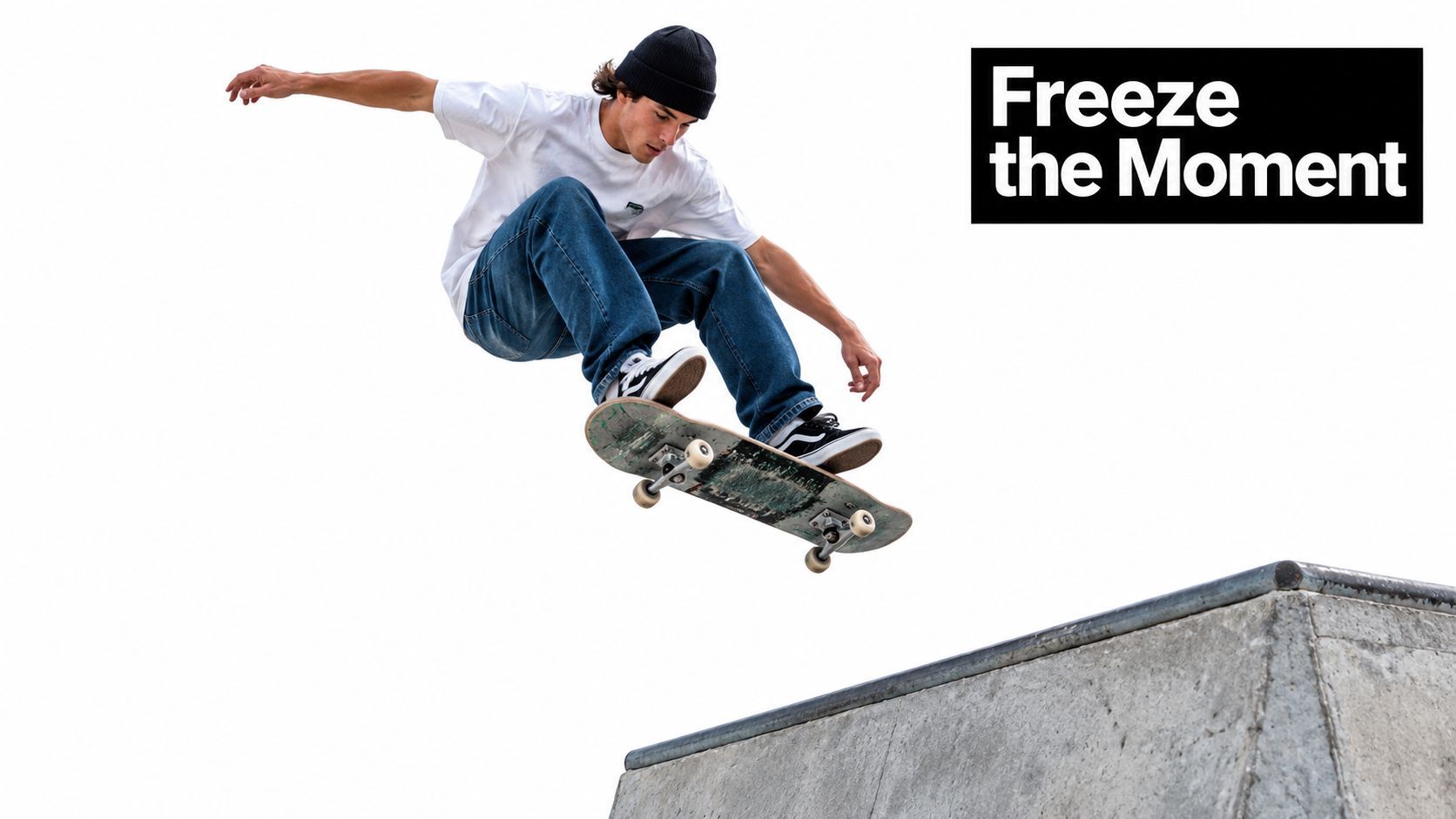
یہ effect کیوں attention کماتا ہے
ایک skateboarder ramp کے اوپر frozen ہونے سے آپ کو clear subject، readable silhouette، اور natural beginning و end والا moment ملتا ہے۔ Orbit information add کرتا ہے، trick کی shape changing viewpoint سے دکھاتا ہے بجائے اس کے کہ viewer same action کو slower speed پر دیکھے۔
یہ distinction technique کو action films سے آگے useful بناتی ہے:
- Product launches: Product کو visually important pose میں hold کریں جبکہ viewpoint اس کی form reveal کرے۔
- Educational hooks: Physical process کو freeze کریں جب cause اور effect سمجھنے میں easiest ہو۔
- Sports and performance: Body position، object trajectory، یا impact کو several angles سے دکھائیں۔
- Fashion and lifestyle: Pose، outfit، یا object interaction کو compact visual reveal میں بدلیں۔
Practical rule: بلٹ ٹائم تب استعمال کریں جب changing viewpoint meaning add کرے۔ اگر orbit صرف otherwise ordinary shot کو decorate کرے تو slow motion یا conventional camera move usually زیادہ clearly communicate کرے گا۔
Modern creators effect کو generated transitions، stylized camera movement، اور compositing کے ساتھ combine بھی کر سکتے ہیں۔ RemotionAI cinematic effects جیسا resource related visual treatments compare کرنے میں مدد دے سکتا ہے particular production method commit کرنے سے پہلے۔ Decision اب بھی action اور intended viewer response سے start ہونی چاہیے، tool کی novelty سے نہیں۔
Frozen Camera Orbit کیسے کام کرتا ہے
Traditional setup میں still cameras subject کے گرد ring یا arc پر place کیے جاتے ہیں۔ ہر camera action کو slightly different horizontal position سے record کرتا ہے، اور editor ان frames کو sequence میں play کرتا ہے۔ Viewer changing viewpoints کو camera movement interpret کرتا ہے، حالانکہ ہر individual camera fixed رہتی ہے۔
Original Matrix effect نے 100 سے زیادہ still cameras استعمال کیے actor کے گرد circle میں arranged، inward aimed اور sequenced تاکہ 360-degree view بنے، جیسا کہ اس academic discussion میں فلم کی camera array کا description۔ Dense arrangement matter کرتا ہے کیونکہ ہر camera nearby viewpoint supply کرتی ہے۔ اگر frames کے درمیان gap بہت large ہو تو orbit jump کی بجائے glide نہیں کرتی۔
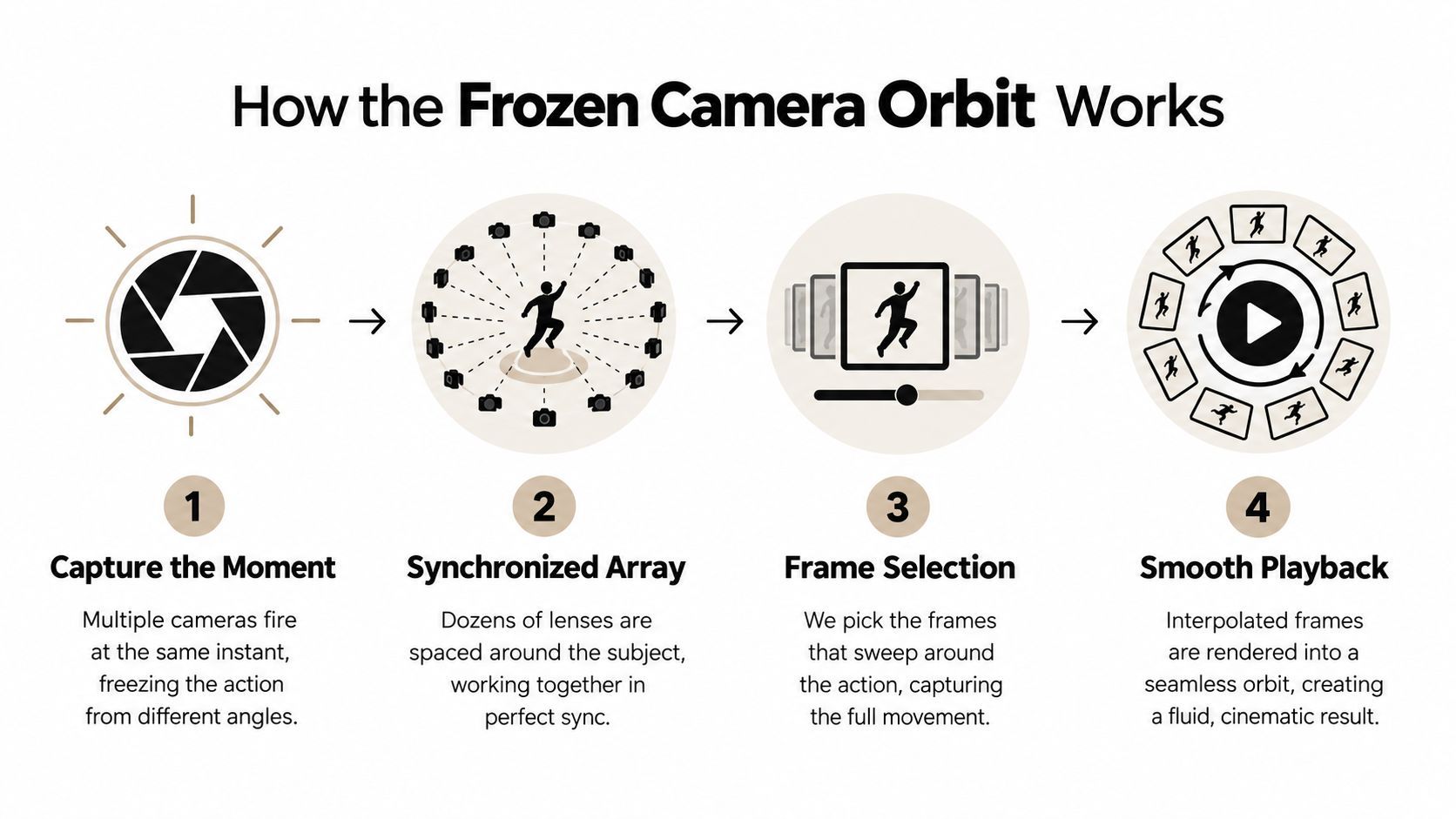
چار technical decisions
Moment capture کریں۔ Decide کریں کہ کون سا instant suspended دکھنا چاہیے۔ Subject کو readable pose hold کرنا چاہیے، یا action camera sequence میں controlled way سے progress کرنی چاہیے۔
Viewpoint path بنائیں۔ Cameras کو action کے گرد arc، partial ring، یا planned path پر place کریں۔ Full orbit mandatory نہیں۔ Subject کے ایک important front یا side profile پر shorter sweep زیادہ effective ہو سکتا ہے۔
Frames synchronize کریں۔ Cameras کو intended moment اتنی closely record کرنا چاہیے کہ subject viewpoints کے درمیان visibly jump نہ کرے۔ Synchronization hair، hands، loose clothing، water، یا debris کے independent movement پر especially important ہو جاتی ہے۔
Viewpoints کو motion کی طرح play کریں۔ Cleanest sweep بنانے والے frames select کریں، پھر timing، interpolation، stabilization، اور transitions adjust کریں۔ Final result ایک camera کے space میں سفر کرنے جیسا feel کرنا چاہیے، related photographs کا slideshow نہیں۔
Camera count، spacing، اور synchronization apparent smoothness control کرتے ہیں۔ Adobe Research کا CamSwarm prototype report کرتا ہے کہ technique دو cameras جتنی کم سے بھی کام کرتی ہے، جو دکھاتا ہے کہ large array underlying idea کی prerequisite نہیں، حالانکہ sparse setup fewer viewpoints دیتا ہے۔ Adobe کا CamSwarm prototype کا description اس trade-off کو سمجھنے کے لیے useful ہے۔
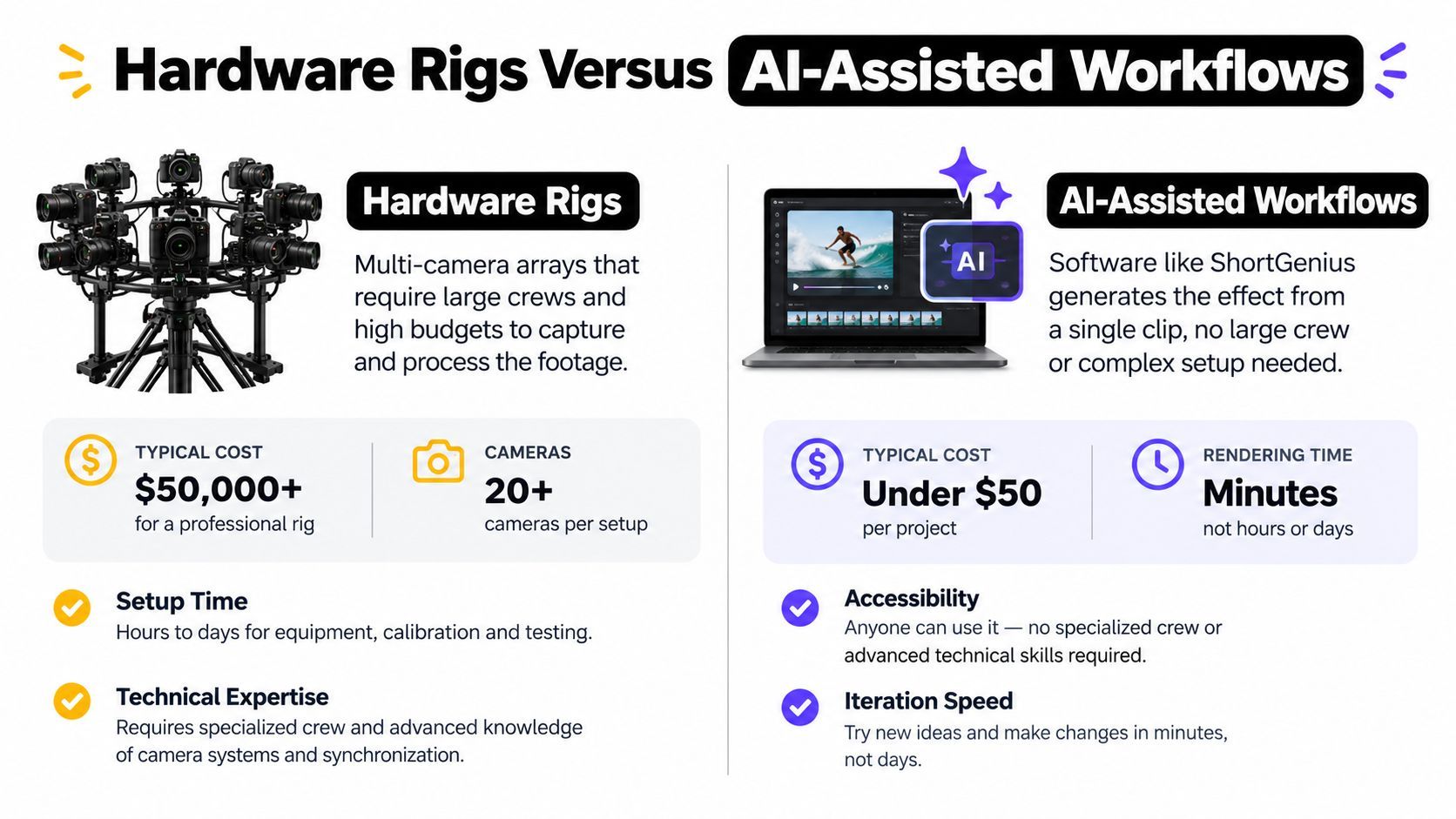
Hardware Rigs بمقابلہ AI-Assisted Workflows
Physical rig multiple viewpoints سے real optical evidence produce کرتا ہے، dependable perspective، lighting، background، اور subject detail دیتا ہے۔ یہ evidence close inspection کے تحت hold up کرنے والے shot کا main advantage ہے۔
Trade-off production overhead ہے۔ Cameras کو matching exposure، lens alignment، focus، timing، mounting، اور file management کی ضرورت ہوتی ہے۔ Performer کو action correct position میں repeat کرنا پڑتا ہے۔ Compact rig cameras match نہ ہوں یا obstruction ایک angle سے appear ہو تو difficult ہو جاتی ہے۔
AI-assisted workflows different compromise کرتے ہیں۔ وہ photograph، short clip، یا limited inputs سے missing viewpoints infer کرتے ہیں بجائے ہر angle record کرنے کے۔ Recent approaches، including 4D Gaussian splatting research جو اس AI-generated bullet time کے overview میں described ہے، interactive orbiting views اور near-real-time reconstruction کی طرف بڑھ رہے ہیں۔ Solo creator کے لیے یہ concepts test کرنا faster بناتا ہے، حالانکہ result source material اور reconstruction quality پر heavily depend کرتا ہے۔
Production constraint سے انتخاب
| Constraint | Hardware rig | AI-assisted workflow |
|---|---|---|
| Viewpoint accuracy | Real angles اور physical parallax capture کرتا ہے | Direct record نہ ہونے والے angles estimate کرتا ہے |
| Setup demand | Synchronized cameras، mounting، اور controlled capture کی ضرورت | Strong source footage اور careful prompting یا processing کی ضرورت |
| Iteration | Shot repeat کرنے پر setup rebuild کرنا پڑ سکتا ہے | Variations test کرنا usually faster ہوتا ہے |
| Complex subjects | Capture well controlled ہو تو real details preserve کر سکتا ہے | Occlusion، reflections، hair، اور overlapping forms سے struggle کر سکتا ہے |
| Best fit | High-value shots جہاں physical realism essential ہو | Concept tests، social clips، product ideas، اور rapid revisions |
Workflow کو اس detail کے گرد choose کریں جو fail نہ کر سکے۔ Client product shot جس میں precise geometry ہو real camera viewpoints اور physical parallax سے benefit لیتا ہے۔ Campaign concept جس میں several possible hooks ہوں AI سے benefit لے سکتا ہے، orbit test کرنے کی اجازت دیتا ہے rig پر time اور equipment commit کرنے سے پہلے۔
ایک small rig دونوں methods combine کر سکتا ہے۔ چند synchronized cameras short sweep کے لیے genuine viewpoints provide کرتے ہیں، جبکہ software selected gaps fill کرتی ہے یا editing handle کرتی ہے۔ یہ setup capture authenticity retain کرتا ہے full camera array کی cost اور operating burden کے بغیر۔ یہ AI reconstruction reflections، fine hair، یا overlapping forms کے گرد break ہونے پر practical fallback بھی دیتا ہے۔
صحیح Scenes اور Actions کا انتخاب
Scene choice اکثر decide کرتی ہے کہ بلٹ ٹائم effect deliberate لگے یا broken۔ Action select کریں جو viewer immediately recognize کر سکے، پھر test کریں کہ viewpoint change ہونے پر subject readable رہے۔ Strong silhouette، distinct focal point، اور surroundings سے clear separation دونوں camera rig اور AI workflow کو better material دیتے ہیں۔
Jumps، punches، splashes، اور thrown objects reliable candidates ہیں کیونکہ ہر ایک space میں clear event بناتا ہے۔ Jump recognizable body shape freeze کرتی ہے۔ Punch strong directional pose دیتی ہے۔ Splash obvious outline بناتی ہے، حالانکہ individual droplets inspection چاہتے ہیں۔ Thrown object orbit anchor کر سکتا ہے جب اس کا path clear ہو اور background similar shapes نہ رکھے۔ Cluttered backgrounds reconstruction systems کو less usable information دیتے ہیں اور cleanup بڑھاتے ہیں، جیسا کہ اس AI bullet time workflows کی discussion میں noted ہے۔
اچھے candidates
Product shots controlled background اور viewpoint پر depend کرنے والے reveal کے گرد بنائیں۔ Bottle، shoe، device، یا package کے گرد orbit thickness، surface finish، یا construction expose کرے جو front-facing shot conceal کرتا ہے۔ Rig ان angles کو physically record کرتا ہے، exact geometry matter کرنے پر مددگار۔ AI idea faster test کر سکتا ہے، لیکن simple edges اور consistent surfaces چاہیے detail invent نہ کرے۔
Action کو frame by frame inspect کرنے لائق compact رکھیں۔ اگر subject rapidly shape change کرے تو long sequence کی بجائے decisive pose استعمال کریں۔ Effect کو frames کے درمیان زیادہ information reconstruct کرنی پڑے تو limited-budget workflow کو manual cleanup زیادہ چاہیے ہوگا۔
Risky candidates
Busy environments competing edges بناتے ہیں۔ Furniture، signs، crowds، foliage، اور patterned walls foreground اور background کی boundary blur کر سکتے ہیں۔ Rig synchronized cameras اور controlled scene سے ان relationships capture کر سکتا ہے۔ AI-generated viewpoints source footage hidden sides نہ دکھانے پر details stretch، duplicate، یا melt کر سکتے ہیں۔
Reflections اور transparent materials separate ambiguity کا source add کرتے ہیں۔ Mirror، glossy package، window، یا wet surface inferred camera position سے conflict کرنے والا viewpoint display کر سکتا ہے۔ Hair، fingers، loose fabric، اور fast-moving objects کو frame-by-frame inspection چاہیے۔ Thin یا irregular shapes small reconstruction errors جلدی reveal کرتے ہیں۔
Visual separation جتنا clean، orbit stylize کرنے کی اتنی freedom۔
Recording یا generating سے پہلے تین questions جواب دیں:
- کیا frozen ہے؟ Pose یا action identify کریں جو attention deserve کرے۔
- اس کے گرد کیا move کر رہا ہے؟ Camera path اور intended perspective change define کریں۔
- کیا stable رہنا چاہیے؟ Key edges، product features، اور background references mark کریں۔
اگر کوئی answer unclear ہو تو scene simplify کریں۔ ایک legible action کے گرد restrained orbit usually visually dense environment میں ambitious sweep سے زیادہ professional لگتا ہے۔
ShortGenius اور AI Tools کے ساتھ بلٹ ٹائم بنانا
Convincing AI bullet time shot button سے نہیں بلکہ source design سے start ہوتا ہے۔ Clear subject، stable lighting، اور depth infer کرنے کے لیے enough surrounding context والا short clip یا still image choose کریں۔ Clean source viewpoint move ہونے پر correction work کم کرتا ہے۔
ShortGenius جیسے platforms script planning، image generation، video assembly، voiceover، اور editing کو ایک workspace میں combine کرتے ہیں۔ یہ matter کرتا ہے کیونکہ bullet time usually larger short-form edit support کرتا ہے۔ Opening hook، action shot، captions، music، product frame، اور different aspect ratios کے versions چاہیے ہوں گے۔ AI workflow surrounding tasks handle کر سکتا ہے، جبکہ physical rig shot کے accurate رہنے پر dependable geometry دیتا ہے۔
Practical AI workflow
Action سے start کریں۔ One-sentence brief لکھیں: “Skateboarder کو jump کے peak پر freeze کریں جبکہ viewpoint front سے side sweep کرے۔” Instruction subject، selected moment، اور camera movement define کرتی ہے۔
Source prepare کریں۔ Subject کا دوسرے object سے blocked نہ ہونے والا image یا clip استعمال کریں۔ Intent سے crop کریں، distracting background detail remove کریں جہاں possible، اور focal point کو inspect کرنے لائق large بنائیں۔
Restrained move generate کریں۔ Full rotation کی بجائے short orbit request کریں۔ Limited viewpoint change source میں hands، hair، wheels، water، یا reflective surfaces ہونے پر coherent رکھنا easier ہوتا ہے۔ AI setup time بچاتا ہے، لیکن ہر hidden surface reliably reconstruct نہیں کر سکتا۔
Edges review کریں۔ Face، fingers، shoes، product corners، text، اور background lines inspect کریں۔ یہ areas reconstruction errors جلدی expose کرتے ہیں۔ Opening image judge کرنے کی بجائے first، middle، اور final frames compare کریں۔
Edit کی طرح finish کریں۔ Lead-in trim کریں، frozen moment beat پر place کریں، captions add کریں، اور intended destination کے لیے export کریں۔ Orbit message clarify کرے، postpone نہ کرے۔
AI tools ایک concept سے several treatments produce کر سکتے ہیں۔ Clean product orbit، stylized camera path، اور freeze-frame transition test کریں same hook رکھتے ہوئے۔ AI-powered short video studio complete rig بنائے بغیر related short-form edits test کرنے والے creators کے لیے suit کرتا ہے۔
نیچے video generated short-form work کی pacing اور style کا visual reference فراہم کرتا ہے:
Approve کرنے سے پہلے complete orbit scrub کریں۔ اگر shot اچھا start ہو لیکن بعد میں subject کی shape lose ہو تو sweep shorten کریں، background simplify کریں، یا clearer silhouette والا source استعمال کریں۔ Solo creators کے لیے یہ trade-off worthwhile ہوتا ہے، جبکہ repeatable camera geometry matter کرنے پر rig بہتر choice ہے۔
Common Pitfalls اور Troubleshooting Tips
سب سے common mistake بلٹ ٹائم کو speed setting سمجھنا ہے۔ Clip slow کرنا motion emphasize کر سکتا ہے، لیکن changing viewpoint نہیں بناتا۔ اگر camera ایک position میں رہے تو result slow motion، freeze frame، یا speed ramp ہوتا ہے true camera-orbit effect نہیں۔
Physical rigs different class کے problems لاتے ہیں۔ Mismatched exposure sequence flicker کرتی ہے۔ Inconsistent focus sharpness viewpoint move ہونے پر change کرتی ہے۔ Poor timing subject کو frames کے درمیان jump کراتی ہے، جبکہ uneven camera spacing orbit کو unintentionally accelerate/decelerate کرتی ہے۔
Effect fix کرنے سے پہلے source fix کریں
Rigged sequence unstable لگے تو capture order inspect کریں:
- Subject پہلے check کریں۔ Confirm کریں کہ action camera sequence میں intended pose تک پہنچتی ہے۔
- Camera consistency check کریں۔ Stitching سے پہلے exposure، white balance، focus، اور lens characteristics match کریں۔
- Path check کریں۔ Cameras deliberate arc follow کریں uneven approximation نہیں۔
- Frame selection check کریں۔ Blur، obstruction، یا distracting shift والے viewpoints remove کریں۔
- Transition check کریں۔ Interpolation carefully استعمال کریں۔ یہ move smooth کر سکتی ہے، لیکن never captured detail restore نہیں کر سکتی۔
AI workflows کو different review process چاہیے۔ Face drift، changing logos، duplicated limbs، warped fingers، unstable text، اور virtual camera move ہونے پر shape change کرنے والے background objects دیکھیں۔ Reflections impossible viewpoint reveal کر سکتے ہیں، اور transparent objects missing depth expose کرتے ہیں۔
Review rule: پہلے overall hook کے لیے دیکھیں، پھر sound off کر کے edges inspect کریں۔ Strong idea ایک visible artifact سے illusion break ہونے پر fail ہو سکتی ہے۔
Short-form delivery ایک اور trap بناتی ہے۔ Creator effect زیادہ دیر دکھا سکتا ہے product، lesson، یا punchline reveal کرنے سے پہلے۔ Most legible moment early رکھیں، پھر orbit detail add کرے۔ Captions throughout readable رہیں، critical text distort یا perspective change کرنے والے frame parts پر نہ place کریں۔
Publish سے پہلے یہ final checklist استعمال کریں:
- Subject clarity: کیا viewer frozen action immediately identify کر سکتا ہے؟
- Orbit logic: کیا viewpoint consistent visual intention سے move کرتا ہے؟
- Temporal feel: کیا shot suspended لگتا ہے صرف slowed down نہیں؟
- Artifact control: کیا faces، hands، edges، text، اور reflections stable رہتے ہیں؟
- Message timing: کیا effect hook support کرتا ہے replace نہیں؟
- Version control: کیا intended format میں crop، captions، اور readability check کی ہے؟
Speed سے زیادہ real parallax اور reliable geometry matter کرنے پر physical rig choose کریں۔ Rapid exploration، lightweight setup، یا limited source سے several creative directions چاہیے تو AI۔ اگر کوئی option clean subject اور meaningful viewpoint change نہ دے تو technical ambition بڑھانے سے پہلے action simplify کریں۔
ShortGenius (AI Video / AI Ad Generator) scriptwriting، image generation، video assembly، voiceovers، editing، اور publishing workflows combine کرتا ہے short-form content بنانے والے creators کے لیے۔ Bullet time concepts test کرنے، supporting scenes develop کرنے، اور strong visual hook کو multiple channels کے versions میں بدلنے کے لیے ShortGenius (AI Video / AI Ad Generator) visit کریں۔