2026 کے لیے 10 بہترین AI ویڈیو ایڈیٹنگ ٹولز

2026 کے لیے ٹاپ AI ویڈیو ایڈیٹنگ ٹولز دریافت کریں۔ خصوصیات، فوائد، نقائص اور قیمتوں کا موازنہ کریں تاکہ اپنے تخلیقی ورک فلو اور پروجیکٹس کے لیے بہترین AI ایڈیٹر تلاش کریں۔
آپ کے پاس فوٹیج سے بھرا ہارڈ ڈرائیو ہے، ایک انٹرویو جس کی ٹرانسکرپشن ابھی باقی ہے، اور ہفتے ختم ہونے سے پہلے شائع کرنے کے لیے کئی ورژن۔ روایتی طور پر، ویڈیو کیپچرنگ رکاوٹ نہیں تھی۔ یہ ٹیکس کی اسکربنگ، خاموشیوں کو ہٹانا، کیپشنز لکھنا، سیکوئنسز کا سائز تبدیل کرنا، آڈیو صاف کرنا، اور ہر پلیٹ فارم کے لیے ایک ہی کہانی کو دوبارہ بنانا تھا۔ AI video editing tools اب اس تکراری کام کا بڑا حصہ سنبھالتے ہیں، لیکن وہ سب ایک ہی مسئلے کا حل نہیں کرتے۔
کچھ پلیٹ فارمز ایک پرامپٹ سے مکمل شارٹ تیار کرتے ہیں۔ دوسرے پروفیشنل nonlinear editor میں AI assistance شامل کرتے ہیں۔ ٹیکسٹ-فرسٹ ٹولز ٹرانسکرپٹ کو ایڈٹ میں تبدیل کرتے ہیں، جبکہ براؤزر-بیسڈ پلیٹ فارمز کیپشنز، repurposing، اور تیز سوشل پبلشنگ پر فوکس کرتے ہیں۔ صحیح انتخاب کم از کم لمبے فیچر لسٹ پر منحصر ہے اور زیادہ آپ کے موجودہ workflow کی رکاوٹ پر۔
یہ گائیڈ 2026 کے لیے 10 بہترین AI video editing tools کا جائزہ لیتی ہے، جس میں speed، editorial control، output quality، اور وہ نقطہ جہاں human review ضروری رہتا ہے، اس پر عملی توجہ دی گئی ہے۔ اگر آپ کا پہلا چیلنج لمبی ویڈیو فوٹیج کا خلاصہ ہے، تو وہاں سے شروع کریں، پھر کام کے مطابق editor منتخب کریں۔
1. ShortGenius
ShortGenius ان ٹیموں کو ٹارگٹ کرتا ہے جو ایک آئیڈیا کو کئی specialist apps کے بغیر شائع شدہ شارٹ میں تبدیل کرنا چاہتی ہیں۔ اس کا workspace scriptwriting، scene اور image generation، video assembly، voiceover، editing، brand controls، اور distribution کو کور کرتا ہے۔ یہ اسے end-to-end generation اور publishing tool بناتا ہے نہ کہ traditional editing timeline میں AI feature شامل کرنے والا۔
Workflow کا فائدہ کم handoffs ہے۔ ایک ٹیم script ڈرافٹ کر سکتی ہے، scenes generate کر سکتی ہے، voice یا shot تبدیل کر سکتی ہے، captions شامل کر سکتی ہے، نتیجے کا سائز تبدیل کر سکتی ہے، brand kit apply کر سکتی ہے، اور متعلقہ ویڈیوز کو series میں گروپ کر سکتی ہے بغیر فائلوں کو بار بار export کیے۔ Camera-movement presets، scroll-stopping treatments، اور visual effects خالی timeline سے شارٹ بناتے وقت production کو تیز کرنے کے لیے شروعاتی structure فراہم کرتے ہیں۔
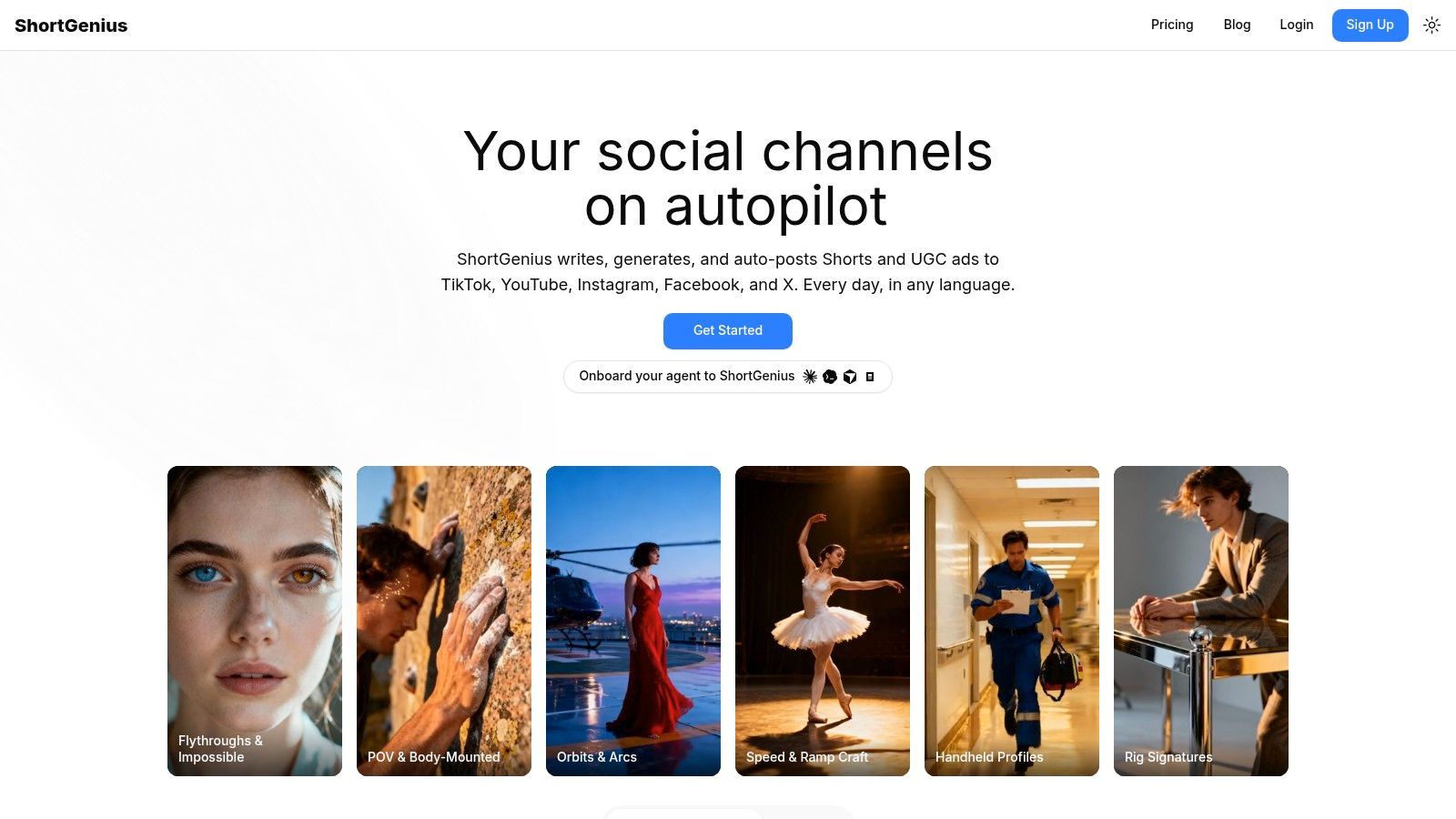
script-to-post short-form production کے لیے بہترین
ShortGenius سوشل ٹیموں، agencies، e-commerce brands، educators، اور solo creators کے لیے موزوں ہے جو recurring vertical content تیار کرتے ہیں۔ Series organization repeatable formats کو سپورٹ کرتا ہے، جبکہ auto-scheduling TikTok، YouTube، Instagram، Facebook، اور X کے لیے پوسٹس تیار کرتا ہے۔ یہ तब مفید ہے جب production کا مسئلہ channels کے سراسر consistency ہو، نہ کہ detailed timeline control۔
پلیٹ فارم کا دعویٰ ہے کہ یہ 100,000+ creators and teams استعمال کرتے ہیں، جس میں languages اور regions کی مثالیں شامل ہیں۔ اس کا model layer language، image، video، اور voice capabilities کو جوڑتا ہے، بشمول ElevenLabs voice technology، لہٰذا users کو ہر function کے لیے الگ API connections یا subscriptions کا انتظام نہیں کرنا پڑتا۔
عملی اصول: پہلے production pass کے لیے AI استعمال کریں، پھر publication سے پہلے ہر claim، hook، voiceover، اور visual کی review کریں۔
Trade-off editorial choices کی کم visibility ہے۔ Generated scripts کو brand-specific rewriting کی ضرورت پڑ سکتی ہے، scenes مطلوبہ emphasis miss کر سکتے ہیں، اور compliance-sensitive ads کو human approval چاہیے۔ Pricing اور plan limits دستیاب product material میں واضح نہیں، لہٰذا commit کرنے سے پہلے پلیٹ فارم پر current details چیک کریں۔ AI کے video ads کو revolutionize کرنے والی ٹیموں کے لیے، اس کی عملی قدر multiple channels میں تیز، repeatable production ہے۔
Pros
- End-to-end workflow: Writing اور visuals سے editing، voiceover، اور scheduling تک ایک پلیٹ فارم میں۔
- Cross-channel publishing: TikTok، YouTube، Instagram، Facebook، اور X کے لیے consistent versions تیار کریں۔
- Model breadth: Writing، image، video، اور voice capabilities الگ integrations کے بغیر استعمال کریں۔
- Series production: متعلقہ content کو batch کریں جبکہ brand اور format consistency برقرار رکھیں۔
- Team operations: Assets، ads، scheduling، support، payments، اور API-based automation ایک ماحول میں manage کریں۔
Cons
- Pricing clarity: پلیٹ فارم منتخب کرنے سے پہلے current plans، limits، اور business costs confirm کریں۔
- Human review remains necessary: Outputs کو accuracy، tone، rights، اور compliance کے لیے چیک کریں۔
2. Adobe Premiere Pro
Adobe Premiere Pro تب عملی انتخاب ہے جب AI assistance کو serious editing environment میں رکھنا ہو۔ یہ mature nonlinear timeline کو text-based editing، Speech to Text، automatic captions، caption translation، Enhance Speech، اور Auto Reframe کے ساتھ جوڑتا ہے جو horizontally oriented footage کو vertical یا square formats میں تبدیل کرنے کے لیے۔
Transcript workflow interviews، podcasts، اور recorded presentations کے لیے خاص طور پر مفید ہے۔ Editors dialogue سرچ کر سکتے ہیں، text سے sections ہٹا سکتے ہیں، اور اس structure کو استعمال کر کے rough cut بنا سکتے ہیں اس سے پہلے کہ timeline پر timing، cutaways، sound، اور pacing کو refine کریں۔ Auto Reframe 16:9 master کو social versions میں تبدیل کرنے کا manual کام کم کرتا ہے، حالانکہ subject کے unpredictable movement یا frame کے کنارے اہم visual information کے وقت چیک کرنا پڑتا ہے۔
professional teams اور established post-production کے لیے بہترین
Premiere Pro agencies، production companies، اور Creative Cloud استعمال کرنے والی in-house teams کے لیے موزوں ہے۔ After Effects کے ساتھ round-trip workflow motion graphics، detailed compositing، یا broadcast-ready finish کی ضرورت والے quick AI-assisted edit کے لیے بڑا فائدہ ہے۔
AI repetitive work کو تیز کرتا ہے، لیکن pause tension پیدا کرتا ہے یا reaction shot line سے پہلے آتا ہے یا brand کا visual rhythm صحیح ہے، یہ فیصلہ نہیں کرتا۔ Premiere experienced editors کو وہ control دیتا ہے نہ کہ automation کے پیچھے چھپاتا ہے۔
Pros
- Professional timeline: Complex edits کو established media اور sequence controls سے ہینڈل کریں۔
- Transcript-driven assembly: Searchable dialogue سے rough cuts بنائیں۔
- Social adaptation: Existing edits کو additional formats کے لیے reframe اور caption کریں۔
- Creative Cloud integration: Premiere Pro اور After Effects کے درمیان efficiently move کریں۔
- Extensible workflow: Plugins، templates، اور established team practices استعمال کریں۔
Cons
- Learning curve: New editors کو browser-based tool سے سیکھنے میں سست لگ سکتا ہے۔
- Hardware demands: Complex timelines capable desktop hardware طلب کر سکتے ہیں۔
- Finishing responsibility: AI tasks تیز کرتا ہے، لیکن editor final creative judgment کا مالک ہے۔
Current feature اور plan details Adobe Premiere Pro پر دیکھیں۔
3. DaVinci Resolve
DaVinci Resolve اس لسٹ میں سب سے مضبوط آپشن ہے ان creators کے لیے جو AI assistance کے ساتھ serious color، audio، visual effects، اور editing tools چاہتے ہیں۔ اس کا Neural Engine Magic Mask، voice isolation، Smart Reframe، اور text-based editing جیسے functions سپورٹ کرتا ہے، جبکہ broader application میں VFX کے لیے Fusion اور professional audio کے لیے Fairlight شامل ہے۔
یہ combination workflow بدل دیتا ہے۔ Grading یا sound cleanup کے لیے edit کو الگ application میں export کرنے کی بجائے، آپ project کو ایک post-production environment میں رکھ سکتے ہیں۔ Magic Mask لوگوں یا objects کو isolate کرنے میں مدد کرتا ہے، Smart Reframe format changes میں، اور voice isolation unwanted background sound کم کرتا ہے۔ ہر نتیجہ inspection کا مستحق ہے، خاص طور پر mask hair، glass، fast movement، یا overlapping subjects عبور کرے۔
ایک professional finishing environment چاہنے والے creators کے لیے بہترین
Resolve کے color tools اسے منتخب کرنے کی مرکزی وجہ ہیں۔ ایک social clip quick AI-assisted assembly سے شروع ہو سکتا ہے، لیکن consistent skin tones، controlled contrast، اور clean audio final piece کو deliberate محسوس کراتے ہیں۔ Resolve creator کو rough cut کو آگے لے جانے دیتا ہے بغیر project چھوڑے۔
Downside density ہے۔ Application multiple pages میں تقسیم ہے، اور new users کو سمجھنے میں وقت لگتا ہے کہ editing، Fusion، Fairlight، اور color کیسے کام کرتے ہیں۔ Best performance capable GPU پر منحصر ہے، خاص طور پر high-resolution media، noise reduction، effects، یا demanding AI operations والے projects میں۔
“AI subject تلاش کر سکتا ہے۔ Editor اب بھی فیصلہ کرتا ہے کہ audience کو کیا محسوس ہونا چاہیے۔”
Pros
- Complete post-production suite: ایک application میں edit، grade، mix، اور VFX شامل کریں۔
- AI-assisted isolation: Magic Mask اور related tools سے selective work تیز کریں۔
- Strong audio controls: Fairlight اور voice isolation dialogue-heavy projects سپورٹ کرتے ہیں۔
- Professional color: Automated looks سے آگے detailed grading control کے ساتھ۔
- Collaboration support: Blackmagic Cloud distributed project work سپورٹ کرتا ہے۔
Cons
- Complex interface: Multiple pages steeper learning path بناتے ہیں۔
- Performance requirements: High-end workflows stronger hardware سے فائدہ اٹھاتے ہیں۔
- Manual refinement: AI masks اور reframing delivery سے پہلے چیک کریں۔
Current application options DaVinci Resolve پر دیکھیں۔
4. CapCut
CapCut سوشل content کی speed اور visual language کے گرد ڈیزائن کیا گیا ہے۔ Auto captions، translation، background اور sticker removal، beat اور lyric tools، templates، effects، اور platform-oriented export options raw footage کو شارٹ میں تبدیل کرنا آسان بناتے ہیں بغیر traditional editing system سیکھے۔
سب سے بڑا workflow فائدہ immediacy ہے۔ Creator mobile، desktop، یا web پر کام کر سکتا ہے، پھر TikTok اور YouTube Shorts کی pace match کرنے والے templates اور effects استعمال کر سکتا ہے۔ یہ influencers، social managers، اور rapid publishing کو detailed finishing پر ترجیح دینے والی ٹیموں کے لیے strong fit ہے۔
trend-led vertical video کے لیے بہترین
CapCut تب اچھا کام کرتا ہے جب creative brief واضح ہو اور edit مختصر۔ Auto captions usable first pass بناتے ہیں، جبکہ background removal اور social templates recognizable format جلدی بناتے ہیں۔ Editor Premiere Pro یا Resolve میں trained نہ ہونے والے contributors کے لیے barrier کم کرتا ہے۔
یہ complex narrative edits، detailed color work، یا advanced sound design کے لیے کم موزوں ہے۔ بڑا template اور effect ecosystem trend-led preset سے ہر project شروع کرنے پر sameness کو encourage کر سکتا ہے۔ Pricing region اور platform کے لحاظ سے مختلف ہو سکتی ہے، لہٰذا ٹیموں کو premium features کے گرد high-volume process بنانے سے پہلے current structure confirm کرنا چاہیے۔
Pros
- Fast onboarding: New users usable social edit جلدی حاصل کر سکتے ہیں۔
- Social-native assets: Templates اور effects current short-form conventions سپورٹ کرتے ہیں۔
- Multiple platforms: Workflow کے مطابق mobile، desktop، اور web versions استعمال کریں۔
- Caption assistance: الگ service کے بغیر captions اور translations generate کریں۔
- Team access: Shared workspaces سوشل ٹیموں کو production coordinate کرنے میں مدد دیتے ہیں۔
Cons
- Limited finishing depth: Color اور audio controls full professional NLEs سے match نہیں کرتے۔
- Pricing complexity: Regional اور platform-specific plan details confirm کریں۔
- Template dependence: Fast presets brand direction کے بغیر visual distinction کم کر سکتے ہیں۔
Current plan information CapCut پر چیک کریں۔
5. Descript
Descript ویڈیو کو editable document سمجھتا ہے۔ یہ recorded material کو automatically transcribe کرتا ہے، اور transcript میں کیے گئے changes underlying audio اور video کو متاثر کرتے ہیں۔ Podcasts، courses، interviews، webinars، اور screen recordings کے لیے، یہ approach timeline میں ہر unwanted phrase تلاش کرنے سے بہت تیز ہے۔
اس کا AI toolkit میں filler-word اور silence removal، Studio Sound enhancement، captions، screen recording، multicam support، اور AI co-editor Underlord شامل ہے۔ Underlord drafts assemble کرنے اور broad cleanup instructions apply کرنے میں مدد کرتا ہے، لیکن best results تب ملتے ہیں جب editor clear objective دے نہ کہ project کے entire tone کو automatically سمجھنے کی توقع کرے۔
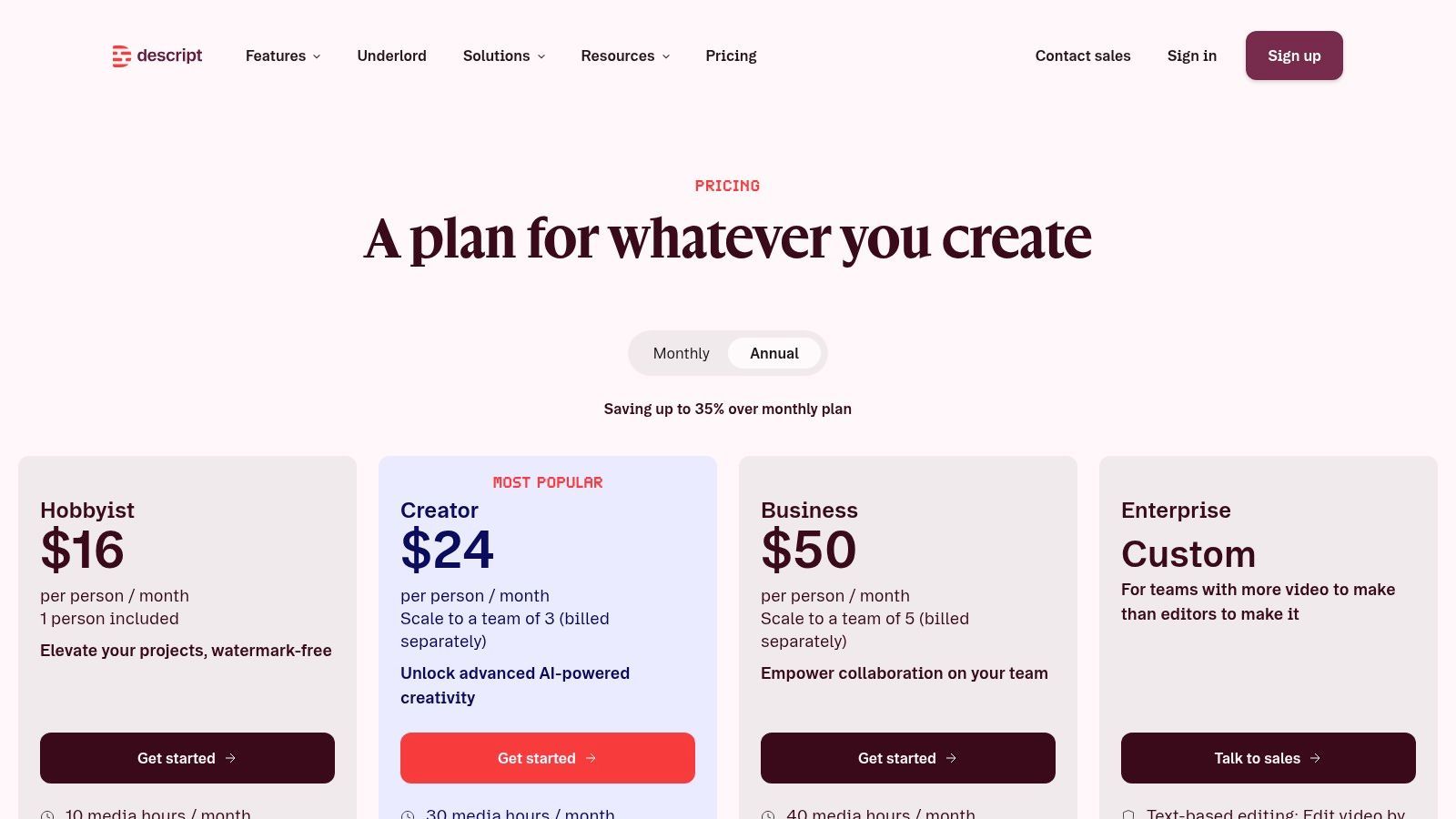
dialogue-heavy content اور fast repurposing کے لیے بہترین
Descript تب خاص طور پر effective ہے جب spoken words story برداشت کرتے ہوں۔ Transcript سرچ long recording scrub کرنے سے آسان ہے، اور repeated phrases یا dead air ہٹانا text-editing task بن جاتا ہے۔ یہ ایک conversation کو main episode، short clips، quote videos، اور captioned social posts میں تبدیل کرنے کے لیے مفید ہے۔
Editor full finishing suite کی جگہ نہیں لیتا۔ Complex compositing، detailed color grading، اور advanced multicam decisions کہیں اور بہتر ہینڈل ہوتے ہیں۔ Credit یا minute-based plans large footage process کرنے والی ٹیموں کو active management چاہیے۔
Careful AI transcription editing workflow original recording preserve کرے اور transcript cuts کو waveform کے خلاف review کرے۔ Automated transcription names، technical language، accents، اور overlapping speakers غلط سن سکتا ہے۔
Pros
- Text-based editing: Transcript سے spoken content براہ راست کاٹیں۔
- Fast cleanup: Filler words، silence، اور distracting audio problems ہٹائیں۔
- Repurposing speed: Long-form conversations سے clips بنائیں بغیر edit rebuild کیے۔
- Accessible interface: Nontraditional editors dense NLE master کیے بغیر productively کام کر سکتے ہیں۔
- Recording included: Screen، camera، یا presentation content ایک ہی ماحول میں capture کریں۔
Cons
- Finishing limits: Advanced post-production tools Premiere Pro یا Resolve سے کم features دیتے ہیں۔
- Usage management: High-volume teams minutes یا credits monitor کریں۔
- Transcript review: Accuracy errors edit چیک نہ کرنے پر meaning بدل سکتے ہیں۔
Current plans Descript پر دیکھیں۔
6. Runway
Runway کو generative video environment سمجھیں جس میں editing capabilities ہیں، نہ کہ conventional editor جو چند AI buttons شامل کرے۔ اس کا browser workspace text-to-video، image-to-video، video-to-video، greenscreen، inpainting، motion tracking، اور upscaling کو اکٹھا کرتا ہے۔
یہ concept development کے دوران valuable ہے۔ Creative team visual direction ٹیسٹ کر سکتی ہے، missing transition generate کر سکتی ہے، existing footage transform کر سکتی ہے، یا advertising concept produce کر سکتی ہے بغیر large desktop project setup کیے۔ یہ visual experimentation کے لیے بھی مفید ہے جو traditionally shoot کرنا مہنگا یا سست ہو۔
concept development اور generated visual effects کے لیے بہترین
Runway کی طاقت iteration ہے۔ آپ rough prompt سے visual reference تک، پھر کئی passes سے concept refine کر سکتے ہیں۔ Limitation visual consistency اور precise control multiple iterations طلب کرتے ہیں۔ Generated subject appearance، motion، یا object details outputs کے درمیان بدل سکتا ہے، جو sequence continuity کی ضرورت پر extra کام بناتا ہے۔
Credit-based usage practice میں matter کرتا ہے۔ Most capable models credits جلدی consume کرتے ہیں، لہٰذا ٹیموں کو campaign یا content series کی لاگت estimate کرنے سے پہلے small representative workflow ٹیسٹ کرنا چاہیے۔
Pros
- Generative range: Text، image، اور video transformations ایک browser workspace میں combine کریں۔
- Rapid ideation: Heavy software کے بغیر ad concepts اور visual treatments explore کریں۔
- Useful effects: Greenscreen، inpainting، tracking، اور upscaling practical post work سپورٹ کرتے ہیں۔
- Team organization: Workspaces اور projects collaborative experimentation manage کرتے ہیں۔
- No heavy installation: Browser میں projects شروع کریں۔
Cons
- Credit consumption: High-end generations credits جلدی استعمال کرتے ہیں۔
- Consistency challenges: Characters، objects، اور motion repeated refinement طلب کر سکتے ہیں۔
- Limited editorial precision: Exact story اور timing control کے لیے traditional NLE بہتر ہے۔
Current options Runway پر review کریں۔
7. VEED
VEED marketing teams کے ان finishing اور repurposing tasks پر فوکس کرتا ہے جو ہر ہفتے دہرائے جاتے ہیں۔ اس کا browser editor automatic subtitles، translations، AI dubbing اور voice features، silence اور filler-word removal، Clean Audio، stock integrations، prompt-to-video generation، collaboration، اور brand controls سپورٹ کرتا ہے۔
Workflow سیدھا ہے۔ Clip upload یا generate کریں، dead space ہٹائیں، audio clean کریں، captions اور brand styling apply کریں، پھر different channels کے لیے versions تیار کریں۔ یہ sequence campaign teams کے لیے موزوں ہے جو consistent output چاہتے ہیں اور ہر stakeholder کو desktop editor install نہیں کروانا چاہتے۔
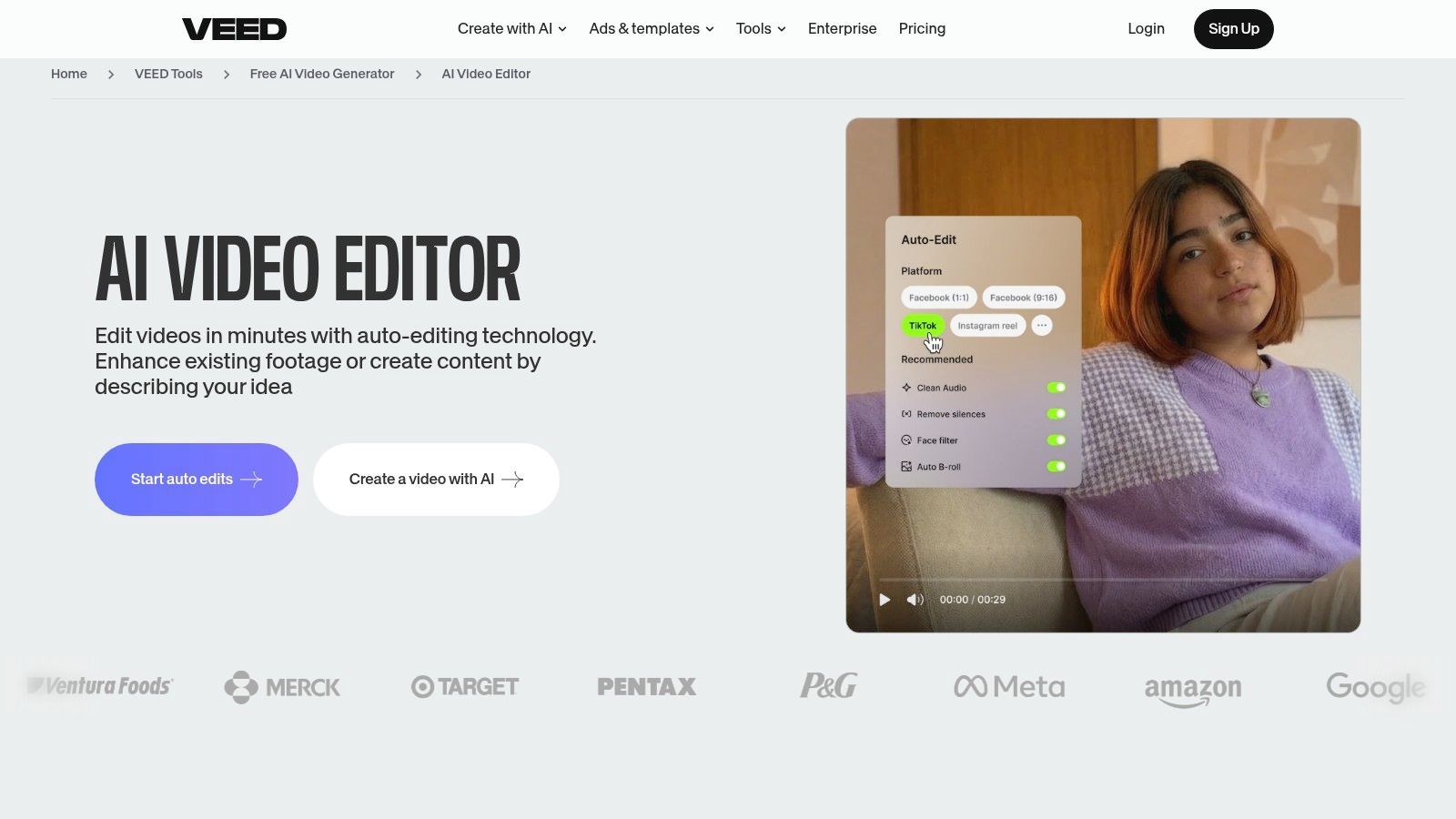
browser-based marketing production کے لیے بہترین
VEED تب strong ہے جب speed، accessibility، اور collaboration elaborate compositing سے زیادہ matter کریں۔ Content manager captioned product clip، translated version، یا branded announcement بنا سکتا ہے بغیر ہر adjustment کے لیے specialist editor کو involve کیے۔
Trade-off demanding projects پر نظر آتا ہے۔ Advanced VFX، detailed compositing، complex multicam edits، اور fine color work desktop NLEs کے لیے بہتر ہیں۔ AI dubbing اور automatic captions کو human language اور brand review چاہیے، خاص طور پر names، technical vocabulary، regulated claims، اور humor کے لیے۔
Editorial safeguard: Preview سے اکیلے auto-dubbed یا auto-captioned campaign approve نہ کریں۔ Output کو approved script سے listen، read، اور compare کریں۔
Pros
- Browser accessibility: ٹیمیں heavyweight editor install کیے بغیر collaborate کر سکتے ہیں۔
- Repurposing tools: Caption، translate، اور content adapt ایک workspace میں کریں۔
- Audio cleanup: Clean Audio اور silence removal marketing edits تیز کرتے ہیں۔
- Brand consistency: Templates اور controls recurring content standardize کرتے ہیں۔
- Fast learning curve: Occasional edit کرنے والے marketers کے لیے مفید۔
Cons
- VFX limitations: Complex effects more capable desktop environment طلب کرتے ہیں۔
- Manual review: AI captions، dubbing، اور generated scenes correction طلب کر سکتے ہیں۔
- Workflow ceiling: Power users browser timeline سے آگے نکل سکتے ہیں۔
پلیٹ فارم VEED پر explore کریں۔
8. Wondershare Filmora
Filmora simple social editor اور professional NLE کے درمیان middle ground پر ہے۔ اس کا AI toolkit میں AI Copilot assistance، audio denoise، smart cutout، text-to-speech، AI Portrait features، motion tracking، captions، reframing، اور templates اور effects کی broad collection شامل ہے۔
Application YouTubers، educators، small businesses، اور creators کے لیے اچھا کام کرتا ہے جو Resolve یا Premiere Pro کی complexity کے بغیر quick wins چاہتے ہیں۔ One-click tools common obstacles جیسے subject isolate، noisy recording clean، یا talking-head clip social format کے لیے تیار کرنا ہٹاتے ہیں۔
approachable desktop editing کے لیے بہترین
Filmora کا main advantage control اور simplicity کا balance ہے۔ آپ familiar timeline میں کام کرتے ہیں، لیکن draft improve کرنے کے لیے advanced compositing knowledge نہیں چاہیے۔ AI Copilot features editing path تلاش کرنے میں مدد دیتے ہیں، جبکہ templates اور integrated assets raw footage سے presentable video تک وقت کم کرتے ہیں۔
یہ precise finishing، intricate effects، یا extensive multicam management طلب کرنے والے projects کے لیے کم convincing ہے۔ Asset libraries اور effects additional subscriptions involve کر سکتے ہیں، لہٰذا production teams editor capabilities کو optional content packs کی لاگت سے الگ کریں۔
Beginner AI video editing tools compare کرنے والے creators Filmora کو practical starting point سمجھیں، نہ کہ basic pacing، audio balance، اور shot selection سیکھنے کی جگہ۔
Pros
- Gentle learning curve: Professional editing background کے بغیر useful results حاصل کریں۔
- Broad AI toolkit: Denoise، cutout، tracking، captions، اور speech generation کور کریں۔
- Desktop control: Browser-first editors سے زیادہ timeline control رکھیں۔
- Template support: YouTube اور social content کے لیے repeatable formats بنائیں۔
- Cross-platform access: Supported desktop environments میں کام کریں۔
Cons
- Less granular control: Complex projects limits expose کر سکتے ہیں۔
- Optional costs: Effects اور asset add-ons extra subscriptions طلب کر سکتے ہیں۔
- AI assistance needs direction: Copilot features editorial judgment کی جگہ نہیں لیتے۔
Current purchase options Wondershare Filmora پر دیکھیں۔
9. InVideo
InVideo تب ڈیزائن کیا گیا ہے جب ٹیم کے پاس brief ہو لیکن finished edit نہ ہو۔ اس کا prompt اور script-to-video workflow scenes، voiceover، stock media، captions، اور templates assemble کرتا ہے، پھر in-browser editor timing، layout، اور individual scenes refine کرنے کے لیے دیتا ہے۔
یہ product explainers، social ads، اور early campaign variants کے لیے مفید ہے۔ Marketer offer describe کر سکتا ہے، draft generate کر سکتا ہے، unsuitable stock replace کر سکتا ہے، script adjust کر سکتا ہے، اور internal review کے لیے version produce کر سکتا ہے بغیر ہر first pass specialist editor کو دیے۔
fast drafts اور explainers کے لیے بہترین
InVideo production کے beginning میں وقت بچاتا ہے، نہ کہ end میں۔ Generated scenes structure جلدی قائم کرتے ہیں، لیکن draft کو manual polish چاہیے۔ Stock choices generic لگ سکتے ہیں، pacing brand match نہ کرے، اور voiceover script میں awkward phrasing یا specialized terminology پر غلط لگے۔
Tool کا credit-based generation model usage accounting کو workflow کا حصہ بناتا ہے۔ Heavy users project کے drafts، revisions، اور outputs کی تعداد track کریں fixed production volume promise کرنے سے پہلے۔
Pros
- Prompt-to-video assembly: Script یا brief کو structured first draft میں تبدیل کریں۔
- Stock integration: ہر asset الگ source کیے بغیر scenes بھریں۔
- Simple refinement: Browser میں timing، layout، scenes، اور voiceover adjust کریں۔
- Useful for variants: Review کے لیے different hooks یا product angles produce کریں۔
- Accessible to non-editors: Deep timeline expertise کے بغیر ٹیمیں شروع کر سکتے ہیں۔
Cons
- Variable output quality: Prompts اور model choices first draft کو strongly affect کرتے ہیں۔
- Manual polish required: Stock، pacing، voice، اور claims review طلب کرتے ہیں۔
- Credit tracking: High-volume workflows careful usage management طلب کرتے ہیں۔
- Limited finishing: Complex visual storytelling full NLE میں belong کرتا ہے۔
Current plans InVideo پر چیک کریں۔
10. Kapwing
Kapwing AI generation اور social repurposing کو shared browser workspace میں لاتا ہے۔ یہ AI video اور image-to-video tools کو text-to-speech، automatic subtitles، translation، resizing، templates، brand workspaces، اور major social formats کے لیے exports کے ساتھ combine کرتا ہے۔
Useful distinction یہ ہے کہ Kapwing generated content اور traditional edits کے درمیان choice force نہیں کرتا۔ ٹیم starting scene generate کر سکتی ہے، existing footage import کر سکتی ہے، timeline پر کاٹ سکتی ہے، captions شامل کر سکتی ہے، resize کر سکتی ہے، اور platform versions تیار کر سکتی ہے بغیر multiple applications میں move کیے۔
collaborative social pipelines کے لیے بہترین
Kapwing marketing teams اور creators کے لیے موزوں ہے جو source material سے platform-specific outputs تک repeatable route چاہتے ہیں۔ Brand assets اور workspace collaboration writers، editors، اور approvers کے درمیان drafts ہینڈ کرنے کی friction کم کرتے ہیں۔ Interface occasional contributors کے لیے بھی approachable ہے۔
Power users advanced color، VFX، اور multicam work میں limits پائیں گے۔ کچھ AI tools credits یا paid plans طلب کرتے ہیں، لہٰذا پلیٹ فارم کو team کے edits کی تعداد کے خلاف evaluate کریں، نہ کہ individual features کی availability پر۔
Pros
- Balanced workflow: AI creation کو ordinary timeline editing کے ساتھ combine کریں۔
- Repurposing focus: Subtitle، translate، resize، اور source videos adapt کریں۔
- Team collaboration: Shared workspaces، templates، اور brand resources استعمال کریں۔
- Fast onboarding: NLE training کے بغیر creators اور marketers کے لیے موزوں۔
- Social exports: Different publishing destinations کے لیے variations تیار کریں۔
Cons
- Advanced limits: Complex color، VFX، اور multicam work دوسرے editor طلب کر سکتا ہے۔
- Credit requirements: کچھ AI functions paid usage پر منحصر ہیں۔
- Browser constraints: Large یا demanding projects desktop software پر comfortable ہو سکتے ہیں۔
Available tools Kapwing میں try کریں۔
Top 10 AI Video Editors: Quick Feature Comparison
| Tool | Core features | UX & Quality | Price & Value | Target audience | Unique selling point |
|---|---|---|---|---|---|
| ShortGenius (AI Video / AI Ad Generator) 🏆 | Script→image→video→voice ایک editor میں؛ presets، scheduling | ★★★★★، fast، consistent output | 💰 Site چیک کریں، enterprise/team plans؛ high scale value | 👥 Influencers، social teams، agencies، e‑commerce | ✨ End-to-end AI pipeline + multi-channel scheduling |
| Adobe Premiere Pro | Pro NLE، text-based edit، Auto Reframe، CC integration | ★★★★★، broadcast-grade، precise controls | 💰 Subscription (Creative Cloud)، pro value | 👥 Agencies، broadcast pros، advanced editors | ✨ Deep pro tooling + After Effects round‑trip |
| DaVinci Resolve | Edit، color، VFX، Fairlight audio، Neural Engine tools | ★★★★☆، industry color/audio quality | 💰 Free tier + paid Studio upgrade | 👥 Colorists، post houses، serious creators | ✨ World‑class color + free professional pipeline |
| CapCut | Mobile/desktop/web editor، templates، auto captions | ★★★★، fast، trendy social edits | 💰 Freemium؛ Pro/subscription region کے لحاظ سے مختلف | 👥 Influencers، short‑form creators، social managers | ✨ One‑click social templates & effects library |
| Descript | Text-first editor، auto-transcript، Studio Sound، AI co-editor | ★★★★☆، dialogue-driven content کے لیے fastest | 💰 Tiered plans؛ credit/minute model | 👥 Podcasters، educators، talk‑driven creators | ✨ Text-based edit + AI co-editor quick cuts کے لیے |
| Runway | Browser timeline + text/vid generative models، upscaling | ★★★★، rapid ideation، creative effects | 💰 Credit-based؛ top models credits consume کرتے ہیں | 👥 Concept artists، VFX creators، ad teams | ✨ State‑of‑the‑art generative video models in‑browser |
| VEED | Browser editor: auto-subtitles، AI dubbing، prompt→video | ★★★★، branded shorts کے لیے efficient | 💰 Freemium + paid teams؛ easy scaling | 👥 Marketing teams، social publishers | ✨ Prompt-to-video + collaboration & brand controls |
| Wondershare Filmora | Desktop editor، AI Copilot، templates، TTS | ★★★★، easy learning curve، quick results | 💰 One‑time یا subscription options | 👥 YouTubers، small teams، beginners | ✨ Gentle learning curve one‑click AI assists کے ساتھ |
| InVideo | Script→video stock، templates، voiceover کے ساتھ | ★★★★، ads/explainers کے لیے fast first drafts | 💰 Credit/plans؛ generation per cost matter کرتا ہے | 👥 Small marketing teams، ad creators | ✨ Rapid script-to-draft workflow ads کے لیے |
| Kapwing | Web editor، AI generators، auto subtitles & resize | ★★★★، balanced AI + timeline editing | 💰 Freemium + paid plans؛ کچھ tools credits طلب کرتے ہیں | 👥 Social teams، quick repurposing چاہنے والے creators | ✨ All-in-one web workspace socials کے لیے optimized |
Your New Creative Partner
AI video editing creators کو process سے ہٹانے کا نہیں بلکہ ان کے وقت کی بہتر control دینے کا ہے۔ AI interview transcribe کر سکتا ہے، silence identify کر سکتا ہے، captions generate کر سکتا ہے، background noise ہٹا سکتا ہے، rough cut suggest کر سکتا ہے، sequence resize کر سکتا ہے، یا first draft assemble کر سکتا ہے۔ Creator اب بھی فیصلہ کرتا ہے کہ کیا matter کرتا ہے، کیا authentic لگتا ہے، اور کیا audience کا توجہ کا مستحق ہے۔
Market signals explain کرتے ہیں کہ یہ tools novelty سے workflow infrastructure کیوں بن گئے۔ ایک estimate AI video editing tools market کو 2025 میں USD 1.6 billion اور 2030 تک USD 9.3 billion قرار دیتا ہے، 2025 سے 2030 تک 42.19% CAGR کے ساتھ۔ یہ forecast Virtue Market Research کی رپورٹ ہے۔ ایک اور industry roundup Wyzowl findings کا حوالہ دے کر کہتا ہے کہ 2026 میں 63% video marketers نے marketing videos create یا edit کرنے میں AI استعمال کیا، جو پچھلے سال کے 51% سے اضافہ ہے، جبکہ 91% businesses video کو marketing tool کے طور پر استعمال کرتے ہیں اسی roundup کے مطابق، جو VdoBloom's AI video statistics overview پر دستیاب ہے۔
یہ figures adoption بیان کرتے ہیں، نہ کہ guaranteed quality۔ الگ industry summary رپورٹ کرتا ہے کہ 74.3% users نے ہفتہ وار تین گھنٹے تک بچائے، جبکہ 11.6% نے پانچ گھنٹے سے زیادہ بچائے، جو بتاتا ہے کہ current tools repetitive work کم کرتے ہیں نہ کہ entire production process replace کریں۔ یہ evidence Ngram's AI video statistics review میں ہے۔
Tools اپنی bottleneck کے مطابق منتخب کریں:
- Script-to-post short-form output کے لیے: ShortGenius broadest single-workspace workflow دیتا ہے۔
- Professional editing اور finishing کے لیے: Premiere Pro اور DaVinci Resolve deepest control دیتے ہیں۔
- Transcript-led production کے لیے: Descript dialogue-heavy material کے لیے fastest fit ہے۔
- Social-first speed کے لیے: CapCut، VEED، اور Kapwing publishing friction کم کرتے ہیں۔
- Generated concepts کے لیے: Runway visual experimentation اور transformations سپورٹ کرتا ہے۔
- Approachable desktop editing کے لیے: Filmora beginners کو useful AI assistance دیتا ہے highly technical interface کے بغیر۔
- Fast drafts کے لیے: InVideo brief کو reviewable explainer یا ad starting point میں تبدیل کرتا ہے۔
Trust اور editorial control برابر weight کے مستحق ہیں۔ Coverage اکثر AI وقت بچاتا ہے اس پر emphasize کرتی ہے، لیکن creators کو automatic changes کے intent، disclosure، authenticity، اور ownership پر effects بھی جاننے چاہییں۔ YouTube's testing of AI edits on Shorts پر رپورٹنگ بتاتی ہے کہ undisclosed alterations concern پیدا کر سکتے ہیں حتیٰ کہ efficiency goal ہو۔
Best workflow usually hybrid ہے۔ AI کو transcription، rough assembly، captions، format adaptation، cleanup، اور repetitive versioning ہینڈل ہونے دیں۔ Human control hook، structure، factual claims، visual continuity، emotional timing، rights، اور final approval پر رکھیں۔ ایک representative project سے شروع کریں، adoption سے پہلے اور بعد وقت compare کریں، اور چیک کریں کہ tool footage سے approved publication تک complete route improve کرتا ہے یا نہیں۔
اپنی bottleneck match کرنے والے ایک یا دو tools کے free trial یا accessible version استعمال کریں۔ Most impressive demo پر منتخب نہ کریں۔ وہ پلیٹ فارم منتخب کریں جو آپ کی ٹیم کے سب سے زیادہ دہرائے جانے والے stage میں کام کم کرے، جبکہ finished video کو yours بنانے کے لیے کافی control برقرار رکھے۔
ShortGenius scriptwriting، generated scenes، natural voiceovers، editing controls، brand kits، series organization، اور multi-platform scheduling کو ایک workflow میں combine کرتا ہے۔ اگر آپ ideas کو consistent short-form videos اور ads میں تبدیل کرنا چاہتے ہیں بغیر کئی الگ tools کو wire کیے، تو ShortGenius (AI Video / AI Ad Generator) وزٹ کریں اور چیک کریں کہ اس کا script-to-post process آپ کے production pipeline میں fit ہوتا ہے یا نہیں۔