2026 میں ویڈیو کے لیے AI کلر گریڈنگ ماسٹر کریں

2026 میں ویڈیو کے لیے AI کلر گریڈنگ ماسٹر کریں۔ ہمارا رہنما بتاتا ہے کہ یہ کیسے کام کرتا ہے، طریقوں کا موازنہ کرتا ہے، اور آپ کے کنٹینٹ کو بہتر بنانے کے لیے عملی ورک فلو فراہم کرتا ہے۔
آپ کی ایڈٹس تیز تر ہو رہی ہیں، لیکن آپ کا فیڈ اب بھی مختلف دنیاؤں سے جوڑا گیا لگتا ہے۔ ایک Reel ٹھنڈا اور کنٹراسٹی ہے، اگلا پیلا اور فلیٹ، اور اس کلپ کے بعد والا جملے کے بیچ میں ہی skin tones تبدیل ہو جاتا ہے۔ یہ عدم تسلسل اچھے کنٹنٹ کو بھی کم ارادی لگنے کا باعث بنتا ہے۔
اس صورتحال میں، AI color grading مددگار ہے۔ جادوئی بٹن کی طرح نہیں، اور ذائقے کی جگہ نہیں لے سکتا، بلکہ شارٹ فارم ویڈیوز کی بڑی تعداد میں صاف، دہراتے ہوئے بیس گریڈ بنانے کا تیز طریقہ ہے۔
یہ اہم ہے کیونکہ AI grading اب نارمل پوسٹ ورک فلو کا حصہ ہے۔ 2026 تک، 47% فلم ایڈیٹرز پہلے سے AI tools استعمال کر رہے ہیں جن کاموں میں color grading اور object removal شامل ہیں، WifiTalents کی رپورٹ کے مطابق جو OAGP ڈیٹا کا حوالہ دیتی ہے AI in the filming industry پر۔ شارٹ فارم کریئٹرز کے لیے، یہ ایک بڑا تبدیلی ہے۔ AI color grading اب تجسس نہیں رہا۔ یہ معیاری ورک فلو کا حصہ بن رہا ہے۔
Inconsistent Color کا خاتمہ
شارٹ فارم کریئٹرز عام طور پر آئیڈیاز پر ناکام نہیں ہوتے۔ وہ repeatability پر ناکام ہوتے ہیں۔
آپ مختلف دنوں پر شوٹ کرتے ہیں، مختلف کمروں میں، تبدیل ہوتے ونڈو لائٹ، مکسڈ practicals، auto white balance drift، اور ایک سے زیادہ کیمروں سے کلپس۔ پھر آپ اس سب کو ایک برانڈ کی طرح ٹائم لائن میں بنانے کی کوشش کرتے ہیں جو آج لائیو ہونا ہے۔ Manual grading اسے ٹھیک کر سکتا ہے، لیکن ہر پوسٹ پر manual grading consistency توڑ دیتا ہے۔
AI color grading پہلی مسئلے کو اچھی طرح حل کرتا ہے۔ یہ exposure کو نارمل کر سکتا ہے، واضح color casts کو بیلنس کر سکتا ہے، اور کلپس کو ایک ہی ویژول neighborhood میں لا سکتا ہے بغیر ہر بار صفر سے شروع کیے۔ یہ 80 فیصد ہے جو زیادہ تر کریئٹرز کو چاہیے۔
کریئٹرز کو AI سے اصل میں کیا چاہیے
ہر اپ لوڈ پر ہر ہیروئک cinematic grade کی ضرورت نہیں۔ انہیں ایک ایسا ورک فلو چاہیے جو تین چیزیں قابل اعتماد طور پر کرے:
- کلپس کو تیز match کریں تاکہ talking-head intro اور cutaway B-roll غیر متعلق نہ لگیں۔
- TikTok، Reels، Shorts، اور paid variations میں recognizable look برقرار رکھیں۔
- بیچز میں پروڈیوس کرتے وقت decision fatigue کم کریں۔
عملداری اصول: پہلے AI سے correction، پھر style۔ اگر فوٹیج بیلنس نہیں، تو creative look اسے نہیں بچا سکتا۔
سب سے بڑی غلطی یہ توقع ہے کہ ٹول ذائقہ ایجاد کرے گا۔ AI آپ کی فوٹیج کو technically قریب لا سکتا ہے، لیکن اسے اب بھی ہدایت چاہیے۔ اگر آپ کے references inconsistent ہیں، تو outputs بھی inconsistent ہوں گے۔
یہاں ایک mindset shift بھی ہے۔ Traditional color work ایڈیٹرز کو shot by shot سوچنے کی تربیت دیتا ہے۔ AI pipeline view کو encourage کرتا ہے۔ ایک solid base بنائیں، اسے broadly apply کریں، پھر manual time صرف جہاں لوگ نوٹس کرتے ہیں: faces، hero shots، product close-ups، اور lighting environments کے درمیان transitions۔
AI Color کو کیسے سمجھتا ہے
AI grading بہترین کام کرتا ہے جب آپ اسے “auto filter” سمجھنا چھوڑ دیں اور اسے fast assistant کی طرح treat کریں جو patterns recognize کرتا ہے۔
یہ آپ کے کلپ کو human colorist کی طرح نہیں دیکھتا۔ یہ image کو data کی طرح پڑھتا ہے، پھر اس data کو learned visual patterns سے compare کرتا ہے۔ اس میں brightness relationships، contrast distribution، color separation، likely subject areas، اور scene context شامل ہے۔
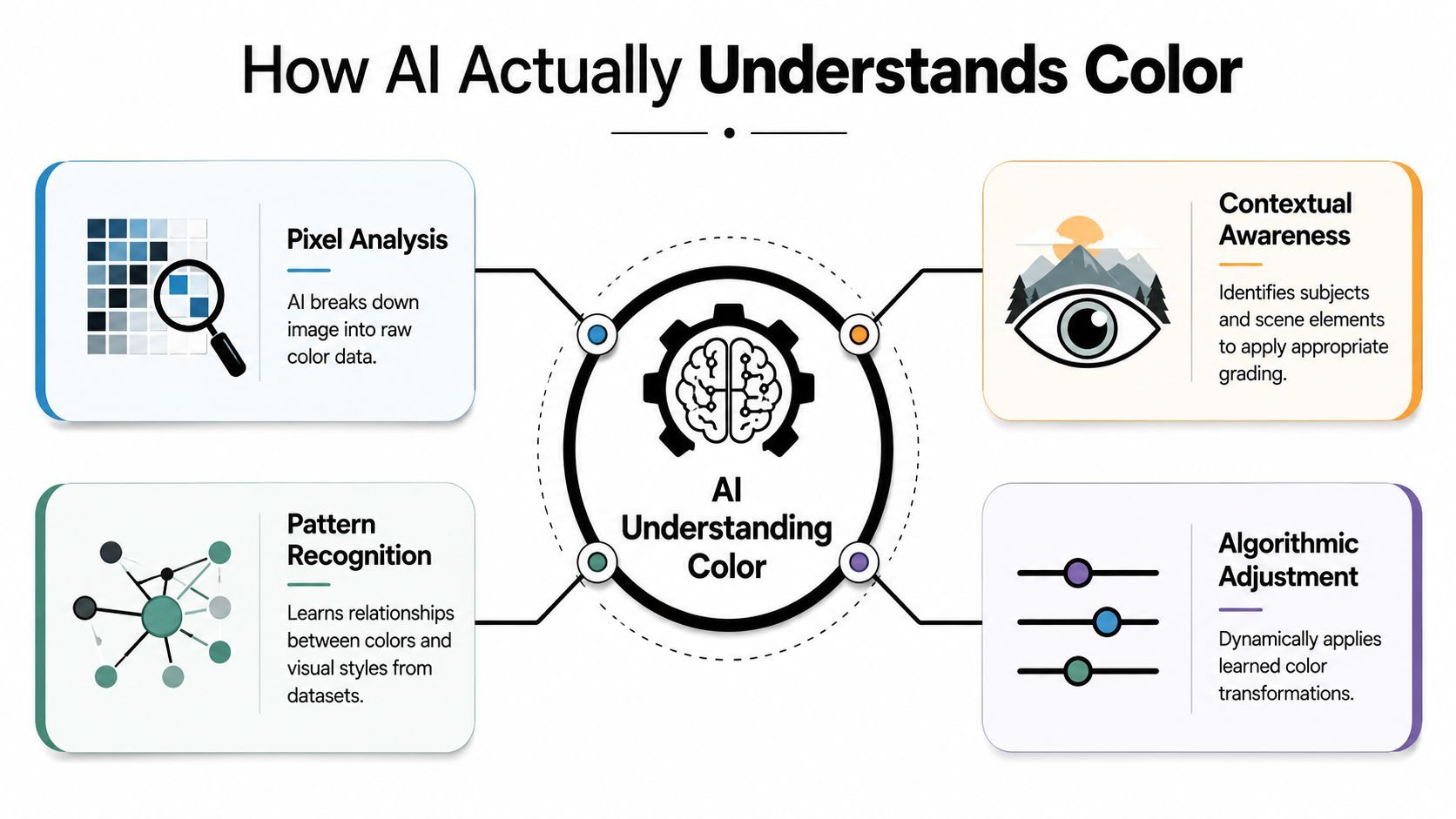
یہ scenes پڑھتا ہے، صرف pixels نہیں
ایک basic correction tool فوٹیج کو values کے ڈھیر کی طرح treat کرتا ہے۔ بہتر AI systems اس سے زیادہ کرتے ہیں۔ وہ interpret کر سکتے ہیں کہ frame close-up، exterior، یا dominant subject والا scene ہے، پھر مختلف grading logic apply کرتے ہیں۔
یہ ایک وجہ ہے کہ modern systems old one-click auto correction سے تیز اور believable لگتے ہیں۔ AI color grading systems جو perceptual transforms استعمال کرتے ہیں وہ standard algorithmic methods سے 22x تیز processing speeds حاصل کر سکتے ہیں جبکہ shot composition analyze کرتے ہوئے reference looks کو higher fidelity سے replicate کرتے ہیں، جیسا کہ Cined کی Colourlab AI پر کوریج میں نوٹ کیا گیا۔
Practice میں اہم تین حصے
یہاں hood کے نیچے کیا ہو رہا ہے اس کا simple ورژن ہے:
- Pattern recognition recurring visual structures identify کرتا ہے۔ Faces، skies، interiors، foliage، neon، اور low-key scenes کو مختلف treatment کی ضرورت ہوتی ہے۔
- Reference learning model کو آپ کی فوٹیج کو target aesthetic سے compare کرنے دیتا ہے، چاہے still image ہو یا saved look۔
- LUT generation اس فیصلے کو editing app میں usable چیز میں بدل دیتا ہے۔
LUT صرف color recipe ہے۔ جو بدلا ہے وہ یہ ہے کہ AI اب اس recipe کو create کرنے میں مدد کر سکتا ہے بجائے ہر transform کو hand سے بنانے کے۔
اچھا AI grading artistic sense میں “cinema” نہیں جانتا۔ یہ color relationships recognize کرتا ہے جن پر humans پہلے سے cinematic کی طرح respond کرتے ہیں۔
اگر آپ short-form production کے آس پاس وسیع ورک فلو بنا رہے ہیں، تو یہ broader AI video strategies for creators میں اچھی طرح فٹ ہوتا ہے۔ Color خود bottleneck نہیں ہے۔ یہ scripting، pacing، thumbnails، اور format-specific variants کے system کا ایک حصہ ہے۔
Context کیوں اتنا اہم ہے
Human colorist face دیکھتا ہے اور فوراً skin protect کرتا ہے۔ AI miss کر سکتا ہے اگر frame noisy، synthetic، backlit، یا heavily stylized ہو۔ یہی وجہ ہے کہ بہترین نتائج اس وقت ہوتے ہیں جب ٹول broad correction pass handle کرتا ہے اور آپ judgment calls handle کرتے ہیں۔
یہی وجہ ہے کہ کچھ AI grades oddly generic لگتے ہیں۔ Model “برا” نہیں ہو رہا۔ جب فوٹیج mixed signals دیتی ہے تو safety کی طرف average کر رہا ہے۔ اگر آپ clear reference اور clean clip دیں، تو بہت بہتر behave کرتا ہے۔
Automated بمقابلہ Manual Grading: کریئٹر کا انتخاب
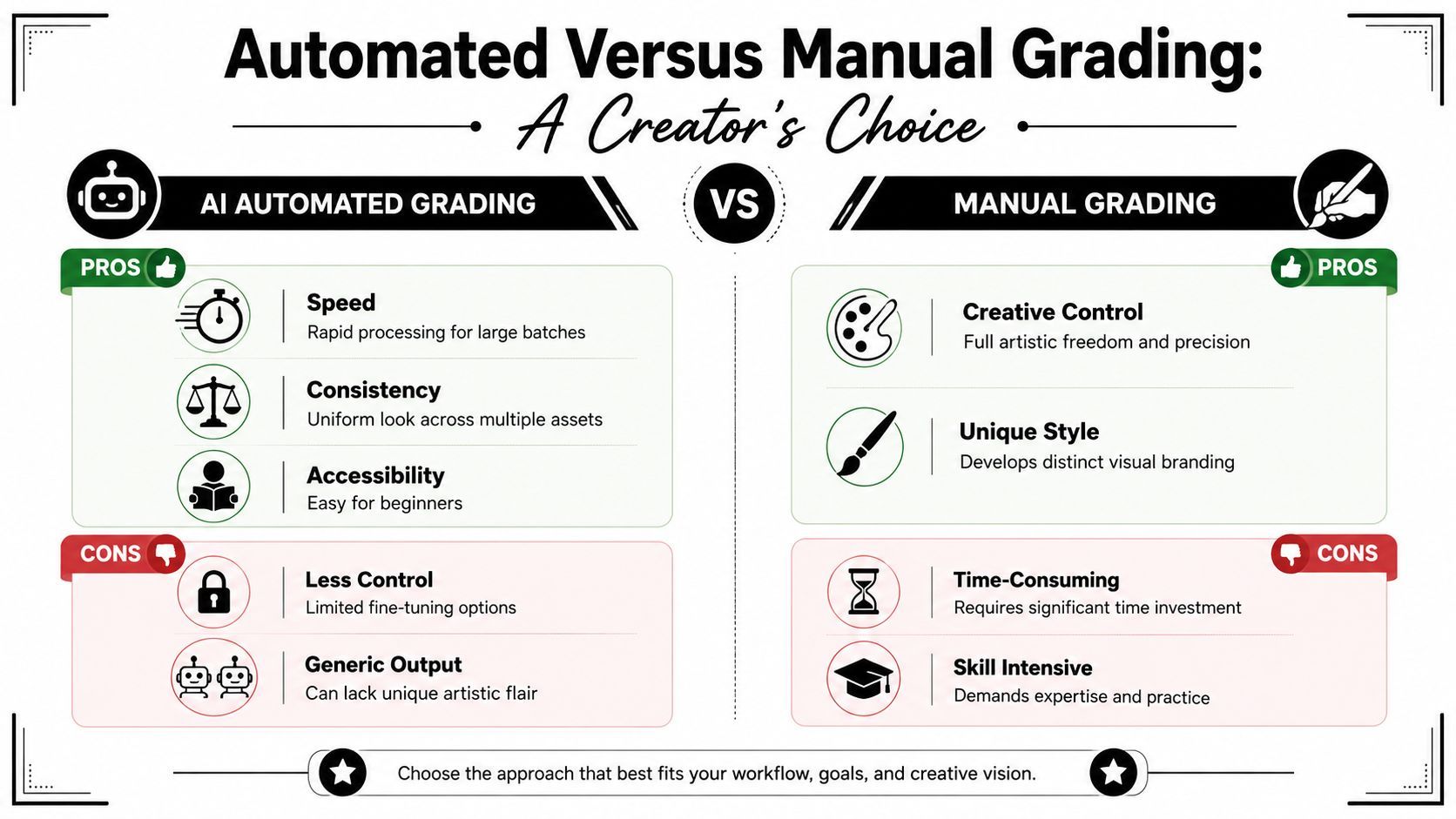
useful question یہ نہیں کہ AI manual grading سے بہتر ہے یا نہیں۔ یہ نہیں ہے۔ Useful question یہ ہے کہ ہر ایک کی جگہ کہاں ہے۔
Short-form volume کے لیے، AI setup battle جیتتا ہے۔ Signature work کے لیے، manual grading finish جیتتا ہے۔
جہاں AI واضح مدد کرتا ہے
Studios AI color tools novelty کے لیے نہیں अपना رہے۔ Repetitive correction work time میں مہنگا ہے اس لیے अपना رہے ہیں۔ 2026 Jon Peddie Research survey کے مطابق post-production studios AI color correction tools اپنانے کے بعد 40% تیز turnaround times رپورٹ کرتے ہیں، اور اسی رپورٹ میں cited NVIDIA data کہتا ہے کہ AI-powered color grading professional editors کے لیے manual adjustments کو 70% تک کم کر سکتا ہے، اس 2026 AI video editing and color correction overview کے مطابق۔
کریئٹرز کے لیے، یہ simple advantage میں translate ہوتا ہے: آپ clip matching پر hours جلانا چھوڑ دیتے ہیں۔
| Criteria | AI grading | Manual grading |
|---|---|---|
| Speed | Batch correction اور first-pass matching کے لیے تیز | بہت سارے کلپس پر سست، خاص طور پر |
| Consistency | جب ایک brand look repeat کر رہے ہوں تو strong | Discipline اور saved workflows پر depend کرتا ہے |
| Creative control | Edges پر limited | Precise shaping کے لیے best |
| Learning curve | Start کرنے میں آسان | Right کرنے میں زیادہ وقت لگتا ہے |
جہاں manual اب بھی اہم ہے
AI اکثر “clean and usable” تک پہنچا دیتا ہے۔ “Intentional” تک نہیں ہمیشہ۔
Manual grading اہم ہے جب:
- Skin focal point ہے اور subtle hue اور luminance shaping چاہیے۔
- Product میں color sensitivity ہے جیسے cosmetics، food، apparel، یا branded packaging۔
- Look میں restraint چاہیے کیونکہ AI obvious contrast اور saturation choices push کرتا ہے۔
- Footage real اور synthetic elements mix کرتا ہے اور selective correction چاہیے۔
Practical split
زیادہ تر کریئٹرز کو hybrid approach استعمال کرنا چاہیے۔
AI سے balancing اور shot matching شروع کریں۔ پھر manual سے targeted moves سے finish کریں۔ جہاں synthetic لگے وہاں saturation کم کریں۔ Foreheads پر highlights tame کریں۔ Shadow density adjust کریں تاکہ image میں shape رہے۔ Brand colors protect کریں اگر drift کریں۔
سب سے تیز workflows manual grading skip نہیں کرتے۔ انہیں shrink کرتے ہیں moments جو matter کرتے ہیں۔
یہ core trade-off ہے۔ AI time خریدتا ہے۔ Manual work specificity خریدتا ہے۔ اگر آپ جانتے ہیں کہ ہر stage پر کس کی ضرورت ہے، تو workflow بہت light ہو جاتا ہے۔
Practical AI Color Grading Workflow
بہترین AI color grading workflow صحیح جگہوں پر boring ہے۔ یہ repeat decisions ہٹاتا ہے اور آپ کا attention clips کے لیے محفوظ رکھتا ہے جو post carry کرتے ہیں۔
جو کریئٹرز تیز move کرتے ہیں انہیں ایک system چاہیے جو Premiere Pro، DaVinci Resolve، یا Final Cut Pro میں کام کرے۔ یہیں AI-generated LUTs مدد کرتے ہیں، کیونکہ وہ consistent look carry کرنے دیتے ہیں tools کے درمیان بجائے ہر بار rebuild کرنے کے۔
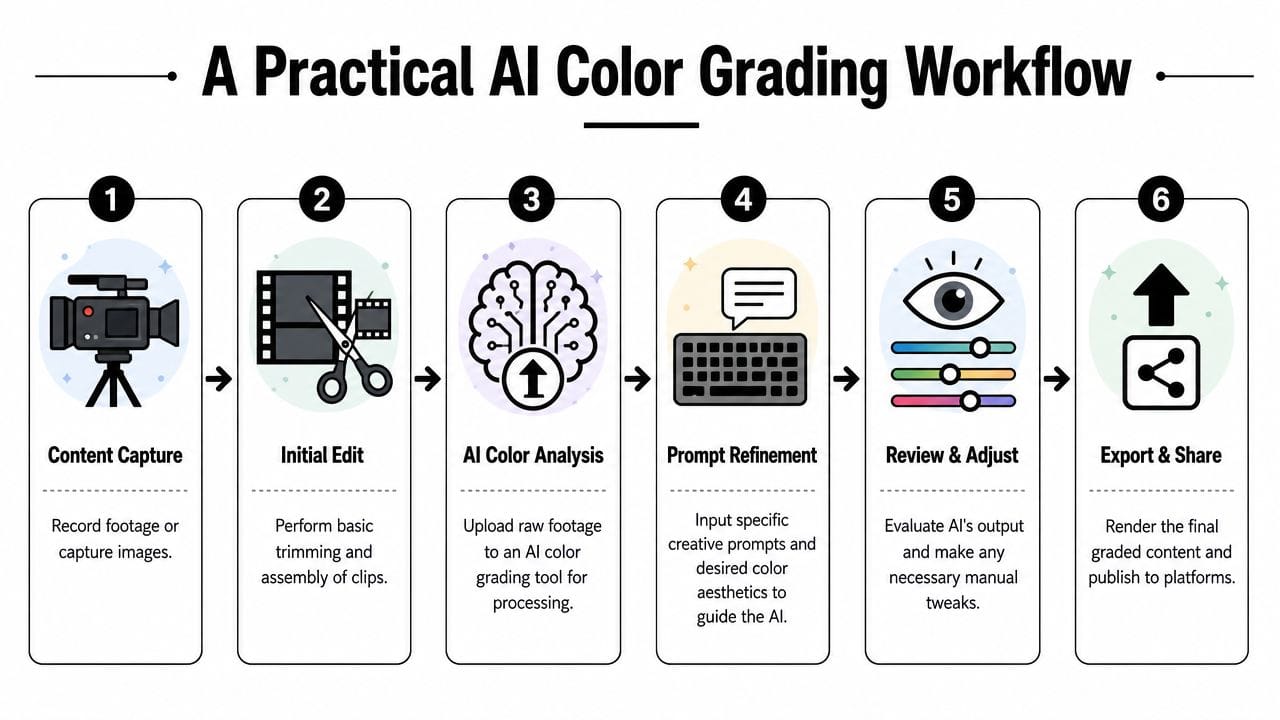
ایک six-step workflow جو hold up کرتا ہے
-
پہلے edit، پھر grade
Color touch کرنے سے پہلے sequence trim کریں۔ Dead takes، alternate hooks، یا cutaways grade کرنے کی کوئی وجہ نہیں جو نہ رکھیں۔ -
Clips کو lighting condition سے group کریں
Daylight clips ایک ساتھ، studio clips ایک ساتھ، screen recordings ایک ساتھ، اور AI-generated inserts اپنے group میں۔ AI grading similar material کو ایک ساتھ process کرنے پر بہتر behave کرتا ہے۔ -
AI base correction pass چلائیں
Tool سے white balance، exposure، اور broad contrast balance کریں۔ AI اس میں excel کرتا ہے۔ Repetitive matching work اسے سونپ دیں۔ -
Reference-driven look یا generated LUT apply کریں
.cube format میں AI-generated LUTs text prompts یا reference images سے create کی جا سکتی ہیں اور DaVinci Resolve، Premiere Pro، اور Final Cut Pro میں استعمال ہو سکتی ہیں، جبکہ high-volume creators کے لیے post-production time 40% تک کم کرتی ہیں، اس AI-generated LUT workflows walkthrough کے بنیاد پر۔ Practical benefit speed نہیں صرف۔ Portability ہے۔ -
Manual face pass کریں
Skin، teeth، under-eye shadows، اور red channel overload چیک کریں۔ اچھے AI passes کو بھی یہ چاہیے۔ -
Final delivery سے پہلے test versions export کریں
Phone اور desktop display پر دیکھیں۔ اگر mobile پر grade fall apart ہو، تو aggressive saturation اور contrast back off کریں۔
Presets کے طور پر کیا save کریں
سب کچھ save نہ کریں۔ Repeat decisions save کریں۔
- Correction presets آپ کے common camera یا room setups کے لیے
- Look LUTs recurring brand aesthetics کے لیے
- Adjustment layers platform variants کے لیے، جیسے slightly brighter mobile version
- Face protection nodes interview اور talking-head content کے لیے
اگر آپ paid social اور organic posts دونوں produce کرتے ہیں، تو grading workflow کو wider ad assembly process سے align کریں۔ Meta اور TikTok کے لیے AI ad production گائیڈ useful ہے کیونکہ color کو faster production chain کا ایک piece treat کرتا ہے، separate art project نہیں۔
جہاں کریئٹرز time lose کرتے ہیں
وہ too early over-grade کرتے ہیں۔ یا AI سے footage حل کرنے کو کہتے ہیں جو reshot، relit، یا different correction group میں separate ہونا چاہیے تھا۔
Strong workflow simple ہے: normalize، stylize، skin protect، پھر device پر چیک جہاں audience دیکھے گی۔
Prompt سے Palette تک: AI Color Commands ماسٹرنگ
Useful AI grade اور forgettable کے درمیان فرق عام طور پر input پر آتا ہے۔ “Auto” safe correction دیتا ہے۔ Prompts اور references direction دیتے ہیں۔
یہ سب سے زیادہ matter کرتا ہے جب آپ whole channel میں visual identity بنا رہے ہوں بجائے ایک clip کو isolated nice بنانے کے۔
بہتر prompts بہتر grades produce کرتے ہیں
Weak prompt:
- “اسے cinematic بنائیں۔”
Usable prompt:
- “Warm skin tones، soft highlight rolloff، lower green cast، slightly lifted shadows، premium lifestyle ad look۔”
Better still:
- “Natural daylight portrait، clean skin tones، restrained contrast، subtle warm mids، neutral whites، polished but realistic social ad finish۔”
Point poetic sound کرنا نہیں۔ Mood، contrast behavior، temperature، اور realism کے بارے میں specific ہونا ہے۔ AI بہتر respond کرتا ہے جب آپ image کے ساتھ کیا ہونا چاہیے describe کریں، vibe نہیں۔
Short-form میں کام کرنے والے prompt patterns
کچھ prompt structures reliably کام کرتے ہیں:
-
Talking heads کے لیے
“Neutral skin tones، reduced background cast، soft contrast، clear separation from backdrop، natural creator studio look۔” -
Product shots کے لیے
“Crisp contrast، accurate product color، controlled highlights، luxury commercial feel، clean blacks۔” -
Dramatic edits کے لیے
“Cool shadows، warm highlights، stronger contrast، punchy but not oversaturated، modern trailer mood۔” -
UGC ads کے لیے
“Bright and believable phone-native color، healthy skin، clean whites، no heavy film look۔”
Reference images vague language کو beat کرتے ہیں۔ اگر look پسند ہے تو tool کو وہ look feed کریں memory سے describe کرنے کی بجائے۔
Strong reference image دو چیزیں کرتا ہے۔ Usable result تک path short کرتا ہے، اور brand کو repeatable بناتا ہے۔ اگر آخری دس posts ایک ہی visual target کی طرف point کریں تو feed intentional لگنے لگتا ہے۔
یہاں prompt-led grading ideas کو actual video outputs میں translate کرنے کا useful walkthrough ہے:
Prompt language میں کیا avoid کریں
کچھ prompt habits fast bad grades create کرتے ہیں:
- Too many aesthetics stack کرنا جیسے “moody، clean، vintage، luxury، sci-fi، natural۔”
- Film references loosely استعمال کرنا جب contrast یا color density نہیں چاہیے جو ان کے ساتھ آتی ہے۔
- Subject priority ignore کرنا تاکہ AI environment کو person سے بہتر grade کرے۔
بہترین habit اپنی small prompt library بنانا ہے۔ Bright educational content کے لیے ایک۔ Direct-response ads کے لیے ایک۔ Dramatic B-roll کے لیے ایک۔ Product demonstrations کے لیے ایک۔ جب dialed in ہو جائیں تو grading تیز اور consistent ہو جاتی ہے generic نہیں بنتے۔
Real-World Troubleshooting: Common AI Grading Issues
AI color grading کے آس پاس سب سے بڑا myth یہ ہے کہ hard part tool choose کرنا ہے۔ نہیں ہے۔ Hard part یہ recognize کرنا ہے کہ جب tool غلط ہے، اور fix کرنا بغیر start over کیے۔
یہ AI-generated footage میں سب سے واضح نظر آتا ہے۔ Synthesia، Runway، Pika، اور similar systems کے ساتھ کام کرنے والے کریئٹرز same issue میں run into کرتے ہیں: “waxy skin tone” collapse، جہاں faces texture lose کرتے ہیں، flatten out، اور plasticky لگنے لگتے ہیں۔ جیسا کہ اس Reddit ColorGrading thread میں AI-generated footage پر discuss کیا گیا، standard auto-correction tools اکثر texture اور micro-contrast restore کرنے میں fail کرتے ہیں جو faces کو real بنانے کے لیے چاہیے۔
AI-generated footage میں waxy skin fix کرنا
Auto correction عام طور پر اسے worse بناتا ہے کیونکہ local texture rebuild کیے بغیر broad tonal relationships smooth کرتا ہے۔
اس protocol کو استعمال کریں:
-
Global correction back off کریں پہلے
اگر image already too smooth لگتا ہے تو stylized LUT pile نہ کریں۔ Intensity reduce کریں سب سے پہلے۔ -
Skin luminance gently lower کریں
Waxy faces image میں too high بیٹھتے ہیں۔ انہیں slightly down لائیں تاکہ frame کے باقی حصے کے مقابلے glow نہ کریں۔ -
Oversoft saturation reduce کریں
Flat لگنے والی skin strangely uniform بھی لگتی ہے۔ Saturation pull back کریں push کی بجائے۔ -
Selective contrast add کریں، global نہیں
Global contrast boost everything harden کرتا ہے اور skin کی rarely مدد کرتا ہے۔ Curves، masks، یا local tools سے face area carefully shape کریں۔ -
Perceived texture reintroduce کریں
یہ most tutorials میں missing step ہے۔ Controlled sharpening، midtone contrast، یا texture tools sparingly استعمال کریں۔ Believable surface variation restore کرنے کی کوشش کریں، crunchy skin create نہیں۔
اگر face polished plastic جیسا لگے تو “beauty” کے لیے grade کرنا چھوڑ دیں اور structure کے لیے شروع کریں۔
دیگر failures جو ہمیشہ show up کرتے ہیں
AI ordinary طریقوں سے بھی miss کرتا ہے۔
Context mismatch
Tool subject کی بجائے background کے لیے grade کر سکتا ہے۔ Bright window یا colorful wall correction کو face سے pull کر سکتے ہیں۔
یہ try کریں:
- Subject کو manually mask کریں اگر software allow کرے
- Automated pass کی strength reduce کریں
- Foreground اور background کے لیے separate adjustments چلائیں
Over-saturation
یہ lifestyle content، travel clips، food footage، اور neon-heavy edits میں common ہے۔ AI “pleasing” کو “more color” interpret کرتا ہے۔
Short correction checklist استعمال کریں:
- Reds پہلے check کریں کیونکہ skin، lips، اور signage fastest break کرتے ہیں
- Mixed light میں greens دیکھیں کیونکہ synthetic quickly ہو جاتے ہیں
- Selectively desaturate کریں whole image lower کرنے کی بجائے اگر brand colors matter کریں
Screen-to-screen inconsistency
Grade desktop پر polished اور phone پر harsh لگ سکتا ہے۔ Short-form mobile پر زندہ ہے، تو mobile آخری word رکھتا ہے۔
Fast review pass
Export سے پہلے چار questions پوچھیں:
- Skin اب بھی human لگتی ہے؟
- Whites neutral enough read کرتے ہیں؟
- Shadows detail hold کرتے ہیں washed out نہیں لگتے؟
- Image low brightness پر phone پر کام کرتی ہے؟
Most AI grading problems dramatic نہیں۔ Cumulative ہیں۔ Slightly hot face، slightly pushed teal shadow، slightly fake product color۔ ان small misses fix کریں اور whole edit expensive لگتا ہے۔
آپ کا نیا Creative Partner، Replacement نہیں
آپ کو اب بھی finisher's eye چاہیے۔
AI short-form creators کو grading کے slow part سے fast لے جاتا ہے۔ Exposure normalize، clips کو consistent palette کی طرف pull، اور batch videos کو same baseline look دے سکتا ہے taste-level decisions سے پہلے۔ Deadline پر Reels، Shorts، اور TikTok کے لیے پانچ variations cut کرتے وقت matter کرتا ہے۔
Limit quality matter کرنے والی جگہ show up کرتا ہے۔ AI reliably نہیں جانتا کہ beauty clip کو natural skin texture چاہیے plastic smoothness کی بجائے، یا AI-generated talking head waxy skin اور fake highlights میں cross ہو گیا ہے۔ Product color، makeup shade، یا brand cue protect نہیں کرے گا جب تک check نہ کریں۔ آخری 20% editor سے آتا ہے۔
Time-poor creator کے لیے، یہ good trade ہے۔ Tool کو balancing اور first-pass matching handle کرنے دیں۔ Time calls پر استعمال کریں جو trust اور conversion affect کریں۔ Face believable ہے؟ Hoodie brand color match کرتا ہے؟ Grade hook support کرتا ہے یا attention pull کر رہا ہے؟
اچھے creators systems بناتے ہیں، صرف edits نہیں۔ اگر creator time بچانے والے AI tools discover کرنا چاہیں، تو وہ roundup automation compare کرنے کی useful جگہ ہے scripting، production، editing، اور publishing میں۔
اگر grading piece کو broader short-form pipeline میں fit کرنا چاہیں، تو ShortGenius for AI video workflows دکھاتا ہے کہ بہت سے creators کی طرف جا رہے ہیں۔ Significant gain fully automated taste نہیں۔ Strong first pass quickly حاصل کرنا ہے، پھر judgment apply جہاں AI short fall کرتا ہے۔