10 AI امیج جنریشن پرامپٹس جو کام کرتے ہیں

اسٹائل، کمپوزیشن، برانڈنگ، تھمب نیلز، پروڈکٹس اور ملٹی-پلیٹ فارم کنٹینٹ کے لیے عملی مثالوں سمیت 10 AI امیج جنریشن پرامپٹس دریافت کریں۔
2024 تک پانچ میں سے چار سے زیادہ لوگوں نے AI استعمال کر کے images generate کی تھیں، اور سب سے مضبوط AI image generation prompts وہ نہیں جیتتے جو سب سے لمبے ہوں۔ وہ کام کرتے ہیں کیونکہ وہ ایک production goal define کرتے ہیں، پھر subject، visual treatment، composition، constraints، اور platform requirements کو layer کرتے ہیں۔
“Add more adjectives” اب بھی prompt writing میں سب سے مقبول نصیحت ہے۔ یہ production asset کو بہتر بنانے کا سب سے کم قابل اعتماد طریقہ بھی ہے۔ الفاظ کا ایک سلسلہ جیسے “beautiful, cinematic, stunning, professional, highly detailed” mood کو متاثر کر سکتا ہے، لیکن یہ image model کو یہ نہیں بتاتا کہ asset کو کیا حاصل کرنا ہے۔
بہتر اپروچ یہ ہے کہ ہر prompt کو ایک creative brief کی طرح treat کریں۔ کام سے شروع کریں، subject بیان کریں، style قائم کریں، layout control کریں، بتائیں کہ کیا avoid کرنا ہے، اور variations بنائیں ایک معنی خیز variable کو تبدیل کر کے ایک وقت میں۔ یہ طریقہ product ad کے لیے isolated art prompt سے زیادہ مفید ہے، اور یہ thumbnails، recurring characters، storyboards، text-safe layouts، branded series، اور platform-specific publishing پر लागو ہوتا ہے۔
Prompt-driven image creation پہلے ہی novelty سے workflow کی طرف منتقل ہو چکا ہے۔ Pick-a-Pic اور Stable Diffusion prompt datasets سے منسلک تحقیق نے 66,798 prompts اور 6,394 users سے 968,965 user rankings دستاویز کیے، ساتھ ہی ایک متعلقہ dataset جو 14 million generated images اور 1.8 million unique prompts پر مشتمل ہے۔ عملی سوال یہ نہیں کہ آپ image generate کر سکتے ہیں یا نہیں۔ یہ ہے کہ کیا آپ صحیح asset کو بار بار generate کر سکتے ہیں، اسے efficiently edit کر سکتے ہیں، اور اسے اس format میں publish کر سکتے ہیں جو آپ کے audience کو چاہیے۔
1. تفصیلی وصف پر مبنی Prompts آرٹ اسٹائل پیرامیٹرز کے ساتھ
تفصیلی وصف پر مبنی prompt اس وقت مفید ہے جب asset کو ایک series میں recognizable visual treatment کی ضرورت ہو۔ ایک جملے سے شروع کریں جو production job کا نام دے، جیسے “ocean pressure کے بارے میں science explainer کے لیے vertical opening frame بنائیں۔” پھر subject، setting، lighting، camera position، color treatment، اور intended mood شامل کریں۔
ایک استعمال شدہ structure کچھ اس طرح ہو سکتی ہے:
Create a vertical cinematic opening frame for a short educational video about ocean pressure, showing a research submarine descending above a deep blue trench, dramatic shafts of light from the surface, wide-angle composition, the submarine placed in the lower third, cool navy and teal palette, realistic documentary photography, clear negative space in the upper third, no logos, no extra vehicles, no distorted instruments.
یہ prompt تصویر بیان کرنے سے زیادہ کرتا ہے۔ یہ thumbnail یا intro job قائم کرتا ہے، hierarchy control کرتا ہے، اور بعد کی editing کے لیے space محفوظ کرتا ہے۔ “Inspired by [artist or photographer]” visual direction guide کرنے میں مدد کر سکتا ہے، لیکن یہ light، lens feel، framing، یا subject placement کے concrete instructions کی جگہ نہیں لے سکتا۔
پورا brief نہیں، treatment کو ٹیسٹ کریں
submarine، trench، placement، اور negative space کو fixed رکھیں۔ صرف “realistic documentary photography” کو “editorial ink illustration” یا “premium 3D animation still” میں تبدیل کریں۔ اس موازنہ سے پتہ چلے گا کہ کون سا visual treatment channel کے لیے فٹ ہے، بجائے اس کے کہ ہر کوشش میں نیا subject اور نیا style mix کریں۔
Negative prompts predictable distractions ہٹا سکتے ہیں، لیکن یہ positive composition کی جگہ نہیں لے سکتے۔ Video intros کے لیے، ایک ہی scene کے ارد گرد angles کا ایک چھوٹا set generate کریں، جیسے wide establishing، medium subject، اور close detail۔ یہ editor کو options دیتا ہے بغیر continuity قربان کیے۔
Adobe کی 2024 survey نے بتایا کہ Gen Z نے prompt فی word اوسطاً 17 words استعمال کیے جبکہ Gen X نے 20.1 words، اور یہ رپورٹ کیا کہ پانچ میں سے چار سے زیادہ لوگوں نے AI استعمال کر کے images generate کی تھیں۔ سبق یہ نہیں کہ word count target کریں۔ یہ ہے کہ ہر phrase production instruction carry کرے۔ TikTok openings that boost watch time opening frame کو finished video کے پہلے seconds سے جوڑنے میں مدد کر سکتے ہیں۔
2. کردار اور Avatar Generation Prompts
Character prompts continuity problem حل کرتے ہیں۔ Recurring animated teacher، beauty avatar، brand mascot، یا fictional host کو scene سے scene ایک ہی شخص کی طرح نظر آنا چاہیے، چاہے pose، setting، اور expression بدل جائیں۔
Episode prompts لکھنے سے پہلے character brief لکھیں۔ Stable traits شامل کریں جیسے face shape، hairstyle، skin tone، clothing silhouette، signature accessory، age presentation، اور overall attitude۔ ان details کو reusable block میں رکھیں، پھر scene-specific action append کریں۔
Episode سے پہلے identity بنائیں
مثال کے طور پر:
- Identity: Friendly animated science teacher, oval face, short dark curls, round green glasses, mustard cardigan, navy shirt, small silver star pin.
- Expression: Curious and encouraging, natural smile, attentive eyes.
- Scene: Standing beside a transparent model of a volcano in a bright classroom, one hand pointing to the lava chamber.
- Framing: Medium shot, subject facing slightly toward the empty side of the frame for captions.
- Exclusions: No extra fingers, no changed glasses, no alternate clothing, no text inside the image.
پہلے character sheet generate کریں، front، profile، seated، pointing، surprised، اور explaining poses کے ساتھ۔ Sheet visual reference library دیتی ہے اور full series بنانے سے پہلے unstable traits expose کرتی ہے۔ جب model reference images یا image editing support کرے، تو same source identity استعمال کریں اور صرف intended change بیان کریں۔
“the same character as before” پر rely نہ کریں continuity instruction کے طور پر۔ یہ distinctive identity block repeat کرنے سے کمزور ہے، اور separate sessions میں images generate کرنے پر فیل ہو سکتا ہے۔ Short batches comparison آسان بناتے ہیں، تو چند outputs ٹیسٹ کریں، facial structure اور clothing inspect کریں، اور next episode produce کرنے سے پہلے brief revise کریں۔
Fashion-focused content کے لیے، dedicated AI fashion model generator recurring persona کو multiple outfits present کرنے میں مفید ہو سکتا ہے۔ Production principle وہی رہتا ہے: identity preserve کریں، ایک wardrobe یا setting variable vary کریں، اور چیک کریں کہ model نے fixed رہنا چاہیے چیز تبدیل تو نہیں کی۔
3. پروڈکٹ شوکیس اور Lifestyle Image Prompts
Product prompts scene decorate کرنے سے پہلے product protect کریں۔ Skincare jar، shoe، drink can، یا tech accessory کو accurate shape، packaging، proportions، label placement، اور material cues کی ضرورت ہے۔ Lifestyle context اس foundation کے بعد آتی ہے۔
Product-only description سے شروع کریں:
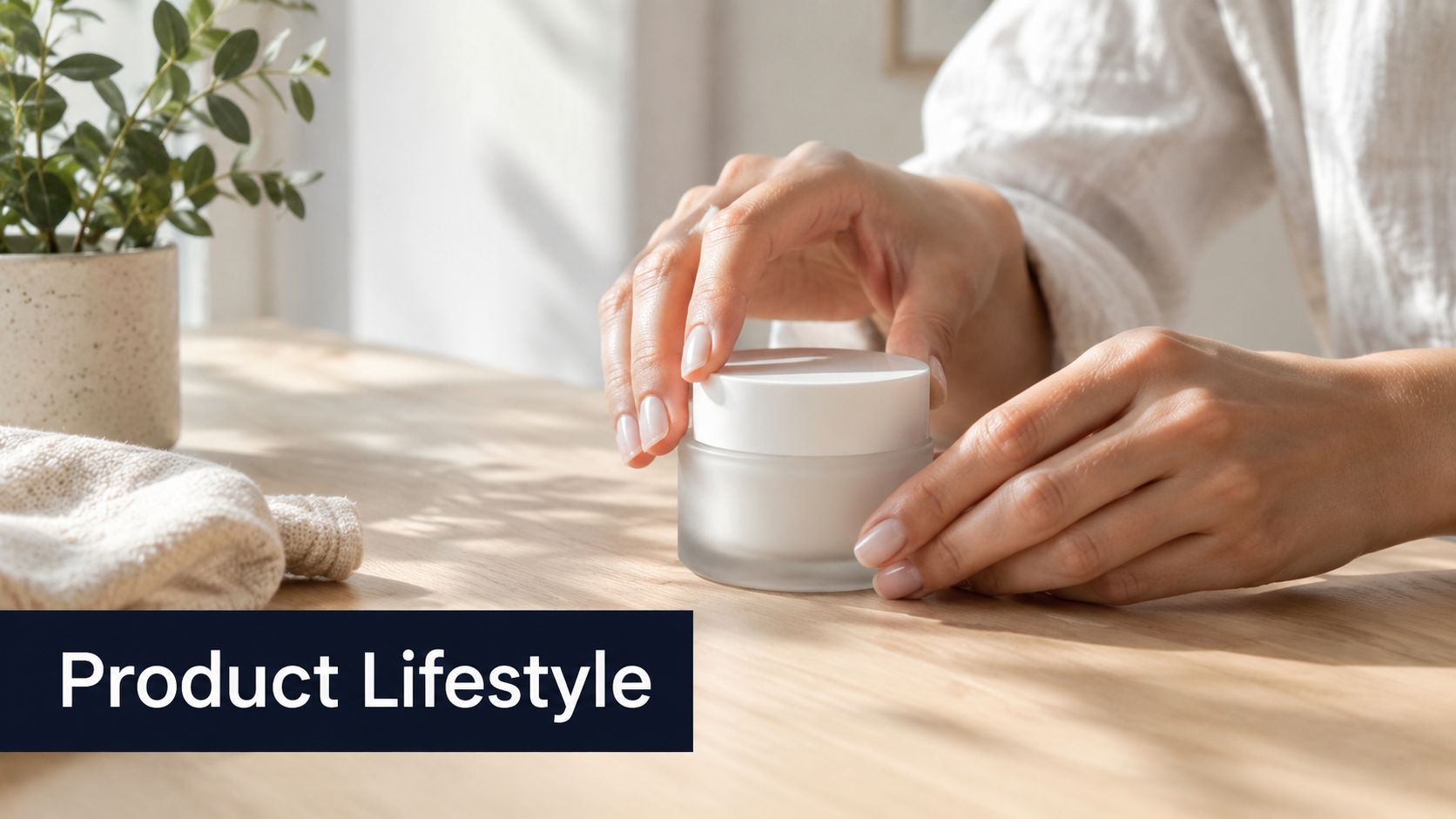
“Small cylindrical glass skincare cream jar with a matte ivory lid, pale green cream visible inside, minimal black label, centered on a light wooden table.”
پھر use case شامل کریں:
“An adult hand opens the jar beside a folded white towel and a ceramic water glass, soft morning window light, quiet bathroom-inspired setting, premium lifestyle photography, realistic skin and glass reflections, product fully visible, no altered label text.”
Campaign variation سے product truth الگ کریں
ایک controlled family of scenes بنائیں:
- Environment: Light wooden table, bathroom shelf, travel pouch.
- Action: Opening the jar, applying cream, placing it beside a towel.
- Audience cue: Minimal skincare routine, premium self-care, practical morning routine.
- Camera treatment: Clean product photography, candid lifestyle photography, soft editorial close-up.
ایک وقت میں ایک group تبدیل کریں۔ اگر environment، hand position، lighting، اور camera treatment ایک ساتھ بدلیں، تو آپ نہیں جان سکیں گے کہ jar کیوں distorted ہوا یا visual prominence کھو دی۔ AI image generation prompts commerce میں اکثر fail ہوتے ہیں کیونکہ scene item سے زیادہ persuasive ہو جاتا ہے۔
Actual captions، logos، اور final brand elements editing stage میں استعمال کریں بجائے generated packaging text پر trust کے۔ ShortGenius selected product images کو broader AI video and ad creation workflow میں لے جا سکتا ہے، جہاں teams brand kit apply کر سکتے ہیں، scenes assemble کر سکتے ہیں، captions add کر سکتے ہیں، اور variations prepare کر سکتے ہیں بغیر ہر asset manually rebuild کیے۔ Backgrounds اور scenarios batches میں generate کریں، لیکن label accuracy، hand anatomy، اور claims compliance کے لیے ہر output approve کریں publication سے پہلے۔
4. ٹرینڈنگ Audio-Visual Scene Prompts
Trend-led prompts speed اور cultural fit کے لیے مفید ہیں، لیکن trend copy کرنے سے brand interchangeable لگ سکتا ہے۔ Trend کے پیچھے visual behavior بیان کریں، پھر اسے اپنے subject اور audience سے جوڑیں۔
“make it viral” لکھنے کی بجائے scene specify کریں:
“Vertical short-form opening for a late-night café review, handheld street-photography energy, quick push-in toward a steaming cup, flash-lit candid atmosphere, saturated red and amber highlights, imperfect framing, subject entering from the side, clear center area for the creator's opening caption, no visible brand logos.”
یہ model کو motion-friendly composition اور mood دیتا ہے بغیر یہ pretend کیے کہ image prompt reach guarantee کر سکتا ہے۔ اگر asset video transition بننا ہے، تو beginning state اور ending state مانگیں، جیسے closed café door سے drink کے close-up کی طرف۔ Editor پھر ان visual states کو movement یا cut سے جوڑ سکتا ہے۔
Grammar borrow کریں، identity نہیں
Target platform کے ارد گرد visual patterns monitor کریں، بشمول color grades، camera movement references، framing habits، اور recurring scene concepts۔ پھر brand-owned element preserve کریں، جیسے recurring palette، product shape، character، location، یا caption treatment۔
چھوٹا audience test بتا سکتا ہے کہ trend message support کرتا ہے یا overwhelm۔ Trend کے ارد گرد پورا ماہ content بنانے سے پہلے چیک کریں کہ viewers offer، lesson، یا story سمجھتے ہیں یا نہیں۔ چند related scenes quickly generate کریں، content reinforce کرنے والا select کریں، اور باقی retire کر دیں۔
Short-form production image generation، editing، اور distribution کے درمیان fast handoff سے فائدہ اٹھاتی ہے۔ جب ایک scene کام کرے، تو اس کے visual descriptors next prompt میں carry کریں بجائے blank page سے شروع کے۔ یہ shared visual grammar والی series بناتا ہے جبکہ new subjects اور hooks کے لیے room چھوڑتا ہے۔
5. Text-Overlay اور Typography-Ready Prompts
Text کے لیے ڈیزائن کردہ image text contain کرنے والی image سے مختلف ہے۔ Prompt کو readable region reserve کرنا چاہیے، contrast control کرنا چاہیے، اور subject کو headline یا caption کے area سے دور رکھنا چاہیے۔
کوئی کریں:
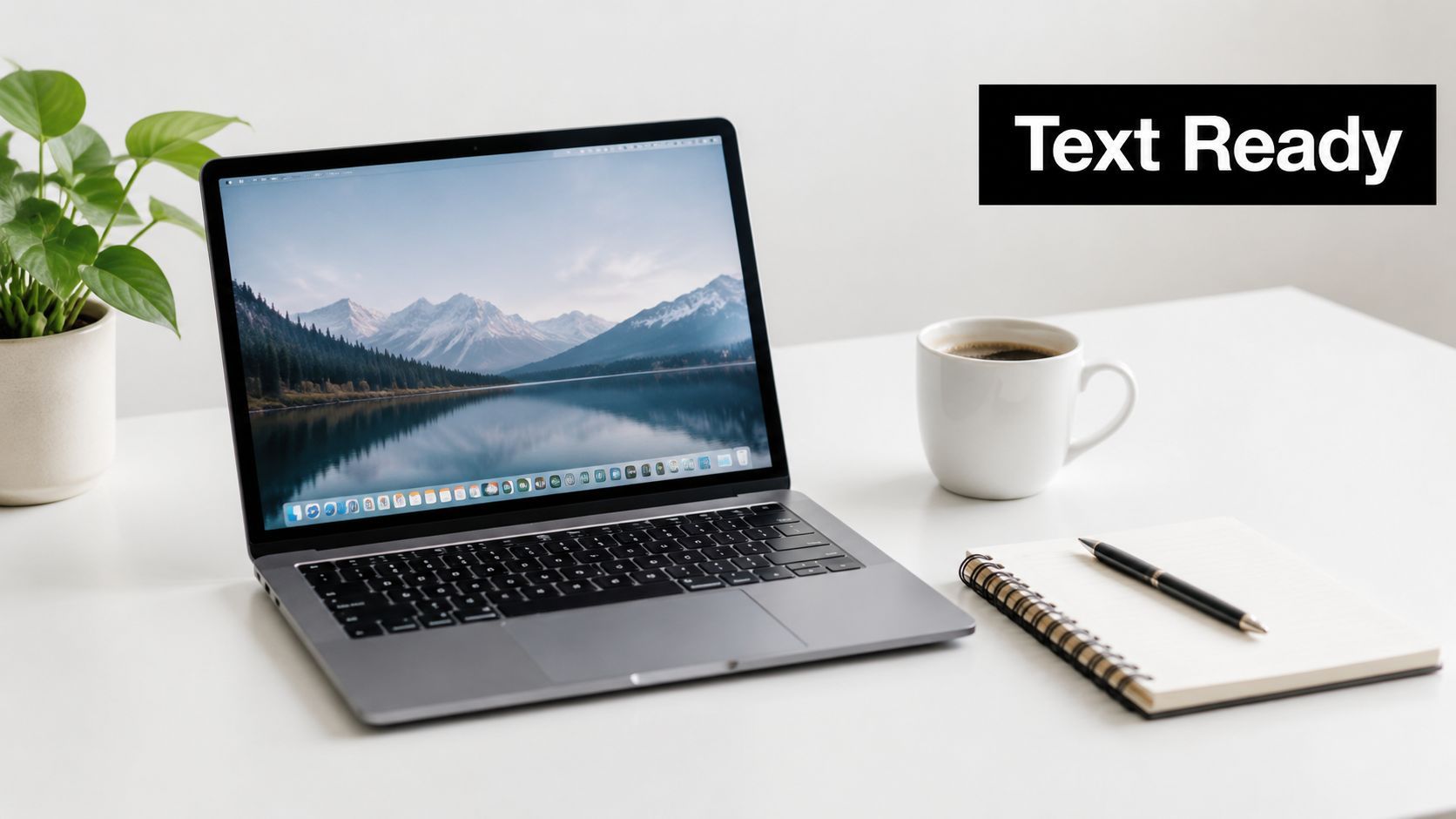
“Square educational background for a post about budgeting, a neatly arranged notebook and calculator in the lower right, soft cream desk surface, muted green and charcoal palette, broad uncluttered negative space on the left for a headline, low-detail background, strong contrast between the empty text area and surrounding objects, no words, no letters, no numbers.”
Final caption layer کے لیے ڈیزائن کریں
Position language استعمال کریں جیسے “left third,” “upper left,” “lower third,” یا “subject confined to the right side.” Image model سے final headline render نہ مانگیں جب تک platform اور model typography reliably handle نہ کریں۔ Visual background generate کریں، پھر text editor سے exact copy add کریں۔
Composition کو caption کے ساتھ ٹیسٹ کریں، placeholder text سے نہیں۔ Light headline bright wall پر غائب ہو سکتی ہے، جبکہ dark headline dense object پر fail ہو سکتی ہے۔ Prompt tonal separation request کر سکتا ہے، لیکن final decision assembled design میں ہوتی ہے۔
Platform requirements safe area بدل دیتے ہیں۔ Vertical short-form frame کو interface elements، captions، اور speaker's face کے لیے room چاہیے۔ Square feed graphic کا balance مختلف ہے۔ Possible ہو تو start سے suitable aspect ratio generate کریں، پھر cropped version inspect کریں بجائے original frame کے resizing survive کرنے کے assume کے۔
یہ prompt type quote cards، educational slides، coaching content، اور campaign templates کے لیے خاص طور پر اچھا کام کرتا ہے۔ Layout stable رکھیں اور object، color accent، یا subject vary کریں۔ یہ series کو intentional feel دیتا ہے بجائے دس unrelated backgrounds پر same slogan add کرنے کے۔
6. Thumbnail Optimization Prompts ہائی امپیکٹ عناصر کے ساتھ
Thumbnail کا کام cinematic still سے مختلف ہے۔ اسے glance پر simple promise communicate کرنا چاہیے، dominant subject retain کرنا چاہیے، اور clear visual question بنانی چاہیے۔ زیادہ detail small display sizes پر crowded image بنا کر impact کم کر سکتی ہے۔
ایک prompt استعمال کریں جو viewer کو ایک action پڑھنے دے:
Video thumbnail for a laptop troubleshooting tutorial, close-up of a surprised creator pointing toward a glowing laptop error screen, bright yellow warning shape behind the device, strong red and blue contrast, face on the left and laptop on the right, clean empty space above the laptop for three-word headline, crisp studio lighting, exaggerated but believable expression, no tiny background objects, no generated text.
Facial expression صرف مفید ہے جب video promise سے match کرے۔ Calm tutorial پر shocked face unnecessary click attract کر سکتا ہے اور trust کمزور کر سکتا ہے۔ Product comparisons کے لیے، دو clearly separated objects اور visual contrast استعمال کریں جیسے light versus dark، old versus new، یا damaged versus repaired۔
ایک سوال کا جواب دینے والی variations produce کریں
Batch فی ایک variable تبدیل کریں:
- Expression: Curious, excited, confused, concerned.
- Direction: Pointing inward, looking toward the product, holding the object.
- Contrast: Yellow and black, red and white, blue and orange.
- Composition: Face left, face right, centered subject.
Thumbnail test entire finished design compare کرے، actual headline اور overlays سمیت۔ Generated text اکثر replace کی ضرورت ہوتی ہے، اور strong background title focal point cover کرنے پر fail ہو سکتا ہے۔ ShortGenius handoff support کر سکتا ہے selected imagery کو text tools اور short-form production workflow کے باقی حصے سے combine کر کے۔
Useful constraint simplicity ہے۔ ایک face، ایک object، ایک directional cue، اور text area مانگیں decorative elements add کرنے سے پہلے۔ اگر image کو explain کرنے کے لیے paragraph چاہیے، تو prompt غلط problem حل کر رہا ہے۔
7. Emotion اور Sentiment-Driven Scene Prompts
Emotion color words کا accidental byproduct نہیں، explicit production objective ہونی چاہیے۔ طے کریں کہ audience image دیکھنے کے بعد کیا feel کرے، پھر facial behavior، distance، posture، environment، light، اور color سے وہ feeling express کریں۔
Supportive mental health post کے لیے:
“Quiet supportive scene for a post about asking for help, an adult sitting near a sunlit window with relaxed shoulders, a trusted friend seated nearby at a respectful distance, warm natural light, soft blue and muted green tones, open composition, calm expressions, ordinary lived-in room, no melodrama, no medical symbols, clear space on the upper right for text.”
Prompt emotion کو observable details سے جوڑتا ہے۔ “Hopeful” اکیلا بہت abstract ہے۔ Raised posture، warmer light، open body language، اور environment میں visible path hope reliably communicate کرتے ہیں mood adjectives کی لمبی فہرست سے زیادہ۔
Message سے emotional intensity match کریں
Urgency limited-time offer کے لیے suit کر سکتی ہے، لیکن aggressive red palette wellness message کو alarming بنا سکتی ہے۔ Calm blue scene reassurance support کر سکتی ہے، لیکن launch announcement جو energy چاہے اسے کمزور کر سکتی ہے۔ Color کو several signals میں سے ایک سمجھیں، universal psychological switch نہیں۔
پوچھیں کہ کیا image اس لوگوں کا احترام کرتی ہے جن کا وہ represent کرتی ہے۔ Inclusive casting intentional ہونی چاہیے، اور emotional expressions believable رہیں stock-photo territory میں exaggerated نہ ہوں۔ Community content کے لیے، interaction اور shared attention استعمال کریں بجائے کئی لوگوں کو same frame میں رکھنے کے۔
Selected image کو aligned copy اور audio کے ساتھ pair کریں۔ Hopeful image threatening voiceover کے ساتھ friction بناتی ہے، جبکہ serious message playful visual پر careless لگ سکتا ہے۔ ایک emotional variable بدل کر alternatives generate کریں، پھر actual script یا caption کے پاس review کریں۔ Best result وہ ہے جو message strengthen کرے، necessarily most dramatic frame نہیں۔
8. Multi-Scene Sequence اور Storyboard Prompts
Storyboard prompt attractive shots کی collection نہیں، continuity بیان کرے۔ Character، environment، prop، action، اور camera progression define کریں narrative کو scene prompts میں الگ کرنے سے پہلے۔
Product unboxing sequence اس pattern پر follow کر سکتی ہے:
- Scene one: Wide shot of the creator at a clean desk, sealed package centered on the table, morning light, product box unopened.
- Scene two: Medium shot of the same creator cutting the tape, same desk, same shirt, package held in both hands.
- Scene three: Close-up of the product emerging from the box, creator's hands visible, packaging facing camera.
- Scene four: Medium shot of the creator using the product, box placed beside the device, expression pleased but natural.
Spectacle add کرنے سے پہلے continuity lock کریں
ہر scene میں stable descriptors repeat کریں۔ Shirt، desk، package color، lighting direction، اور character identity fixed رکھیں۔ Camera angle اور action vary کریں، entire visual world نہیں۔
ایک complex sequence مانگنے والا single prompt visually impressive collage produce کر سکتا ہے جو editing کے لیے useful نہ ہو۔ Separate scenes cleaner assets دیتی ہیں اور ایک weak take reject کرنے دیتے ہیں بغیر باقی lose کیے۔ Scene groups logically compare کرنے کے لیے چھوٹی رکھیں، جبکہ transition cues جیسے “match cut from the opening lid to the product close-up” editor کو narrative assemble کرنے میں مدد دیتے ہیں۔
Prompt stability پر research اس production concern کی تائید کرتی ہے۔ Auth-Prompt Bench نے 17,580 authentic prompt-image pairs متعارف کروائے اور stability کو mutual information، prompt entropy، اور prompt energy سے evaluate کیا، similarity یا alignment پر rely کرنے کی بجائے۔ Recurring storyboards کے لیے، practical lesson یہ ہے کہ generations across intent survive کرتی ہے یا نہیں measure کریں، صرف ایک frame اچھا لگنے سے نہیں۔
Scene group approve ہونے پر، selected images کو editor میں timing، captions، voiceover، transitions، اور platform versions کے لیے move کریں۔ Storyboard prompt successful ہے جب assembly friction کم کرے، most elaborate single image produce نہ کرے۔
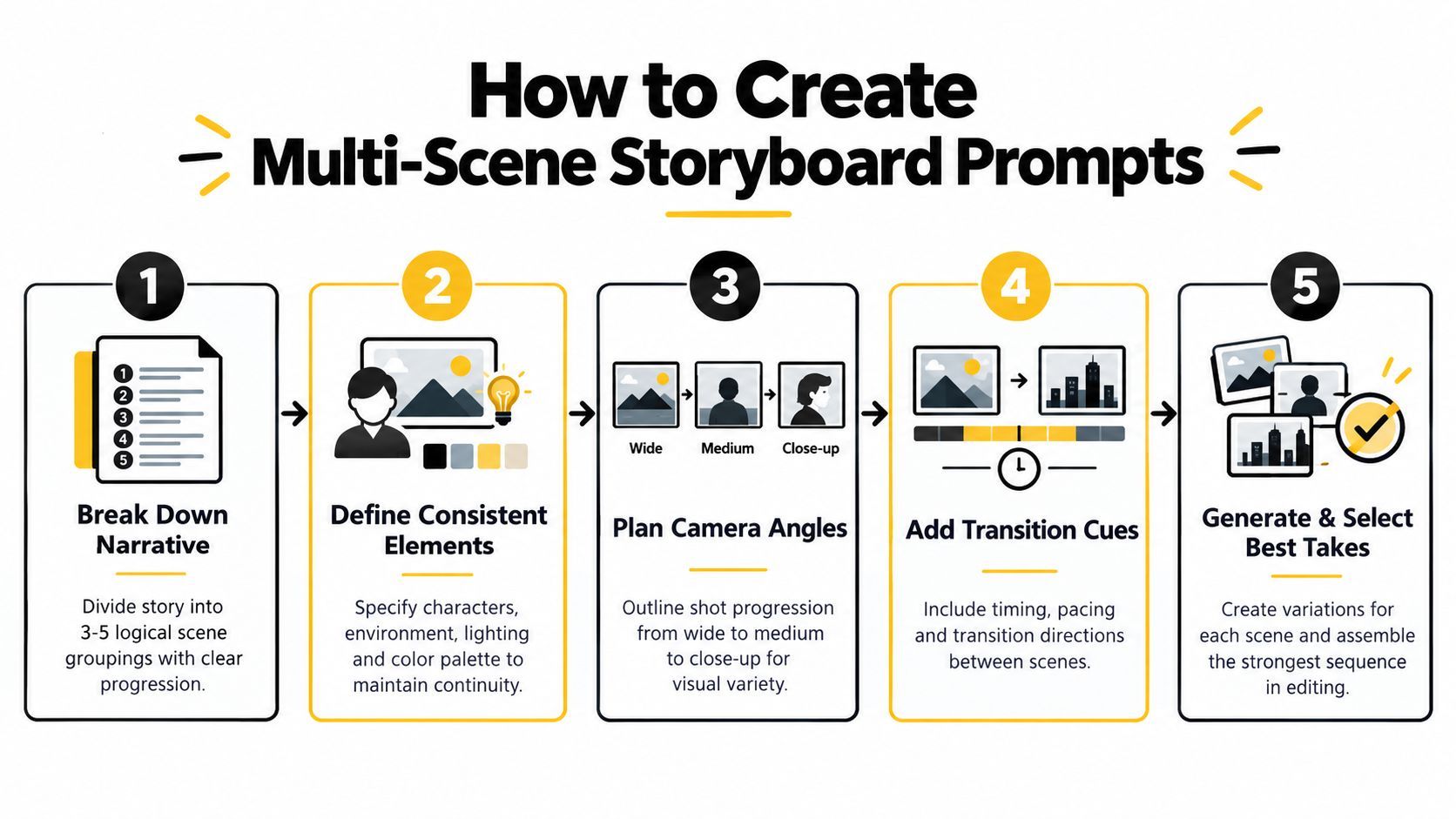
یہ short walkthrough sequence کو planning سے production میں move کرنے کا دکھاتا ہے:
9. Platform-Optimized Aspect Ratio اور Dimension Prompts
Aspect ratio production brief میں belong کرتا ہے، process کے آخر میں نہیں۔ Vertical mobile frame کے لیے composed scene square crop survive نہ کرے، اور wide YouTube visual tall asset میں convert ہونے پر subject lose کر سکتا ہے۔
Layout directly state کریں:
“Vertical 9:16 short-form scene showing a creator holding a compact microphone in the lower center, face in the upper middle, important product details away from the edges, uncluttered background, clear lower region for captions, strong central focal point, no text.”
پھر platform versions deliberately بنائیں۔ Square feed asset کو center کے ارد گرد tighter arrangement چاہیے۔ Wide video frame subject کو ایک side رکھ سکتا ہے اور title یا presenter کے لیے room چھوڑ سکتا ہے۔ Tall Pinterest-style composition top سے bottom تک longer visual path سے فائدہ اٹھا سکتی ہے۔
Resizing کو rescue tool سمجھیں
Possible ہو تو native composition generate کریں۔ Resizing minor adjustment میں مدد کر سکتا ہے، لیکن original سے cropped face، product، یا headline area recover نہ کر سکے۔ ہر final export target platform پر inspect کریں، interface overlays اور caption placement سمیت۔
Platform-specific prompt یہ بھی state کرے کہ کیا safe رہنا چاہیے:
- Subject safety: Faces اور products extreme edges سے دور رکھیں۔
- Text safety: Headline یا captions کے لیے uncluttered area reserve کریں۔
- Crop safety: Core action central region میں رکھیں۔
- Series consistency: Platform variants across same visual treatment reuse کریں۔
ShortGenius کے resize tools selection کے بعد minor adjustments میں مدد کر سکتے ہیں، لیکن strongest workflow platform-aware base پہلے generate کرتا ہے۔ یہ ایک master image کو ہر channel میں force کرنے اور awkward crops قبول کرنے کی temptation کم کرتا ہے۔
Formats across same subject اور style block استعمال کریں، صرف aspect ratio، placement، اور safe zones بدل کر۔ یہ campaign recognition preserve کرتا ہے جبکہ audiences asset کو ہر feed میں encounter کرنے کے طریقے کا احترام کرتا ہے۔
10. Brand Identity اور Style Guide-Aligned Prompts
Brand prompts visual identity کو repeatable instructions میں بدلتے ہیں۔ انہیں approved palette، contrast behavior، photography یا illustration treatment، spacing preference، product presentation، logo handling، اور never appear ہونے والے elements define کرنے چاہیے۔
Baseline prompt کچھ اس طرح پڑھ سکتی ہے:
“Create a premium wellness campaign image for a brand using warm cream, muted coral, and deep forest green, soft natural light, tactile paper and glass textures, generous negative space, calm editorial photography, restrained composition, inclusive everyday lifestyle, no neon colors, no harsh shadows, no playful candy styling, no unapproved logos, no generated claims or packaging copy.”
Assume نہ کریں کہ model vague terms جیسے “on brand” سے color system accurately reproduce کرے گا۔ Tool support کرے تو visual examples یا references add کریں، اور brand brief کو campaign variable سے الگ رکھیں۔ Campaign skincare routine سے travel kit میں بدل سکتی ہے جبکہ palette، light، اور composition logic stable رہیں۔
Prompt workflow کا حصہ approval بنائیں
Baseline version save کریں، controlled variation generate کریں، اور چار areas inspect کریں:
- Identity: کیا palette اور treatment recognizably consistent feel کرتے ہیں؟
- Legibility: کیا generated labels، logos، یا claims replace کرنے کے safe ہیں؟
- Composition: کیا asset intended headline یا product placement support کر سکتا ہے؟
- Compliance: کیا scene visual یا verbal claim introduce کرتی ہے جو brand support نہ کر سکے؟
Brand consistency descriptive words add کرنے سے زیادہ composition اور editability control کرنے کا معاملہ ہے۔ Prompt structure پر research نے پایا کہ fixed اور flexible structures، clear subject-object relationships کے ساتھ، expectations better match کرنے والے outputs produce کرتے ہیں۔ متعلقہ 2025 study نے repeated prompts کو submissions کا 40-50% رپورٹ کیا اور lexical similarity کو visual similarity سے linked کیا prompt structure and image outcomes پر research میں۔ Repetition اکیلا brand system نہیں۔ Stable visual brief plus purposeful variation زیادہ مفید ہے۔
ShortGenius saved brand kit selected assets پر apply کر سکتا ہے، teams کو generation کے بعد logos، colors، اور consistent finishing treatments add کرنے میں مدد دے کر۔ Model prompt کو scene اور visual direction کا ذمہ دار رکھیں، پھر brand kit اور editing stage exact identity elements کے لیے استعمال کریں۔
AI Image Prompt Types کا 10-Point موازنہ
| Prompt Type | 🔄 Complexity | ⚡ Resources & Efficiency | ⭐ Expected Outcomes / Key Advantages | 📊 Ideal Use Cases | 💡 Key Tips |
|---|---|---|---|---|---|
| تفصیلی وصف پر مبنی Prompts آرٹ اسٹائل پیرامیٹرز کے ساتھ | High, long, technical prompts and art terminology | Moderate efficiency; may need more tokens/longer generation time but fewer iterations overall | ⭐⭐⭐ Professional, consistent, brand-aligned visuals; reduces iteration cycles | Thumbnails, ad creatives, social assets, branded series | Start with a core sentence then layer style/lighting; use negative prompts |
| Character اور Avatar Generation Prompts | High, requires granular specs and reference continuity | Moderate–High; needs reference sheets or seeds and iterations for consistency | ⭐⭐⭐ Recognizable recurring characters; cost-effective vs hiring talent | Series characters, avatars, mascots, VTuber/content personas | Create detailed character briefs and expression/pose sheets upfront |
| Product Showcase اور Lifestyle Image Prompts | Medium, product detail + contextual composition | High efficiency at scale; may need post-edit for labels/text accuracy | ⭐⭐ Authentic lifestyle images; scalable catalog variation; supports A/B testing | DTC product ads, Instagram/Facebook lifestyle shots, catalog imagery | Start with precise product description, then add lifestyle context and angles |
| Trending Audio-Visual Scene Prompts | Medium, needs constant trend monitoring and rapid updates | Fast to produce trend-aligned assets but requires frequent refresh | ⭐⭐ High short-term discoverability when trend-accurate; variable longevity | TikTok/Reels viral content, trend-driven campaigns, quick deployments | Monitor platform trends weekly; blend trends with brand for differentiation |
| Text-Overlay اور Typography-Ready Prompts | Low–Medium, requires understanding of text-safe areas | Very efficient; reduces post-generation editing and layout work | ⭐⭐⭐ Readable, caption-ready images that integrate with text tools | Quote posts, educational slides, caption-heavy social content | Specify text-safe zones, contrast colors, and target aspect ratios |
| Thumbnail Optimization Prompts ہائی امپیکٹ عناصر کے ساتھ | Medium, composition rules and expressive direction needed | High efficiency for thumbnail production; supports rapid A/B testing | ⭐⭐⭐ Optimized for CTR and viewer attention; scalable thumbnail variants | YouTube thumbnails, short-form covers, high-CTR campaigns | Research niche thumbnails, test expressions, leave space for text |
| Emotion اور Sentiment-Driven Scene Prompts | Medium, emotional nuance and cultural sensitivity required | Moderate; may require audience testing and iterations | ⭐⭐ Strong emotional resonance when authentic; can boost engagement/conversions | Coaching, wellness, motivational content, emotionally-driven ads | Define target emotion, use color psychology, test with sample audiences |
| Multi-Scene Sequence اور Storyboard Prompts | High, complex narrative continuity and timing cues | Lower throughput per run; longer generation and selective editing needed | ⭐⭐⭐ Cohesive visual narratives; speeds up video assembly if consistent | Tutorials, story-driven videos, product demos, educational sequences | Break into 3–5 scene groups, keep descriptors consistent, generate variations |
| Platform-Optimized Aspect Ratio اور Dimension Prompts | Low–Medium, separate prompts per platform required | Very efficient for multi-channel publishing; reduces cropping/resizing waste | ⭐⭐⭐ Platform-ready compositions with fewer artifacts; better cross-post results | Multi-platform campaigns, TikTok/IG/YouTube specific assets | Specify exact aspect ratio and safe zones; batch-generate platform variants |
| Brand Identity اور Style Guide-Aligned Prompts | Medium–High, requires detailed brand documentation | Moderate; upfront effort saves time and errors at scale | ⭐⭐⭐ Ensures brand consistency and compliance across assets | Agency clients, enterprise campaigns, multi-brand teams | Document exact colors/fonts, create baseline templates, use brand kit integrations |
Strong Prompts کو Repeatable System میں تبدیل کریں
Best prompt شاذ و نادر ہی ایک beautiful image produce کرنے والا ہوتا ہے۔ یہ وہ ہے جو آپ کی team reuse، test، revise، اور next asset میں carry کر سکے original intent lose کیے بغیر۔
ایک business یا content objective سے شروع کریں۔ “Create a product image” بہت broad ہے۔ “Create a vertical opening frame that makes a new skincare routine feel calm and achievable” model اور editor کو meaningful job دیتی ہے۔ پھر style، lighting، camera position، color، expression، یا background experiment کرنے سے پہلے core subject description save کریں۔
ایک وقت میں ایک variable تبدیل کریں۔ اگر پہلی version warm editorial treatment استعمال کرے، تو product، pose، framing، اور negative space fixed رکھیں cooler documentary treatment ٹیسٹ کرتے ہوئے۔ اگر سب کچھ ایک ساتھ بدلیں، تو output improve ہو سکتا ہے، لیکن آپ نہیں جان سکیں گے کہ کون سا decision مددگار تھا۔ Controlled variation reusable knowledge بناتی ہے disconnected generations کی pile کی بجائے۔
Practical refinement loop کچھ اس طرح ہے:
- Job define کریں: Audience، platform، اور intended action کا نام دیں۔
- Subject lock کریں: Product، character، environment، یا central object description save کریں۔
- Visual treatment set کریں: Style، lighting، palette، lens feel، اور mood منتخب کریں۔
- Frame control کریں: Aspect ratio، subject placement، safe zones، اور text space specify کریں۔
- Exclusions add کریں: Distracting objects، unapproved colors، altered labels، یا unwanted text ہٹائیں۔
- Variations generate کریں: ایک وقت میں ایک stylistic یا compositional parameter بدلیں۔
- Defects inspect کریں: Identity، anatomy، packaging، typography، continuity، اور crop behavior چیک کریں۔
- Winner adapt کریں: Selected image کو captions، assembly، resizing، brand application، اور distribution کے لیے prepare کریں۔
Reusable templates کی چھوٹی library maintain کریں۔ Character briefs، product descriptions، brand rules، text-safe layouts، thumbnail structures، اور storyboard scene groups separately store کریں۔ یہ creator کو new episode یا campaign variation بنانے دیتا ہے بغیر entire system memory سے rewrite کیے۔
Prompt stability commercial work کے لیے خاص طور پر matter کرتی ہے۔ Auth-Prompt Bench stability کو generations across intent reliably transfer ہونے کے طور پر frame کرتا ہے، جو recurring brand assets کے لیے single attractive result judge کرنے سے بہتر standard ہے۔ Practice میں، prompt، model، reference image، selected output، rejected defects، اور next test میں one change کا record رکھیں۔
Model choice process کا حصہ ہے۔ 2026 benchmark نے 10 major image-generation platforms across 100 standardized prompts سے 10,000 images ٹیسٹ کیے، visual quality، prompt adherence، consistency، text rendering accuracy، اور speed score کیے۔ اس نے Midjourney v6.1 کو 8.42/10، DALL-E 3 کو 8.16/10، اور fastest-system average 4.2 seconds per image رپورٹ کیا industry mean 14.8 seconds کے مقابلے میں، جیسا 2026 image-generation benchmark میں تفصیل سے۔ یہ figures ایک model کو ہر job کے لیے right نہیں بناتے۔ یہ دکھاتے ہیں کہ teams کو actual requirement کے خلاف model test کرنا چاہیے، خاص طور پر جب throughput، text، repeatability، یا visual fidelity general ranking سے زیادہ matter کرے۔
جب selected assets finished media بننی ہوں تو ShortGenius استعمال کریں۔ اس کا workflow image generation کو script planning، video assembly، captions، natural voiceovers، trim and scene edits، brand-kit application، resizing، اور multi-channel scheduling کے ساتھ combine کر سکتا ہے۔ Tool prompt کے job کرنے کے بعد most useful ہے، جب challenge possibilities generate کرنے سے approved assets کو consistent output میں تبدیل کرنے کی طرف shift ہو جائے۔
یہی discipline audiences کو misleading visuals سے protect بھی کرتی ہے۔ Photorealistic result publish کرنے سے پہلے review کریں کہ کیا image documentary evidence، real product photograph، یا authentic person سمجھا جا سکتا ہے۔ how AI Image Detector finds fakes پر guidance teams کو provenance اور disclosure کے بارے میں سوچنے میں مدد دے سکتی ہے، لیکن human review essential رہتی ہے۔
Strong AI image generation prompts production instructions ہیں جن کے پیچھے testing method ہے۔ Job define کریں، stable رکھنا چاہیے چیز preserve کریں، change ہونے والی vary کریں، اور صرف approved outputs کو editing اور distribution workflow میں move کریں۔
ShortGenius text-to-image generation، image editing، video assembly، captions، brand kits، resizing، اور multi-channel scheduling کو creators اور teams کے لیے ایک workflow میں لاتا ہے۔ Tested image prompts کو branded videos، ads، اور publish-ready content میں تبدیل کرنے کے لیے ShortGenius (AI Video / AI Ad Generator) visit کریں۔